Monitoring AWS Services (TryHackMe)

Monitoring AWS Services room is a continuation of an AWS log analysis and security series that TryHackMe has been running. You can find other rooms within their platform if you haven't checked them out.
Cloud security misconfigurations are among the most common and costly mistakes organizations make today. With over 200 AWS-managed services, the attack surface is vast — and a single misconfiguration can expose millions of sensitive records to the public internet. This article walks through the most impactful AWS attack scenarios, including exposed S3 buckets, internet-facing EC2 instances, publicly accessible RDS databases, adversarial cloud discovery, and Denial of Wallet attacks. Using CloudTrail logs analyzed in Splunk, we explore how these exposures happen, how to detect them early, and how SOC analysts can respond effectively.
Introduction
With over 200 AWS-managed services, it is hard to know every possible attack vector, and even harder to defend against all of them. Fortunately, roughly 80% of attacks on AWS services can be detected with just 20% of SOC effort. This room focuses on the most common and impactful attacks targeting AWS services, and explores how to detect them using CloudTrail and other cloud logs.
Learning Objectives
Learn the risks of exposed S3 and RDS, and practice the defenses
Understand the workflows to detect insecure EC2 security groups
Learn about the emerging Denial of Wallet attacks targeting AWS
Practice the material in Splunk via CloudTrail and GuardDuty datasets
Prerequisites
Preferably, Introduction to AWS module
Preferably, SOC Level 1 Analyst path
S3 Attacks and Defenses
Attacks on S3
Amazon Simple Storage Service (S3) is one of the most widely used cloud storage services. At TryHackMe, we use it to store room images. DevOps teams use it to store configuration files and backups. SOC teams use it to store cloud logs before forwarding them to a SIEM. While many companies use S3, not all understand the importance of strict S3 access controls. With just one misconfiguration, you can expose sensitive S3 buckets to the public, leading to a major data leak. For example:
WebWork Incident: Between June 2024 and January 2025, WebWork exposed an internal S3 bucket to the public Internet. The bucket contained over 13 million records, including employee activity logs and desktop screenshots belonging to its customers.
WorkComposer Breach: In a similar incident, attackers accessed an unsecured, public S3 bucket operated by WorkComposer. As a result, more than 21 million sensitive desktop capture images were exposed and presumably exfiltrated.
Pegasus Airlines Case: In 2022, the researchers discovered 23 million files (6.5 TB of data) in a publicly-exposed S3 bucket. The data contained flight records, crew PII, proprietary source code, and various documents. The bucket remained exposed for at least a month.
Early Detection
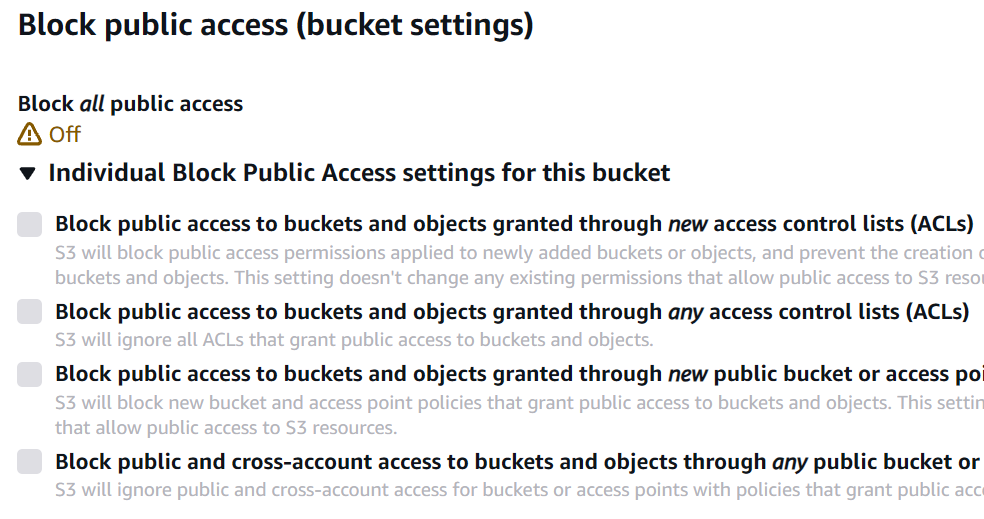
New buckets are private by default, so the best approach to preventing such incidents is to detect the moment an S3 bucket becomes public. To make a bucket public, you need to disable the "S3 Public Access Block" security feature (PutBucketPublicAccessBlock) and then apply the correct bucket ACL (PutBucketAcl) or bucket policy (PutBucketPolicy). Bucket ACLs are considered legacy, so let's focus on the bucket policies. For example, to allow public read of the user-avatars-thm bucket, you need to apply these settings in its Permissions tab:
| The "S3 Public Access Block" | The Bucket Policy |
|---|---|
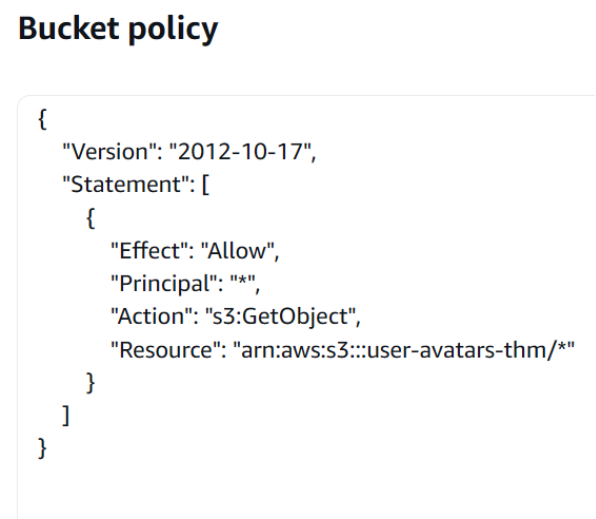
Not every bucket policy grants public, anonymous access. If you're hunting for public buckets, start by filtering PutBucketPolicy events for statements with Effect: "Allow" and Principal: "*", and then review the policy in detail: it may include additional Deny statements or conditions that limit exposure. For example, the event below allows external access to the thm-internal-backups bucket. It may look insecure at first glance, but an IP-based condition makes it acceptable:
// Key field from the PutBucketPolicy event
{
  "eventTime": "2025-12-31T17:55:15Z",
  "eventSource": "s3.amazonaws.com",
  "eventName": "PutBucketPolicy",
  "userIdentity": {
    "userName": "alex.morgan",
  },
  "requestParameters": {
    "bucketName": "thm-internal-backups",
    "bucketPolicy": {                                          // Here starts the applied policy
      "Version": "2012-10-17",
      "Statement": [
        {
          "Sid": "AllowAccessOnlyFromTorontoOffice",           // Sid is optional, but can be helpful
          "Effect": "Allow",                                   // Note that it can also be set to Deny
          "Principal": "*",                                    // Allow public, anonymous bucket access
          "Action": "s3:GetObject",                            // Allow public read, not list or write
          "Resource": "arn:aws:s3:::thm-internal-backups/*",
          "Condition": {                                       // Investigate the Condition field (if any)
            "IpAddress": {                                     // Allow access only from the specified IP
              "aws:SourceIp": [ "67.55.61.83/32" ]
            }
        [...]
}
Note that public read access (e.g., GetObject, HeadObject, and sometimes ListObjects) is often required to host assets such as user avatars, static website content, or media files. You can usually get a bucket's purpose from its name, tags, and by verifying the content in a browser via https://BUCKET.s3.amazonaws.com/FILE. If anything seems unclear and you are still not sure how to classify the alert, consult your IT team or the bucket owner.
Late Detection
If the detection rules failed to detect a bucket exposure, your next opportunity is to alert on external object access. Botnets periodically scan for open buckets and will surely find yours in a matter of time. Every access attempt will generate HeadObject or GetObject events coming from an anonymous user and external, often malicious IPs. Moreover, if the policy does not allow object listing, the adversaries would have to brute-force the file names and generate a lot of "Access Denied" records:
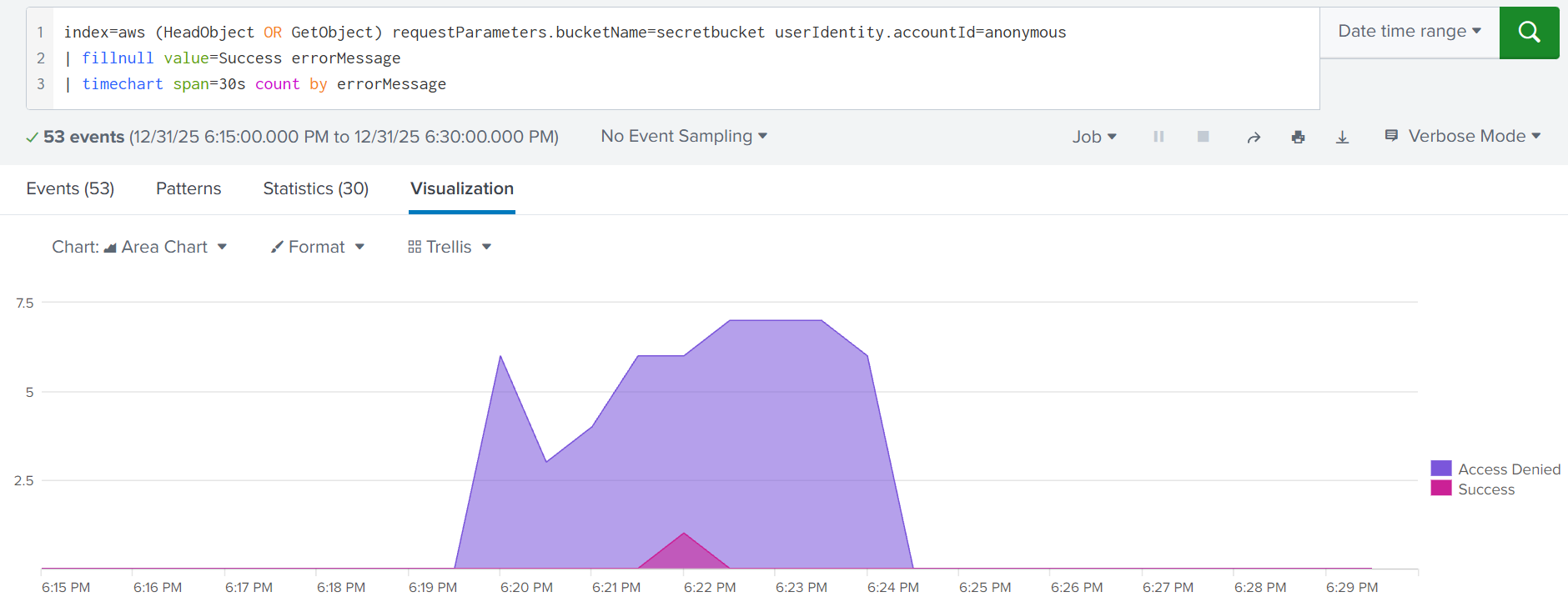
S3 object brute force indicated by a spike of failed GetObject requests
GuardDuty Usage
You can also rely on Amazon GuardDuty for S3 monitoring. In practice, it's difficult to build detection rules that correctly account for every policy condition when hunting for exposed buckets, whereas GuardDuty is exceptionally effective at this thanks to its automated reasoning feature. For example, it can generate these findings:
Policy:S3/BucketBlockPublicAccessDisabled: The "S3 Public Access Block" feature was disabled
Policy:S3/BucketAnonymousAccessGranted: The bucket was made public via ACL or bucket policy
Impact:S3/MaliciousIPCaller: A known-malicious IP address accessed an exposed S3 bucket
Practice
You will investigate how Alex exposed the S3 bucket and how it led to the breach.
Access the Splunk console and start your hunt from the index=task2 query.
Search for All Time and note that field ordering may differ from the example.
Answer the questions below
When did Alex disable the "S3 Public Access Block" feature?
Answer Example: 2025-12-31 15:30:45 2025-12-31 17:48:12
index=task2 eventSource="s3.amazonaws.com" msg=NoSuchPublicAccessBlockConfiguration


What is the SID of the applied policy that made the bucket public? TempAccessDeniedDebug
index=task2 eventSource="s3.amazonaws.com" errorCode=success


Which IP address started the bucket scan soon after it was exposed? 212.8.250.220
index=task2 eventSource="s3.amazonaws.com" errorCode=success

How many filenames were attempted, and which file was exfiltrated?
Answer Example: 42, secrets.json 53, repo.zip

EC2 Internet Exposure
EC2 Internet Exposure
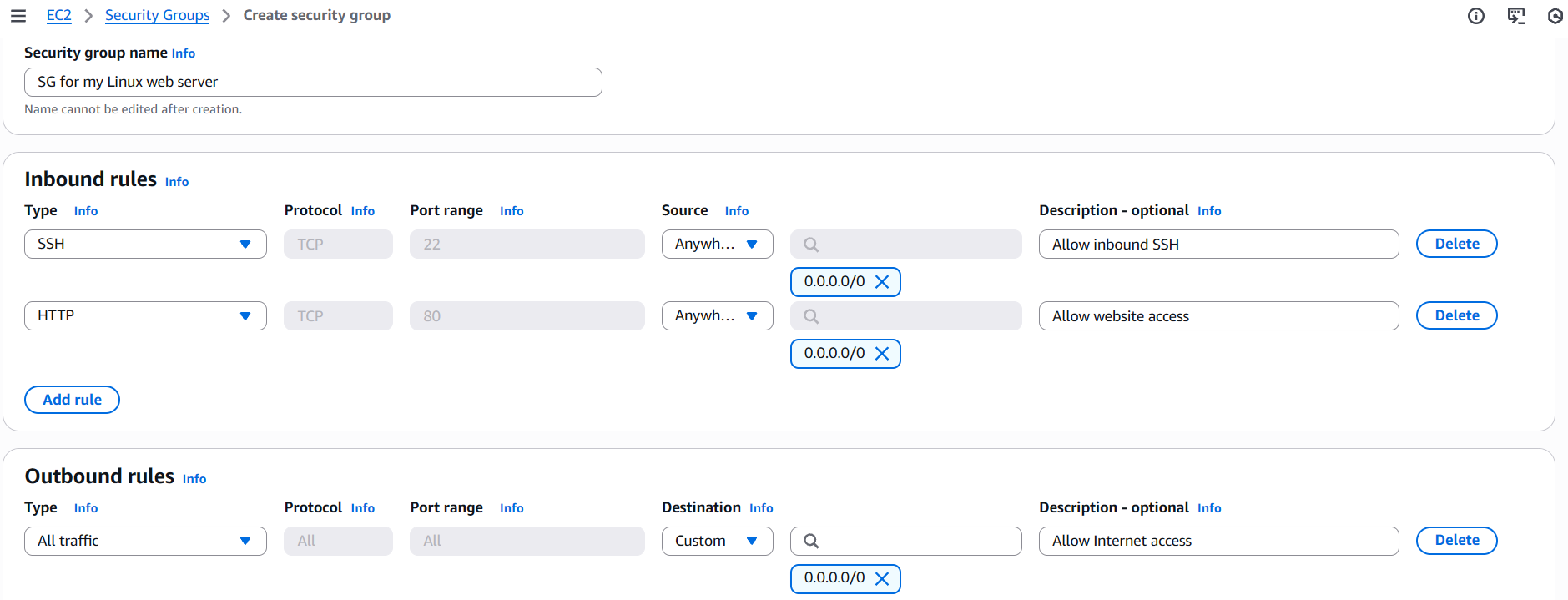
Amazon Elastic Compute Cloud (EC2) is a powerful service for launching and managing VMs in the cloud. To access the created VMs, you'd typically rely on traditional SSH or RDP access. And to make the SSH and RDP ports accessible, you need to create and attach the correct AWS security group (SG) to the EC2 instance. Below is an example of a typical security group that allows inbound SSH and HTTP access. Then, it can be attached to one or multiple EC2 instances:
Early Detection
A common breach scenario is when system owners open a port on the VM and do not properly protect it: set a weak RDP password, expose SSH keys, or host a vulnerable web service. Same as with S3 monitoring, you should respond to an exposed VM as early as possible. For example, you can alert whenever a security group is modified to allow public RDP access (left image) and when an EC2 instance is launched to use an insecure security group (center image):

Note the two problems mentioned above. Indeed, it is sometimes hard to correlate security groups and resources, such as EC2 instances, with the locations where they are used. Unless you have AWS access or SOAR automations that can do it for you, you need to perform an additional investigation. Below are two playbooks you can use to hunt for insecure security group changes and identify instances that were affected:
Hunt 1. A new security group has been created
1 | Review the group creation event and note its name and ID |
|
2 | Review the security group for any insecure inbound rules |
|
3 | Check if any new or old VMs start using this security group |
|
4 | If the rules are insecure or inappropriate for the linked VMs, | N/A |
Hunt 2. One of the security group rules has been modified
1 | Review the changes and note the security group ID |
|
2 | Find the group creation and note its author and description |
|
3 | Identify the EC2 instances that use the modified security group |
|
4 | If the changes are insecure or inappropriate for the linked VMs, | N/A |
Another important detail is that there are a few overlapping ways to control traffic in AWS: security groups, network ACLs, VM firewalls, and more. From logs, you might be confident that the instance is exposed, but in fact, it is private thanks to other applied security controls. This is a complex topic, but if possible, verify the issue yourself with a port scanner or consult your IT before raising an incident.
Late Detection
If you don't alert on insecure security group changes, such as exposing SSH, RDP, or VNC, you are leaving an Internet-facing entry point for attackers to exploit. For example, the Dota3 miner from Linux Threat Detection 2 room often targets EC2 via exposed SSH. Beyond the mining impact, instances may contain sensitive data, connect to critical databases, or have permissive IAM roles. Even if detections miss the misconfiguration, a mature SOC team should still apply defense in depth, for example:
Alert on insecure security group modifications with CloudTrail, as described in this task
Enable GuardDuty, which may generate the Recon:EC2/PortProbeUnprotectedPort finding
Collect auth.log from the VMs and detect SSH brute force from the endpoint point of view
As a last resort, detect the dropped miner with installed EDR, network, or endpoint logs
**Practice
**In this task, you will investigate a typical EC2 exposure scenario.
Continue with the VM and use this Splunk query: index=task3.
Search for All Time and start your hunt from the earliest logs.
Answer the questions below
Which security group did Emma create, and which risky service did it expose?
Answer Example: bastion-public-access, RDP website-access-sg, SSH
For the first part - the security group:
index=task3 dvc="ec2.amazonaws.com" action=created eventName=CreatteSecurityGroup

I came across this responseElements' item that has port 22 and knew it would be SSH that we're looking for before I found the security group so I had to go back after finding the security group as the hint showed that it would be found seperately
index=task3 dvc="ece.amazonaws.com"


Which EC2 instance ID was created shortly after and uses that security group? i-082579354380296e6
index=task3 dvc="ec2.amazonaws.com" eventName=RunInstances

According to the GuardDuty alert, which IP soon attacked the instance? 45.78.205.134
The AWS Rooms are so interesting, but you really have to be keen coz the AWS source, logs, or given thing can be changed, and you might miss finding the expected output or take a lot of time, but it's a great learning experience
index=task3 source="guardduty.json"

When did Emma revoke the insecure rule from the security group?
Answer Example: 2025-12-31 20:30:45 2025-12-31 21:58:34
index="task3" eventName=RevokeSecurityGroupIngress

Risks of Public Databases
Exposed Database
Many AWS services can be exposed to the Internet, including database services like Amazon RDS, DynamoDB, Redshift, and OpenSearch. Unfortunately for SOC teams, there is no universal playbook for detecting exposure because each service defines public access differently and is configured in its own way. But overall, public/private access for most database services is determined by one or both of two control groups:
Access Policies: Resource-based policies that define service access, same as with S3
Network Controls: VPCs, subnets, access control lists, security groups, same as with EC2

Amazon RDS Example
Amazon RDS is a managed relational database service that supports many engines, such as MySQL and PostgreSQL. It is the most common place where customer emails, passwords, and credit cards are stored. To make a grave mistake, make the RDS instance public, and welcome threat actors for data exfiltration, you'd need to enable the "Public Access" switch and allow inbound access from 0.0.0.0/0 in the DB's security group. Here is how it looks in logs:

Note that, same as with EC2 instances, a database may be private at first but become public months or years later due to an accidental misconfiguration (ModifyDBInstance) or insecure change in its security groups (*SecurityGroupIngress, ModifySecurityGroupRules). Also, keep in mind that exposure can occur at creation time in a single CreateDBInstance event, where you can enable "Public Access" on the spot and attach the instance to an existing security group.
SOC Team and CSPM
You may notice that detecting exposure across S3, EC2, and RDS isn't easy, as there are many edge cases and conditions to account for. This expertise is valuable for DFIR and threat hunting, but for routine SOC monitoring, it's often more effective to rely on a Cloud Security Posture Management (CSPM) solution such as AWS Config, Wiz, and Lacework. While they differ in features, they generally work in similar ways:
Continuously scan your AWS environment for exposures and misconfigurations
Detect if any deployed resources are exposed, vulnerable, or misconfigured
Optionally, revert the misconfiguration without waiting for SOC involvement
Generate an alert with more context than with independent CloudTrail logs

Real-World Scenario
RDS and other database exposures are rare but devastating. In one DFIR case, a payment provider migrated an OpenSearch cluster containing customer bank transactions but failed to copy key security settings, leading to cluster exposure. Within a week, the data was exfiltrated, the company was blackmailed, the breach became public, and the provider eventually paid huge government fines. All due to a single misconfiguration. To prevent this as a SOC analyst, you had to:
Develop detection rules that detect any change to the most critical OpenSearch clusters
Develop detection rules that cover an insecure change to OpenSearch policies and SGs
Configure a CSPM solution that can detect and immediately prevent cluster exposure
**Practice
**In this task, you will analyze the RDS database exposure scenario.
Continue with the VM and use this Splunk query: index=task4.
Search for All Time and focus on the write events (readOnly=false).
Answer the questions below
What is the name (instance identifier) of the created RDS instance? db-thm-preprod-qa
index="task4" readOnly=false eventSource="rds.amazonaws.com"

Which two events indicate the database is Internet-exposed?
Provide the first part of their eventID in chronological order.
Answer Example: 0a1b2c3d, 1b2c3d4f dcb54877, 0a3b23c1
this was the most challenging for me I spent a lot of time trying to match some random first part of the eventIDs i got thinking i would get the possible matches. I ended up asking for an hint on discord and got response which was helpful
hint is in the room text " misconfiguration (ModifyDBInstance) or insecure change in its security groups (*SecurityGroupIngress, ModifySecurityGroupRules). Also, keep in mind that exposure can occur at creation time in a single CreateDBInstance event" check these events.
(eventName=ModifyDBInstance OR eventName=AuthorizeSecurityGroupIngress)
index=task4 eventName=CreateDBInstance or eventName=ModifySecurityGroupRules
| table _time, eventID, requestParameters
| sort _time asc


Detecting Cloud Discovery
Cloud Discovery Intro
The previous tasks focused on two tactics present in every completed intrusion: Initial Access (an exposed EC2 instance) and Impact (a data leak from an unprotected database). However, in more complex or targeted scenarios where Impact isn't immediately possible due to limited permissions or strong security controls, attackers first perform Discovery to map the environment and identify the best path forward.
Initial Discovery
As with Windows or Linux breaches, targeted attacks on AWS typically begin with a "whoami". If the adversaries use AWS Management Console, you won't easily detect "whoami" since most discovery-related requests happen automatically, making it hard to distinguish malicious activity from legitimate use. In contrast, CLI/SDK-based attacks leave much clearer traces. Below are the typical commands that follow the Initial Access:
Initial Discovery Commands (Output Simplified)
// GetCallerIdentity: AWS alternative for "whoami"
attacker@kali:~$ aws iam get-caller-identity
{
    "UserId": "AIDAVZZK4G6EVLTNRWXXX",
    "Account": "398985017225",
    "Arn": "arn:aws:iam::398985017225:user/john.doe"
}
// ListAttachedUserPolicies: Verifying own privileges
attacker@kali:~$ aws iam list-attached-user-policies --user-name john.doe
[{
    "PolicyName": "AdministratorAccess",
    "PolicyArn": "arn:aws:iam::aws:policy/AdministratorAccess"
}]
// GetAccountSummary: Listing AWS account statistics
attacker@kali:~$ aws iam get-account-summary
{
    "Policies": 12,
    "Users": 16,
    "Providers": 1,
    "AccountMFAEnabled": 4,
    "AccountAccessKeysPresent": 1,
    "AccountPasswordPresent": 1,
    [...]
}
Once the adversary determines their identity (GetUser, GetCallerIdentity), enumerates permissions (List*UserPolicies, ListGroupsForUser), and gathers basic account context (GetAccount*), they often continue to the deeper IAM or service discovery. Note that in some cases, attackers may skip early Discovery entirely, especially if they already know their victim and the privileges they have.
Broad Discovery
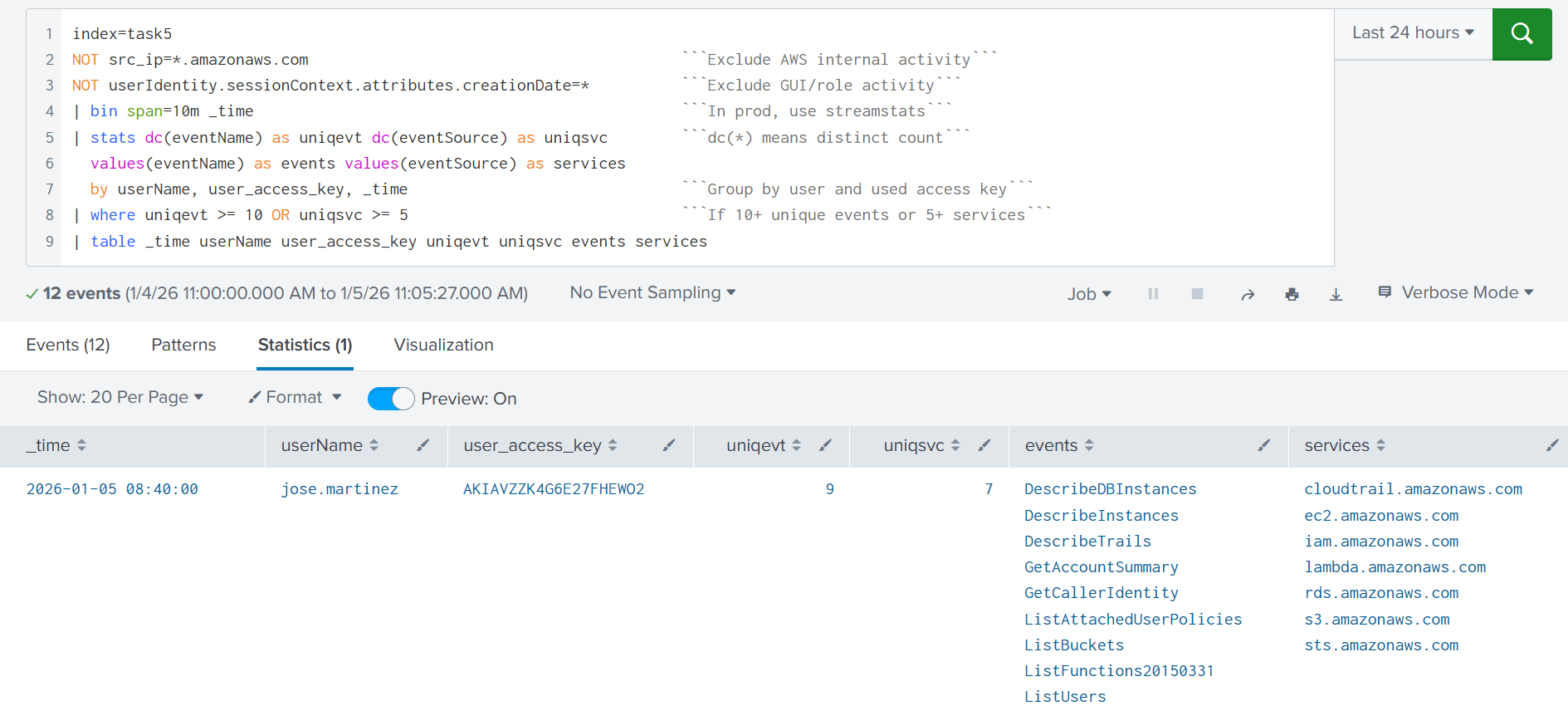
Opportunistic threat actors may want to do a broad scan of the AWS account for attack vectors: list S3 buckets (ListBuckets), EC2 instances (DescribeInstances), Lambda functions (ListFunctions*), or privileged IAM users (ListUsers). One way to detect this behavior is to alert on a spike in distinct API calls across multiple services from a single user account. The rule below is a starting point for detecting discovery activity originating from the AWS CLI or SDK:
Deeper Discovery
Once an adversary finds an interesting resource, they often pivot into deeper Discovery. For example, after identifying an interesting user via ListUsers, they may query additional details using GetUser and ListAccessKeys for that specific username. In large environments, attackers may also use filters to speed up the attack. For example, searching for terms like "secret" or "vault" in EC2 instance names to identify the most valuable targets. In CloudTrail, you will see it in the requestParameters field:
// Three detection opportunities from a single event
{
  "userIdentity": {
    "userName": "john.doe"
  },
  "eventTime": "2025-12-31T10:30:45Z",
  "eventSource": "ec2.amazonaws.com",
  "eventName": "DescribeInstances",
  "awsRegion": "us-east-1",
  "sourceIPAddress": "167.99.40.20",                              // #1 Known-malicious IP!
  "userAgent": "aws-cli/1.22.34 Linux/5.15.0-kali3-amd64 [...]",  // #2 Kali Linux user-agent!
  "requestParameters": {
    "instancesSet": {},
    "filterSet": {
      "items": [                                                  // #3 Suspicious search keywords!
        {
          "name": "tag:Name",
          "valueSet": {
            "items": [{ "value": "*vault*" }, { "value": "*secret*" }]
...
}
Practice
You will analyze a simple Discovery originating from a breached IAM user.
Search for All Time and start your search from the index=task5 query.

Answer the questions below
What was the second Discovery command the adversary ran? ListAttachedUserPolicies


Which other IAM user did the adversary discover and backdoor?
lars.andersen
Denial of Wallet Attacks
Denial of Wallet Attacks
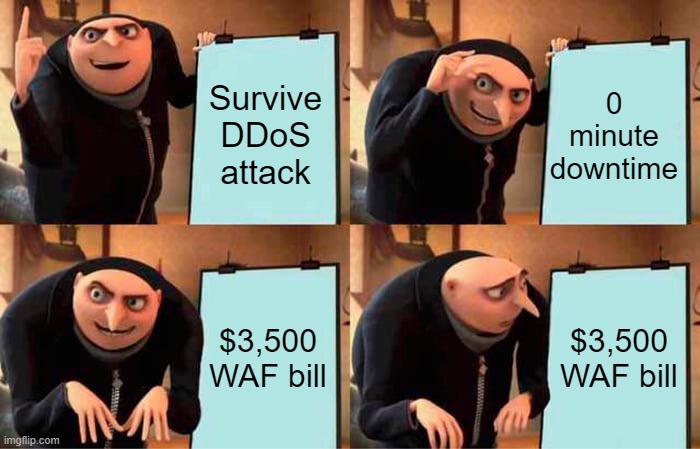
As serverless, autoscaling, CDNs, WAFs, and other cloud defenses become more common, traditional Denial of Service (DoS) attacks can be too expensive for attackers to cause real disruption. Sounds great, so where is the catch? The catch is that you pay for every extra CPU cycle in serverless, every EC2 instance that scales up, and sometimes every request your WAF blocks. Instead of taking your services offline, adversaries may simply drain your wallet by increasing your cloud costs over time. This is called a Denial of Wallet (DoW) attack.
DoW Attack Examples
Attack on S3 Buckets
When using Amazon S3, your costs are largely driven by object operations (such as GetObject/PutObject) and data transfer out (bytes sent from AWS to the requester). This means an attacker, sometimes even a competitor, can attempt DoW by repeatedly sending meaningless requests at high volume or repeatedly downloading large objects (e.g., PDFs or videos), driving up both request charges and data transfer costs.
Attack on Compute Workloads
Compute workloads are targeted as well, often as a side effect of traditional DoS attacks. For example, an attacker may flood a web application to make it unavailable. In response, the Auto Scaling settings will launch more EC2 instances to absorb the load. Even if the DoS doesn't put the application offline, the new EC2 resources will generate a huge AWS bill, turning the attack into a DoW scenario. Below is an example of why you should balance between modern DoS and DoW attacks and always consider both risks:

SOC Team and Mitigation
Same as with DoS attacks, the SOC team can help with detection and triage, but not full remediation. All you can do is detect a spike of requests, block offensive IPs (which is a short-term response), and report the risks to your IT team. However, what you should know is what to say when IT team has no idea how to address the risks. Even while exact steps require strong AWS expertise, the general approach for any cloud is:
Validate if the resource under attack is expected to be public
It is possible that it shouldn't have been public in the first place.Block exploits, known-bad IPs, and user-agents with WAF
In most clouds, blocked requests are much cheaper than allowed.Cache server responses and rate limit user requests with CDN
For example, you can cache images in S3 with CloudFront CDN.Finally, optimize the compute work (CPU, RAM, network usage)
The faster your app is, the lower the amount you pay for compute services.
Answer the questions below
What does the acronym DoW stand for? Denial of Wallet
Should you monitor DoW with the same effort as DoS? (Yea/Nay) Yea
Conclusion
This room showed how AWS services can be abused for DoW attacks, data exfiltration, or even used as an intrusion entry point. Most of the attacks described come down to the same root cause: unnecessary Internet exposure combined with weak or no authentication at all. In addition to monitoring for leaked access keys, detecting cloud service exposure should be your top SOC priority.
Note for Other Clouds
Google Cloud and Microsoft Azure carry exactly the same risks and require the same defensive approach as AWS. For example, I once worked on an incident where a company exposed a large number of sensitive insurance documents to the public because of a single Azure Blob Storage container misconfiguration (the Azure equivalent of S3).
Across every scenario covered — from S3 data leaks to RDS exposure and cloud discovery — the root cause is consistently the same: unnecessary internet exposure combined with weak or absent authentication. As cloud environments grow in complexity, no single tool or detection rule can catch everything. A mature cloud security posture combines proactive monitoring with CloudTrail, automated detection via GuardDuty and CSPM solutions like AWS Config or Wiz, and a SOC team equipped to investigate and respond quickly. The attacks may be sophisticated, but the defenses start with the basics — lock down what doesn't need to be public, and alert the moment that changes.