Password Cracking (TryHackMe)

Link to the Walkthrough on TryHackMe: Password Cracking
Introduction
Passwords are the most common authentication mechanism on the internet and also one of the most reliable attack paths into a system. Whether we are dealing with a leaked database, a captured network handshake, or a hash extracted from a compromised machine, the ability to recover the plaintext from a hash is a fundamental red-team skill.
This room walks through password cracking from the ground up: how passwords are stored, how to identify which algorithm produced a given hash, which tools and techniques to apply, and when to use each. By the end, we will crack a set of real hashes using the exact workflow a penetration tester would follow on an engagement.
Learning objectives
Explain how passwords are stored as hashes and what salting does
Identify common hash types by their visual characteristics and with dedicated tools
Use hashid to narrow down unknown hash formats
Run dictionary attacks with Hashcat and John the Ripper
Apply rule-based and mask attacks to extend coverage beyond a standard wordlist
Choose the right tool and technique for a given hash and scenario
Prerequisites
Linux Fundamentals Part 1: Navigating the command line, reading and writing files
Hashing Basics: What hash functions are and their core properties
Introduction to Wordlists: CeWL, crunch, and Hydra for building and using targeted wordlists
How Passwords Are Stored
Storing passwords as plain text is a catastrophic mistake, but it still happens. When a database holds a password:hunter2 verbatim, a single breach exposes every account immediately, with no cracking required. The standard fix is to store a hash of the password rather than the password itself.
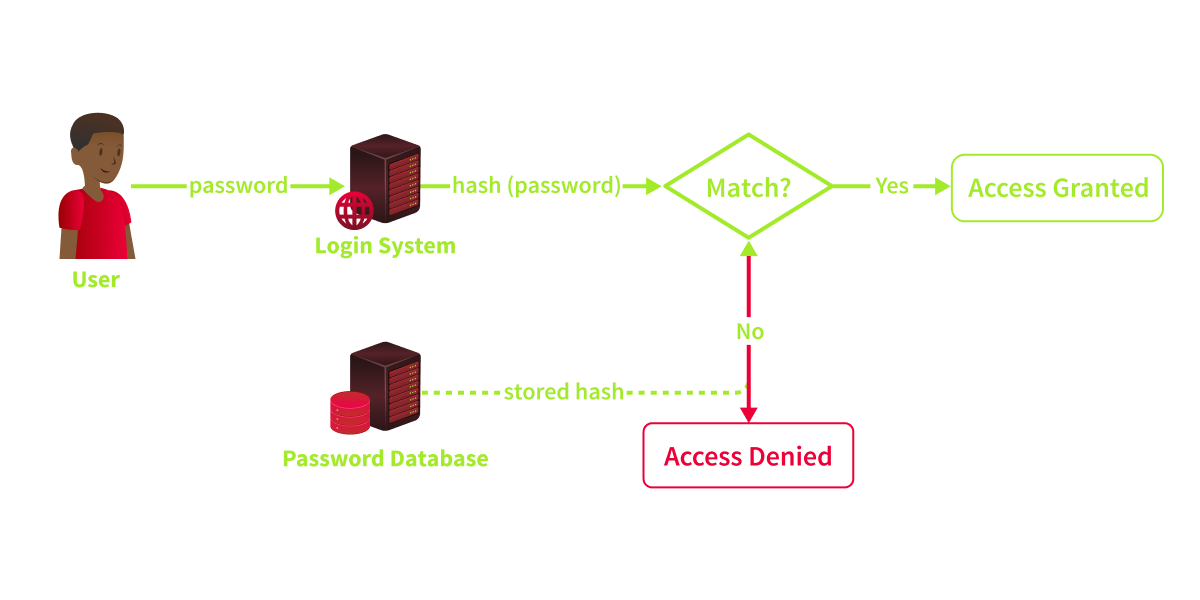
When a user logs in, the system hashes the submitted password and compares it to the stored hash. If they match, access is granted. The original password never needs to be stored anywhere.
What Makes a Hash Function Useful for This
A cryptographic hash function has four properties that make it suitable for password storage:
One-way: There is no way to reverse a hash back to the original input. We can only move forward by hashing a candidate and comparing.
Deterministic: The same input always produces the same output.
hash("hunter2")will always return the same value, on any machine, every time.Fixed-length output: Regardless of input length, the output is always the same size. MD5 always produces 32 hex characters, whether the input is
aor a 10,000-character string.Collision-resistant: It should be computationally infeasible for two different inputs to produce the same hash. When an algorithm loses this property (as MD5 and SHA-1 have), it is considered broken for security purposes.
Common Hashing Algorithms
| Algorithm | Output Length | Still Used for Passwords? | Notes |
|---|---|---|---|
| MD5 | 128 bits (32 hex chars) | No | Fast, collision-prone, widely cracked |
| SHA-1 | 160 bits (40 hex chars) | No | Faster than SHA-256, deprecated |
| SHA-256 | 256 bits (64 hex chars) | Sometimes | Better than MD5/SHA-1 but still fast |
| NTLM | 128 bits (32 hex chars) | Yes (legacy Windows authentication) | MD4-based, used for Windows account hashes |
| bcrypt | ~ 60 chars, \(2*\) prefix | Yes, recommended | Deliberately slow, cost-configurable |
| Argon2 | Variable | Yes, recommended | Modern standard, memory-hard |
It comes down to speed. MD5, SHA-1, and SHA-256 were designed for file integrity checks and digital signatures, not password storage. A modern GPU can compute billions of MD5 hashes per second. bcrypt is different: it was built specifically for passwords, with a cost factor that makes it deliberately expensive to compute. The attacker grinding through a wordlist is slowed down just as much as the server verifying a login, which is the whole idea.
Salting
Even with a strong algorithm, a problem remains: if two users share the same password, their stored hashes will be identical. An attacker who pre-computes hashes for common passwords, a rainbow table, can look up matches instantly without running any cracking at all.
Salting solves this. A salt is a unique random string generated for each user and combined with their password before hashing:
stored_value = hash(password + salt)
The notation above is simplified. In practice, bcrypt and Argon2 handle salt generation internally, so the developer calls bcrypt.hash(password) and the function generates, embeds, and stores the salt automatically. The manual concatenation model applies to older schemes, such as salted SHA-256.
The salt is stored in the database alongside the hash. Because every user gets a different salt, identical passwords produce completely different hashes. Rainbow tables become useless because the attacker would need to pre-compute a separate table for every possible salt value.
When Password Storage Fails
The RockYou breach of 2009 exposed approximately 32 million user passwords stored inplain text. The resulting file, rockyou.txt, became the standard first-pass wordlist for dictionary attacks. It is pre-installed on Kali Linux and the AttackBox at /usr/share/wordlists/rockyou.txt.
The Aptoide breach of April 2020 exposed over 20 million accounts from the independent Android app store. Passwords were stored as SHA-1 hashes without salting. A single modern GPU can test over 10 billion SHA-1 candidates per second, meaning a full rockyou.txt run completes in a fraction of a second. Without a salt, rainbow tables make it faster still: no cracking required at all for any password that appears in a pre-computed lookup table.
Fast hash, no salt, and the attacker barely has to wait.
Answer the questions below
What property of a hash function means you cannot reverse a hash to recover the original input? one-way
What term describes the unique random string added to a password before hashing to prevent rainbow table attacks? salt
Which hashing algorithm was designed specifically for passwords and is deliberately slow by design? bcrypt
Identifying Hash Types
Visual Characteristics
The fastest check is always length and format:
| Hash Type | Length | Prefix / Format | Example |
|---|---|---|---|
| MD5 | 32 hex chars | None | 5f4dcc3b5aa765d61d8327deb882cf99 |
| SHA-1 | 40 hex chars | None | 5baa61e4c9b93f3f0682250b6cf8331b7ee68fd8 |
| SHA-256 | 64 hex chars | None | 5e884898da28047151d0e56f8dc6292773603d0d6aabbdd62a11ef721d1542d8 |
| NTLM | 32 hex chars | None | 8846f7eaee8fb117ad06bdd830b7586c |
| bcrypt | ~60 chars | $2a$, $2b$, or $2y$ | $2y$12$... |
The trickiest ambiguity: MD5 and NTLM are both 32 hex characters. The hash alone will not tell us which is which. Context resolves it. A hash extracted from a Windows SAM file or dumped from Active Directory is almost certainly NTLM. A hash pulled from a web application database is more likely to be MD5 or a SHA variant. When context is absent, try both.
bcrypt hashes are impossible to confuse. The \(2a\),\(2b\), or \(2y\) prefix immediately identifies the algorithm. The number that follows (e.g.,\(2y\)12$) is the cost factor, which controls how slow the hash computation is.
Using Hashid
hashid analyses the format of a hash string and returns a list of possible algorithms. It is pre-installed on Kali. If you don't find it pre-installed on the AttackBox, you can run apt install hashid to install it from the offical repositories.
hashid
root@tryhackme:~# hashid '5f4dcc3b5aa765d61d8327deb882cf99'
Analyzing '5f4dcc3b5aa765d61d8327deb882cf99'
[+] MD2
[+] MD5
[+] MD4
[+] Double MD5
[+] LM
[+] RIPEMD-128
[+] Haval-128
[+] Tiger-128
[+] Skein-256(128)
[+] Skein-512(128)
[+] Lotus Notes/Domino 5
[+] Skype
[+] Snefru-128
[+] NTLM
[+] Domain Cached Credentials
[+] Domain Cached Credentials 2
[+] DNSSEC(NSEC3)
[+] RAdmin v2.x
hashid returns several candidates for a 32-character hex string because multiple algorithms produce output of that length. Use context to narrow it down, or try the most likely candidates in order when cracking.
For bcrypt, hashid gives an unambiguous result:
hashid
root@tryhackme:~# hashid '\(2y\)10$wJ/mZDURD4jQ0lrCEMheE.8FzMXNEBNjIkuZgEFm9VMn1m4ZP4eDG'
Analyzing '\(2y\)10$wJ/mZDURD4jQ0lrCEMheE.8FzMXNEBNjIkuZgEFm9VMn1m4ZP4eDG'
[+] Blowfish(OpenBSD)
[+] Woltlab Burning Board 4.x
[+] bcrypt
All three results refer to the same hash format. hashid labels it Blowfish(OpenBSD) because bcrypt uses Blowfish's key schedule internally and was first shipped with OpenBSD. Any \(2y\) or \(2b\) prefix means bcrypt.
Hashcat --identify
If we are already working in Hashcat, we can skip switching tools entirely. Since version 6.2.6, Hashcat includes a built-in identification flag:
hashcat
root@tryhackme:~# hashcat --identify '5f4dcc3b5aa765d61d8327deb882cf99'
The following 11 hash-modes match the structure of your input hash:

      # | Name                                                       | Category
  ======+============================================================+======================================
    900 | MD4                                                        | Raw Hash
      0 | MD5                                                        | Raw Hash
     70 | md5(utf16le($pass))                                        | Raw Hash
   2600 | md5(md5($pass))                                            | Raw Hash salted and/or iterated
   3500 | md5(md5(md5($pass)))                                       | Raw Hash salted and/or iterated
   4400 | md5(sha1($pass))                                           | Raw Hash salted and/or iterated
  20900 | md5(sha1(\(pass).md5(\)pass).sha1($pass))                    | Raw Hash salted and/or iterated
   4300 | md5(strtoupper(md5($pass)))                                | Raw Hash salted and/or iterated
   1000 | NTLM                                                       | Operating System
   9900 | Radmin2                                                    | Operating System
   8600 | Lotus Notes/Domino 5                                       | Enterprise Application Software (EAS)
The output lists matching modes with their numbers ready to copy directly into a cracking command. For a clean workflow, --identify is often the fastest path from unknown hash to first crack attempt.
Online Resources
For quick lookups, two sites are worth knowing:
crackstation.net(opens in new tab): Paste a hash, and it checks against a pre-computed lookup table of billions of entries. If the plaintext has been seen before, it comes back instantly.
hashes.com(opens in new tab): Identifies the hash type and attempts a lookup against a large database. Also accepts bulk hash submissions.
Both are useful in CTF and lab environments where speed matters.
Note: On a real engagement, never submit client hashes to third-party sites. The hash may be sensitive, and any lookup creates a record of what you were cracking and when.
Hashcat Modes and John Formats
Once we have identified the algorithm, we translate it to the tool-specific format or mode number:
| Algorithm | Hashcat Mode ( -m) | John Format ( --format=) |
|---|---|---|
| MD5 | 0 | raw-md5 |
| SHA-1 | 100 | raw-sha1 |
| SHA-256 | 1400 | raw-sha256 |
| SHA-512 | 1700 | raw-sha512 |
| NTLM | 1000 | nt |
| bcrypt | 3200 | bcrypt |
These values are fixed. Running hashcat -m 1000 always means NTLM, regardless of the hash's format. Getting the mode wrong is one of the most common causes of a crack producing no results.
Note: When hashid gives multiple candidates for a 32-character hex hash, try MD5 (mode
0) first. If the attack completes with no results, try NTLM (mode1000) next.
Answer the questions below
What is the character length of an SHA-256 hash? 64
What John the Ripper format would you use for an SHA-256 hash? raw-sha256
Wordlists and Attack Strategies
We have the hash type. Now we need a plan. The core challenge in cracking is generating the right candidate passwords quickly enough to find a match before running out of time or candidates. No single method works in every case, and choosing the wrong strategy wastes time without producing results.
Note: All tool and wordlist paths in this task reflect the current AttackBox. If you are on an older version, the paths may differ: Hashcat rules at
/opt/hashcat/rules/, and John rules at/opt/john/rules/. If a path does not exist, usefind / -name <filename> 2>/dev/nullto locate it.
Dictionary attacks
A dictionary attack tests a pre-built list of candidate passwords against the hash, one by one. It is the fastest first step for most cracking tasks and should always be our starting point.
The most widely used wordlist is rockyou.txt, a real collection of 14 million passwords leaked in the 2009 RockYou breach. It is pre-installed on the AttackBox at /usr/share/wordlists/rockyou.txt. Because it comes from a real breach, it reflects actual human password choices, which makes it unusually effective.
For broader coverage, the SecLists collection at /usr/share/wordlists/SecLists/ includes targeted wordlists for specific contexts: common web application passwords, application-specific defaults, and country-specific lists. The path /usr/share/wordlists/SecLists/Passwords/ is the one we use most often.
Wordlists have grown considerably since the original RockYou leak. RockYou2024(opens in new tab), published in July 2024, is a compiled list of approximately 9.9 billion unique plaintext passwords drawn from decades of breaches. At that scale, the probability that any given real-world password appears somewhere in the list is high. It is not something we load into a beginner exercise; the uncompressed file runs to around 150 GB, but it illustrates why dictionary attacks remain so effective: attackers are not guessing, they are drawing from passwords that real people have actually used.
A dictionary attack cracks any password that appears verbatim in the wordlist. Its weakness is equally obvious: if the password is not in the list, it will not crack.
Brute-Force Attacks
A brute-force attack generates every possible character combination up to a specified length. Given unlimited time, it will always recover the password. In practice, it is rarely viable beyond 6-7 characters because the search space grows exponentially.
For a lowercase-only 6-character password: 26^6 = 308,915,776 combinations. For an 8-character password using mixed case characters and digits: 62^8 = 218,340,105,584,896 combinations. Even at 1 billion candidates per second, a full 8-character mixed-case Brute-force attack would take over 2 days per hash.
Pure brute force makes sense only when the search space is genuinely small: a 4-digit PIN, for instance, or a pattern so constrained that exhausting all options is fast.
Rule-Based Attacks
Rule-based attacks take an existing wordlist and apply transformations to each word, generating the mutations that people commonly use when constructing passwords:
Capitalise the first letter:
password→PasswordAppend a number:
password→password1Add a special character:
password→password!Substitute characters:
password→p@ssw0rd
Rules dramatically extend coverage without generating the enormous candidate space of a full brute force. Password policies that require a capital letter, a digit, or a special character create predictable mutations: users capitalise the first letter, append 1 or !, and call it done. Rules exploit exactly these patterns. On the AttackBox, Hashcat's rule files live at /opt/hashcat/rules/:
| Rule File | Description |
|---|---|
| best64.rule | 64 highly effective mutations, good first choice |
| rockyou-30000.rule | 30,000 rules derived from RockYou analysis |
| d3ad0ne.rule | Large community-built rule set |
| dive.rule | An extensive rule set covering a wide range of mutations |
| OneRuleToRuleThemAll.rule | Popular community-compiled rule set; not bundled by default, verify it exists on the system before use |
John the Ripper has its own rule sets at /usr/local/john/run/rules/. You can activate them with --rules=wordlist (applies default mutations) or --rules=single (applies the Single rule set, which generates name and username-based mutations).
John also supports mask attacks via its --mask= option, though we will focus on Hashcat's mask syntax in this room since it is more widely documented.
Mask Attacks
A mask attack is a structured Brute-force attack in which you define the pattern of the password rather than just the character set. If we know a password follows a specific structure, for example, a word followed by a four-digit year, a mask attack generates only candidates that match that structure.
Hashcat mask syntax uses placeholders for character sets:
| Placeholder | Character Set |
|---|---|
| ?l | Lowercase letters (a-z) |
| ?u | Uppercase letters (A-Z) |
| ?d | Digits (0-9) |
| ?s | Special characters |
| ?a | All printable ASCII |
A mask for a password like Summer2026! would be ?u?l?l?l?l?l?d?d?d?d?s. This generates far fewer candidates than a full brute force of the same length.
Choosing the Right Approach
| Scenario | Best approach |
|---|---|
| No information about the password | Dictionary attack with rockyou.txt |
| Dictionary fails, password likely mutated | Dictionary + rules (e.g., best64.rule) |
| Known password pattern or enforced policy | Mask attack |
| Short password, small character set | Brute force (constrained length only) |
| Target likely used company-specific terms | Custom wordlist + rules |
Start with a dictionary attack because it is fast and covers the most common passwords. Move to rules if it fails. Use masks when we have reliable information about the password structure.
Answer the questions below
What is the full path to the rockyou wordlist on the AttackBox? /usr/share/wordlists/rockyou.txt
What type of attack applies transformations such as capitalisation and number suffixes to an existing wordlist? rule-based
A password policy requires all passwords to start with a capital letter followed by six lowercase letters and two digits. What attack type is best suited to cracking a hash of such a password? mask
Cracking with John the Ripper and Hashcat
With a strategy in place, we can run our first cracks. John the Ripper and Hashcat are the two tools we will use most for offline cracking. Both handle dictionary attacks, rules, and masks. Where they differ is in speed, format support, and how they handle output.
Setting Up the Example Hash
All examples in this task use two MD5 hashes. Write them to files before running anything:
echo "5f4dcc3b5aa765d61d8327deb882cf99" > demo.txt
echo "0571749e2ac330a7455809c6b0e7af90" > demo2.txt
echo "37b4e2d82900d5e94b8da524fbeb33c0" > demo3.txt
demo.txt is used for basic dictionary attacks, demo2.txt for rule-based attacks, and demo3.txt for the mask attack.
John the Ripper
John the Ripper (usually just "John") is a versatile CPU-based cracker. It handles a wide range of hash formats, including many non-standard ones, and can auto-detect formats when we do not specify one explicitly. It is particularly good for Unix shadow file entries and for quick attempts that require automatic format detection.
Basic Dictionary Attack:
john --format
root@tryhackme:~# john --format=raw-md5 --wordlist=/usr/share/wordlists/rockyou.txt demo.txt
Created directory: /root/.john
Using default input encoding: UTF-8
Loaded 1 password hash (Raw-MD5 [MD5 256/256 AVX2 8x3])
Warning: no OpenMP support for this hash type, consider --fork=2
Press 'q' or Ctrl-C to abort, almost any other key for status
password         (?)
1g 0:00:00:00 DONE (2026-03-24 06:24) 4.166g/s 1600p/s 1600c/s 1600C/s 123456..michael1
Use the "--show --format=Raw-MD5" options to display all of the cracked passwords reliably
Session completed.
Flags explained:
--format=raw-md5, specifies the hash format explicitly (use the John format labels from Task 3)--wordlist=, path to the wordlist filedemo.txt, the file containing one hash per line
Auto-detect mode (when unsure of the format):
john autodetect
root@tryhackme:~# john --wordlist=/usr/share/wordlists/rockyou.txt demo.txt
Warning: detected hash type "LM", but the string is also recognized as "dynamic=md5($p)"
Use the "--format=HAVAL-128-4" option to force loading these as that type instead
Use the "--format=NT" option to force loading these as that type
Loaded 2 password hashes with no different salts (LM [DES 256/256 AVX2])
Warning: poor OpenMP scalability for this hash type, consider --fork=2
Will run 2 OpenMP threads
Press 'q' or Ctrl-C to abort, almost any other key for status
...
0g 0:00:00:24 DONE (2026-03-24 06:25) 0g/s 440565p/s 440565c/s 881130C/s !!1QWER..*7¡VA
Session completed.
Notice the result: 0g means zero passwords cracked. John defaulted to LM format, which is wrong for our MD5 hash, so the entire wordlist ran without a single match. This is exactly why explicit --format is preferred when we know the algorithm.
Rule-Based Attack:
john --rules
root@tryhackme:~# john --format=raw-md5 --wordlist=/usr/share/wordlists/rockyou.txt --rules=wordlist demo2.txt
Using default input encoding: UTF-8
Loaded 1 password hash (Raw-MD5 [MD5 256/256 AVX2 8x3])
Warning: no OpenMP support for this hash type, consider --fork=2
Press 'q' or Ctrl-C to abort, almost any other key for status
sunshine         (?)
1g 0:00:00:00 DONE (2026-03-24 06:40) 1.492g/s 573.1p/s 573.1c/s 573.1C/s 123456..michael1
Use the "--show --format=Raw-MD5" options to display all of the cracked passwords reliably
Session completed.
Viewing Cracked Passwords
John stores results in its potfile at /usr/local/john/run/john.pot. To display previously cracked hashes:
john --show
root@tryhackme:~# john --show --format=raw-md5 demo.txt
?:password

1 password hash cracked, 0 left
Always include --format with --show, otherwise John may not locate the entries in the potfile correctly.
Hashcat
Hashcat is GPU-accelerated, making it significantly faster than John for most hash types. On a modern GPU, Hashcat can process billions of MD5 or SHA-1 candidates per second, compared to millions on the CPU. For bcrypt, the speed difference matters less because bcrypt's cost factor limits throughput regardless of hardware.
Basic Dictionary Attack:
hashcat
root@tryhackme:~# hashcat -m 0 -a 0 demo.txt /usr/share/wordlists/rockyou.txt

hashcat (v6.2.6) starting
...

5f4dcc3b5aa765d61d8327deb882cf99:password

Session..........: hashcat
Status...........: Cracked
Hash.Mode........: 0 (MD5)
Hash.Target......: 5f4dcc3b5aa765d61d8327deb882cf99
Speed.#1.........:     7724 H/s (0.08ms) @ Accel:256 Loops:1 Thr:1 Vec:8
Recovered........: 1/1 (100.00%) Digests (total), 1/1 (100.00%) Digests (new)
...
Flags explained:
-m 0, hash type (0 = MD5; use the mode numbers from Task 3)-a 0, attack mode (0 = dictionary)demo.txt, the file containing one hash per lineThe final argument is the wordlist path
Rule-Based Attack:
root@tryhackme:~# hashcat -m 0 -a 0 demo2.txt /usr/share/wordlists/rockyou.txt -r /usr/local/hashcat/rules/best64.rule
hashcat (v6.2.6) starting

Dictionary cache hit:
* Filename..: /usr/share/wordlists/rockyou.txt
* Passwords.: 14344385
* Bytes.....: 139921507
* Keyspace..: 1104517645

0571749e2ac330a7455809c6b0e7af90:sunshine

Session..........: hashcat
Status...........: Cracked
Hash.Mode........: 0 (MD5)
Hash.Target......: 5f4dcc3b5aa765d61d8327deb882cf99
Time.Started.....: Tue Mar 24 06:51:23 2026 (0 secs)
Time.Estimated...: Tue Mar 24 06:51:23 2026 (0 secs)
Kernel.Feature...: Pure Kernel
Guess.Base.......: File (/usr/share/wordlists/rockyou.txt)
Guess.Mod........: Rules (/usr/share/hashcat/rules/best64.rule)
Guess.Queue......: 1/1 (100.00%)
Speed.#1.........:  8591.6 kH/s (4.07ms) @ Accel:256 Loops:77 Thr:1 Vec:8
Recovered........: 1/1 (100.00%) Digests (total), 1/1 (100.00%) Digests (new)
...

Started: Tue Mar 24 06:51:22 2026
Stopped: Tue Mar 24 06:51:25 2026
Flags explained:
-r, specifies a rule file to apply to the wordlist
Mask Attack:
root@tryhackme:~# hashcat -m 0 -a 3 demo3.txt '?l?l?l?l?l?l?l?l'
hashcat (v6.2.6) starting

Minimum password length supported by kernel: 0
Maximum password length supported by kernel: 256

Hashes: 1 digests; 1 unique digests, 1 unique salts
Bitmaps: 16 bits, 65536 entries, 0x0000ffff mask, 262144 bytes, 5/13 rotates

Optimizers applied:
* Zero-Byte
* Early-Skip
* Not-Salted
* Not-Iterated
* Single-Hash
* Single-Salt
* Brute-Force
* Raw-Hash

Host memory required for this attack: 0 MB

37b4e2d82900d5e94b8da524fbeb33c0:football

Session..........: hashcat
Status...........: Cracked
Hash.Mode........: 0 (MD5)
Hash.Target......: 37b4e2d82900d5e94b8da524fbeb33c0
Time.Started.....: Wed May 20 12:49:52 2026 (11 secs)
Time.Estimated...: Wed May 20 12:50:03 2026 (0 secs)
Kernel.Feature...: Pure Kernel
Guess.Mask.......: ?l?l?l?l?l?l?l?l [8]
Guess.Queue......: 1/1 (100.00%)
Speed.#1.........: 27970.6 kH/s (4.14ms) @ Accel:128 Loops:512 Thr:1 Vec:8
Recovered........: 1/1 (100.00%) Digests (total), 1/1 (100.00%) Digests (new)
Progress.........: 310855680/208827064576 (0.15%)
Rejected.........: 0/310855680 (0.00%)
Restore.Point....: 17664/11881376 (0.15%)
Restore.Sub.#1...: Salt:0 Amplifier:1024-1536 Iteration:0-512
Candidate.Engine.: Device Generator
Candidates.#1....: rladoner -> mrelkess
Hardware.Mon.#1..: Util: 90%

Started: Tue Mar 24 07:06:42 2026
Stopped: Tue Mar 24 07:06:50 2026
Flags explained:
-a3, attack mode 3 = mask attackThe final argument is the mask pattern
Saving Output to a File
root@tryhackme:~# hashcat -m 0 -a 0 demo2.txt /usr/share/wordlists/rockyou.txt -o cracked.txt
cat cracked.txt
0571749e2ac330a7455809c6b0e7af90:sunshine
Viewing Results After the Run
Hashcat stores results in /usr/local/hashcat/hashcat.potfile. After a session completes, add --show to display results without re-running the attack:
root@tryhackme:~# hashcat -m 0 demo.txt --show
5f4dcc3b5aa765d61d8327deb882cf99:password
Performance notes
Worth knowing before running anything long:
CPU fallback: On the AttackBox without a dedicated GPU, Hashcat runs in CPU mode. Dictionary attacks against MD5 and SHA-256 will still complete quickly. bcrypt will be slow by design, regardless.
Potfile behaviour: Both tools skip hashes that are already in their potfile. Re-running an attack against the same hashes will not waste time re-cracking.
Session resuming: For long Hashcat runs, use --session= to name the session and --restore to resume it if interrupted:
root@tryhackme:~# hashcat -m 3200 -a 0 hashes.txt /usr/share/wordlists/rockyou.txt --session=bcrypt_crack
If the run is interrupted, resume exactly where it left off:
root@tryhackme:~# hashcat --session=bcrypt_crack --restore
Comparison
| John the Ripper | Hashcat | |
|---|---|---|
| Acceleration | CPU (primarily) | GPU (primarily, CPU fallback) |
| Speed (MD5/SHA) | Fast | Very fast |
| Format detection | Good auto-detect | Explicit mode required |
| Non-standard formats | Excellent | Good |
| Rule sets | Built-in + extensible | Large file library |
| Best for | Quick attempts, varied formats, shadow files | Sustained attacks, GPU-accelerated cracking |
Neither tool is strictly better. In practice, John works well for quick auto-detect attempts and for formats that Hashcat handles poorly. Hashcat is the choice for sustained, high-speed dictionary, rule, or mask attacks.
Answer the questions below
A penetration tester needs to crack a large set of SHA-256 hashes as quickly as possible. Which tool is the better choice: John the Ripper or Hashcat? hashcat
What Hashcat attack mode number is used for a mask attack? 3
Which John the Ripper flag displays previously cracked passwords from the potfile? --show
Practical
Time to apply everything. The four hash files are pre-loaded on the AttackBox in /root/Rooms/PasswordCracking/. If working on a local machine, download the zip by clicking the Download Task Files button and extract it to get hash1.txt, hash2.txt, hash3.txt, and hash4.txt. Work through the files in order. For each one:
Work through the hashes in order. For each one:
Run
hashidon it and cross-reference the output with the visual characteristics from Task 3 to confirm the algorithmSelect the appropriate Hashcat mode or John format from Task 3's reference table
Run a dictionary attack using
/usr/share/wordlists/rockyou.txt
Hash 4 is bcrypt. It will crack more slowly than the others because bcrypt is designed to be expensive. Be patient.
Two of the four hashes have the same plaintext. That is deliberate. If we run them side by side, the outputs look nothing alike, which is exactly the point: the algorithm matters as much as the password itself. Identifying the hash type is not a formality.
Answer the questions below
What algorithm produced the hash in hash1.txt? md5
// MD5
e10adc3949ba59abbe56e057f20f883e

5e884898da28047151d0e56f8dc6292773603d0d6aabbdd62a11ef721d1542d8
What Hashcat mode would you use to crack the hash in hash2.txt? 1400
What is the plaintext password for hash1.txt? 123456
hash2.txt and hash3.txt have different algorithms but share the same plaintext. What is it? password
What is the plaintext password for hash4.txt?
nano hash1.txt

nano hash1.txt

nano hash2.txt

nano hash4.txt

hashcat -m 3200 hash4.txt /usr/share/wordlists/rockyou.txt

hashcat (v6.2.6) starting

OpenCL API (OpenCL 3.0 PoCL 5.0+debian  Linux, None+Asserts, RELOC, SPIR, LLVM 16.0.6, SLEEF, DISTRO, POCL_DEBUG) - Platform #1 [The pocl project]
==================================================================================================================================================
* Device #1: cpu-haswell-AMD EPYC 7571, 1410/2884 MB (512 MB allocatable), 2MCU

Minimum password length supported by kernel: 0
Maximum password length supported by kernel: 72

Hashes: 1 digests; 1 unique digests, 1 unique salts
Bitmaps: 16 bits, 65536 entries, 0x0000ffff mask, 262144 bytes, 5/13 rotates
Rules: 1

Optimizers applied:
* Zero-Byte
* Single-Hash
* Single-Salt

Watchdog: Temperature abort trigger set to 90c

Host memory required for this attack: 0 MB

Dictionary cache building /usr/share/wordlists/rockyou.txt: 33553435 byteDictionary cache building /usr/share/wordlists/rockyou.txt: 67106875 byteDictionary cache building /usr/share/wordlists/rockyou.txt: 100660309 bytDictionary cache built:
* Filename..: /usr/share/wordlists/rockyou.txt
* Passwords.: 14344391
* Bytes.....: 139921497
* Keyspace..: 14344384
* Runtime...: 2 secs

Cracking performance lower than expected?

* Append -w 3 to the commandline.
  This can cause your screen to lag.

* Append -S to the commandline.
  This has a drastic speed impact but can be better for specific attacks.
  Typical scenarios are a small wordlist but a large ruleset.

* Update your backend API runtime / driver the right way:
  https://hashcat.net/faq/wrongdriver

* Create more work items to make use of your parallelization power:
  https://hashcat.net/faq/morework

[s]tatus [p]ause [b]ypass [c]heckpoint [f]inish [q]uit => s

Session..........: hashcat
Status...........: Running
Hash.Mode........: 3200 (bcrypt \(2*\), Blowfish (Unix))
Hash.Target......: \(2b\)05$9I7YCSrgm6aLO7J5YPC9x.Kp08LQ7cSJTmkALhFTgm5U...wBr5.e
Time.Started.....: Sun May 24 18:40:43 2026 (28 secs)
Time.Estimated...: Mon May 25 01:55:38 2026 (7 hours, 14 mins)
Kernel.Feature...: Pure Kernel
Guess.Base.......: File (/usr/share/wordlists/rockyou.txt)
Guess.Queue......: 1/1 (100.00%)
Speed.#1.........:      550 H/s (3.02ms) @ Accel:2 Loops:16 Thr:1 Vec:1
Recovered........: 0/1 (0.00%) Digests (total), 0/1 (0.00%) Digests (new)
Progress.........: 15332/14344384 (0.11%)
Rejected.........: 0/15332 (0.00%)
Restore.Point....: 15332/14344384 (0.11%)
Restore.Sub.#1...: Salt:0 Amplifier:0-1 Iteration:0-16
Candidate.Engine.: Device Generator
Candidates.#1....: 091186 -> 051290
Hardware.Mon.#1..: Util: 81%

[s]tatus [p]ause [b]ypass [c]heckpoint [f]inish [q]uit =>


Session..........: hashcat
Status...........: Running
Hash.Mode........: 3200 (bcrypt \(2*\), Blowfish (Unix))
Hash.Target......: \(2b\)05$9I7YCSrgm6aLO7J5YPC9x.Kp08LQ7cSJTmkALhFTgm5U...wBr5.e
Time.Started.....: Sun May 24 18:40:43 2026 (31 secs)
Time.Estimated...: Mon May 25 01:40:59 2026 (6 hours, 59 mins)
Kernel.Feature...: Pure Kernel
Guess.Base.......: File (/usr/share/wordlists/rockyou.txt)
Guess.Queue......: 1/1 (100.00%)
Speed.#1.........:      569 H/s (3.30ms) @ Accel:2 Loops:16 Thr:1 Vec:1
Recovered........: 0/1 (0.00%) Digests (total), 0/1 (0.00%) Digests (new)
Progress.........: 16820/14344384 (0.12%)
Rejected.........: 0/16820 (0.00%)
Restore.Point....: 16820/14344384 (0.12%)
Restore.Sub.#1...: Salt:0 Amplifier:0-1 Iteration:16-32
Candidate.Engine.: Device Generator
Candidates.#1....: summer11 -> seven
Hardware.Mon.#1..: Util: 83%

\(2b\)05$9I7YCSrgm6aLO7J5YPC9x.Kp08LQ7cSJTmkALhFTgm5UMFAwBr5.e:hayden07

Session..........: hashcat
Status...........: Cracked
Hash.Mode........: 3200 (bcrypt \(2*\), Blowfish (Unix))
Hash.Target......: \(2b\)05$9I7YCSrgm6aLO7J5YPC9x.Kp08LQ7cSJTmkALhFTgm5U...wBr5.e
Time.Started.....: Sun May 24 18:40:43 2026 (1 min, 42 secs)
Time.Estimated...: Sun May 24 18:42:25 2026 (0 secs)
Kernel.Feature...: Pure Kernel
Guess.Base.......: File (/usr/share/wordlists/rockyou.txt)
Guess.Queue......: 1/1 (100.00%)
Speed.#1.........:      599 H/s (3.17ms) @ Accel:2 Loops:16 Thr:1 Vec:1
Recovered........: 1/1 (100.00%) Digests (total), 1/1 (100.00%) Digests (new)
Progress.........: 58560/14344384 (0.41%)
Rejected.........: 0/58560 (0.00%)
Restore.Point....: 58556/14344384 (0.41%)
Restore.Sub.#1...: Salt:0 Amplifier:0-1 Iteration:16-32
Candidate.Engine.: Device Generator
Candidates.#1....: heather11 -> hayden07
Hardware.Mon.#1..: Util: 88%

Started: Sun May 24 18:39:23 2026
Stopped: Sun May 24 18:42:26 2026
Conclusion
The gap between "I have a hash" and "I have a password" is shorter than it looks. Identify the algorithm, pick an attack that fits what we know about the target, and point the right tool at it. The bcrypt hash in Task 6 should have taken noticeably longer than the others. That is not a bug, it is the point of a slow hash function working exactly as intended.
We moved from how passwords are stored and why algorithm choice matters, through hash identification with hashid and hashcat --identify, to running dictionary, rule-based, and mask attacks with both John the Ripper and Hashcat. The same knowledge works in reverse: choosing bcrypt or Argon2 with a high cost factor, enforcing salting, and avoiding fast hashes for password storage are the defensive side of everything we practised here.
Next steps
The skills from this room feed directly into the capstone:
Checkmate: Apply everything in a full scenario: profiling a target, building custom wordlists, and cracking a multi-compartment hash challenge under realistic constraints
Password Attacks: Broader coverage of both online and offline attack techniques, including credential spraying and brute-forcing live services