Web Server Attacks - I (TryHackMe)

Link to the Walkthrough in TryHackMe - Web Server Attacks - I
Introduction
During a penetration test, you will almost always run into at least one web server. Sometimes it is a production Apache site with careful configuration. Sometimes it is a forgotten Python HTTP server that a developer spun up two years ago and never shut down. Both of them are in scope. Both of them can lead somewhere interesting.
This room focuses on the reconnaissance and misconfiguration-identification phase of web application testing. We have four different web servers running: Apache2, Python's built-in HTTP server, a Node.js Express application, and Nginx. These four were chosen because they represent the dominant server types you will encounter on Linux-based infrastructure: Apache and Nginx cover the traditional web server space, Node.js represents the modern application server pattern, and Python's HTTP server covers the accidental or improvisational server that appears more often than expected. Each one has distinct behaviours, default configurations, and common mistakes that testers encounter regularly.
The room stops at misconfiguration identification. We will not exploit vulnerabilities in the traditional sense, no shells, no RCE, no privilege escalation. The goal is to build reconnaissance skills that tell you what is exposed and why it matters, a prerequisite for every technique that follows.

Info: In a real engagement, these services would typically run on separate hosts. This lab consolidates them onto one machine to keep things manageable. The HTTP behaviour, response headers, and misconfigurations you will see are identical to what you would find in a distributed environment.
Learning Objectives
Identify web server software and versions using response headers and default error pages
Recognise the risks of Python's built-in HTTP server when accidentally exposed
Enumerate Apache directory listings, exposed status pages, and unlinked backup files
Identify debug endpoints, verbose error messages, and environment variable exposure in Node.js Express applications
Detect Nginx
autoindexdirectory listings and exposednginx_statusmetricsPerform a security header audit across multiple servers using
curlandnikto
Prerequisites
Web Security Essentials: Understanding of HTTP request/response cycles, status codes, and response headers
Linux CLI Basics: Comfortable using the terminal for basic navigation and running commands
Networking Essentials: Familiarity with IP addresses and ports
Identifying Web Servers
Before you start enumerating directories or testing inputs, you need to know what you are dealing with. The web server software itself shapes which misconfigurations are possible, which paths are worth checking, and which tools will be most effective. Identifying the server is not a formality. It directly influences every decision that follows.
The good news is that most web servers announce themselves. Developers and administrators often leave default configurations in place, and default configurations tend to be verbose about version information. There are a few reliable places to look.
The Server Response Header
The most direct fingerprinting signal is the Server header in an HTTP response. When you make any request to a web server, the server includes this header in its reply. Different server software formats it differently, and those formats are consistent enough to use as positive identifiers.
Run curl with the -I flag to request only the headers, not the response body:
# -s suppresses the progress bar
# -I sends a HEAD request, returning only response headers
curl -sI http://MACHINE_IP:80
You should see output similar to the following for Apache running on port 80:
Terminal
ubuntu@tryhackme-2404:~$ curl -sI http://MACHINE_IP:80
HTTP/1.1 200 OK
Date: Wed, 08 Apr 2026 13:59:00 GMT
Server: Apache/2.4.58 (Ubuntu)
Last-Modified: Fri, 03 Apr 2026 18:12:44 GMT
ETag: "29af-64e9243796aa2"
Accept-Ranges: bytes
Content-Length: 10671
Vary: Accept-Encoding
Content-Type: text/html
The Server header tells you the software and version outright. Not every server exposes this much detail. A hardened deployment might show only Apache or suppress the header entirely, but the default configuration on most Ubuntu servers leaves this information visible.
Here is what each server in this lab returns by default:
| Port | Server | Default Server Header |
|---|---|---|
| 80 | Apache2 | Apache/2.4.x (Ubuntu) |
| 8000 | Python HTTP Server | SimpleHTTP/0.6 Python/3.xx.x |
| 3000 | Node.js Express | None (set by application) |
| 8080 | Nginx | nginx/1.xx.x |
Notice that the Node.js Express entry shows no Server header. Express does not set one by default; the Node.js HTTP layer beneath it does not either. A developer has to add it explicitly. On a real Express application, the absence of a Server header is itself a signal. The reliable identifier for Express is the X-Powered-By header, which Express sets automatically unless the developer removes it.
The X-Powered-By Header
Some frameworks add an X-Powered-By header that reveals the application layer behind the server. Express sets this by default:
X-Powered-By: Express
This header is separate from Server, and for Express, it is the primary fingerprint. Unlike Apache or Nginx, which announce themselves in the Server header, Express relies on X-Powered-By as its identifier. Check for it on any port where Server is missing or generic.
Browser DevTools
If you are working in a browser, the Network tab in DevTools provides the same header information without any additional tools. Open http://MACHINE_IP:3000 in Mozilla Firefox, then right-click anywhere on the page and choose Inspect (or press F12) to launch Developer Tools. Navigate to the Network tab and refresh the page to capture the requests. Select the main request from the list, and under the Headers section, view the Response Headers to inspect the server’s response details.

Default Error Pages
The -sI flag sends a HEAD request, which returns headers only and no body. To see default error pages, you need a GET request switch to -s without the -I:
# HEAD request: headers only, no body
curl -sI http://MACHINE_IP:PORT/

# GET request: full response including body
curl -s http://MACHINE_IP:PORT/nonexistent-page-xyz
When you request a path that does not exist, most servers return a default 404 error page. Each server's default page has a distinctive look. Python is a plain text response. Nginx includes its version in the HTML footer. Apache includes its name in the page body. These differences let you fingerprint a server even when the Server header has been suppressed. Check this across all four ports, and you will see how differently each server handles the same situation.
Answer the questions below
What value does the Server header return for the Python HTTP Server running on port 8000? (Answer Format: SimpleHTTP/X.X Python/X.X.X)
curl -sI http://IP_Address:80
HTTP/1.1 200 OK
Date: Mon, 11 May 2026 18:55:18 GMT
Server: Apache/2.4.58 (Ubuntu)
Last-Modified: Fri, 03 Apr 2026 18:12:44 GMT
ETag: "29af-64e9243796aa2"
Accept-Ranges: bytes
Content-Length: 10671
Vary: Accept-Encoding
Content-Type: text/html

curl -sI http://IP_Address:8000/
HTTP/1.0 200 OK
Server: SimpleHTTP/0.6 Python/3.12.3
Date: Mon, 11 May 2026 18:56:35 GMT
Content-type: text/html; charset=utf-8
Content-Length: 353
Which HTTP header reveals the application framework running on port 3000?
curl -sI http://IP_Address:3000/
HTTP/1.1 200 OK
X-Powered-By: Express
Content-Type: application/json; charset=utf-8
Content-Length: 56
ETag: W/"38-K8iCfm09rMr0MV0NsgqdAb94DAk"
Date: Mon, 11 May 2026 18:57:06 GMT
Connection: keep-alive
Keep-Alive: timeout=5
What web server software is running on port 8080?
curl -sI http://IP_Address:8080
HTTP/1.1 200 OK
Server: nginx/1.24.0 (Ubuntu)
Date: Mon, 11 May 2026 19:03:31 GMT
Content-Type: text/html
Content-Length: 136
Last-Modified: Fri, 03 Apr 2026 18:23:00 GMT
Connection: keep-alive
ETag: "69d00584-88"
Accept-Ranges: bytes
Python HTTP Server
Python ships with a built-in HTTP server that any developer can start with a single command. That convenience is exactly why it shows up on pentests.
# This command serves the current working directory over HTTP on port 8000
python3 -m http.server 8000
Developers use it to quickly share files, test static websites, or transfer something between two machines on the same network. The problem is that "quickly share files" sometimes becomes "accidentally exposed to the internet for six months", running on public-facing servers, internal network shares, and cloud instances where someone opened port 8000 in the firewall and forgot about it. The server has no access control, no authentication, and no logging beyond what the OS captures.
What It Serves
Python's HTTP server serves the entire working directory, including every file in it, including dotfiles like .env. There is no .htaccess equivalent, no blocklist, no configuration file. If the file exists in the directory, anyone who can reach port 8000 can download it.
This is different from Apache or Nginx, where directory listing is disabled by default, and administrators can restrict individual paths. Python's HTTP server has one mode: serve everything.
Directory Listing
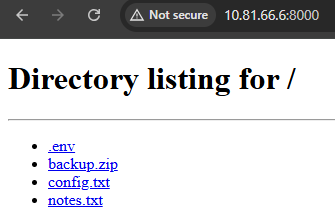
When no index.html file is present in the directory, the Python HTTP server generates an HTML page listing every file it can see. Browse to the root of the server using the following command or directly browse http://MACHINE_IP:8000 in the browser:
curl -s http://MACHINE_IP:8000/
You should see an HTML directory listing with a page title of Directory listing for /. Everything in that listing is directly accessible.
Accessing Dotfiles
Dotfiles like .env are hidden from normal directory navigation on Linux, but Python's HTTP server does not respect that convention. It serves them like any other file. The .env file is a common target because developers use it to store environment-specific configuration, and that configuration often includes credentials:
Terminal
root@attackbox:~# curl -s http://MACHINE_IP:8000/.env
SECRET_KEY=dev-secret-key-do-not-use
DATABASE_URL=postgresql://webapp:S3cur3DBPass!@localhost/production
DEBUG=True
Downloading and Inspecting Archives
If you see a .zip, .tar.gz, or other archive in the directory listing, download it and inspect the contents. Developers sometimes leave backup archives in the same directory they are serving, which may contain source code, database dumps, or configuration files.
Terminal
root@attackbox:~# curl -s http://MACHINE_IP:8000/backup.zip -o backup.zip
root@attackbox:~# unzip backup.zip -d backup-contents/
root@attackbox:~# cat backup-contents/db_dump.sql
Archive:  backup.zip
  inflating: backup-contents/db_dump.sql
-- Database dump for staging environment

CREATE TABLE users (id INTEGER PRIMARY KEY, username VARCHAR(50));
INSERT INTO users VALUES (1, 'admin', 'admin@company.com');
INSERT INTO users VALUES (2, 'jsmith', 'jsmith@company.com');

-- End of dump
Why This Matters
The Python HTTP server is a realistic finding because it requires no exploitation. There is no vulnerability to trigger. The server is functioning exactly as designed. The misconfiguration is that it is running in a location where it should not be, serving files that should not be public. Documenting this in a real engagement means explaining not just that the server exists, but also what it exposes and what an attacker could do with that information.

Note: If the directory shows an index.html file, Python will serve that file instead of showing the directory listing. If you do not see a directory listing at the root, try requesting paths directly or navigating to subdirectories.
Answer the questions below
What database password is stored in the .env file served by the Python HTTP Server?
curl -s http://IP_Address:8000/
<!DOCTYPE HTML>
<html lang="en">
<head>
<meta charset="utf-8">
<title>Directory listing for /</title>
</head>
<body>
<h1>Directory listing for /</h1>
<hr>
<ul>
<li><a href=".env">.env</a></li>
<li><a href="backup.zip">backup.zip</a></li>
<li><a href="config.txt">config.txt</a></li>
<li><a href="notes.txt">notes.txt</a></li>
</ul>
<hr>
</body>
</html>

curl -s http://IP_Address:8000/.env
SECRET_KEY=dev-secret-key-do-not-use
DATABASE_URL=postgresql://webapp:S3cur3DBPass!@localhost/production
DEBUG=True
What is the flag found inside the backup archive served by the Python HTTP Server?
curl -s http://IP_Address:8000/notes.txt
TODO: remove this before going live
Admin creds: admin / admin123
Staging server: 10.10.100.50

curl -s http://IP_Address:8000/config.txt
db_host=localhost
db_user=webapp
db_password=OldP@ssw0rd99
db_name=staging
unzip backup.zip -d backup-contents/
Archive:  backup.zip
  inflating: backup-contents/db_dump.sql

cat backup-contents/db_dump.sql
-- Database dump for staging environment
-- Generated: 2024-11-01

CREATE TABLE users (
    id INTEGER PRIMARY KEY,
    username VARCHAR(50),
    email VARCHAR(100),
    created_at TIMESTAMP
);

INSERT INTO users VALUES (1, 'admin', 'admin@company.com', '2024-01-01 09:00:00');
INSERT INTO users VALUES (2, 'jsmith', 'jsmith@company.com', '2024-03-15 14:30:00');
INSERT INTO users VALUES (3, 'jdoe', 'jdoe@company.com', '2024-06-22 11:00:00');

CREATE TABLE products (
    id INTEGER PRIMARY KEY,
    name VARCHAR(100),
    price DECIMAL(10,2)
);

INSERT INTO products VALUES (1, 'Widget A', 9.99);
INSERT INTO products VALUES (2, 'Widget B', 19.99);

-- End of dump
-- flag: THM{py_server_exposed}
Apache2
Apache is the most widely deployed web server in the world, which means it appears in nearly every engagement that touches web infrastructure. Its default Ubuntu configuration leaves several things enabled that testers regularly find and report. The three most common are directory listing on specific paths, the server-status module, and backup files sitting in the document root.
Version Disclosure
Start with the basics: check the Server header.
Terminal
root@ip-10-81-64-63:~# curl -SI http://MACHINE_IP:80 | grep -i server
  % Total    % Received % Xferd  Average Speed   Time    Time     Time  Current
                                 Dload  Upload   Total   Spent    Left  Speed
  0 10671    0     0    0     0      0      0 --:--:-- --:--:-- --:--:--     0
Server: Apache/2.4.58 (Ubuntu)
Apache on Ubuntu defaults to ServerTokens OS, which includes the OS label alongside the version number. Knowing the exact version helps you check for known CVEs and understand the server's capabilities.
Directory Listing
Apache's Options +Indexes directive tells the server to display a file listing when a directory does not have an index.html or similar default file. This is sometimes enabled intentionally for internal file share directories and accidentally left on paths that contain sensitive data.
Browse to the http://MACHINE_IP/files/ path:
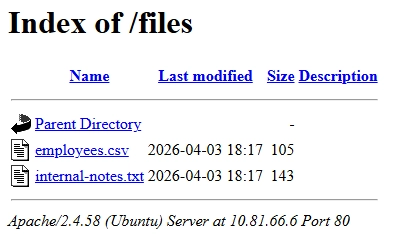
You should see an HTML page with a title of "Index of /files" listing the files available in that directory. Apache's directory listing includes filenames, file sizes, and last-modified dates, which gives you a clear picture of what is there before you decide what to retrieve.
When you find a directory listing, read every file in it. Developers sometimes leave CSV exports, internal notes, or backup files in directories they intended only for casual internal use. Each one is worth checking.
The mod_status Page
Apache includes a built-in status page powered by the mod_status module. When correctly configured, it is accessible only from localhost. When misconfigured with Require all granted, it is accessible from any IP. You can access it using http://MACHINE_IP:80/server-status, as shown below:
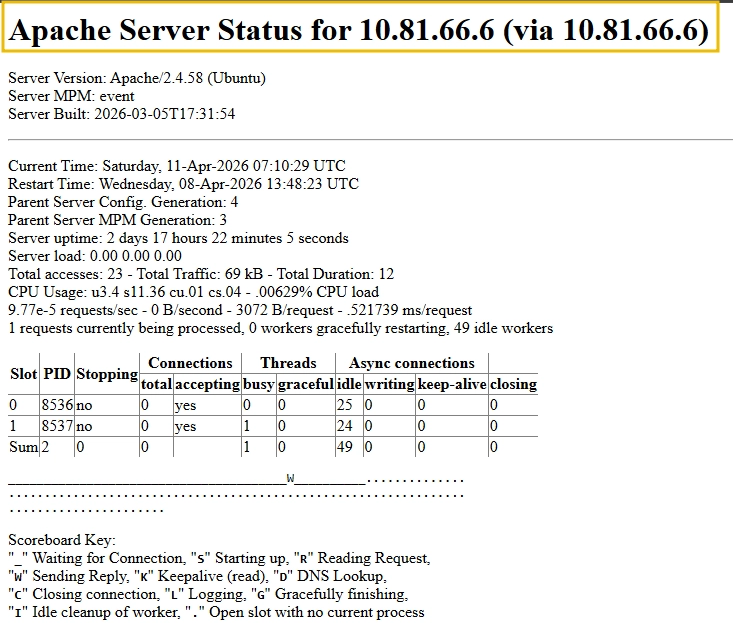
The status page shows active connections and what paths they are requesting, the total number of requests served since the server started, worker states (idle, writing, reading, closing), and the server version and start time. On a production server, this leaks real-time information about what other users are doing and what internal paths exist. It also confirms the exact server version in the page header.
Info: mod_status is enabled by default on Ubuntu's Apache package and ships with a Require local restriction in conf-available/security.conf. However, a Require all granted directive anywhere in a virtual host configuration silently overrides that restriction, exposing /server-status to all IPs without touching the module config. Always check /server-status even on servers that appear to be using default settings.
Finding Unlinked Files with Gobuster
Not everything interesting is linked from a page or visible in a directory listing. Backup files, old configuration copies, and forgotten test files often sit in the document root with no links pointing to them. Tools like Gobuster discover these by guessing paths against a wordlist.
# -u is the target URL
# -w is the wordlist path
# -x tells gobuster to also append these extensions to each word
gobuster dir -u http://TARGET_IP:80 -w /usr/share/wordlists/SecLists/Discovery/Web-Content/common.txt -x bak,txt,html -t 20
root@ip-10-81-64-63:~# gobuster dir -u http://MACHINE_IP:80 -w /usr/share/wordlists/SecLists/Discovery/Web-Content/common.txt -x bak,txt -t 20
===============================================================
Gobuster v3.6
by OJ Reeves (@TheColonial) & Christian Mehlmauer (@firefart)
===============================================================
[+] Url:                     http://MACHINE_IP
[+] Method:                  GET
[+] Threads:                 20
[+] Wordlist:                /usr/share/wordlists/SecLists/Discovery/Web-Content/common.txt
[+] Negative Status codes:   404
[+] User Agent:              gobuster/3.6
[+] Extensions:              bak,txt
[+] Timeout:                 10s
===============================================================
Starting gobuster in directory enumeration mode
===============================================================
/.htpasswd            (Status: 403) [Size: 275]
/.htaccess            (Status: 403) [Size: 275]
/.htpasswd.bak        (Status: 403) [Size: 275]
/.htaccess.txt        (Status: 403) [Size: 275]
/.hta.txt             (Status: 403) [Size: 275]
/.htaccess.bak        (Status: 403) [Size: 275]
/.hta                 (Status: 403) [Size: 275]
/.hta.bak             (Status: 403) [Size: 275]
/.htpasswd.txt        (Status: 403) [Size: 275]
/backup.bak           (Status: 200) [Size: 178]
/files                (Status: 301) [Size: 308] [--> http://MACHINE_IP/files/]
/index.html           (Status: 200) [Size: 10671]
/javascript           (Status: 301) [Size: 313] [--> http://MACHINE_IP/javascript/]
/server-status        (Status: 200) [Size: 17539]
When Gobuster finds a file with a .bak extension, that is almost always worth retrieving. Backup files frequently contain configuration snippets, credentials, or copies of source code.
Also, pay attention to .htpasswd files if they appear in the output. Apache uses .htpasswd to store usernames and hashed passwords for HTTP Basic Authentication. Finding an accessible .htpasswd file gives you a credential hash that can be cracked offline, and confirms that some part of the site uses Basic Auth, which tells you what paths are worth trying authenticated access on.
root@ip-10-81-64-63:~# curl -s http://MACHINE_IP:80/backup.bak
# Apache config backup - DO NOT COMMIT
ServerName company.internal
DocumentRoot /var/www/html
# DB credentials below
# user: dbadmin pass: Backup2024!
# Last updated: 2024-11-15
Putting It Together
The pattern here is consistent across Apache investigations: check the version header, browse any directory that allows listing, visit /server-status, and use gobuster to find unlinked files. These four steps cover the majority of what a misconfigured Apache server will expose.
Answer the questions below
What Apache module exposes real-time server statistics at /server-status? mod_status
What is the flag found in the /files/ directory on Apache?
gobuster dir -u http://IP_Address:80 -w /usr/share/wordlists/SecLists/Discovery/Web-Content/common.txt -x bak,txt,html -t 20

/.hta.bak             (Status: 403) [Size: 279]
/.htaccess.txt        (Status: 403) [Size: 279]
/.hta.txt             (Status: 403) [Size: 279]
/.htpasswd            (Status: 403) [Size: 279]
/.htaccess.html       (Status: 403) [Size: 279]
/.htpasswd.bak        (Status: 403) [Size: 279]
/.htpasswd.txt        (Status: 403) [Size: 279]
/.htaccess.bak        (Status: 403) [Size: 279]
/.htaccess            (Status: 403) [Size: 279]
/.hta.html            (Status: 403) [Size: 279]
/.hta                 (Status: 403) [Size: 279]
/.htpasswd.html       (Status: 403) [Size: 279]
/backup.bak           (Status: 200) [Size: 178]
/files                (Status: 301) [Size: 316] [--> http://IP_Address/files/]
/index.html           (Status: 200) [Size: 10671]
/index.html           (Status: 200) [Size: 10671]
/javascript           (Status: 301) [Size: 321] [--> http://IP_Address/javascript/]
/server-status        (Status: 200) [Size: 17447]
http://IP_Address/files/internal-notes.txt
Meeting notes - Q3 review
Server migration date: 2026-05-01
Action items: update firewall rules, rotate API keys
flag: THM{apache_dir_listing}
curl -s http://IP_Address:80/backup.bak
# Apache config backup - DO NOT COMMIT
ServerName company.internal
DocumentRoot /var/www/html
# DB credentials below
# user: dbadmin pass: Backup2024!
# Last updated: 2024-11-15
curl -s http://IP_Address:80/files
<!DOCTYPE HTML PUBLIC "-//IETF//DTD HTML 2.0//EN">
<html><head>
<title>301 Moved Permanently</title>
</head><body>
<h1>Moved Permanently</h1>
<p>The document has moved <a href="http://IP_Address/files/">here</a>.</p>
<hr>
<address>Apache/2.4.58 (Ubuntu) Server at IP_Address Port 80</address>
</body></html>
curl -s http://IP_Address:80/files/
<!DOCTYPE HTML PUBLIC "-//W3C//DTD HTML 3.2 Final//EN">
<html>
<head>
<title>Index of /files</title>
</head>
<body>
<h1>Index of /files</h1>
<table>
<tr><th valign="top"><img src="/icons/blank.gif" alt="[ICO]"></th><th><a href="?C=N;O=D">Name</a></th><th><a href="?C=M;O=A">Last modified</a></th><th><a href="?C=S;O=A">Size</a></th><th><a href="?C=D;O=A">Description</a></th></tr>
<tr><th colspan="5"><hr></th></tr>
<tr><td valign="top"><img src="/icons/back.gif" alt="[PARENTDIR]"></td><td><a href="/">Parent Directory</a></td><td> </td><td align="right"> - </td><td> </td></tr>
<tr><td valign="top"><img src="/icons/text.gif" alt="[TXT]"></td><td><a href="employees.csv">employees.csv</a></td><td align="right">2026-04-03 18:17 </td><td align="right">105 </td><td> </td></tr>
<tr><td valign="top"><img src="/icons/text.gif" alt="[TXT]"></td><td><a href="internal-notes.txt">internal-notes.txt</a></td><td align="right">2026-04-03 18:17 </td><td align="right">143 </td><td> </td></tr>
<tr><th colspan="5"><hr></th></tr>
</table>
<address>Apache/2.4.58 (Ubuntu) Server at IP_Address Port 80</address>
</body></html>
curl -s http://IP_Address:80/files/internal-notes.txt
Meeting notes - Q3 review
Server migration date: 2026-05-01
Action items: update firewall rules, rotate API keys
flag: THM{apache_dir_listing}
Node.js (Express)
Node.js applications behave differently from Apache and Python HTTP servers. They are not serving static files from a configured document root. They are running application code, and that code decides what to return for every request. That flexibility is powerful, but it is also where many mistakes occur.
Attackers look at Node.js Express applications specifically because developers often leave development-mode features enabled when they push to production. Debug endpoints, verbose error responses, and exposed environment variables all stem from the same habit: code that worked in development went live as-is. The result is an application that tells you exactly how it is built and, sometimes, what credentials it uses.
Framework Fingerprinting
The headers on port 3000 confirm what you are dealing with:
Terminal
root@ip-10-81-64-63:~# curl -sI http://MACHINE_IP:3000
HTTP/1.1 200 OK
X-Powered-By: Express
Content-Type: application/json; charset=utf-8
Content-Length: 56
ETag: W/"38-K8iCfm09rMr0MV0NsgqdAb94DAk"
Date: Sat, 11 Apr 2026 07:27:28 GMT
Connection: keep-alive
Keep-Alive: timeout=5
You will see X-Powered-By: Express in the response. Express sets this header automatically unless the developer explicitly disables it. This confirms you are dealing with an Express application, which tells you what to look for next.
Reading the Application Version
The root path of many Express applications returns a JSON status response:
Terminal
root@ip-10-81-64-63:~# curl -s http://MACHINE_IP:3000
{"status":"ok","app":"company-portal","version":"1.2.0"}
If the response includes a version field, note it. Matching the application version against known vulnerabilities or changelogs can surface useful information.
Triggering Verbose Errors
Express's built-in error handler suppresses stack traces when NODE_ENV is set to production. In development mode, it passes them through. But developers often write their own error handlers, and those custom handlers expose stack traces regardless of NODE_ENV. In the attached VM, the web app uses a custom error handler. The detailed JSON response you see is not part of Express behaviour; it is the result of application code written for debugging and never hardened. Both patterns appear on real engagements: the NODE_ENV=production check is only meaningful if no custom error handler overrides it. Consider a scenario where there is an api call being made to the Express server, as shown below:
root@ip-10-81-64-63:~# curl -s http://MACHINE_IP:3000/api/users | python3 -m json.tool
{
    "error": "connect ECONNREFUSED 127.0.0.1:5432",
    "stack": "Error: connect ECONNREFUSED 127.0.0.1:5432\n    at /opt/nodeapp/app.js:16:15\n    at Layer.handle [as handle_request] (/opt/nodeapp/node_modules/express/lib/router/layer.js:95:5)\n    at next (/opt/nodeapp/node_modules/express/lib/router/route.js:149:13)\n    at Route.dispatch (/opt/nodeapp/node_modules/express/lib/router/route.js:119:3)\n    at Layer.handle [as handle_request] (/opt/nodeapp/node_modules/express/lib/router/layer.js:95:5)\n    at /opt/nodeapp/node_modules/express/lib/router/index.js:284:15\n    at Function.process_params (/opt/nodeapp/node_modules/express/lib/router/index.js:346:12)\n    at next (/opt/nodeapp/node_modules/express/lib/router/index.js:280:10)\n    at expressInit (/opt/nodeapp/node_modules/express/lib/middleware/init.js:40:5)\n    at Layer.handle [as handle_request] (/opt/nodeapp/node_modules/express/lib/router/layer.js:95:5)",
    "query": "SELECT * FROM users"
}
A 500 Internal Server Error from an API endpoint is worth investigating further. In development mode, the response body often contains the error message, stack trace, and context about what the application was trying to do when it failed. The stack trace is the key finding here, as it reveals internal file paths, module names, and, sometimes, the database query that triggered the failure. Each of those details tells you something about the application's internals that a simple status code does not.
Enumerating Routes via Debug Endpoints
One of the most useful things a misconfigured Express application can do is tell you all of its own routes. Developers sometimes build a debug endpoint that lists every registered route for convenience during development, then forget to remove it before going live.
Terminal
root@ip-10-81-64-63:~# curl -s http://MACHINE_IP:3000/api/routes
[{"method":"GET","path":"/"},{"method":"GET","path":"/api/users"},{"method":"GET","path":"/api/routes"},{"method":"GET","path":"/api/debug/env"}]
If this endpoint exists, the response is a list of every path the application handles. This saves enumeration time and shows you which endpoints exist before you spend time guessing them with Gobuster.
Note: The /api/routes endpoint works by reading Express's internal app._router.stack property to enumerate registered routes. This is a recognised Express misconfiguration pattern, but app._router.stack is an internal property whose structure can vary between Express versions, and Express 5 changed the router internals enough to break implementations that relied on the Express 4 structure. If you encounter a route endpoint that returns an unexpected format or an error, the application may be running a different Express version than the one this lab uses.
Exposed Environment Variables
Environment variables in Node.js applications often contain database credentials, API keys, and configuration flags. A debug endpoint that returns process.env is a significant finding:
root@ip-10-81-64-63:~# curl -s http://MACHINE_IP:3000/api/debug/env
{"NODE_ENV":"development","DB_PASSWORD":"NodeDBPass2024!","PORT":"3000","DB_HOST":"localhost:5432","APP_NAME":"company-portal"}r
If the response includes DB_PASSWORD, SECRET_KEY, or similar fields, document them. The NODE_ENV value is also telling. NODE_ENV=development on a production server is a signal that the application was deployed without proper hardening.
Static File Serving
Express applications commonly use the express.static() middleware to serve front-end assets like JavaScript files, stylesheets, and configuration. The static files route, if it exists, serves everything in a directory. Client-side JavaScript files sometimes contain API endpoint URLs, internal hostnames, or debug flags embedded as constants.
Once you know the routes from the /api/routes endpoint, check what is being served statically:
Terminal
root@ip-10-81-64-63:~# curl -s http://MACHINE_IP:3000/static/config.js
// Client-side configuration
const API_BASE = 'http://internal-api.company.local:8080';
const DEBUG = true;
const VERSION = '1.2.0';
Configuration files served as static assets are easy to overlook because they are technically meant to be public (the browser needs them). But "meant to be public" is different from "contains only public information."
Note: express.static() silently returns a 404 for dotfiles (files starting with .) by default. This is the opposite of Python's HTTP server, which serves dotfiles like any other file. If you are looking for a .env or similar file on an Express static route and get a 404, that does not mean the file is absent; it means the middleware is blocking it. You would need shell access or a different route to reach it.
Putting it All Together
Take a step back and look at what we just did. We started with header inspection to confirm the framework, then triggered an error to see what the application leaks in failure mode, then used a debug endpoint to enumerate routes, then checked for credential exposure in environment variables, and finally followed the route list to the static files where the flag lives. This pattern works because each step narrows the scope for the next one. Headers tell you the framework. Errors tell you the internals. Debug endpoints tell you the routes. Static files tell you what the developers assumed was safe to expose.
Answer the questions below
What value does the NODE_ENV variable have in the debug endpoint response?
 curl -sI http://IP_Address:3000
HTTP/1.1 200 OK
X-Powered-By: Express
Content-Type: application/json; charset=utf-8
Content-Length: 56
ETag: W/"38-K8iCfm09rMr0MV0NsgqdAb94DAk"
Date: Tue, 12 May 2026 07:20:36 GMT
Connection: keep-alive
Keep-Alive: timeout=5

curl -s http://IP_Address:3000
{"status":"ok","app":"company-portal","version":"1.2.0"}

curl -s http://IP_Address:3000/api/users | python3 -m json.tool
{
    "error": "connect ECONNREFUSED 127.0.0.1:5432",
    "stack": "Error: connect ECONNREFUSED 127.0.0.1:5432\n    at /opt/nodeapp/app.js:16:15\n    at Layer.handle [as handle_request] (/opt/nodeapp/node_modules/express/lib/router/layer.js:95:5)\n    at next (/opt/nodeapp/node_modules/express/lib/router/route.js:149:13)\n    at Route.dispatch (/opt/nodeapp/node_modules/express/lib/router/route.js:119:3)\n    at Layer.handle [as handle_request] (/opt/nodeapp/node_modules/express/lib/router/layer.js:95:5)\n    at /opt/nodeapp/node_modules/express/lib/router/index.js:284:15\n    at Function.process_params (/opt/nodeapp/node_modules/express/lib/router/index.js:346:12)\n    at next (/opt/nodeapp/node_modules/express/lib/router/index.js:280:10)\n    at expressInit (/opt/nodeapp/node_modules/express/lib/middleware/init.js:40:5)\n    at Layer.handle [as handle_request] (/opt/nodeapp/node_modules/express/lib/router/layer.js:95:5)",
    "query": "SELECT * FROM users"
}

curl -s http://IP_Address:3000/api/routes
[{"method":"GET","path":"/"},{"method":"GET","path":"/api/users"},{"method":"GET","path":"/api/routes"},{"method":"GET","path":"/api/debug/env"}]

curl -s http://IP_Address:3000/api/debug/env
{"NODE_ENV":"development","DB_PASSWORD":"NodeDBPass2024!","PORT":"3000","DB_HOST":"localhost:5432","APP_NAME":"company-portal"}
What is the flag found in the static files served by the Node.js application?
curl -s http://IP_Address:3000/static/config.js
// Client-side configuration
const API_BASE = 'http://internal-api.company.local:8080';
const DEBUG = true;
const VERSION = '1.2.0';
// flag: THM{node_debug_exposed}
Nginx
After Apache and Node.js, the Nginx investigation follows the same template but with its own configuration vocabulary. The categories of misconfiguration version disclosure, directory listing, and exposed status pages appear again, but the specific directives and paths differ.
Nginx occupies a different space from Apache and Node.js. It is most commonly used as a reverse proxy, a load balancer, or a high-performance static file server. In production environments, Nginx often sits in front of an application server and handles the public-facing traffic. That positioning makes its configuration important. A misconfigured Nginx instance can expose internal structure, reveal operational data, or make files accessible that should not be.
Info: In the attached VM, Nginx runs on port 8080 rather than the standard port 80. That is because Apache is already using port 80 on this machine. In a real deployment, Nginx would typically run on port 80 or 443.
Version Disclosure
The pattern is the same as before: start with the Server header.
Terminal
root@ip-10-81-64-63:~# curl -sI http://MACHINE_IP:8080 | grep -i server
Server: nginx/1.24.0 (Ubuntu)
Nginx includes its version in the Server header by default. Unlike Apache, which uses the ServerTokens directive to control this, Nginx uses server_tokens. The default is on, which exposes the version. Knowing the exact version is useful when checking the Nginx changelog for security fixes or when building an engagement report.
The server_tokens directive controls both the Server header and the version string in default error pages simultaneously; setting server_tokens off suppresses the version from both places at once. If the Server header is suppressed, requesting a non-existent path will confirm whether server_tokens is truly off or just partially configured?
Terminal
root@ip-10-81-64-63:~# curl -s http://MACHINE_IP:8080/nonexistent-path
<html>
<head><title>404 Not Found</title></head>
<body>
<center><h1>404 Not Found</h1></center>
<hr><center>nginx/1.24.0 (Ubuntu)</center>
</body>
</html>
Directory Listing with Autoindex
Nginx does not enable directory listing by default. When a developer wants to expose a directory listing, they add autoindex to a location block in the configuration:
location /files/ {
    autoindex on;
    root /var/www/nginx/;
}
This is a documented Nginx configuration option and appears in legitimate file-sharing setups. The misconfiguration is using it on a path that contains sensitive files, or leaving it enabled on a production server without access controls.
Browse to the http://MACHINE_IP/files/ directory:
Terminal
root@ip-10-81-64-63:~# curl -s http://MACHINE_IP:8080/files/
<html>
<head><title>Index of /files/</title></head>
<body>
<h1>Index of /files/</h1><hr><pre><a href="../">../</a>
<a href="deploy-notes.txt">deploy-notes.txt</a>                                   03-Apr-2026 18:23                 148
<a href="old-backup.tar.gz">old-backup.tar.gz</a>                                  03-Apr-2026 18:23                 236
<a href="server-config.txt">server-config.txt</a>                                  03-Apr-2026 18:23                 135
</pre><hr></body>
</html>
Nginx's autoindex HTML format uses a simple table with filename, last-modified date, and file size. When you find this, read every file listed. Nginx directory listings often appear on paths that developers configured as shared storage and then populated with operational data.
The nginx_status Endpoint
Nginx's stub_status module exposes real-time connection metrics at a configurable URL. The secure configuration restricts access to localhost only. The misconfigured version allows access from any IP:
location /nginx_status {
    stub_status;
    allow all;  # Should be: allow 127.0.0.1; deny all;
}
Request it to see what it exposes:
Terminal
root@ip-10-81-64-63:~# curl -s http://MACHINE_IP:8080/nginx_status
Active connections: 1
server accepts handled requests
 15 15 15
Reading: 0 Writing: 1 Waiting: 0
The output format is compact and uses unlabeled numbers on the second line, which can be disorienting the first time you see it:
The three numbers on the second line are in order: total accepted connections, total handled connections, and total requests since the server started. The third line breaks down currently active connections by state. While this data is not directly exploitable, it leaks operational information about server load and usage patterns. On a real engagement, an exposed /nginx_status endpoint is a finding because it confirms the internal monitoring setup and may indicate other monitoring endpoints are similarly exposed.
Putting It All Together
The Nginx investigation follows a parallel structure to the Apache task. Check the version header, browse any directories with autoindex enabled, and check for the status endpoint. The specific paths and configuration directives differ, but the investigative approach is the same.

Tip: Nginx configuration files live in /etc/nginx/ on Ubuntu. If you ever have shell access to a machine running Nginx, reading the site configuration in /etc/nginx/sites-available/ will show you exactly what directories are exposed and what modules are enabled.
Answer the questions below
What Nginx directive enables directory listing in a location block? autoindex on
What URL path exposes Nginx connection statistics? /nginx_status
What is the flag found in the directory listing on port 8080?
curl -sI http://IP_Address:8080 | grep -i server
Server: nginx/1.24.0 (Ubuntu)

curl -s http://IP_Address:8080/nonexistent-path
<html>
<head><title>404 Not Found</title></head>
<body>
<center><h1>404 Not Found</h1></center>
<hr><center>nginx/1.24.0 (Ubuntu)</center>
</body>
</html>

curl -s http://IP_Address:8080/files/
<html>
<head><title>Index of /files/</title></head>
<body>
<h1>Index of /files/</h1><hr><pre><a href="../">../</a>
<a href="deploy-notes.txt">deploy-notes.txt</a>                                   03-Apr-2026 18:23                 148
<a href="old-backup.tar.gz">old-backup.tar.gz</a>                                  03-Apr-2026 18:23                 236
<a href="server-config.txt">server-config.txt</a>                                  03-Apr-2026 18:23                 135
</pre><hr></body>
</html>

curl -s http://IP_Address:8080/files/deploy-notes.txt
Deployment runbook v3
SSH key location: /home/deploy/.ssh/id_rsa
Sudo password: Deploy2024!
Last deployed: 2024-10-30
Contact: ops@company.internal

curl -s http://IP_Address:8080/files/server-config.txt
server_name: web01.company.internal
internal_ip: 10.10.100.50
admin_port: 8443
backup_schedule: daily 02:00
flag: THM{nginx_autoindex}
Common Misconfigurations Across Servers
We have now worked through four different web servers, each with its own configuration model and its own set of common mistakes. There are also patterns that appear regardless of what server is running. Two of the most consistent are missing security headers and the findings that automated scanners surface quickly.
Security Headers
Security headers are HTTP response headers that instruct the browser on how to handle the page content. They protect against a range of client-side attacks, including clickjacking, MIME sniffing, and cross-site scripting. None of the servers in this lab has been configured to send these headers, which is the default state for all four server types.
Here are the most common ones and what each one does:
| Header | What It Protects Against | Example Value |
|---|---|---|
X-Frame-Options |
Clickjacking (prevents the page from being embedded in an iframe on another domain) | DENY or SAMEORIGIN |
X-Content-Type-Options |
MIME sniffing (prevents the browser from guessing content types) | nosniff |
Content-Security-Policy |
Restricts where scripts, stylesheets, and other resources can load from | default-src 'self' |
Referrer-Policy |
Controls what is sent in the Referer header when navigating to another page |
no-referrer or strict-origin |
Strict-Transport-Security |
Forces HTTPS for subsequent requests (only meaningful on HTTPS servers) | max-age=31536000 |
Note: X-Frame-Options is technically superseded by Content-Security-Policy: frame-ancestors, which provides finer-grained control. Hardened modern sites may handle clickjacking protection through CSP alone and intentionally omit X-Frame-Options. When writing findings, check for both.
Audit each server with curl:
Terminal
root@ip-10-81-64-63:~# for port in 80 8000 3000 8080; do echo "=== Port \(port ==="; curl -sI http://MACHINE_IP:\)port/ | grep -iE "x-frame-options|x-content-type|content-security-policy|strict-transport|referrer-policy" || echo "(no security headers found)"; done
=== Port 80 ===
(no security headers found)
=== Port 8000 ===
(no security headers found)
=== Port 3000 ===
(no security headers found)
=== Port 8080 ===
(no security headers found)
When grep returns no output, it means none of those headers is present. Do this across all four ports, and you will see that the default configurations for all four server types share this gap. Security headers require active configuration. They are never present by default.
Automated Scanning with Nikto
Nikto is a web server scanner that checks for known misconfigurations, outdated software, exposed admin interfaces, and missing security headers. It is not subtle; it generates a lot of traffic and is easy to detect. That makes it appropriate for authorised testing, not stealth. Run it against the Apache server:
root@ip-10-81-64-63:~# nikto -h http://MACHINE_IP:80 -nointeractive
- Nikto v2.1.5
---------------------------------------------------------------------------
+ Target IP:          MACHINE_IP
+ Target Hostname:    MACHINE_IP
+ Target Port:        80
+ Start Time:         2026-04-11 09:16:09 (GMT1)
---------------------------------------------------------------------------
+ Server: Apache/2.4.58 (Ubuntu)
+ Server leaks inodes via ETags, header found with file /, fields: 0x29af 0x64e9243796aa2
+ The anti-clickjacking X-Frame-Options header is not present.
+ No CGI Directories found (use '-C all' to force check all possible dirs)
+ Allowed HTTP Methods: HEAD, GET, POST, OPTIONS
+ OSVDB-561: /server-status: This reveals Apache information. Comment out appropriate line in httpd.conf or restrict access to allowed hosts.
+ OSVDB-3268: /files/: Directory indexing found.
+ OSVDB-3092: /files/: This might be interesting...
+ 6544 items checked: 0 error(s) and 6 item(s) reported on remote host
+ End Time:           2026-04-11 09:16:18 (GMT1) (9 seconds)
---------------------------------------------------------------------------
+ 1 host(s) tested
The -nointeractive flag suppresses prompts so the scan runs without waiting for input. Nikto will check hundreds of common paths and patterns. Look for findings that start with + in the output.
On a misconfigured Apache server like this one, expect Nikto to flag the exposed /server-status page, the backup.bak file in the document root, the directory listing on /files/, and multiple missing security header warnings.
Tip: Nikto's output can be verbose. The -Tuning option lets you restrict which checks it runs. For a quick scan, nikto -h TARGET -Tuning 123 covers the most common findings without running the full signature set. Note that tuning codes are concatenated, not comma-separated.
Patterns That Apply Everywhere
Looking back at all four servers, the same categories of misconfiguration appear repeatedly:
| Misconfiguration | Apache | Python HTTP | Node.js | Nginx |
|---|---|---|---|---|
| Version disclosure in headers | Yes | Yes | Partial | Yes |
| Directory listing | /files/ |
Root path | N/A | /files/ |
| Exposed status or debug endpoint | /server-status |
N/A | /api/debug/env, /api/routes |
/nginx_status |
| Sensitive files accessible | backup.bak, internal-notes.txt |
.env, notes.txt, backup.zip |
config.js |
server-config.txt, deploy-notes.txt |
| Missing security headers | All | All | All | All |
The consistent thread is that default configurations prioritise ease of deployment over security. Version disclosure, directory listings, and status pages are enabled by default for diagnostic purposes. They make the administrator's job easier. Removing or restricting them takes deliberate action. In real engagements, finding these patterns does not indicate negligence. It indicates that the default settings were never reviewed.
Answer the questions below
Which security header, when missing, allows a page to be embedded in an iframe on another domain? X-Frame-Options
nikto -h http://IP_Address:80 -nointeractive
- Nikto v2.1.5
---------------------------------------------------------------------------
+ Target IP:          10.112.139.200
+ Target Hostname:    10.112.139.200
+ Target Port:        80
+ Start Time:         2026-05-12 08:32:31 (GMT1)
---------------------------------------------------------------------------
+ Server: Apache/2.4.58 (Ubuntu)
+ Server leaks inodes via ETags, header found with file /, fields: 0x29af 0x64e9243796aa2
+ The anti-clickjacking X-Frame-Options header is not present.
+ No CGI Directories found (use '-C all' to force check all possible dirs)
+ Allowed HTTP Methods: HEAD, GET, POST, OPTIONS
+ OSVDB-561: /server-status: This reveals Apache information. Comment out appropriate line in httpd.conf or restrict access to allowed hosts.
+ OSVDB-3268: /files/: Directory indexing found.
+ OSVDB-3092: /files/: This might be interesting...
+ 6544 items checked: 0 error(s) and 6 item(s) reported on remote host
+ End Time:           2026-05-12 08:32:37 (GMT1) (6 seconds)
---------------------------------------------------------------------------
+ 1 host(s) tested
What finding text does Nikto report when it detects directory indexing on the /files/ path? Directory indexing found
Conclusion
Working through four different web servers on the same machine shows something that is easy to miss when you study each server type in isolation: the underlying patterns are the same. Version disclosure, directory listing, exposed status pages, and missing security headers appear across Apache, Nginx, Node.js, and Python's HTTP server for the same reason. Default configurations are permissive. Security requires configuration.
Key Takeaways
Response headers are the fastest fingerprinting surface. The
ServerandX-Powered-Byheaders reveal software type and sometimes version before you have made a single request to an actual application path.Python's built-in HTTP server has no access controls of any kind. When it appears in an engagement, assume the entire working directory is readable, including dotfiles such as
.env.Apache's
mod_statusand directory listing are enabled by default on Ubuntu installs and require active configuration to restrict them. Their presence is common and worth checking on every Apache engagement.Node.js Express applications in development mode leak stack traces, route lists, and environment variables. Each of those is a finding in its own right, and together they give a complete picture of the application's internals.
Nginx
autoindexandstub_statusmirror Apache's directory listing andmod_statuspatterns. The directives differ, but the investigation approach is the same.Security headers are absent by default on all four server types. An audit with
curl -sIand agrepfor the header names is a fast, reliable check that belongs in every web server engagement.