Securing AI Systems (TryHackMe)

Introduction
TryTrainMe's engineering team has built TryAssist, an AI-powered code review assistant that analyses pull requests, queries internal documentation, and connects to the CI/CD pipeline. Before AI, TryTrainMe's attack surface was well understood: web application, API endpoints, database, and authentication layer. TryAssist changed all of that.
The assistant accepts natural language from developers and converts it into actions. It reads documents from shared storage and summarises them. It calls internal APIs to retrieve repository data and pipeline status. It logs every conversation, including those in which engineers paste credentials, source code, or internal architecture details into the chat window.
In 2023, Samsung engineers pasted proprietary semiconductor source code (opens in new tab)and internal meeting notes directly into ChatGPT. The code left Samsung's control entirely. No exploit was needed. No vulnerability was present. The system worked exactly as designed, and confidential data still leaked, because nobody had mapped the architectural risks before deployment.
How many new attack surfaces did TryTrainMe just introduce?
This room answers that question. As the security architect reviewing TryAssist before it goes live, your job is to map every attack surface, identify the trust boundaries, and recommend defences for each one. If you completed the AI Fundamentals module, you already understand what AI is and how adversarial attacks work at the model level. This room moves up one layer: what does TryAssist's production architecture look like, where are the trust boundaries, and which components create risks that traditional security frameworks were never designed to handle?.
Learning Objectives
By completing this room, you will be able to:
Identify the core components of a production AI system and the data flows between them
Identify the OWASP LLM Top 10 (2025) and MITRE ATLAS as the primary frameworks for AI threat classification
Explain five system-level threat categories: improper output handling, excessive agency, system prompt leakage, unbounded consumption, and sensitive information disclosure
Apply secure design patterns, including defence in depth, least privilege, and monitoring to AI system architectures
Prerequisites
Before starting this room, ensure you have:
Familiarity with AI/ML concepts: what a language model is, how it generates output. The AI fundamentals module covers this; equivalent background works too.
Basic web application security literacy: APIs, input validation, authentication, and authorisation
A working understanding of attack surfaces: what they are and why they matter
Anatomy of an AI System
From Traditional to AI-Augmented
Traditional web applications have well-understood architectures: requests flow from the UI to the API to the database and back, and security teams know exactly where to place controls. When an AI component enters, the picture changes fundamentally: new components appear, and data flows through paths that existing security controls were never designed to monitor.
| Component | Traditional App | AI-Augmented App |
|---|---|---|
| User input | Structured forms, API parameters | Free-form natural language |
| Processing | Deterministic code | Probabilistic model inference |
| Data access | Direct database queries | Model-mediated retrieval (RAG) |
| Output | Template-rendered responses | Generated natural language |
| Dependencies | Libraries, frameworks | Libraries + pre-trained models + embeddings |
The shift from structured to unstructured input is the most consequential change. A traditional input field expects a date, a number, or a selection from a dropdown. An AI system accepts any text the user chooses to type. That single change invalidates most existing input validation strategies.
The TryAssist Architecture
TryTrainMe's TryAssist system has nine components. Each one processes data differently, and each creates a potential point of failure.
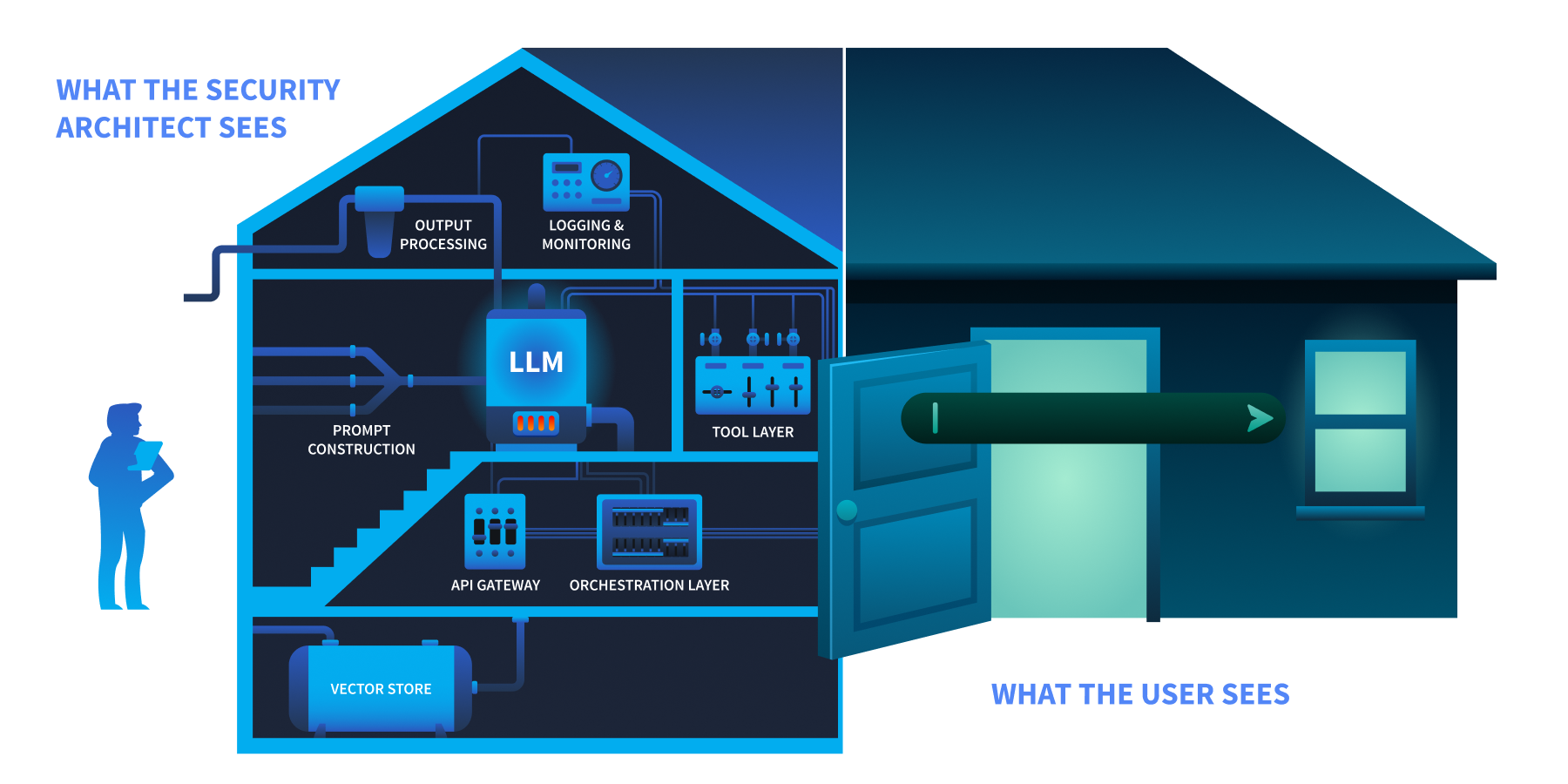
The user sees a chat box at the front door. The security architect sees the foundation, the wiring, and everything behind.
| Component | Function |
|---|---|
| User Interface | Developer-facing chat widget embedded in the code review platform |
| API Gateway | Authentication, rate limiting, request routing |
| Orchestration Layer | Manages conversation state, routes requests, coordinates components |
| Prompt Construction | Combines the system prompt, user query, and retrieved context into the final prompt sent to the model |
| LLM | The language model (hosted internally or accessed via API) that generates responses |
| Tool Layer | Functions the LLM can invoke: database queries, documentation search, CI/CD status checks |
| Output Processing | Response formatting, content filtering, length enforcement |
| Logging and Monitoring | Conversation storage, usage analytics, audit trail |
| Vector Store | Embedded representations of internal documentation for retrieval-augmented generation (RAG) |
Trust Boundaries
A trust boundary is where data moves from one security context to another, and every one is a potential attack surface. TryAssist has five:
| Boundary | Data Crossing |
|---|---|
| User-to-system | Untrusted natural language enters the system |
| System-to-LLM | Constructed prompt (system instructions + user input + context) sent to the model |
| LLM-to-tools | Model output triggers database queries, API calls, or file operations |
| System-to-external-data | Retrieved documents from vector store or external sources enter the prompt |
| System-to-user | Generated response delivered to the user |
Data Flow: A Single Request
Let us trace a single request through TryAssist to see every boundary in action:
A developer types:
"Does this pull request handle authentication correctly?"The API gateway authenticates the request and applies rate limits
The orchestration layer retrieves conversation history and routes the request
The prompt construction layer combines the system prompt ("
You are a secure code review assistant..."), the user's question, and relevant documentation retrieved from the vector storeThe assembled prompt is sent to the LLM, which generates a response
The LLM's response may include a request to invoke a tool (e.g.,
"fetch the latest CI pipeline status for this PR")The tool layer executes the action and returns the result to the LLM
The LLM generates a final response incorporating the tool result
Output processing applies content filters and formats the response
The response is delivered to the developer and the entire exchange is written to the logging system
Every numbered step crosses at least one trust boundary. The question is: which boundaries have security controls, and which are unprotected?
Answer the questions below
What layer in an AI system is responsible for combining the system prompt, user input, and retrieved context before sending it to the model? Prompt Construction
In the TryAssist architecture, what boundary does LLM output cross when it triggers a database query? LLM-to-tools
The AI Attack Surface
You have mapped TryAssist from the inside. An attacker looking at the same diagram sees something different: entry points, weak boundaries, and paths to data. Three frameworks exist to name what they see and provide defenders with a shared language for responding.
OWASP LLM Top 10 (2025)
The OWASP LLM Top 10 (2025) classifies the ten most critical vulnerabilities in LLM applications. Not all ten are equally relevant to a pre-deployment architecture review. Five of the ten operate at the system architecture level: they emerge from how an AI system is built and integrated, not from the model's internal behaviour. Those five are the focus of this room. The remaining five require dedicated treatment and appear in later modules.
| Risk | Category | Description | Covered In |
|---|---|---|---|
| LLM01 | Prompt Injection | Manipulating LLM behaviour through crafted inputs | Prompt Security Module |
| LLM02 | Sensitive Information Disclosure | Leaking confidential data, PII, or system details through responses | This room + Data Poisoning Module |
| LLM03 | Supply Chain | Compromised pre-trained models, datasets, and third-party dependencies introduced before deployment | AI Supply Chain Security Module |
| LLM04 | Data and Model Poisoning | Corrupting training data or model weights to alter behaviour | Data Poisoning Module |
| LLM05 | Improper Output Handling | LLM output is causing injection in the downstream systems | This room |
| LLM06 | Excessive Agency | AI components with more privilege or autonomy than necessary | This room |
| LLM07 | System Prompt Leakage | Exposure of system-level instructions and internal configuration | This room |
| LLM08 | Vector and Embedding Weaknesses | Exploiting retrieval mechanisms and embedding pipelines | Data Poisoning Module |
| LLM09 | Misinformation | LLM generating false or misleading content | LLM Security Room in this module |
| LLM10 | Unbounded Consumption | Resource exhaustion, cost explosion, denial of service | This room |
The five categories marked This room all trace back to architectural decisions made when TryAssist was designed. That is exactly what a pre-deployment security review examines.
MITRE ATLAS
MITRE ATLAS (Adversarial Threat Landscape for AI Systems) is a knowledge base of adversary tactics, techniques, and case studies for AI systems, structured as a counterpart to MITRE ATT&CK. OWASP classifies what the vulnerabilities are. ATLAS documents how adversaries exploit them.
ATLAS follows the adversary's progression through a target. An attacker begins with reconnaissance, learning what model the system uses and how it is exposed. They gain initial access by compromising a supply chain component or exploiting an input vector. They achieve execution through techniques like prompt injection, adversarial inputs, or model tampering. Where persistence is needed, they implant backdoors in model weights. The end goal is impact: data exfiltration, service disruption, or silent manipulation of model outputs. For TryAssist, the most relevant part of this arc runs from Execution through Impact, tracing how an attacker who reaches the chat interface can move through the system and cause real damage.
ATLAS covers over 50 techniques across more than a dozen tactics, each with real-world case studies, and is updated as new attack patterns emerge.
NIST AI Risk Management Framework
The NIST AI RMF approaches the problem from an organisational perspective. Its four functions describe how an organisation manages AI risk systematically: Govern (setting policies and accountability structures), Map (identifying AI systems and their risk contexts), Measure (assessing and monitoring risk levels), and Manage (responding to and mitigating identified risks). Where OWASP names the vulnerabilities, and ATLAS describes how adversaries exploit them, the NIST AI RMF asks whether the organisation has a repeatable process for addressing them. Its companion, NIST AI 100-2 (published January 2025), provides a technical catalogue of adversarial ML techniques and mitigations across the full model lifecycle.
The Threat Modelling room (later in this module) delves into how the NIST AI RMF integrates with STRIDE and PASTA for structured AI risk governance.
Answer the questions below
Which OWASP LLM Top 10 (2025) category covers the risk of LLM output being used to execute SQL injection against a backend database? LLM05
What is the name of the MITRE knowledge base specifically designed for adversary tactics and techniques against AI and ML systems? ATLAS




