Challenges: The Greenholt Phish (TryHackMe)

Just another day in the SOC often begins with an unexpected alert — this time, a suspicious email reported by a Sales Executive at Greenholt PLC. The email contained unusual language, an unexpected reference to a money transfer, and an unsolicited attachment. Given the potential for phishing or malware delivery, the Security Operations Center (SOC) initiated a full investigation to verify the legitimacy of the message, analyze the attachment, and assess any potential threat to the organization’s systems and data.
Just another day as a SOC Analyst

A Sales Executive at Greenholt PLC received an email that he didn't expect to receive from a customer. He claims that the customer never uses generic greetings such as "Good day" and didn't expect any amount of money to be transferred to his account. The email also contains an attachment that he never requested. He forwarded the email to the SOC (Security Operations Center) department for further investigation.
Investigate the email sample to determine if it is legitimate.
Deploy the Machine
Deploy the machine attached to this task; it will be visible in the split-screen view once it is ready.
If you don't see a virtual machine automatically appear, click the Show Split View button.
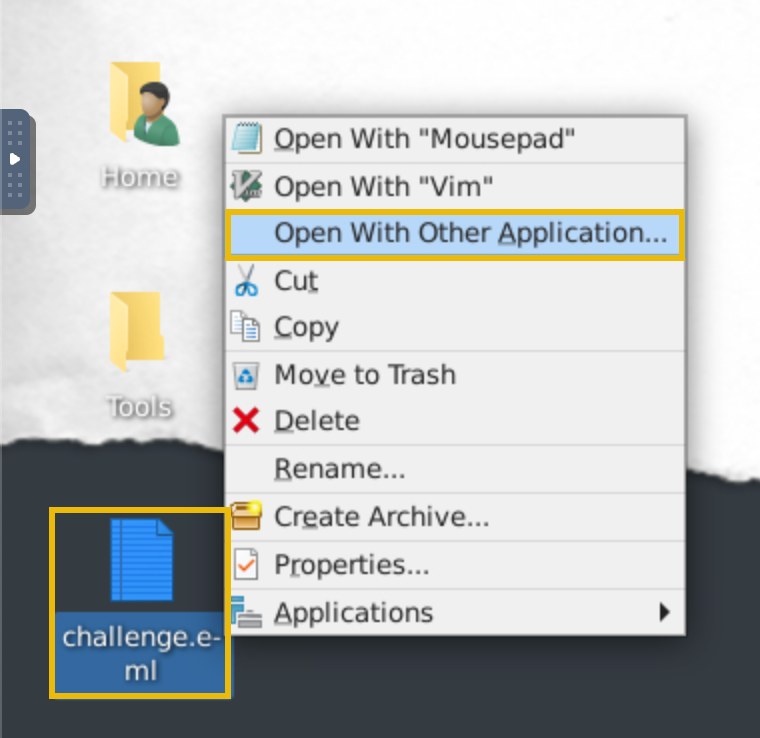
Tip: Open the EML file with Thunderbird. To do so, right-click on the challenge.eml file and select Open With Other Application. From there, scroll down to select Thunderbird Mail and click Open. It may take a few moments to open the application. You will then see the email and its contents appear in the app.
Answer the questions below
What is the Transfer Reference Number listed in the email's Subject?
09674321
Who is the email from?
Mr. James JacksonWhat is his email address?
What email address will receive a reply to this email?
What is the Originating IP?
checked the source of section of the email inorder to get the x-originating-IP, return-path, among other details which were helpful in answering the next set of questions


Who is the owner of the Originating IP? (Do not include the "." in your answer.)
using the originating IP found in the previous question we used the whois command to find the organization name or the owner.
whois IP_Address
What is the SPF record for the Return-Path domain?
got the domain by extracting it from the email provided. Used the dig command to find the SPF record
dig TXT mutawamarine.com
What is the DMARC record for the Return-Path domain?
to find the DMARC record we had prepend _dmarc on the domain and used the dig, and nslookup commands to find the record.
dig TXT _dmarc.mutawamarine.comnslookup -type=TXT _dmarc.mutawamarine.com
What is the name of the attachment?

What is the SHA256 hash of the file attachment?
tried to use 7z to extract files from the file attachment but later on found that it was unnecessary as the original attachment is the one that revealed the right SHA256 hash
sha256sum Attachment_File_Name
What is the attachments file size? (Don't forget to add "KB" to your answer, NUM KB)
the hint suggested using an open-source tool to find the details of this question. I searched the hash on Virus Total and it revealed the size in KB.

What is the actual file extension of the attachment?
still using virus total to search the hash under the details section the basic properties of the file are shown including the file type.

The investigation confirmed that the email was malicious. Analysis of the email headers exposed the originating IP, revealing its true owner, and DNS queries of the Return-Path domain uncovered both SPF and DMARC records inconsistent with legitimate communications from the alleged sender. The attachment, when hashed and reviewed in VirusTotal, showed a suspicious executable file disguised as a document, further confirming the phishing attempt. By following email header forensics, DNS record analysis, and file hashing procedures, the SOC was able to identify and contain the threat before any damage occurred — another example of proactive incident response stopping a phishing attack in its tracks.