
Link to the walkthrough on TryHackMe: Basic Vulnerability Identification Techniques
Introduction
Vulnerability identification is the process of examining a target environment to identify exploitable weaknesses. These weaknesses can occur in network services, operating systems, or applications. Before you can exploit anything, you need to know what is there and what is wrong with it.
This phase is distinct from both reconnaissance and exploitation. Reconnaissance is about collecting information about the target, such as IP ranges, domain names, and publicly exposed infrastructure. Exploitation is the act of leveraging a confirmed weakness to achieve a specific outcome. Vulnerability identification sits between the two.
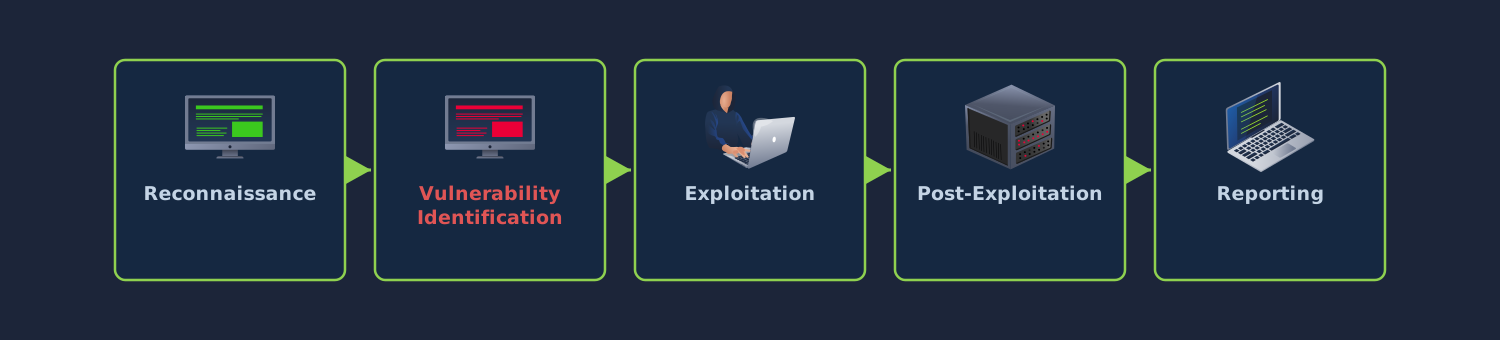
An attacker who skips straight from a port scan to running an exploit is guessing. Without knowing what software a target is running, how it is configured, and what version it is at, there is no rational basis for choosing an attack path. A methodical approach to vulnerability identification removes that guesswork and gives you a clear picture of where a target is weak before you commit to an exploitation strategy.
The techniques covered here follow that methodology from start to finish. You will begin by mapping the attack surface of a target environment, then enumerate services and extract version information. From there, you will cross-reference those versions against public vulnerability databases, probe a web application for common flaw classes, and test system-level services for misconfigurations. A practical challenge at the end brings all of these techniques together against a single machine.
Learning Objectives
By the end of this room, you will be able to:
Explain what vulnerability identification means and where it fits in the offensive security methodology
Enumerate an environment's attack surface, including open ports, exposed services, and input vectors
Identify common vulnerability classes across networks, operating systems, and web applications
Use Nmap and browser developer tools to interrogate target behaviour
Interpret service banners, error messages, and application responses to assess exploitability
Triage findings by potential impact and decide which warrant further investigation
Prerequisites
You should be comfortable with the following before starting:
Basic networking concepts, including TCP/IP, ports, and the client-server model
Navigating the Linux command line and running tools from a terminal
Common services such as HTTP, SSH, FTP, and SMB
Understanding the Attack Surface
The attack surface of a system is the total set of points where an attacker can attempt to interact with it. Every open port, running service, input field, and API endpoint is part of that surface. The larger and more varied it is, the more likely it is that something has been misconfigured, left unpatched, or otherwise exposed.
What Makes Up an Attack Surface
An attack surface is not confined to a single layer. At the network level, it includes every port accepting connections and every protocol in use. A machine exposing SSH, HTTP, and SMB has a fundamentally different attack surface from one exposing only SSH.
At the operating system level, the surface includes user accounts, file permissions, scheduled tasks, and locally running services. These may not be reachable over the network at first, but they become relevant the moment an attacker gains a foothold.
At the application level, the surface covers every mechanism that accepts user input. A web application receives input through URL parameters, form fields, HTTP headers, cookies, and uploaded files. A network service might accept input through protocol commands or database queries.
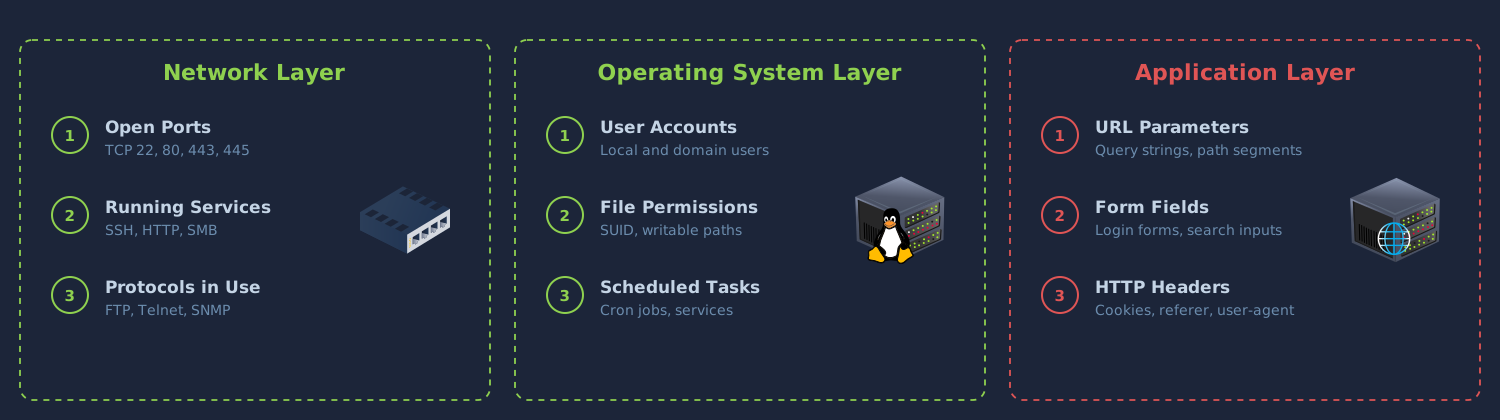
A single target can present an attack surface at all three layers simultaneously. A thorough assessment accounts for each of them.
External vs. Internal
The external attack surface is everything reachable from outside the target's network. Publicly exposed web servers, VPN gateways, and mail servers all fall under this category. These are the only entry points available before any access has been gained.
The internal attack surface becomes relevant once an attacker has a foothold. File shares, management interfaces, database servers, and domain controllers that were invisible from the outside are now within reach. Many of these are configured with less scrutiny than their externally facing counterparts, on the assumption that the network perimeter is enough. That assumption frequently proves wrong.
Directing Your Efforts
Understanding the attack surface tells you where to focus. If a target exposes a web application with many dynamic pages and input fields alongside an SSH service running a current OpenSSH version with key-based authentication, the web application is the richer target.
Attack surface analysis also surfaces quick wins. A service on a non-standard port may be an old, forgotten deployment that has not been patched. An administrative interface exposed without authentication is an immediate finding. Mapping what is available before committing to detailed testing prevents you from wasting time on hardened components while weak ones go unexamined.
Answer the questions below
Which type of attack surface becomes accessible only after gaining an initial foothold inside the network? Internal
Service Enumeration and Banner Grabbing
Service enumeration is the process of discovering which services are listening on a target's open ports and gathering enough detail about each to support further testing. This typically involves port scanning, banner grabbing, and version detection.
Port Scanning with Nmap
Nmap sends packets to a range of ports on a target and reports which ones respond. However, knowing a port is open tells you very little on its own. Port 80 is conventionally used for HTTP, but nothing prevents an administrator from running SSH on it. Relying on port numbers alone leads to wrong assumptions.
A basic scan against a target:
nmap -sV -sC -p- MACHINE_IP -oN scan_results
The -sV flag enables version detection. Rather than just reporting that port 22 is open, Nmap probes the service and tries to determine the software and its version. The-sC flag runs Nmap's default scripts, which perform extra checks such as testing for anonymous FTP access or retrieving HTTP page titles. The -p- flag scans all 65,535 TCP ports rather than just the default set. The -oN flag saves the output of the scan to a file named scan_results.
The output shows the protocol, service name, and where Nmap can determine them, the software version for each open port. This version information is the most valuable output of enumeration. It is what lets you match a running service to known vulnerabilities.
Banner Grabbing
Banner grabbing is the process of connecting to a service and reading its initial response. Many services announce themselves on connection, providing a name and version string known as a banner.
Connecting to an SSH service with netcat:
Terminal
attacker@tryhackme:~$ nc MACHINE_IP 22
SSH-2.0-OpenSSH_7.6p1 Ubuntu-4ubuntu0.3
That single string reveals the OpenSSH version and the underlying operating system. It is enough to start searching for known vulnerabilities against that version.
Connecting to an SMTP service might return:
Terminal
attacker@tryhackme:~$ nc MACHINE_IP 25
220 mail.target.local ESMTP Postfix (Ubuntu)
You can perform banner grabbing manually with netcat ortelnet, or automate it through Nmap's version detection probes.
When Banners Are Absent or Misleading
Not every service gives a useful banner. Some suppress version information entirely, returning only a generic greeting. Nmap's probing engine handles this by fingerprinting the service, sending crafted requests and matching responses against a database of known signatures. This is less precise than reading a banner directly, but it can still narrow things down considerably.
Banners can also be deliberately changed. An administrator aware that attackers use banner information might alter the version string. However, this is uncommon outside honeypot environments. Other indicators, such as response behaviour and supported protocol features, often reveal the real identity of the service regardless.
Building a Service Inventory
As you enumerate each port, build an inventory. For each service, record the port number, protocol, software name and version, and any extra details revealed by scripts or manual inspection.
| Port | Service | Version | Notes |
|---|---|---|---|
| 22 | SSH | OpenSSH 7.6p1 | Ubuntu banner |
| 80 | HTTP | Apache 2.4.29 | Default page present |
| 445 | SMB | Samba 4.7.6 | Signing not required |
| 3306 | MySQL | 5.7.33 | Remote connections enabled |
This is a working document that you will annotate and update as you progress through the rest of the engagement.
Answer the questions below
Run an Nmap scan against the target with -sV -sC flags. What version of Apache is running on port 80? 2.4.52
nmap -sV -sC -p- IP_Address

21/tcp   open  ftp         vsftpd 3.0.5
| ftp-anon: Anonymous FTP login allowed (FTP code 230)
|_dr-xr-xr-x    2 ftp      ftp          4096 Mar 17 08:03 pub
| ftp-syst:
|   STAT:
| FTP server status:
|      Connected to IP_Address
|      Logged in as ftp
|      TYPE: ASCII
|      No session bandwidth limit
|      Session timeout in seconds is 300
|      Control connection is plain text
|      Data connections will be plain text
|      At session startup, client count was 1
|      vsFTPd 3.0.5 - secure, fast, stable
|*End of status
22/tcp   open  ssh         OpenSSH 8.9p1 Ubuntu 3ubuntu0.14 (Ubuntu Linux; protocol 2.0)
80/tcp   open  http        Apache httpd 2.4.52 ((Ubuntu))
| http-robots.txt: 4 disallowed entries
|*/admin/ /backup/ /config.php.bak /info.php
|_http-server-header: Apache/2.4.52 (Ubuntu)
|_http-title: WidgetCorp Internal Portal
139/tcp  open  netbios-ssn Samba smbd 4.6.2
445/tcp  open  netbios-ssn Samba smbd 4.6.2
3306/tcp open  mysql       MySQL 5.5.5-10.6.23-MariaDB-0ubuntu0.22.04.1
| mysql-info:
|   Protocol: 10
|   Version: 5.5.5-10.6.23-MariaDB-0ubuntu0.22.04.1
|   Thread ID: 33
|   Capabilities flags: 63486
|   Some Capabilities: ConnectWithDatabase, Support41Auth, Speaks41ProtocolNew, SupportsTransactions, IgnoreSpaceBeforeParenthesis, IgnoreSigpipes, SupportsLoadDataLocal, FoundRows, ODBCClient, SupportsCompression, InteractiveClient, Speaks41ProtocolOld, DontAllowDatabaseTableColumn, LongColumnFlag, SupportsMultipleResults, SupportsAuthPlugins, SupportsMultipleStatments
|   Status: Autocommit
|   Salt: 8G=9ICRR%*1u|.kS?~#,
|*  Auth Plugin Name: mysql_native_password
Service Info: OSs: Unix, Linux; CPE: cpe:/o:linux:linux_kernel

Host script results:
| smb2-security-mode:
|   2.02:
|_    Message signing enabled but not required
| smb2-time:
|   date: 2026-04-30T07:30:53
|_  start_date: N/A
Use netcat to grab the SSH banner on port 22. What is the full OpenSSH version string returned? OpenSSH_8.9p1
nc IP_Address 22
SSH-2.0-OpenSSH_8.9p1 Ubuntu-3ubuntu0.14
Matching Services to Known Exploits
With a service inventory in hand, the next step is to determine whether any of the discovered services contain known weaknesses. This means cross-referencing version information against public vulnerability databases and working out whether the results actually apply to the target.
Public Vulnerability Databases
The Common Vulnerabilities and Exposures (CVE)(opens in new tab) system is the primary resource for identifying known vulnerabilities. Each entry describes a specific flaw in a specific piece of software and carries an identifier in the format CVE-YYYY-NNNNN.
The National Vulnerability Database (NVD)(opens in new tab), maintained by NIST, adds severity scores and technical detail to each CVE. Exploit-DB(opens in new tab) goes further by linking entries to publicly available exploit code, giving you an immediate sense of whether a flaw is exploitable in practice and not just in theory.
You can search Exploit-DB from the command line using searchsploit, which queries a local copy of the database:
searchsploit apache 2.4.29
This returns matching entries along with the file path to the exploit code on your system.
GitHub(opens in new tab) is another valuable source, and often the fastest one. When a high-profile CVE is disclosed, proof-of-concept exploit code frequently appears on GitHub within hours or days. Security researchers and offensive tooling developers publish working PoCs, sometimes before the vulnerability even makes it into Exploit-DB. Searching GitHub for a CVE identifier directly, for example CVE-2021-41773, will often turn up multiple repositories containing exploit scripts, detailed write-ups, and scanning tools built around that specific flaw. It is worth checking GitHub alongside the traditional databases, especially for recently disclosed vulnerabilities where Exploit-DB may not yet have an entry.
A typical workflow after enumeration:
Take the first service and version from your inventory.
Search the NVD or Exploit-DB for that software name and version.
Check GitHub for the CVE identifier to find any proof-of-concept code or tooling.
Review the results, noting any CVEs affecting the exact version or a range that includes it.
Assess each result for relevance and exploitability.
Repeat for every service in the inventory.
Severity Ratings
Most CVE entries carry a CVSS score, rating severity from 0.0 to 10.0. The score accounts for the attack vector (network vs local), whether authentication is required, and the impact on confidentiality, integrity, and availability.
A critical-severity vulnerability allowing unauthenticated remote code execution is a fundamentally different finding from a low-severity information disclosure issue that requires local access. However, CVSS scores should not be treated as the only measure of usefulness during an engagement. A medium-severity vulnerability that gets you authenticated access may matter more than a critical one whose prerequisites you cannot satisfy.
The Gap Between "Vulnerable" and "Exploitable"
A CVE might describe a buffer overflow in a particular version of a web server. However, if the target has applied a patch without updating the version string, the vulnerability is no longer there. A flaw that requires a specific module to be enabled is irrelevant if the target's configuration does not include that module.
Network-level controls might block the traffic needed to trigger a vulnerability. An exploit that requires valid credentials is useless if you have not obtained any. A vulnerability that looks promising in a database can turn out to be a dead end once you account for what is actually running on the target.
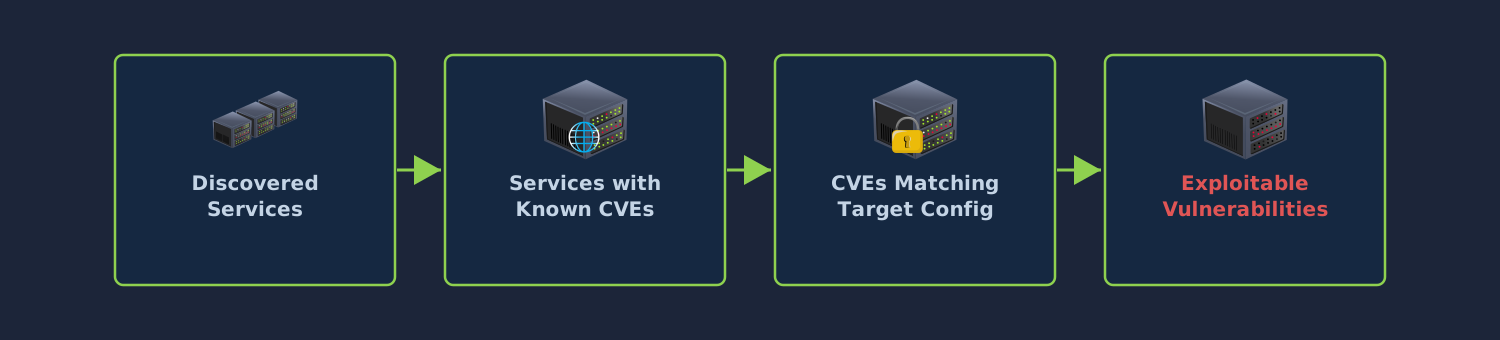
This is why vulnerability identification is a separate phase from exploitation. The goal is to build a prioritised list of potential weaknesses, not to confirm each one. Confirmation happens during exploitation.
Automated Vulnerability Scanners
Tools such as Nessus(opens in new tab), OpenVAS(opens in new tab), and Nikto(opens in new tab) automate the process of matching services against vulnerability databases. They run their own enumeration and compare results against known issues, producing a report of potential vulnerabilities.
These scanners are useful for covering a broad attack surface quickly. However, they produce false positives and miss issues that require contextual understanding, things like business logic flaws or chained weaknesses that only work in combination. Scanner output is a starting point for manual investigation, not a replacement for it.
Answer the questions below
A CVE describes a remote code execution flaw in the version of a service running on the target, but the administrator has applied a patch without updating the version string. Is this service still exploitable through that CVE? (Yay/Nay) Nay
Identifying Web Application Vulnerabilities
Web applications accept user input through many channels and interact with backend databases and filesystems. Identifying vulnerabilities in them requires a different approach from scanning network services. Rather than matching version numbers to CVE entries, you are probing how the application behaves and looking for patterns that point to exploitable flaws.
Establishing a Baseline
Before testing, spend time using the application as a normal user would. Browse every page, submit forms with legitimate data, and observe how the application responds. This gives you a map of its functionality and a baseline of normal behaviour. You need that baseline to recognise when something abnormal happens once you start manipulating input.
You can also use Burp Suite(opens in new tab)'s proxy running while you browse so that every request and response gets captured in the site map. Pay attention to URL structures, query parameters, form fields, cookies, and hidden fields in the HTML source.
Recognising Injection Points
Injection vulnerabilities occur when user-supplied input ends up in a command, query, or expression that the application processes without proper sanitisation. The application fails to distinguish between data and instructions.
Imagine a web application that displays user profiles based on a numeric ID in the URL:
https://target.local/profile?id=15
A legitimate request returns the expected profile page. The backend is constructing something like:
SELECT * FROM users WHERE id = '15'
Now submit a value that breaks the query:
https://target.local/profile?id=15'
The query becomes:
SELECT * FROM users WHERE id = '15''
The database cannot parse this and returns an error. If that error shows up in the HTTP response, the input is reaching the SQL query without sanitisation.
Why does the application behave this way? The developer built the query using string concatenation rather than parameterised queries. The single quote you submitted became part of the query syntax instead of being treated as data.
If the application returns a blank page or a generic error instead, the vulnerability may still exist. The application might just be suppressing detailed error output. Techniques such as time-based blind injection can confirm the issue, though they fall outside the scope of basic identification.
Spotting Access Control Weaknesses
Access control flaws arise when an application fails to enforce restrictions on what authenticated users can do. An attacker can often escalate privileges or access other users' data with nothing more than a modified request.
The most straightforward form is an Insecure Direct Object Reference (IDOR). This happens when the application uses a user-controllable value to look up internal objects without checking whether the requesting user is authorised to see them.
Imagine your account profile is at:
https://target.local/api/user/1042
Change the ID:
https://target.local/api/user/1043
If the application returns another user's profile, the authorisation check is missing.
Vertical access control weaknesses matter just as much. If a regular user can reach administrative endpoints by navigating to them directly, the application is not enforcing role-based restrictions. You can test this by finding admin functionality through the site map or source code references, then trying to access those endpoints with a low-privilege session.
Information Disclosure
Information disclosure is any situation where the application reveals data that helps an attacker advance. This can include technical details about infrastructure, internal paths, software versions, or in more serious cases, credentials and API keys.
A Server: Apache/2.4.29 (Ubuntu) header tells an attacker exactly what to search for in a vulnerability database. A stack trace that includes a database connection string is far more severe.
Make a habit of inspecting response headers and page source for every page you visit. Submit invalid input and observe whether error messages are generic or detailed. Request common paths like /robots.txt, /.git/, and /backup/ to check for exposed files. These checks take very little time and frequently produce findings that shape the rest of the engagement.
Answer the questions below
Navigate to http://MACHINE_IP in your browser and view the HTML source of the main page. What internal IP address is referenced in the deployment note comment? 10.10.14.50

Access /profile.php?id=1, then change the id parameter to 2. You can view another user's profile without authorisation. What type of vulnerability is this? IDOR

Navigate to /admin/. What is the username of the user whose notes contain backup server credentials? dbadmin

Identifying System and Network Vulnerabilities
Not all vulnerabilities live in web applications. Network services and operating system configurations have their own weaknesses, many of which are straightforward to find.
Default and Weak Credentials
Many services ship with well-known default usernames and passwords. Administrators do not always change them after deployment. Databases, network appliances, management consoles, and IoT devices are particularly prone to this.
When you find a service that requires authentication, check whether the default credentials work. The DefaultCreds-Cheat-Sheet(opens in new tab) repository and vendor documentation list factory-set credentials for thousands of products.
If the defaults have been changed but the service allows remote login attempts, you can test a short list of common weak passwords. For SSH:
hydra -l admin -P /usr/share/wordlists/rockyou.txt ssh://MACHINE_IP
Take care with account lockout policies and rate limiting. Aggressive brute-force attempts can lock out accounts or trigger alerts. At the identification stage, you are trying to determine whether weak credentials are likely, not trying every possible combination.
SMB Misconfigurations
The Server Message Block (SMB) protocol is used widely in Windows environments for file sharing and inter-process communication. Misconfigurations are common.
The first check is whether null session access is allowed. A null session lets an unauthenticated user connect and enumerate shares, user accounts, and group memberships:
smbclient -L //MACHINE_IP -N
The -N flag suppresses the password prompt. If the target returns a share list, you have unauthenticated access to at least the listing. From there, try connecting to each share and check whether any allow read or write access without credentials.
Another common weakness is SMB signing not being required. When signing is disabled or optional, an attacker on the same network segment can perform relay attacks, intercepting authentication requests and forwarding them to other services:
nmap --script smb2-security-mode -p 445 MACHINE_IP
If the output shows that message signing is enabled but not required, the service is vulnerable to relay.
FTP Misconfigurations
FTP is an older file transfer protocol still found in many environments, especially on legacy systems. The most common misconfiguration is anonymous access:
ftp MACHINE_IP
Name: anonymous
Password: anything@here.com
If the server accepts the connection, look through the directory listing for sensitive files. FTP servers with anonymous access sometimes expose configuration files, backups, or credentials. Even if the files are not directly exploitable, the presence of an anonymous FTP server is worth noting.
Beyond anonymous access, check whether the service transmits credentials in plaintext. If it does, an attacker with network access can capture them through packet sniffing.
Answer the questions below
Connect to the FTP service using anonymous access. What is the filename in the /pub directory that contains the internal network map? network-map.txt
ftp IP_Address
Connected to IP_Address.
220 (vsFTPd 3.0.5)
Name (IP_Address:root): anonymou

230 Login successful.
Remote system type is UNIX.
Using binary mode to transfer files.
ftp> ls
200 PORT command successful. Consider using PASV.
150 Here comes the directory listing.
dr-xr-xr-x    2 ftp      ftp          4096 Mar 17 08:03 pub
226 Directory send OK.
ftp> ls -la
200 PORT command successful. Consider using PASV.
150 Here comes the directory listing.
dr-xr-xr-x    3 ftp      ftp          4096 Mar 17 08:03 .
dr-xr-xr-x    3 ftp      ftp          4096 Mar 17 08:03 ..
dr-xr-xr-x    2 ftp      ftp          4096 Mar 17 08:03 pub
226 Directory send OK.
ftp> get pub
local: pub remote: pub
200 PORT command successful. Consider using PASV.
550 Failed to open file.
ftp> cd pub
250 Directory successfully changed.
ftp> ls -la
200 PORT command successful. Consider using PASV.
150 Here comes the directory listing.
dr-xr-xr-x    2 ftp      ftp          4096 Mar 17 08:03 .
dr-xr-xr-x    3 ftp      ftp          4096 Mar 17 08:03 ..
-rw-r--r--    1 ftp      ftp           154 Mar 17 08:03 README.txt
-rw-r--r--    1 ftp      ftp           246 Mar 17 08:03 maintenance-schedule.txt
-rw-r--r--    1 ftp      ftp           387 Mar 17 08:03 network-map.txt
226 Directory send OK.
ftp> get README.txt
local: README.txt remote: README.txt
200 PORT command successful. Consider using PASV.
150 Opening BINARY mode data connection for README.txt (154 bytes).
226 Transfer complete.
154 bytes received in 0.00 secs (412.0291 kB/s)
ftp> get maintenance-schedule.txt
local: maintenance-schedule.txt remote: maintenance-schedule.txt
200 PORT command successful. Consider using PASV.
150 Opening BINARY mode data connection for maintenance-schedule.txt (246 bytes).
226 Transfer complete.
246 bytes received in 0.00 secs (329.5396 kB/s)
ftp> get network-map.txt
local: network-map.txt remote: network-map.txt
200 PORT command successful. Consider using PASV.
150 Opening BINARY mode data connection for network-map.txt (387 bytes).
226 Transfer complete.
387 bytes received in 0.00 secs (1.3372 MB/s)
ftp> exit
According to the file, what are the default credentials for the Dev environment? (Format: username:password)
cat README.txt
WidgetCorp File Server
======================
This server is for internal file distribution.
Contact IT at it-support@widgetcorp.local for access issues.

cat maintenance-schedule.txt
Scheduled Maintenance Windows
=============================
Patching: First Sunday of each month, 02:00-06:00 UTC
Last patch cycle: 2024-01-07 (SKIPPED - change freeze)
Next patch cycle: TBD
Note: Several servers are 3+ months behind on patches.

cat network-map.txt
WidgetCorp Internal Network Map (Q3 2024)
==========================================
Web Server:       10.10.14.10 (this machine)
Database Server:  10.10.14.50 (MariaDB, PostgreSQL)
Domain Controller: 10.10.14.1 (dc01.widgetcorp.local)
Backup Server:    10.10.14.60 (rsync, SSH)
Dev Environment:  10.10.14.100 (Docker host)

Default credentials for dev environment: devops / D3vOps2024!
Use smbclient to list shares on the target with a null session. What is the name of the readable share?
smbclient -L //IP_Address -N

	Sharename       Type      Comment
	---------       ----      -------
	shared          Disk      Internal shared documents
	IPC$            IPC       IPC Service (WidgetCorp File Server)
SMB1 disabled -- no workgroup available

nmap --script smb2-security-mode -p 445 IP_Address

PORT    STATE SERVICE
445/tcp open  microsoft-ds

Host script results:
| smb2-security-mode:
|   2.02:
|_    Message signing enabled but not required
Triaging and Documenting Findings
By this point in an engagement, you will have collected a range of potential vulnerabilities across different services and applications. Not all of them carry the same weight. Triage is the process of evaluating each finding, assessing what it actually enables, and deciding which ones to pursue first.
Assessing Impact
The impact of a vulnerability depends on what an attacker gains by exploiting it. A remote code execution flaw on an externally facing web server is a fundamentally different finding from an information disclosure issue on an internal monitoring dashboard.
The most impactful vulnerabilities grant direct access to a system, enable privilege escalation, or expose sensitive data such as credentials. A finding that reveals database credentials might not be exploitable on its own, but it could unlock access to a database server that was otherwise unreachable.
Where the affected system sits in the environment matters too. A vulnerability on a domain controller has far greater consequences than the same vulnerability on a standalone workstation, because compromising the domain controller can hand an attacker control over the entire Active Directory environment.
Prioritising
Once you have assessed impact, sort your findings into a priority order. A practical approach is to group them into three tiers.
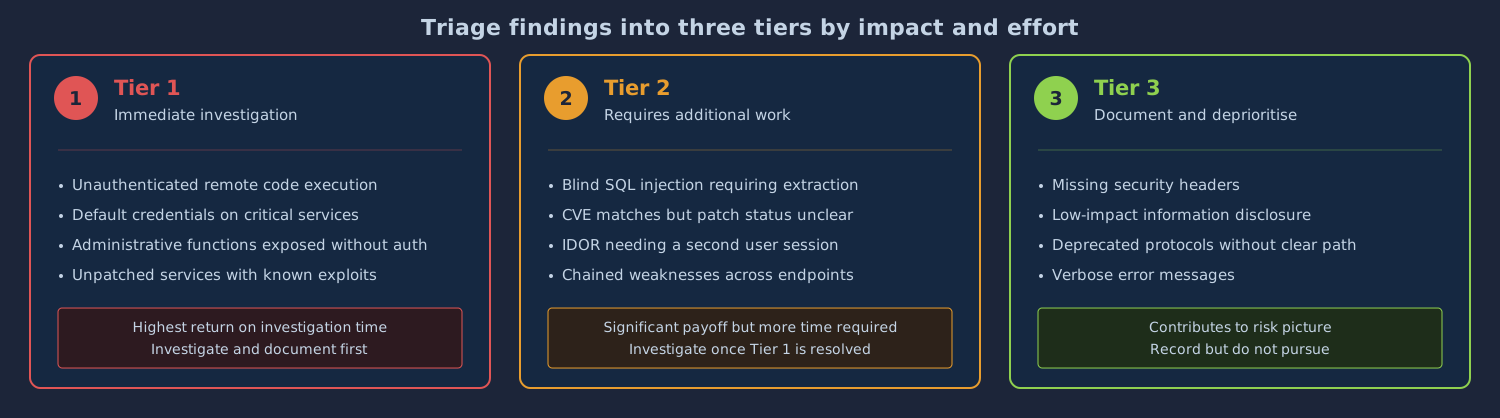
Tier 1 findings are likely to give immediate access or significant escalation with minimal effort. Unauthenticated remote code execution, default credentials on critical services, and access control flaws that expose administrative functionality all belong here.
Tier 2 findings need more work to confirm or exploit, but could have a significant impact. A SQL injection that requires blind extraction, a service version that matches a CVE but may have been patched, or an IDOR that needs a valid session from a different user are typical examples.
Tier 3 findings are lower-impact and unlikely to advance access on their own. Information disclosure, missing security headers, and deprecated protocols with no clear exploitation path fall under this category. They contribute to the overall risk picture but should not eat into testing time at the expense of higher-priority items.
Documentation
Every finding should be recorded as you go, not reconstructed from memory afterwards. For each one, note the affected host or component, the type of vulnerability, the evidence (the request and response, for instance), the steps to reproduce it, and an assessment of the impact.
Avoid vague descriptions. "The web application may be vulnerable to injection" is not useful. "The q parameter on GET /search.php returns a MySQL syntax error when a single quote is submitted" gives anyone reading the note enough to understand and reproduce the issue.
Screenshots and request/response pairs from Burp Suite make particularly good evidence. They provide an unambiguous record of what you observed.
Answer the questions below
You discover an unauthenticated remote code execution vulnerability on an externally facing web server. Which priority tier does this belong to? 1
You find that a service is using a deprecated protocol but cannot identify a clear exploitation path. Which priority tier does this belong to? 3
Practical Challenge
Work through the target machine using the techniques from the previous tasks. Your goal is to enumerate the attack surface, identify the vulnerabilities planted on the machine, and answer the questions below.
The questions cover three areas:
A web application flaw found through manual probing
An FTP misconfiguration found through direct interaction with the service
An SMB share misconfiguration found through direct interaction with the service
For the web application flaw, examine how the application handles user input in URL parameters and check whether access controls are consistent across all endpoints. For the FTP and SMB misconfigurations, test every service that supports authentication for default credentials and anonymous access, and read any files you can access for sensitive information.
Answer the questions below
What URL path exposes the admin dashboard without any authentication? admin
gobuster dir -u http://IP_Address -w /usr/share/wordlists/dirb/common.txt -x php,html,txt

/.php                 (Status: 403) [Size: 278]
/.hta.php             (Status: 403) [Size: 278]
/.hta.html            (Status: 403) [Size: 278]
/.hta                 (Status: 403) [Size: 278]
/.htaccess            (Status: 403) [Size: 278]
/.hta.txt             (Status: 403) [Size: 278]
/.htaccess.txt        (Status: 403) [Size: 278]
/.htaccess.php        (Status: 403) [Size: 278]
/.htpasswd.php        (Status: 403) [Size: 278]
/.htaccess.html       (Status: 403) [Size: 278]
/.htpasswd            (Status: 403) [Size: 278]
/.htpasswd.html       (Status: 403) [Size: 278]
/.htpasswd.txt        (Status: 403) [Size: 278]
/.html                (Status: 403) [Size: 278]
/admin                (Status: 301) [Size: 314] [--> http://IP_Address/admin/]
/config.php           (Status: 200) [Size: 0]
Progress: 7348 / 18460 (39.80%)
/index.php            (Status: 200) [Size: 549]
/index.php            (Status: 200) [Size: 549]
/info.php             (Status: 200) [Size: 74373]
/info.php             (Status: 200) [Size: 74373]
/products.php         (Status: 200) [Size: 547]
/profile.php          (Status: 200) [Size: 16]
/robots.txt           (Status: 200) [Size: 97]
/robots.txt           (Status: 200) [Size: 97]
/search.php           (Status: 200) [Size: 302]
/server-status        (Status: 403) [Size: 278]
What file on the anonymous FTP server reveals that several servers are 3+ months behind on patches? maintenance-schedule.txt
- We saw this in the previous section, where we had another FTP challenge
cat maintenance-schedule.txt
Scheduled Maintenance Windows
=============================
Patching: First Sunday of each month, 02:00-06:00 UTC
Last patch cycle: 2024-01-07 (SKIPPED - change freeze)
Next patch cycle: TBD
Note: Several servers are 3+ months behind on patches.

cat network-map.txt
WidgetCorp Internal Network Map (Q3 2024)
==========================================
Web Server:       10.10.14.10 (this machine)
Database Server:  10.10.14.50 (MariaDB, PostgreSQL)
Domain Controller: 10.10.14.1 (dc01.widgetcorp.local)
Backup Server:    10.10.14.60 (rsync, SSH)
Dev Environment:  10.10.14.100 (Docker host)

Default credentials for dev environment: devops / D3vOps2024!
What is the default temporary password assigned to new employees according to the SMB share's onboarding document? Welcome2024!
smbclient //IP_Address/shared -N
Try "help" to get a list of possible commands.
smb: \> ls
  .                                   D        0  Tue Mar 17 08:03:56 2026
  ..                                  D        0  Tue Mar 17 08:03:56 2026
  onboarding.txt                      N      352  Tue Mar 17 08:03:56 2026
  credentials.csv                     N      234  Tue Mar 17 08:03:56 2026

		50745656 blocks of size 1024. 47562428 blocks available
smb: \> get onboarding.txt
getting file \onboarding.txt of size 352 as onboarding.txt (85.9 KiloBytes/sec) (average 85.9 KiloBytes/sec)
smb: \> exit
root@ip-10-80-84-166:~# ls
burp.json   Desktop    Instructions              network-map.txt  Pictures  README.txt  Scripts  thinclient_drives
CTFBuilder  Downloads  maintenance-schedule.txt  onboarding.txt   Postman   Rooms       snap     Tools
root@ip-10-80-84-166:~# cat onboarding.txt
New Employee Onboarding - IT Checklist
======================================
1. Create AD account (request via ServiceNow)
2. Assign to "Domain Users" group
3. Set temporary password: Welcome2024!
   (User must change on first login)
4. Provision laptop from imaging server (IP_Address)
5. Enrol in MFA (postponed until Q2 - budget approval pending)
Conclusion
This room covered foundational techniques for identifying vulnerabilities during an offensive security engagement. You mapped attack surfaces, enumerated services and extracted version information, cross-referenced versions against public vulnerability databases, probed web applications for common flaw classes, and inspected system-level services for misconfigurations. You also learned how to triage findings by impact and document them clearly.
The techniques here are deliberately fundamental. They represent the minimum competency required to approach a target environment methodically. Vulnerability identification is a collection of habits: thorough enumeration, careful observation, systematic cross-referencing, and disciplined documentation. The difference between an effective tester and an ineffective one is rarely the tools. It is how methodically they work through the target and how carefully they interpret what they find.
From here, the natural progression is exploitation. Once you can reliably identify that a vulnerability exists, the next step is to confirm it by leveraging it for access or escalation. Rooms covering SQL Injection, SMB relay attacks, and known CVE exploits build directly on the identification skills practised here.
You should also consider deepening your enumeration capabilities. More advanced service enumeration, Active Directory enumeration, and application-layer fuzzing each warrant dedicated study. The better your enumeration, the more complete your vulnerability identification, and the more successful your exploitation attempts will be.
Further Resources
OWASP Testing Guide(opens in new tab) for a comprehensive web application vulnerability identification methodology
NIST National Vulnerability Database (NVD)(opens in new tab) for searching CVE entries and understanding CVSS scoring
Exploit-DB(opens in new tab) for publicly available exploit code associated with known vulnerabilities
About the author
- Software Developer | Learning Cybersecurity | Open for roles * If you're in the early stages of your career in software development (student or still looking for an entry-level role) and in need of mentorship, you can reach out to me.
Comments
Join the discussionNo comments yet. Be the first to comment.




