Agent Evaluation (TryHackMe)
Link to the challenge on TryHackMe: Agent Evaluation
Introduction
In the previous rooms, Agent Discovery, Agent Design, Agent Foundations, and Agent Building, you explored where AI agents can support security workflows, designed the NorthStar Fashion Security Investigation Agent, and progressively built its investigation capabilities.
The agent can retrieve alerts, search related SIEM logs, check IP reputation, consult organisational context, maintain investigation context, and return a structured verdict.
Now it is time to evaluate it.
A convincing final response does not prove that the investigation was performed correctly. The agent could retrieve the wrong alert, search the wrong SIEM field, miss relevant evidence, or reach the expected verdict for the wrong reason.
In this room, you will evaluate the NorthStar agent against reviewed security investigations. You will establish a baseline, diagnose failed behaviour, apply focused improvements, retest the affected cases, and run a complete regression to confirm that previously working behaviour still passes.
The goal is not simply to make the agent produce the expected answer. It is to make its improvements observable, measurable, and supported by evidence.
Learning Objectives
By the end of this room, you will be able to:
Evaluate agent behaviour using reviewed security investigation cases
Identify evidence-retrieval and decision-making failures
Use evaluation results to guide focused agent improvements
Compare behaviour before and after a change
Run regression tests to detect previously working behaviour that has been broken
Prerequisites
Before starting this room, you should understand the concepts introduced in:
You should also be familiar with AI agents, tools, security investigation workflows, SIEM evidence, and structured agent verdicts.
Establish the Baseline
Before improving the agent, you first need to understand how it behaves without any changes. This starting point is called a baseline, and it provides a reference for measuring whether later improvements actually make the agent more reliable.
In this task, you will use the NorthStar Agent Evaluation Workspace to run the Security Investigation Agent against five reviewed security cases and record its initial performance.
Click the View Site button at the top of this task to open the workspace.
Reviewed Evaluation Cases
The evaluation set contains five security investigations:
| Case | Alert |
|---|---|
| Routine office sign-in | ALT-001 |
| Credential attack | ALT-007 |
| Unusual location | ALT-014 |
| New device | ALT-038 |
| Approved authentication test | ALT-049 |
Each case includes an investigation request and a separately reviewed expected outcome used by the evaluator, similar to an exam question and its answer key. The agent receives only the investigation request, such as Investigate alert ALT-038, while the evaluator keeps the expected outcome hidden so the agent cannot simply reproduce the correct answer.
What Are We Measuring?
A final verdict is only one part of an investigation, so the evaluator checks several behaviours independently:
Alert Argument verifies that the agent retrieved the requested alert, such as calling the alert tool with
alert_id="ALT-038".Query Syntax checks whether the SIEM search uses supported syntax. For example,
network.source_ip="203.0.113.42"is valid, whilenetwork.source_ip:203.0.113.42is not supported in this environment.Query Target checks whether the agent searched the right evidence. A query can be syntactically valid and still use the wrong field or value.
Verdict checks whether the final controlled verdict matches the reviewed outcome for the case.
Together, these measurements help distinguish where an investigation failed rather than treat every incorrect result as the same problem.
Run the Baseline
In the Agent Evaluation Workspace, click Run Evaluation.
The baseline candidate will be evaluated against all five reviewed cases. You should see:
✓ Routine office sign-in
✓ Credential attack
✗ Unusual location
✗ New device
✓ Approved authentication test

3 / 5 passed
The New Device case is highlighted with:
QUERY TARGET    FAIL
VERDICT         FAIL
This tells us that the agent retrieved the correct alert and used valid SIEM syntax, but searched the wrong evidence and ultimately produced the wrong verdict.
In the next task, you will inspect this failed investigation to determine why the query target failed.
Answer the questions below
How many reviewed cases passed the baseline evaluation? 3
Which search-related measurement failed for the New Device investigation? query_target
Diagnose the Failure
The baseline showed that the New Device investigation failed two measurements:
QUERY TARGET    FAIL
VERDICT         FAIL
A failed score tells us what went wrong, but not necessarily why. In this task, you will inspect the investigation evidence to identify the cause of the incorrect search target.
Return to the NorthStar Agent Evaluation Workspace and click Investigate Failure.
Inspect the Failed Search
The alert is:
Sign-in from New Device
The device associated with the alert is:
northstar-maria-phone-0002
During the investigation, the agent searched:
device.device_name="northstar-maria-phone-0002"
The SIEM accepted the query, but returned:
0 results
The evaluator therefore reported:
Query Syntax     PASS
Query Target     FAIL
Verdict          FAIL
At first, these results may seem contradictory: if the query syntax was valid, why did the investigation still fail?
Valid Syntax Does Not Mean Useful Search
query_syntax checks whether the SIEM can understand the query format.
For example:
device.device_name="northstar-maria-phone-0002"
This query uses valid SIEM syntax: a supported field, an equals sign, and a quoted value. However, query_target evaluates something different: whether the agent selected the appropriate field and value for the evidence it intended to retrieve.
In this case, the value is a platform device identifier, not a human-readable hostname. Compare the two fields:
| Field | Purpose | Example |
|---|---|---|
device.device_name |
Human-readable device or hostname | LAPTOP-042 |
device.device_id |
Platform or managed-device identifier | northstar-maria-phone-0002 |
The query was therefore syntactically correct, but it searched the platform identifier using the wrong field.
In the workspace, answer:
The query is syntactically valid. Why did the search still fail?
Select:
The agent searched a device identifier using the device-name field.
What Do Zero Results Mean?
There is another important problem with the investigation.
The search returned:
0 results
A zero-result search does not prove that no related activity exists; it only shows that this specific query returned no matches. The agent should therefore reconsider whether it searched the correct field before drawing a conclusion. In this case, it could search for the same device using the appropriate field:
device.device_id="northstar-maria-phone-0002"
Alternatively, it could continue the investigation using related entities such as the account or source IP.
This gives us an important evaluation principle:
0 results ≠ evidence does not exist
Before changing the agent, we now have a clear diagnosis:
The SIEM query format was valid
The platform identifier was searched using the wrong field
The empty result should not have ended the evidence search
The agent needs better guidance for retrieving related evidence
In the next task, you will apply a focused improvement and measure whether the failed behaviour changes.
Answer the questions below
Which SIEM field should be used for a platform device identifier? device.device_id
Does one zero-result search prove that related activity is absent? (Yea / Nay) Nay
Improve the Candidate
In the previous task, you diagnosed the New Device failure.
The agent used valid SIEM syntax, but searched the platform identifier using the wrong field:
device.device_name="northstar-maria-phone-0002"
The search returned no results, and the investigation stopped too early. Now that the cause is clear, you can make a focused improvement that addresses the specific failure rather than changing the agent blindly.
Return to the NorthStar Agent Evaluation Workspace and continue to the improvement step.
Improve the Evidence Search
The workspace asks:
Which change best addresses the measured failure?
Select the option that improves the SIEM search guidance by:
Using
device.device_idfor platform identifiersRetrying an empty search using related account or source IP evidence
Then click:
Apply Improvement
The workspace compares the behaviour before and after the change.
Before
device.device_name="northstar-maria-phone-0002"

0 results

Query Target    FAIL
Verdict         FAIL
After
device.device_id="northstar-maria-phone-0002"

4 results

Query Target    PASS
Verdict         FAIL
The comparison shows that the improvement worked: the agent now searches an appropriate source of evidence. However, the investigation still fails because correcting evidence retrieval does not automatically correct the agent's decision-making.
Inspect the Retrieved Evidence
The improved search reveals that the device:
Was registered previously
Is company managed
Is compliant
Has previously been used with MFA
The alert, however, claims:
Sign-in from New Device
The authentication itself occurred, but the evidence contradicts the condition that the device is new.
This distinction is important when assigning a verdict.
| Verdict | Meaning |
|---|---|
TruePositive |
Evidence supports the suspicious condition asserted by the alert |
BenignPositive |
The alert accurately describes real activity, but that activity is routine or authorised |
FalsePositive |
Reliable evidence contradicts a condition asserted by the alert |
InsufficientEvidence |
Available evidence cannot sufficiently support or contradict the alert |
For this investigation, the correct verdict is:
FalsePositive
The sign-in happened, but the condition that triggered the alert was contradicted by reliable historical evidence.
This is different from BenignPositive.
A routine office sign-in may be BenignPositive because the alert accurately describes activity that is expected.
A new-device alert for a device that is already registered is FalsePositive because part of the alert itself is incorrect.
Improve the Decision Guidance
In the workspace, select:
FalsePositive
Then click:
Apply Decision Guidance
The candidate is now updated with more general guidance for distinguishing routine activity from alert conditions contradicted by evidence.
The workspace then reruns the affected investigations:
Targeted Evaluation

✓ Credential attack
✓ Unusual location
✓ New device

3 / 3 passed
The focused changes improved the cases they were intended to fix, but the evaluation is not complete yet. A change can correct one behaviour while unintentionally affecting another case that previously worked.
In the next task, you will run a full regression to confirm that the improvement holds across all reviewed cases.
Answer the questions below
Which verdict applies when reliable evidence contradicts a condition asserted by the alert? FalsePositive
Did fixing the evidence search automatically fix the verdict? (Yea / Nay) Nay
Test for Regressions
The targeted evaluation now passes:
✓ Credential attack
✓ Unusual location
✓ New device

3 / 3 passed
This confirms that the changes improved the investigations they were intended to fix, but the candidate is not ready yet. An improvement can correct one behaviour while unintentionally breaking another that previously worked; this is known as a regression.
For example, stronger FalsePositive guidance might fix the New Device case while incorrectly changing a routine office sign-in that should remain BenignPositive.
Why Regression Testing Matters
Targeted testing asks whether the changed behaviour improved, while regression testing checks whether that change affected behaviour that previously worked. A reliable evaluation workflow requires both.
Return to the NorthStar Agent Evaluation Workspace and answer:
The affected cases now pass. Are we ready to use the candidate?
Select:
Not yet. We need to check that previously working cases still pass.
Then click:
Run Full Regression
Run the Complete Evaluation Set
The evaluator runs all five reviewed investigations again using the improved candidate.
You should see:
✓ Routine office sign-in
✓ Credential attack
✓ Unusual location
✓ New device
✓ Approved authentication test

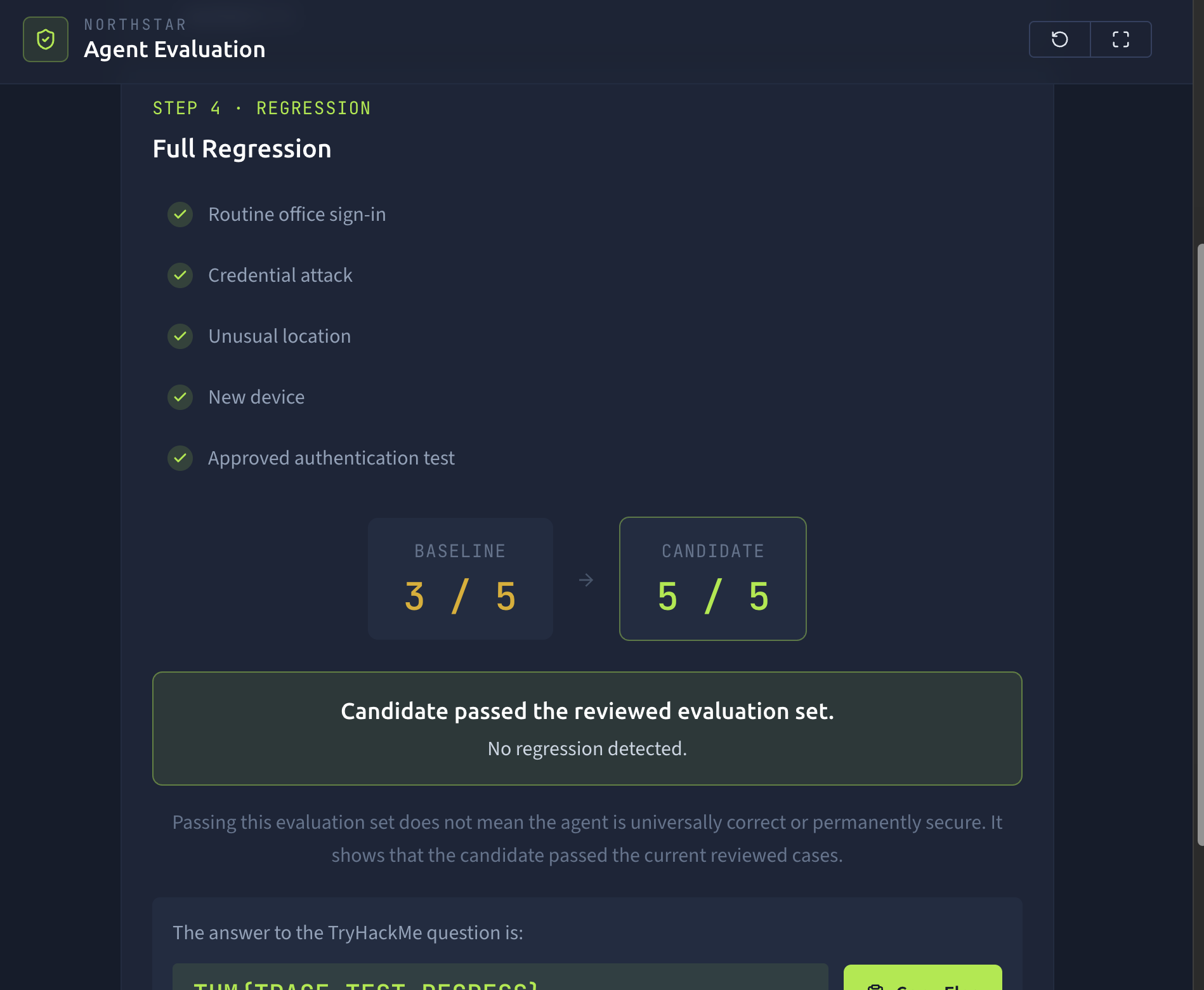
5 / 5 passed
The workspace also compares the new result with the original baseline:
BASELINE                 CANDIDATE

3 / 5                    5 / 5
The two previously failing investigations now pass, while the three investigations that already worked continue to pass.
This is stronger evidence of improvement than testing only the changed cases.
What Does 5 / 5 Mean?
The result shows that the candidate passed the current reviewed evaluation set.
It does not prove that the agent will always behave correctly, nor does it mean that every possible security investigation has been tested.
Real agent evaluation normally expands over time as teams discover:
New failure modes
Edge cases
Regressions
Changes to prompts, tools, or models
New security requirements
Each useful failure can become another evaluation case that protects future versions of the agent.
The important workflow is therefore not simply:
Make a change
→ get a better answer
It is:
Measure
   ↓
Diagnose
   ↓
Improve
   ↓
Retest
   ↓
Regress
Once the full regression reaches 5 / 5, the workspace will reveal the room flag.
Answer the questions below
What type of testing checks whether a change broke behaviour that previously worked? Regression
How many reviewed cases passed the final regression? 5
What is the flag revealed after completing the full regression? THM{TRACE_TEST_Redacted}
#### NorthStar**Agent Evaluation**

1. **Baseline**→
2. **Diagnose**→
3. **Improve**→
4. **Regression**

1. 1. →

    **Baseline**

2. 2. →

    **Diagnose**

3. 3. →

    **Improve**

4. 4.

    **Regression**


**Baseline evaluation**: 3 / 5 passed. Unusual location and new device need investigation.

**Diagnosis**: the agent searched device.device_name instead of device.device_id.

**Improvement applied**: search guidance and decision guidance updated; targeted evaluation reached 3 / 3.

Step 4 · Regression

## **Full Regression**

- Routine office sign-inpassed
- Credential attackpassed
- Unusual locationpassed
- New devicepassed
- Approved authentication testpassed

Baseline

# **3 / 5**

→

Candidate

# **5 / 5**

### **Candidate passed the reviewed evaluation set.**

No regression detected.

*Passing this evaluation set does not mean the agent is universally correct or permanently secure. It shows that the candidate passed the current reviewed cases.*
Conclusion
Congratulations! You have completed Agent Evaluation and taken the NorthStar agent from a working candidate to one whose improvements can be measured and verified.
Throughout this room, you moved from trusting a convincing agent response to evaluating whether the NorthStar Security Investigation Agent behaves reliably across reviewed investigations.
You established a baseline, identified failed measurements, diagnosed an evidence-retrieval problem, applied a focused improvement, corrected the remaining verdict issue, and finally ran a complete regression to confirm that previously working behaviour still passed.
The final improvement from:
3 / 5
to:
5 / 5
was useful, but the most important result was understanding why the agent failed and how the evaluation demonstrated that the candidate improved.