Advent of Cyber Prep Track (TryHackMe)

It’s December once again, and it’s the season for Advent of Cyber by TryHackMe, which runs from the 1st to the 30th of this month. The 24 daily challenges are beginner-friendly, and the beauty of it there are top creators and cybersecurity professionals who will be guiding through videos for each day’s challenge, and also there are written walkthroughs. Apart from this, there are prizes to be won, and the challenges will cover skills linked to:
Exploitation with cURL
Web Attack Forensics
Phishing Detection
Malware Analysis
AWS Security
Linux CLI
SOC Alert Triage
Password Cracking
Splunk Basics
Network Discovery
Container Escape
IDOR Exploitation
Prompt Injection
Web Log Analysis
Registry Forensics
Social Engineering
AI in Security
CyberChef
ICS/Modbus
YARA Rules
Race Conditions
C2 Detection
Obfuscation

Welcome to Advent of Cyber 2025!
In this year’s Advent of Cyber, something isn't quite right in Wareville. Can you help save the town and their beloved SOC-mas tradition from the evil grasp of King Malhare?
Dive into the wonderful world of cyber security by engaging in festive beginner-friendly challenges every day in the lead-up to Christmas!
Advent of Cyber is available to all TryHackMe users, and best of all, it's free to participate in. You’ll also be in with the chance of winning from this year’s huge $150,000 prize draw. The more rooms you complete, the higher your chances of winning BIG!
Main Prizes
This year is our biggest and best prize draw yet, with over $150,000 worth of prizes!
In this event, the number of rooms you complete really matters! For each question answered, you'll receive a raffle ticket. The more raffle tickets you collect, the higher your chances of winning big!
Here are the prizes up for grabs:
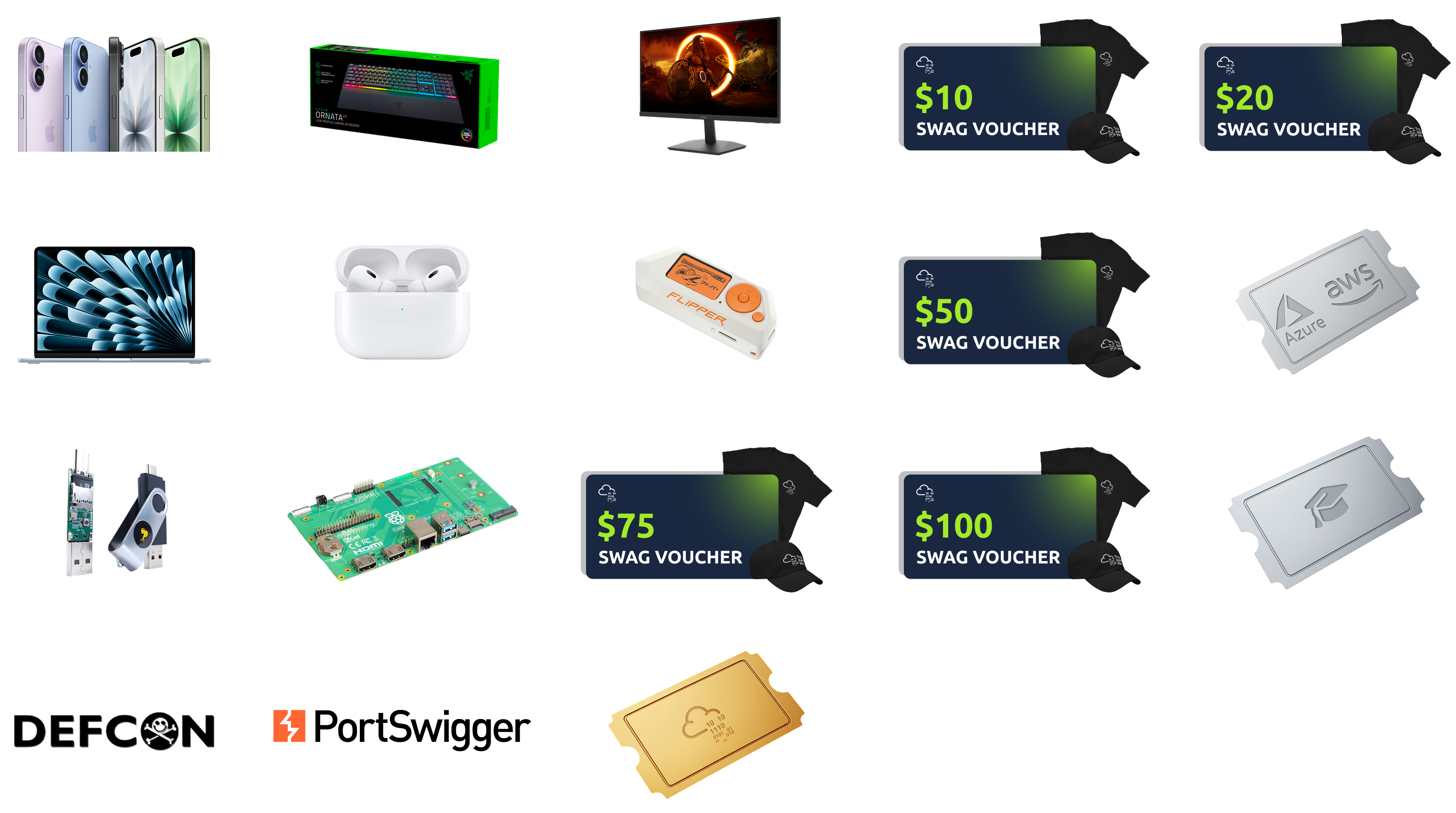
| 5 x MacBook Air M4 | 500 x THM Subscriptions (1 Month) |
| 3 x iPhone 17 | 300 x THM Subscriptions (3 Months) |
| 15 x Apple AirPod 4 | 100 x THM Subscriptions (6 Months) |
| 10 x Samsung Curved Monitors | 80 x THM Subscriptions (12 Months) |
| 10 x Ornata Gaming Keyboards with Chroma RGB Backlighting | 250 x TryHackMe Swag Gift Cards ($10.00) |
| 10 x Flipper Zeros | 200 x TryHackMe Swag Gift Cards ($20.00) |
| 10 x Raspberry Pi Compute Module 5 IO board | 100 x TryHackMe Swag Gift Cards ($50.00) |
| 20 x HAK5 Rubber Ducky | 80 x TryHackMe Swag Gift Cards ($75.00) |
| 3 x DefCon Tickets | 20 x TryHackMe Swag Gift Cards ($100.00) |
| 3 x Sponored Cyber Bootcamps | 5 x BurpSuite 6 Month Subscriptions |
| 100 x SAL1 Certifications | 100 x BurpSuite Web Security Certifications |
| 100 x PT1 Certifications | 10 x AWS & Azure Cloud Licenses |
All winners will be chosen at random, verified by our team (no cheating allowed!), and contacted by Thursday, 8 January 2026.
General Rules
Breaking any of the following rules will result in elimination from the event:
.tryhackme.com and the OpenVPN server are off-limits to probing, scanning, or exploiting
Users are only authorised to hack machines deployed in the rooms they have access to
Users are not to target or attack other users
Users should only enter the event once, using one account
Answers to questions are not to be shared unless shown on videos/streams
Cheating
Usage of bot accounts
For the prize raffle terms and conditions, please visit this page.
Please note: Cheating is NOT allowed and will result in a disqualification from the Advent of Cyber event. All winners will be fully verified. This includes, in particular:
creating puppet accounts to inflate your chance to win
using bots to auto-complete the answers in the room
How To Qualify
To qualify for the main prizes, you must complete the rooms in the Advent of Cyber 2025 event, starting with Day 1. Only room completions in the Advent of Cyber 2025 roadmap will qualify you for the raffle.
It doesn't matter when you complete rooms. You just need to complete them by 31st December 2025. For example, if you complete Day 1 on 31st December 2025, you will still receive the same amount of raffle tickets as a user who completes on the day of the task release!
You don't have to complete all the rooms or complete them in order. The more rooms you complete, the more raffle tickets you get and the higher your chances of winning.
Please visit this page to read the detailed Raffle Terms and Conditions.
Certificate
Finally, if you complete every room in the event, you will earn a certificate of completion! As your name will be included on the certificate, we advise ensuring your full name is set (and updated) in your profile.
Featured Videos
Each room released has a supporting video walkthrough to guide you through. You can expect to see some of your favourite cyber security video creators. All videos will be available within the relevant task content.
This year's Advent of Cyber featured creators include John Hammond, 0day, UnixGuy, Bearded I.T. Dad, Mad Hat, Day Cyberwox, Marcus Hutchins, David Alves, Bitten Tech, Grant Collins, Eric Parker and more!
Join our community
Follow us on social media for exclusive giveaways, Advent of Cyber rooms releases, and your weekly missions!
Follow us on LinkedIn! | Be a part of our community and join our Discord! | Follow us on X to receive daily challenge posts! |
Join us on Instagram! | Follow us on Facebook! | Join our growing subreddit! | Follow our TikTok! |
Join our Discord
Discord is the heartbeat of the TryHackMe community. It's where we go to connect with fellow hackers, get help with difficult rooms, and find out when a new room launches. Our Discord server has over 326,000 members (and continues to grow every day), so there's always something happening.
Are you excited about Advent of Cyber? Visit a dedicated channel on our Discord, where you can chat with other participants in the event and follow the daily releases!
If you haven't used it before, it's very easy to set up (we recommend installing the app). We'll ask a couple of onboarding questions to help figure out which channels are most relevant to you.
What do you get with Discord?
There are so many benefits to joining:
Discuss the day's Advent of Cyber challenges and receive support in a dedicated channel.
Discover how to improve your job applications and fast-track your way into a cyber career.
Learn about upcoming TryHackMe events and challenges.
Browse discussion forums for all of our learning paths and releases.
Click on this link to join our Discord Server: Join the Community!
Grab your swag!
Want to rep swag from your favourite cyber security training platform? We have a NEW special edition Advent of Cyber swag, now available for order!

Introduction
Let's Get Warmed Up
The snow has started falling in Wareville, home of The Best Festival Company (TBFC). The team is preparing for SOCMAS, the annual cyber celebration, but something’s not right. Systems are glitching, passwords are failing, and McSkidy suspects something is afoot. This name keeps coming up: King Malhare. What could it mean?
Before joining the SOCMAS Response Team, you can complete 10 short missions to ensure you are ready. Each one teaches an essential cyber security skill and uncovers clues to help get you ready for Advent of Cyber 2025.

How it Works
To start each challenge, click the “View Site” button in the top-right corner of the task page. You’ll need to press this button again for every new task, as each one loads its own challenge site. Once clicked, the room will open in a split-screen view, letting you follow the instructions on the left while interacting with the challenge on the right. This is where you’ll complete all of our interactive challenges to get you ready for this year's event!
Challenge 1 — Password Pandemonium
Password Pandemonium
As you log into your new TBFC workstation, an alert pops up:
“Weak passwords detected on 73 TBFC accounts!”
Even McSkidy’s password, P@ssw0rd123, has been flagged. Before gaining full access, you’ll need to prove your password prowess.
Strong passwords are one of the simplest yet most effective defences against cyber attacks.
Objective:
Create a password that passes all system checks and isn’t found in the leaked password list.
Steps:
Enter a password with at least 12 characters.
Include uppercase, lowercase, numbers, and symbols.
Ensure it isn’t in the breach database.
Answer the questions below
What's the flag?
For this challenge, just follow the instructions by creating a secure password that has 12 characters that include uppercase, lowercase, numbers, and symbols.


Challenge 2 — The Suspicious Chocolate.exe
The Suspicious Chocolate.exe
A shiny USB labelled “SOCMAS Party Playlist” appears on your desk. Inside is a mysterious file called chocolate.exe.
It looks festive, but who sent it?
In this challenge, you’ll scan the file using a simulated VirusTotal tool to decide whether it’s safe or malicious.
Checking suspicious files is a crucial skill for every defender.
Objective:
Determine if chocolate.exe is safe or infected.
Steps:
Click the “Scan” Button.
Review the scan report (49 clean results, 1 malicious).
Decide correctly whether the file is safe or dangerous.
Answer the questions below
What's the flag?
For this challenge, we’ve access to VirusTotal, which is a malware analysis tool. We will scan the file that has been provided, i.e, chocolate.exe then based on the results, we’ll select whether it’s safe or malicious for the flag to be revealed.


Challenge 3 — Welcome to the AttackBox!
Welcome to the AttackBox!
You step into TBFC’s AttackBox, a secure virtual environment built for training. The system hums quietly, waiting for your first command.
This is where defenders learn, break, and rebuild safely. Getting comfortable with the command line is your first step toward cyber mastery.
Objective:
Find and read the hidden welcome message inside your AttackBox.
Steps:
Use
lsto list files.Use
cd challenges/to change directories.Use
cat welcome.txtto read the text file.
Answer the questions below
What's the flag?
This challenge tests your Linux skills, like accessing folders and opening files

Challenge 4 — The CMD Conundrum

The CMD Conundrum
McSkidy’s workstation shows signs of tampering, suspicious files moved, logs wiped, and a strange folder named mystery_data.
It’s time to use the Windows Command Prompt to uncover what’s hidden.
Learning these commands helps you investigate systems and find what the GUI can’t.
Objective:
Find the hidden flag file using Windows commands.
Steps:
Use
dirto list visible files.Try
dir /ato reveal hidden ones.Use
type hidden_flag.txtto read the flag.
Answer the questions below
What's the flag?
This challenge tests your Windows OS skills, like file navigation and opening files.

Challenge 5 — Linux Lore
Linux Lore
TBFC’s delivery drones are glitching, dropping eggs instead of presents! McSkidy’s last login came from a Linux server, and something in his account might explain why.
Linux powers most servers worldwide, and knowing how to search within it is a must for any defender.
Objective:
Locate McSkidy’s hidden message in his Linux home directory.
Steps:
Use
cd /home/mcskidy/to enter his folder.Run
ls -lato show all files.Use
cat .secret_messageto reveal the flag.
Answer the questions below
What's the flag?

Challenge 6 — The Leak in the List
The Leak in the List
Rumours swirl that TBFC’s data has been leaked. Emails are bouncing, and the staff are panicking.
McSkidy suspects his account might have been part of a breach.
Defenders often use tools like Have I Been Pwned to check for compromised accounts. Early detection can stop an attack from spreading.
Objective:
Check if McSkidy’s email has appeared in a breach.
Steps:
Enter
mcskidy@tbfc.cominto the breach checker.Review results for each domain.
Identify the one marked “Compromised.”
Answer the questions below
What's the flag?


Challenge 7 — WiFi Woes in Wareville
WiFi Woes in Wareville
The TBFC drones are looping endlessly over Wareville Square. Someone logged into the company router using default credentials!
Securing WiFi is critical. Default passwords are like leaving the front gate wide open.
Objective:
Log into the router and secure it with a strong new password.
Steps:
Log in with username
adminand passwordadmin.Go to “Security Settings.”
Set a new strong password that passes validation.
Answer the questions below
What's the flag?


Challenge 8 — The App Trap
The App Trap
McSkidy’s social account has gone rogue, posting strange messages about “EASTMAS.” A suspicious third party app may be behind it.
Learning to review and manage app permissions helps stop data leaks before they start.
Objective:
Find and remove the malicious connected app.
Steps:
Review the list of connected apps.
Look for one with unusual permissions (like “password vault” access).
Click “Revoke Access.”
Answer the questions below
What's the flag?


Challenge 9 — The Chatbot Confession
The Chatbot Confession
TBFC’s AI assistant, FestiveBot, was meant to help write cheerful emails, but it’s been spilling secrets.
Some messages reveal internal URLs and even passwords.
AI tools can be powerful, but defenders must know how to prevent them from oversharing.
Objective:
Identify which chatbot messages contain sensitive information.
Steps:
Read each line of the conversation.
Select the ones containing private data.
Submit your findings.
Answer the questions below
What's the flag?


Challenge 10 — The Bunny’s Browser Trail
The Bunny’s Browser Trail
SOCMAS web servers are showing heavy traffic, but one log entry stands out:
“User Agent: BunnyOS/1.0 (HopSecBot)”
Someone or something has infiltrated the system.
User Agent strings help defenders spot automated or suspicious visitors in network logs.
Objective:
Find the unusual User Agent in the HTTP log.
Steps:
Read the provided web log entries.
Compare them to common browsers (Chrome, Firefox, Edge).
Identify and select the suspicious entry.
Answer the questions below
What's the flag?


The Finish Line
Consider Yourself Warmed Up!
Well done for making your way through Advent of Cyber 2025's Prep Track! These mini challenges have been designed to familiarise you with some of the key tricks and tools you'll need at your disposal to help save SOC-mas in this year's event. If you're looking to start your cyber security journey, there's no better place to do it than with us, as we take you on a tour of topics from Linux CLI to Prompt Injection, getting you up to speed with the world of cyber and all, while earning chances to win some of our amazing prizes in our annual AoC giveaway!
Sounds like fun? It is! And you can wait for the fun to begin at this year's Advent of Cyber landing page!




