Vulnerability Scanning Tools (TryHackMe)

Introduction
Vulnerability scanning is an automated process that identifies weaknesses, misconfigurations, and potential security issues across systems, networks, web applications, and devices. It’s usually one of the first steps in a penetration test or security assessment.

Learning Objectives
Understand what vulnerability scanning is and why it is crucial for securing systems and networks
Learn key concepts, including vulnerabilities, CVEs, CVSS, and common types of scanners
Gain practical skills using Nmap, OpenVAS, and Nikto to identify and analyse vulnerabilities
Develop the ability to interpret scan results and understand their security impact
Learn best practices for performing safe, effective, and ethical vulnerability scans
Prerequisites
You should have a better understanding of the following rooms before starting:
Important Topics
In this task, the basic terminology used in vulnerability assessment will be reviewed. The goal is to build a clear understanding of core concepts, including vulnerabilities, CVEs, CVSS scores, and common scanner types. This foundational knowledge will support the practical scanning activities in the upcoming tasks.
Core Terminology
Vulnerability
A vulnerability is a weakness or flaw in a system that could be exploited to bypass security or gain unauthorised access. It may result from outdated software, poor configuration, or design mistakes. For example, like a door with a broken lock that anyone can open, even though it’s supposed to stay secure.
Common Vulnerabilities and Exposures (CVE)
A CVE is a unique identification number assigned to a publicly known security flaw, enabling consistent tracking across various tools and databases. It helps security teams quickly reference and research the issue. For example, similar to a product recall number for a faulty car part, but applied to software vulnerabilities.
Common Vulnerability Scoring System (CVSS)
CVSS provides a standardised score (0-10) that measures the severity or risk of a vulnerability based on its impact and exploitability. Higher scores indicate issues that require urgent attention. For example, much like weather alerts that classify storms as mild, moderate, or severe.
Misconfiguration
A misconfiguration occurs when a system or service is set up incorrectly, creating unnecessary security weaknesses. These issues often arise from default settings, open permissions, or a lack of hardening. For example, leaving a Wi-Fi network protected with a password like “123456”.
Software Vulnerability
A software vulnerability is a flaw in an application’s code or logic that allows unintended behaviour or exploitation. These weaknesses often require developers to apply patches or updates. For example, a calculator app that crashes or behaves strangely when certain inputs are entered.
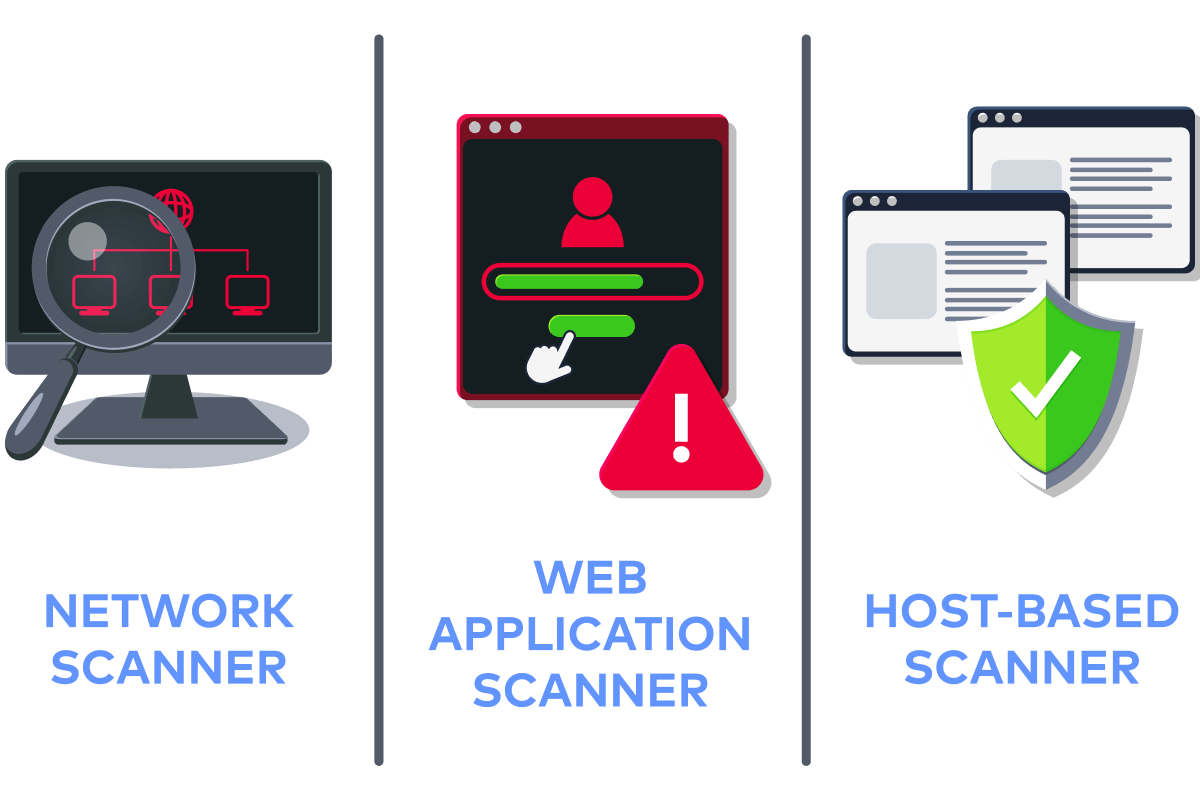
Types of Vulnerability Scanners
Network Scanner
A network scanner examines devices on a network to identify open ports, running services, and possible exposure points. It helps map out what systems are accessible and where risks may exist. For example, walking down a street and checking which doors or windows are unlocked.
Web Application Scanner
A web application scanner analyses websites or web apps for security issues, including outdated components, weak configurations, or risky behaviours. It focuses specifically on the HTTP/HTTPS layer. For example, testing a login form to see if it accepts weak or unexpected inputs.
Host-Based Scanner
A host-based scanner runs directly on a system to check for missing patches, outdated software, and insecure configuration settings. It provides a detailed view of internal system health. For example, similar to an antivirus that reviews installed programs for known issues, not just malware.
Output of a Scanning Report
Include the severity level, indicating how serious the issue is
Detected services and version information
Related CVEs or known risks
Recommended fixes or mitigation steps
Answer the questions below
What is the maximum range for a CVSS score? 10
What is a scanner called that examines devices on a network to identify open ports and running services? network scanner
Nmap
Network Mapper (Nmap) is a widely used network scanning tool that discovers hosts, identifies open ports, and determines which services are running on systems. It plays a key role in the early stages of vulnerability assessment by helping analysts understand what is exposed on a network. Before any vulnerability can be tested or exploited, Nmap is used to map the attack surface and gather essential information about the target environment.
Scanning the Environment
In this practical section, the attached VM will serve as the target environment. Open the terminal on your AttackBox or local machine and perform Nmap scans against the provided MACHINE_IP. As a pentester, your task is to enumerate this single IP address just as you would during an initial assessment. The following steps will guide you through host discovery, port scanning, service detection, and basic vulnerability identification using Nmap.
Host Discovery
Host discovery determines which devices on a network are active and responding. This step helps build a list of live systems to focus on before deeper scanning. In the attached VM, open the terminal and execute the command nmap -sn MACHINE_IP:
Vulnerability Scanning
ubuntu@tryhackme:~$ nmap -sn MACHINE_IP
Starting Nmap 7.94SVN ( https://nmap.org ) at 2025-11-28 17:32 UTC
Nmap scan report for ip-MACHINE_IP.eu-west-1.compute.internal (MACHINE_IP)
Host is up (0.00014s latency).
Nmap done: 1 IP address (1 host up) scanned in 0.00 seconds
In the output above, Nmap confirms that the target machine at MACHINE_IP is active and responding to probes. Since this is a host-only discovery scan, no ports or services are checked; Nmap reports whether the system is reachable. This step verifies that the machine is online before moving on to deeper enumeration.
Port Scanning
Port scanning identifies which ports are open and what communication pathways are available. Open ports often reveal running services that may contain vulnerabilities or misconfigurations. In the attached VM, run the command nmap -sV MACHINE_IP:
Vulnerability Scanning
buntu@tryhackme:~$ nmap -sV MACHINE_IP
Starting Nmap 7.94SVN ( https://nmap.org ) at 2025-12-06 18:43 UTC
Nmap scan report for ip-MACHINE_IP.eu-west-1.compute.internal (MACHINE_IP)
Host is up (0.00022s latency).
Not shown: 995 closed tcp ports (conn-refused)
PORT     STATE SERVICE VERSION
21/tcp   open  ftp     vsftpd 3.0.5
22/tcp   open  ssh     OpenSSH 9.6p1 Ubuntu 3ubuntu13.11 (Ubuntu Linux; protocol 2.0)
80/tcp   open  http    WebSockify Python/3.12.3
5901/tcp open  vnc     VNC (protocol 3.8)
8080/tcp open  http    Apache httpd 2.4.58 ((Ubuntu))
1 service unrecognized despite returning data. If you know the service/version, please submit the following fingerprint at https://nmap.org/cgi-bin/submit.cgi?new-service :
SF-Port80-TCP:V=7.94SVN%I=7%D=12/6%Time=69347965%P=x86_64-pc-linux-gnu%r(G
SF:etRequest,21C,"HTTP/1\.1\x20405\x20Method\x20Not\x20Allowed\r\nServer:\
SF:x20WebSockify\x20Python/3\.12\.3\r\nDate:\x20Sat,\x2006\x20Dec\x202025\
SF:x2018:43:49\x20GMT\r\nConnection:\x20close\r\nContent-Type:\x20text/htm
SF:l;charset=utf-8\r\nContent-Length:\x20355\r\n\r\n<!DOCTYPE\x20HTML>\n<h
SF:tml\x20lang=\"en\">\n\x20\x20\x20\x20<head>\n\x20\x20\x20\x20\x20\x20\x
SF:20\x20<meta\x20charset=\"utf-8\">\n\x20\x20\x20\x20\x20\x20\x20\x20<tit
SF:le>Error\x20response</title>\n\x20\x20\x20\x20</head>\n\x20\x20\x20\x20
SF:<body>\n\x20\x20\x20\x20\x20\x20\x20\x20<h1>Error\x20response</h1>\n\x2
SF:0\x20\x20\x20\x20\x20\x20\x20<p>Error\x20code:\x20405</p>\n\x20\x20\x20
SF:\x20\x20\x20\x20\x20<p>Message:\x20Method\x20Not\x20Allowed\.</p>\n\x20
SF:\x20\x20\x20\x20\x20\x20\x20<p>Error\x20code\x20explanation:\x20405\x20
SF:-\x20Specified\x20method\x20is\x20invalid\x20for\x20this\x20resource\.<
SF:/p>\n\x20\x20\x20\x20</body>\n</html>\n")%r(HTTPOptions,22D,"HTTP/1\.1\
SF:x20501\x20Unsupported\x20method\x20\('OPTIONS'\)\r\nServer:\x20WebSocki
SF:fy\x20Python/3\.12\.3\r\nDate:\x20Sat,\x2006\x20Dec\x202025\x2018:43:49
SF:\x20GMT\r\nConnection:\x20close\r\nContent-Type:\x20text/html;charset=u
SF:tf-8\r\nContent-Length:\x20360\r\n\r\n<!DOCTYPE\x20HTML>\n<html\x20lang
SF:=\"en\">\n\x20\x20\x20\x20<head>\n\x20\x20\x20\x20\x20\x20\x20\x20<meta
SF:\x20charset=\"utf-8\">\n\x20\x20\x20\x20\x20\x20\x20\x20<title>Error\x2
SF:0response</title>\n\x20\x20\x20\x20</head>\n\x20\x20\x20\x20<body>\n\x2
SF:0\x20\x20\x20\x20\x20\x20\x20<h1>Error\x20response</h1>\n\x20\x20\x20\x
SF:20\x20\x20\x20\x20<p>Error\x20code:\x20501</p>\n\x20\x20\x20\x20\x20\x2
SF:0\x20\x20<p>Message:\x20Unsupported\x20method\x20\('OPTIONS'\)\.</p>\n\
SF:x20\x20\x20\x20\x20\x20\x20\x20<p>Error\x20code\x20explanation:\x20501\
SF:x20-\x20Server\x20does\x20not\x20support\x20this\x20operation\.</p>\n\x
SF:20\x20\x20\x20</body>\n</html>\n")%r(RTSPRequest,16C,"<!DOCTYPE\x20HTML
SF:>\n<html\x20lang=\"en\">\n\x20\x20\x20\x20<head>\n\x20\x20\x20\x20\x20\
SF:x20\x20\x20<meta\x20charset=\"utf-8\">\n\x20\x20\x20\x20\x20\x20\x20\x2
SF:0<title>Error\x20response</title>\n\x20\x20\x20\x20</head>\n\x20\x20\x2
SF:0\x20<body>\n\x20\x20\x20\x20\x20\x20\x20\x20<h1>Error\x20response</h1>
SF:\n\x20\x20\x20\x20\x20\x20\x20\x20<p>Error\x20code:\x20400</p>\n\x20\x2
SF:0\x20\x20\x20\x20\x20\x20<p>Message:\x20Bad\x20request\x20version\x20\(
SF:'RTSP/1\.0'\)\.</p>\n\x20\x20\x20\x20\x20\x20\x20\x20<p>Error\x20code\x
SF:20explanation:\x20400\x20-\x20Bad\x20request\x20syntax\x20or\x20unsuppo
SF:rted\x20method\.</p>\n\x20\x20\x20\x20</body>\n</html>\n");
Service Info: OSs: Unix, Linux; CPE: cpe:/o:linux:linux_kernel

Service detection performed. Please report any incorrect results at https://nmap.org/submit/ .
Nmap done: 1 IP address (1 host up) scanned in 78.82 seconds
In the output above, Nmap discovers four open and active services on the target system: FTP (21), SSH (22), an HTTP service running through WebSockify on port 80, and a VNC service on port 5901. These exposed services reveal how the machine communicates externally and indicate potential entry points for attackers. The scan also detects service versions, which are important because outdated or misconfigured versions may contain known vulnerabilities.
Aggressive Scan
An aggressive scan performs deeper enumeration, including OS detection, service versions, running scripts, and traceroute. It provides far more detailed information than basic scans, but it also generates louder, more noticeable traffic. This scan simulates a more thorough early-stage assessment performed during penetration testing. In the attached VM, issue the command nmap -A MACHINE_IP:
Vulnerability Scanning
ubuntu@tryhackme:/var/www/html$ nmap -A MACHINE_IP
Starting Nmap 7.94SVN ( https://nmap.org ) at 2025-12-06 18:47 UTC
Nmap scan report for ip-MACHINE_IP.eu-west-1.compute.internal (MACHINE_IP)
Host is up (0.00022s latency).
Not shown: 995 closed tcp ports (conn-refused)
PORT     STATE SERVICE VERSION
21/tcp   open  ftp     vsftpd 3.0.5
|_ftp-anon: Anonymous FTP login allowed (FTP code 230)
| ftp-syst:
|   STAT:
| FTP server status:
|      Connected to ::ffff:10.82.73.204
|      Logged in as ftp
|      TYPE: ASCII
|      No session bandwidth limit
|      Session timeout in seconds is 300
|      Control connection is plain text
|      Data connections will be plain text
|      At session startup, client count was 2
|      vsFTPd 3.0.5 - secure, fast, stable
|_End of status
22/tcp   open  ssh     OpenSSH 9.6p1 Ubuntu 3ubuntu13.11 (Ubuntu Linux; protocol 2.0)
| ssh-hostkey:
|   256 dc:28:44:c6:90:2d:6a:a2:ae:ec:62:eb:0d:cb:5d:97 (ECDSA)
|_  256 ec:c5:fa:37:31:eb:e7:56:8e:05:d5:5a:d1:58:7d:5e (ED25519)
80/tcp   open  http    WebSockify Python/3.12.3
|_http-server-header: WebSockify Python/3.12.3
| fingerprint-strings:
|   GetRequest:
|     HTTP/1.1 405 Method Not Allowed
|     Server: WebSockify Python/3.12.3
|     Date: Sat, 06 Dec 2025 18:47:24 GMT
|     Connection: close
|     Content-Type: text/html;charset=utf-8
|     Content-Length: 355
|     <!DOCTYPE HTML>
|     <html lang="en">
|     <head>
|     <meta charset="utf-8">
|     <title>Error response</title>
|     </head>
|     <body>
|     <h1>Error response</h1>
|     <p>Error code: 405</p>
|     <p>Message: Method Not Allowed.</p>
|     <p>Error code explanation: 405 - Specified method is invalid for this resource.</p>
|     </body>
|     </html>
|   HTTPOptions:
|     HTTP/1.1 501 Unsupported method ('OPTIONS')
|     Server: WebSockify Python/3.12.3
|     Date: Sat, 06 Dec 2025 18:47:24 GMT
|     Connection: close
|     Content-Type: text/html;charset=utf-8
|     Content-Length: 360
|     <!DOCTYPE HTML>
|     <html lang="en">
|     <head>
|     <meta charset="utf-8">
|     <title>Error response</title>
|     </head>
|     <body>
|     <h1>Error response</h1>
|     <p>Error code: 501</p>
|     <p>Message: Unsupported method ('OPTIONS').</p>
|     <p>Error code explanation: 501 - Server does not support this operation.</p>
|     </body>
|     </html>
|   RTSPRequest:
|     <!DOCTYPE HTML>
|     <html lang="en">
|     <head>
|     <meta charset="utf-8">
|     <title>Error response</title>
|     </head>
|     <body>
|     <h1>Error response</h1>
|     <p>Error code: 400</p>
|     <p>Message: Bad request version ('RTSP/1.0').</p>
|     <p>Error code explanation: 400 - Bad request syntax or unsupported method.</p>
|     </body>
|_    </html>
|_http-title: Error response
5901/tcp open  vnc     VNC (protocol 3.3; Locked out)
8080/tcp open  http    Apache httpd 2.4.58 ((Ubuntu))
|_http-title: AtlasNews \xE2\x80\x94 Company News
|_http-server-header: Apache/2.4.58 (Ubuntu)
|_http-open-proxy: Proxy might be redirecting requests
| http-cookie-flags:
|   /:
|     PHPSESSID:
|_      httponly flag not set
1 service unrecognized despite returning data. If you know the service/version, please submit the following fingerprint at https://nmap.org/cgi-bin/submit.cgi?new-service :
SF-Port80-TCP:V=7.94SVN%I=7%D=12/6%Time=69347A3C%P=x86_64-pc-linux-gnu%r(G
SF:etRequest,21C,"HTTP/1\.1\x20405\x20Method\x20Not\x20Allowed\r\nServer:\
SF:x20WebSockify\x20Python/3\.12\.3\r\nDate:\x20Sat,\x2006\x20Dec\x202025\
SF:x2018:47:24\x20GMT\r\nConnection:\x20close\r\nContent-Type:\x20text/htm
SF:l;charset=utf-8\r\nContent-Length:\x20355\r\n\r\n<!DOCTYPE\x20HTML>\n<h
SF:tml\x20lang=\"en\">\n\x20\x20\x20\x20<head>\n\x20\x20\x20\x20\x20\x20\x
SF:20\x20<meta\x20charset=\"utf-8\">\n\x20\x20\x20\x20\x20\x20\x20\x20<tit
SF:le>Error\x20response</title>\n\x20\x20\x20\x20</head>\n\x20\x20\x20\x20
SF:<body>\n\x20\x20\x20\x20\x20\x20\x20\x20<h1>Error\x20response</h1>\n\x2
SF:0\x20\x20\x20\x20\x20\x20\x20<p>Error\x20code:\x20405</p>\n\x20\x20\x20
SF:\x20\x20\x20\x20\x20<p>Message:\x20Method\x20Not\x20Allowed\.</p>\n\x20
SF:\x20\x20\x20\x20\x20\x20\x20<p>Error\x20code\x20explanation:\x20405\x20
SF:-\x20Specified\x20method\x20is\x20invalid\x20for\x20this\x20resource\.<
SF:/p>\n\x20\x20\x20\x20</body>\n</html>\n")%r(HTTPOptions,22D,"HTTP/1\.1\
SF:x20501\x20Unsupported\x20method\x20\('OPTIONS'\)\r\nServer:\x20WebSocki
SF:fy\x20Python/3\.12\.3\r\nDate:\x20Sat,\x2006\x20Dec\x202025\x2018:47:24
SF:\x20GMT\r\nConnection:\x20close\r\nContent-Type:\x20text/html;charset=u
SF:tf-8\r\nContent-Length:\x20360\r\n\r\n<!DOCTYPE\x20HTML>\n<html\x20lang
SF:=\"en\">\n\x20\x20\x20\x20<head>\n\x20\x20\x20\x20\x20\x20\x20\x20<meta
SF:\x20charset=\"utf-8\">\n\x20\x20\x20\x20\x20\x20\x20\x20<title>Error\x2
SF:0response</title>\n\x20\x20\x20\x20</head>\n\x20\x20\x20\x20<body>\n\x2
SF:0\x20\x20\x20\x20\x20\x20\x20<h1>Error\x20response</h1>\n\x20\x20\x20\x
SF:20\x20\x20\x20\x20<p>Error\x20code:\x20501</p>\n\x20\x20\x20\x20\x20\x2
SF:0\x20\x20<p>Message:\x20Unsupported\x20method\x20\('OPTIONS'\)\.</p>\n\
SF:x20\x20\x20\x20\x20\x20\x20\x20<p>Error\x20code\x20explanation:\x20501\
SF:x20-\x20Server\x20does\x20not\x20support\x20this\x20operation\.</p>\n\x
SF:20\x20\x20\x20</body>\n</html>\n")%r(RTSPRequest,16C,"<!DOCTYPE\x20HTML
SF:>\n<html\x20lang=\"en\">\n\x20\x20\x20\x20<head>\n\x20\x20\x20\x20\x20\
SF:x20\x20\x20<meta\x20charset=\"utf-8\">\n\x20\x20\x20\x20\x20\x20\x20\x2
SF:0<title>Error\x20response</title>\n\x20\x20\x20\x20</head>\n\x20\x20\x2
SF:0\x20<body>\n\x20\x20\x20\x20\x20\x20\x20\x20<h1>Error\x20response</h1>
SF:\n\x20\x20\x20\x20\x20\x20\x20\x20<p>Error\x20code:\x20400</p>\n\x20\x2
SF:0\x20\x20\x20\x20\x20\x20<p>Message:\x20Bad\x20request\x20version\x20\(
SF:'RTSP/1\.0'\)\.</p>\n\x20\x20\x20\x20\x20\x20\x20\x20<p>Error\x20code\x
SF:20explanation:\x20400\x20-\x20Bad\x20request\x20syntax\x20or\x20unsuppo
SF:rted\x20method\.</p>\n\x20\x20\x20\x20</body>\n</html>\n");
Service Info: OSs: Unix, Linux; CPE: cpe:/o:linux:linux_kernel

Service detection performed. Please report any incorrect results at https://nmap.org/submit/ .
Nmap done: 1 IP address (1 host up) scanned in 84.05 seconds
In the output above, Nmap’s aggressive scan reveals detailed information about the target, including open ports, service versions, SSH keys, and HTTP banner data. The scan also performs OS detection and runs extra scripts to gather deeper insight into each service. This helps build a clearer understanding of the machine’s attack surface beyond basic port scanning.
Vulnerability Scanning via NSE
Nmap includes the Nmap Scripting Engine (NSE), a powerful framework that automates vulnerability checks. NSE scripts can test for common issues, weak configurations, outdated services, and more, enabling Nmap to perform lightweight vulnerability assessments.
The Nmap Scripting Engine allows Nmap to run specialised scripts written in Lua to extend its functionality. These scripts can perform tasks such as brute-force attempts, version checks, protocol analysis, and basic vulnerability detection. NSE makes Nmap more than just a port scanner; it becomes a flexible tool for in-depth exploration and early security assessment.
Vulnerability Scanning
ubuntu@tryhackme:/var/www/html$ nmap --script=ftp-anon -p21 MACHINE_IP
Starting Nmap 7.94SVN ( https://nmap.org ) at 2025-12-06 18:48 UTC
Nmap scan report for ip-MACHINE_IP.eu-west-1.compute.internal (MACHINE_IP)
Host is up (0.00020s latency).

PORT   STATE SERVICE
21/tcp open  ftp
|_ftp-anon: Anonymous FTP login allowed (FTP code 230)

Nmap done: 1 IP address (1 host up) scanned in 0.15 seconds
In the above terminal, the Nmap ftp-anon NSE script was used to test anonymous authentication on the FTP service runing on port 21. The scan confirms that the FTP server is online and responding normally. The script reports Anonymous FTP login allowed (FTP code 230), indicating that the server grants unauthenticated users access. This represents a security risk, as anyone can log in without credentials and potentially view or download exposed files. Anonymous FTP access should be disabled unless explicitly required.
Answer the questions below
What is the FTP port number on the target machine?
21What service is running on port 80 on the target machine?
WebSockifyWhat is the name of the scripting engine that allows Nmap to run specialised scripts written in Lua to extend its functionality?
Nmap Scripting Engine
Nikto Web Scanner
Nikto is a widely used web server vulnerability scanner that identifies insecure configurations, outdated components, and common web-based weaknesses. It performs a comprehensive scan of a target web server and checks it against thousands of known issues, including default files, dangerous HTTP methods, misconfigurations, and potential security exposures. While Nikto is not a stealthy tool, it is extremely effective during early web vulnerability assessments where thoroughness is more important than evasion. Before moving into deeper application-layer testing, Nikto helps determine whether the web server itself introduces weaknesses that attackers could exploit.
Scanning the Environment
In this practical step, we will scan the vulnerable web application running on port 5000, as shown below:
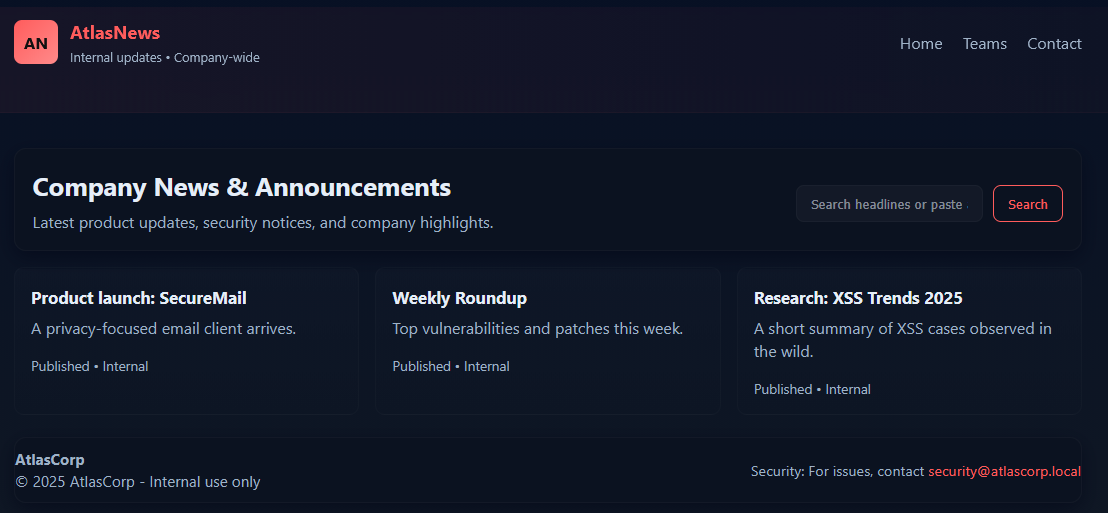
Using Nikto, we’ll identify misconfigurations, exposed files, and other common weaknesses. Begin the assessment in the target environment by running the following command nikto -h http://MACHINE_IP:8080:
ubuntu@tryhackme:~$ nikto -h http://MACHINE_IP:8080
- Nikto v2.1.5
---------------------------------------------------------------------------
+ Target IP:          10.82.73.204
+ Target Hostname:    ip-MACHINE_IP.eu-west-1.compute.internal
+ Target Port:        8080
+ Start Time:         2025-12-06 16:52:38 (GMT0)
---------------------------------------------------------------------------
+ Server: Apache/2.4.58 (Ubuntu)
+ Cookie PHPSESSID created without the httponly flag
+ The anti-clickjacking X-Frame-Options header is not present.
+ No CGI Directories found (use '-C all' to force check all possible dirs)
+ DEBUG HTTP verb may show server debugging information. See http://msdn.microsoft.com/en-us/library/e8z01xdh%28VS.80%29.aspx for details.
+ OSVDB-561: /server-status: This reveals Apache information. Comment out appropriate line in httpd.conf or restrict access to allowed hosts.
+ OSVDB-3233: /info.php: PHP is installed, and a test script which runs phpinfo() was found. This gives a lot of system information.
+ OSVDB-3268: /static/: Directory indexing found.
+ OSVDB-5292: /info.php?file=http://cirt.net/rfiinc.txt?: RFI from RSnake's list (http://ha.ckers.org/weird/rfi-locations.dat) or from http://osvdb.org/
+ 6544 items checked: 0 error(s) and 7 item(s) reported on remote host
+ End Time:           2025-12-06 16:52:45 (GMT0) (7 seconds)
---------------------------------------------------------------------------
+ 1 host(s) tested
Understanding the Nikto Scan Results
After running Nikto against the target web application, the scanner identifies several issues related to insecure configurations, unnecessary information exposure, and web server misconfigurations. These findings highlight potential entry points attackers might explore. Below is a breakdown of the results and what each item means in practical terms.
Web Server Information Disclosure (Server: Apache/2.4.58): Nikto detects the exact server version, which helps attackers look up known vulnerabilities for that version. Ideally, servers should limit the amount of version information to reduce unnecessary exposure.
Cookie Missing Security Flags (PHPSESSID created without the HttpOnly flag): This means the cookie can be accessed via client-side scripts, increasing the risk of session hijacking. Secure applications normally set both the HttpOnly and Secure flags on cookies used to handle session data.
Missing Clickjacking Protection (X-Frame-Options header not present): Without this header, the site can be embedded in an iframe, enabling “clickjacking” attacks that trick users into clicking hidden elements.
Potentially Dangerous HTTP Method (DEBUG HTTP verb available): Some servers respond to uncommon methods, such as DEBUG, which can reveal internal debugging information. This is unnecessary for normal operation and should be disabled to reduce information leakage.
Exposed PHP Info Page (/info.php found running phpinfo()): The
phpinfo()output reveals extensive system information, modules, configuration values, and environment variables and is commonly removed in production environments. Leaving it accessible introduces high information leakage risks.Directory Indexing Enabled (/static/ directory indexing): This allows anyone to browse the contents of a directory without restriction, revealing files that shouldn’t be publicly visible. Directory listing should be disabled unless absolutely required.
Remote File Inclusion (RFI) Test Detected (info.php?file=<external_link>): Nikto detected a parameter that may be vulnerable to Remote File Inclusion if mishandled. RFI vulnerabilities allow attackers to load code from external servers and execute it on the target system, one of the most severe web risks.
Overall Assessment
Nikto reports 7 notable issues out of 6,544 checks, indicating the web server has several misconfigurations and unnecessary exposures. While none of these findings alone guarantees exploitation, they significantly increase the attack surface. Many of these issues exposed status pages, missing headers, and directory indexing, and are configuration-related and can be fixed quickly through proper hardening.
Answer the questions below
What is the Apache Server version?
2.4.58nmap -p- -sV IP_Address PORT STATE SERVICE VERSION 21/tcp open ftp vsftpd 3.0.5 22/tcp open ssh OpenSSH 9.6p1 Ubuntu 3ubuntu13.11 (Ubuntu Linux; protocol 2.0) 80/tcp open http WebSockify Python/3.12.3 5901/tcp open vnc VNC (protocol 3.8) 8080/tcp open http Apache httpd 2.4.58 ((Ubuntu))Per the Nikto report, which flag is missing from the cookie in the web app?
HttpOnlynikto -h http://IP_Address:8080 - Nikto v2.1.5 --------------------------------------------------------------------------- + Target IP: IP_Address + Target Hostname: IP_Address + Target Port: 8080 + Start Time: 2026-03-30 20:07:10 (GMT1) --------------------------------------------------------------------------- + Server: Apache/2.4.58 (Ubuntu) + Cookie PHPSESSID created without the httponly flag + The anti-clickjacking X-Frame-Options header is not present. + No CGI Directories found (use '-C all' to force check all possible dirs) + DEBUG HTTP verb may show server debugging information. See http://msdn.microsoft.com/en-us/library/e8z01xdh%28VS.80%29.aspx for details. + OSVDB-3233: /info.php: PHP is installed, and a test script which runs phpinfo() was found. This gives a lot of system information. + OSVDB-3268: /static/: Directory indexing found. + OSVDB-5292: /info.php?file=http://cirt.net/rfiinc.txt?: RFI from RSnake's list (http://ha.ckers.org/weird/rfi-locations.dat) or from http://osvdb.org/ + 6544 items checked: 0 error(s) and 6 item(s) reported on remote host + End Time: 2026-03-30 20:07:17 (GMT1) (7 seconds) --------------------------------------------------------------------------- + 1 host(s) testedWhat is the name of the directory with directory listing enabled?
staticWhat is the parameter vulnerable to RFI?
file
OpenVAS & Greenbone Vulnerability Management
Now we will use OpenVAS, a powerful vulnerability scanner that assesses both host-level weaknesses and web application security issues. It provides deep, authenticated and unauthenticated scanning, making it ideal for identifying misconfigurations, outdated software, missing patches, and exposed services.
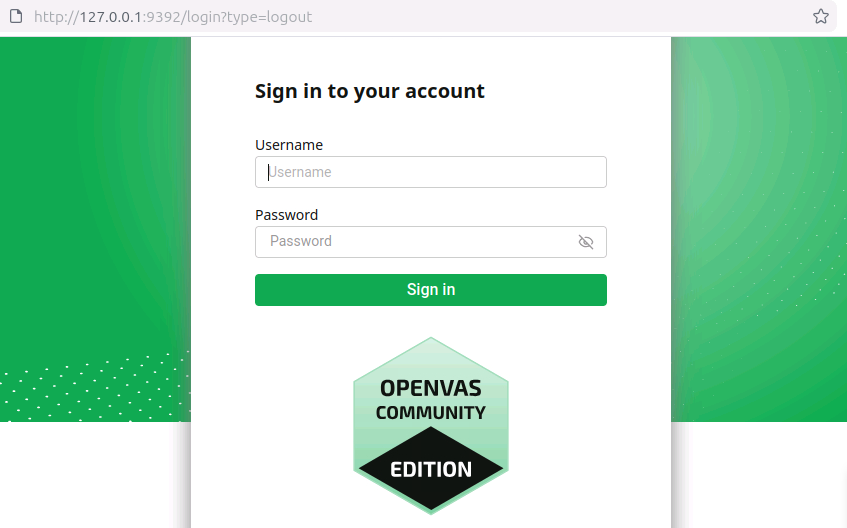
In the attached VM, OpenVAS is already running in the background. Open Firefox and navigate to the URL http://127.0.0.1:9392 to access the Greenbone Security Assistant web dashboard. You will be greeted with the login screen.
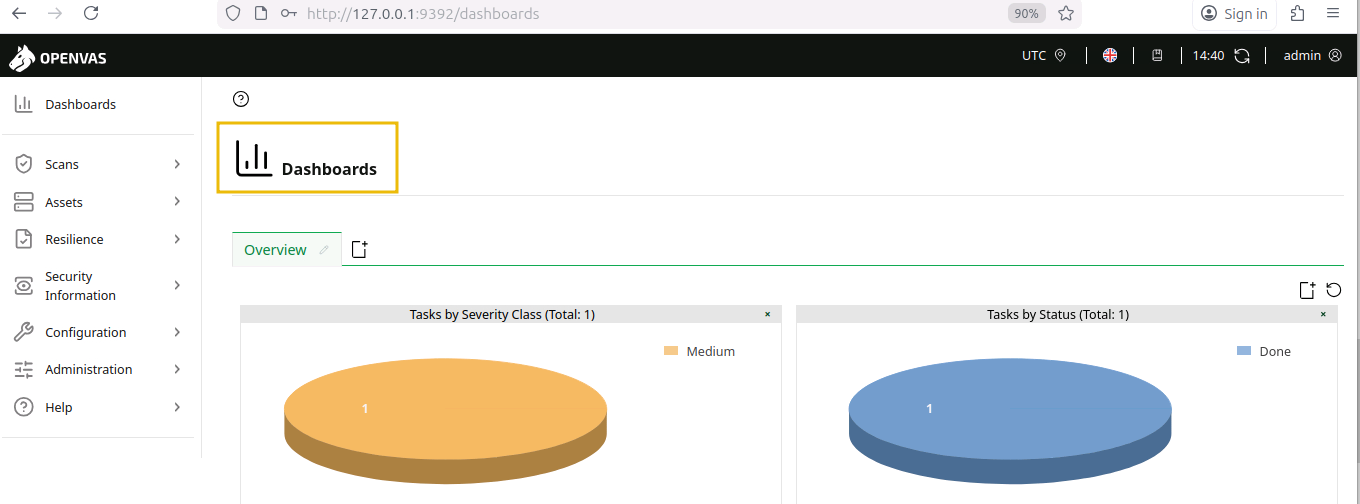
Enter the default credentials admin:admin to log in and begin exploring the vulnerability scanning features. You will see the following screen after logging in.
Adding a Target
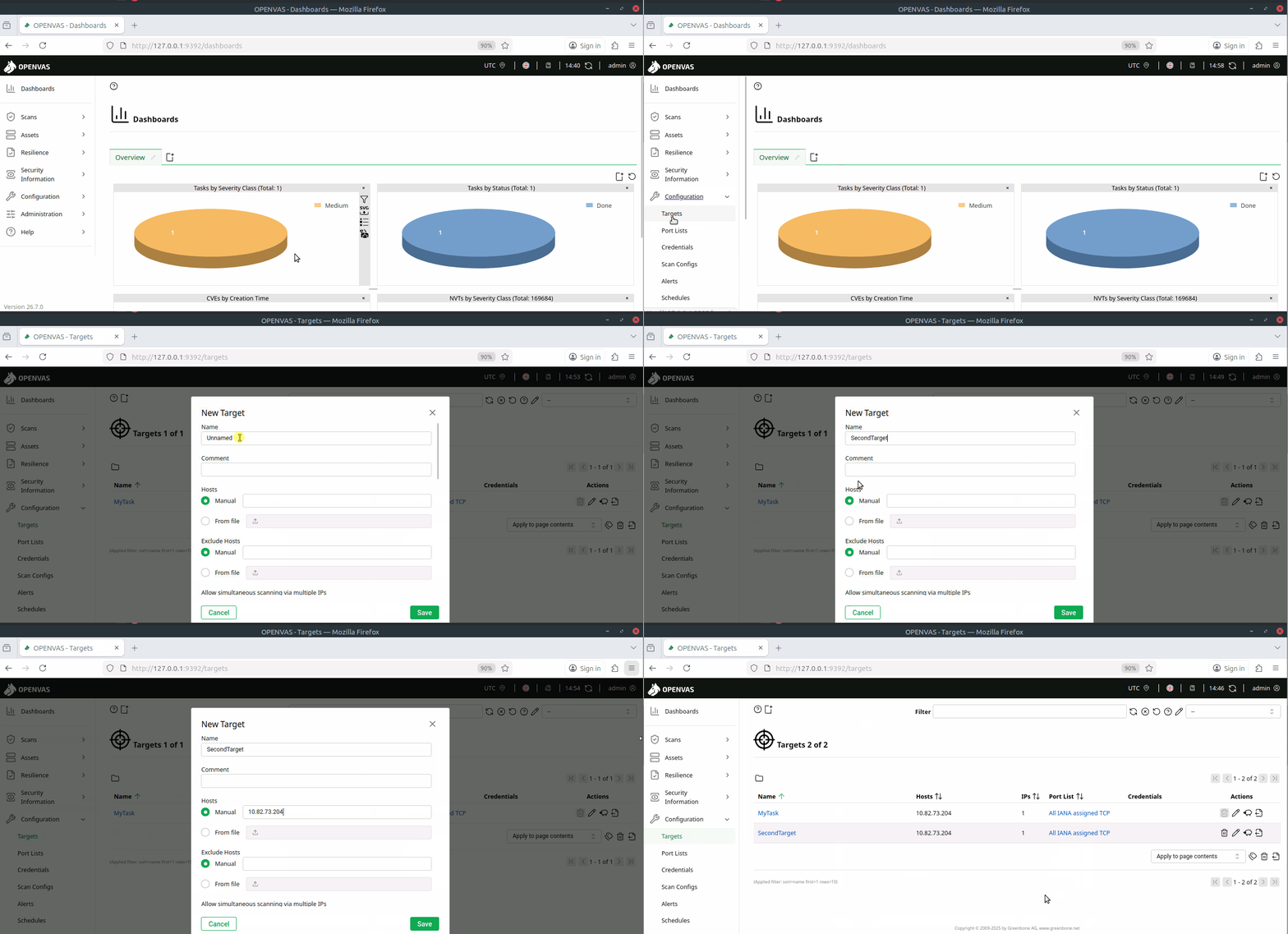
Before running any scan, OpenVAS requires a target to be defined. Navigate to Configuration > Targets, click the Plus (+) icon, and enter the target name SecondTarget and the IP MACHINE_IP. Once the details are filled in, click Save to register the target for scanning, as shown below:
Scanning a Target
After adding a target, the next step is to create a scan task. Go to Scans > Tasks, click the Plus (+) icon, and choose New Task. Enter the task name SecondTask and select the target you added earlier, keep the default scan configuration, and click Save to create the task. Once created, click the Run button to begin the vulnerability scan. OpenVAS will analyse the host and display real-time progress until the scan completes.
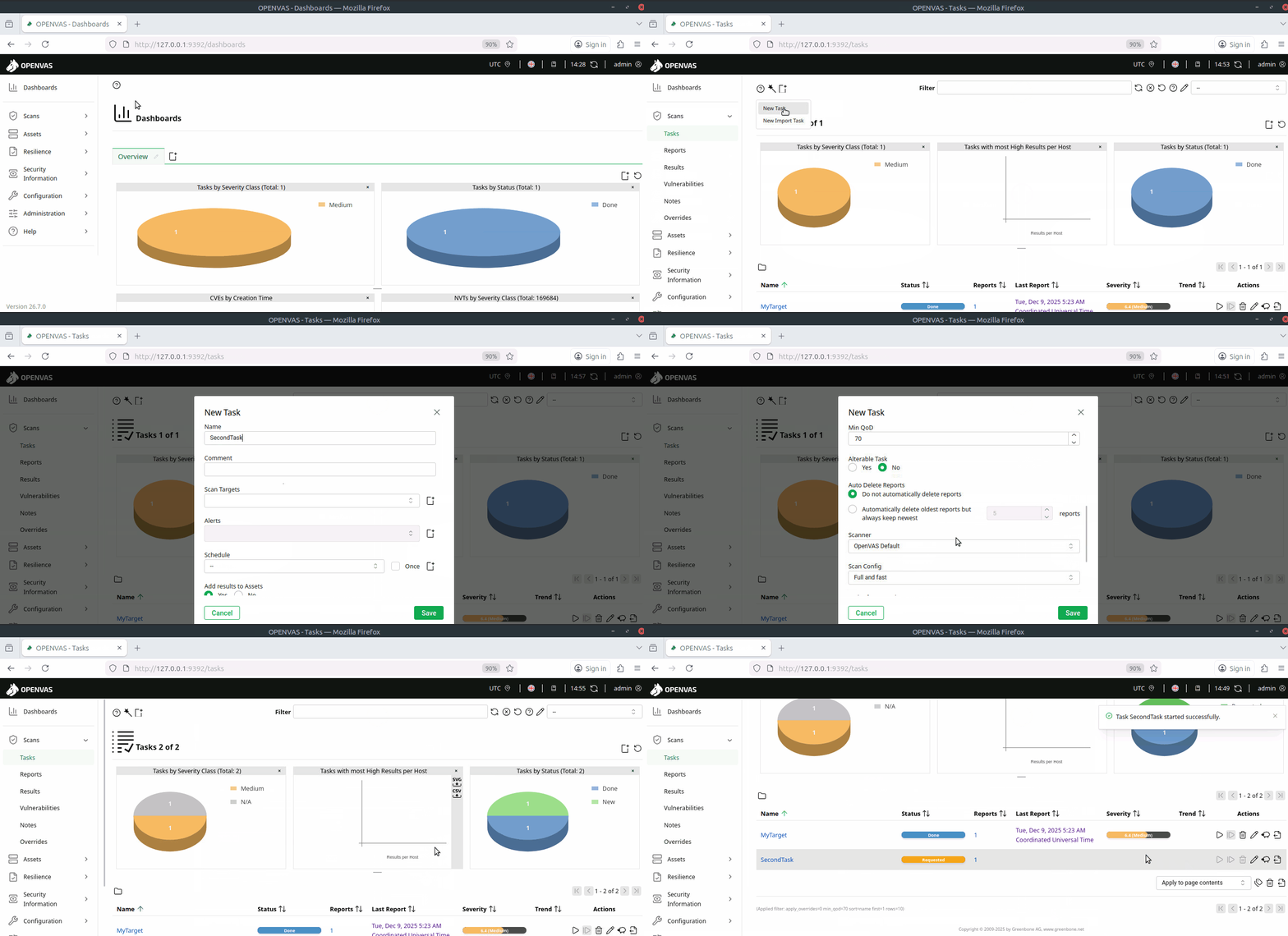
Note: You won’t be able to run a scan in the VM as it requires an active internet connection to sync the feeds. Scans may also take 20-25 minutes to complete. To help you answer the questions in this task, a pre-scanned task named MyTarget has already been generated in Reports..
Viewing the Report
To view the results of the MyTarget report, go to Scans > Reports. Click the report entry for the scan date and time.

This will open a detailed dashboard showing key information, including detected hosts, open ports, identified applications, operating system details, and associated CVEs. You can navigate through each section to explore vulnerabilities and their severity.
Results Tab
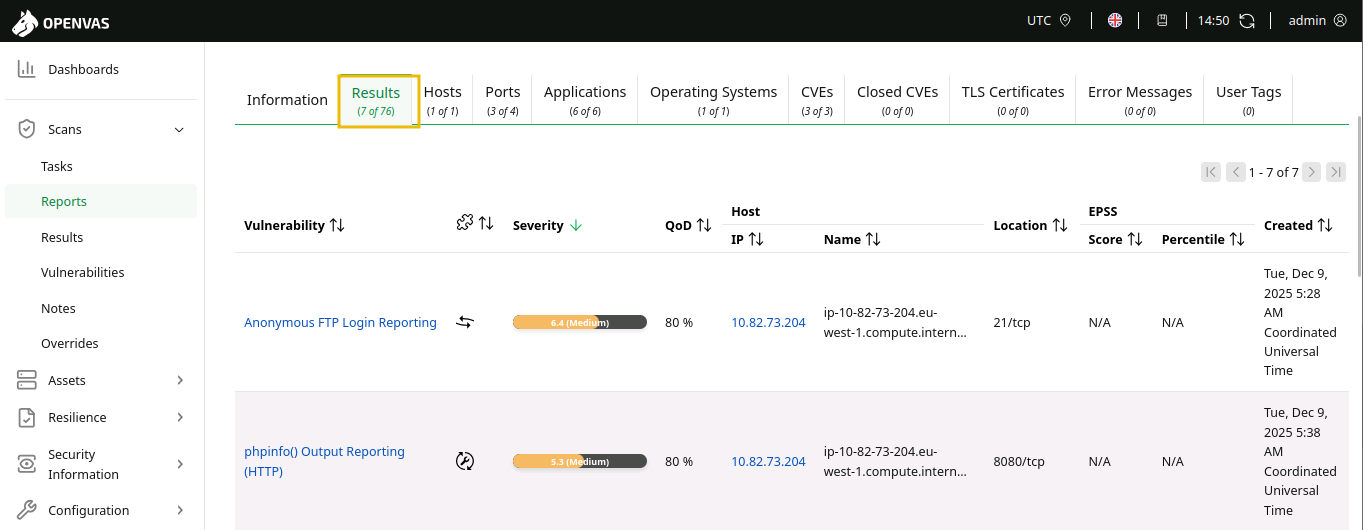
In the Results tab, the scan findings are listed by severity level, affected ports, and host details. The report highlights issues such as anonymous FTP access, exposed phpinfo pages, missing cookie protections, and weak encryption settings. Each entry shows when it was detected and provides a quick overview of the risk it poses. This view helps understand exactly which services or configurations introduce vulnerabilities.
CVEs Tab
In the CVEs tab, OpenVAS maps detected issues to known published vulnerabilities. The scan identified several CVEs, including ones related to anonymous FTP access, phpinfo exposure, and ICMP timestamp disclosure.
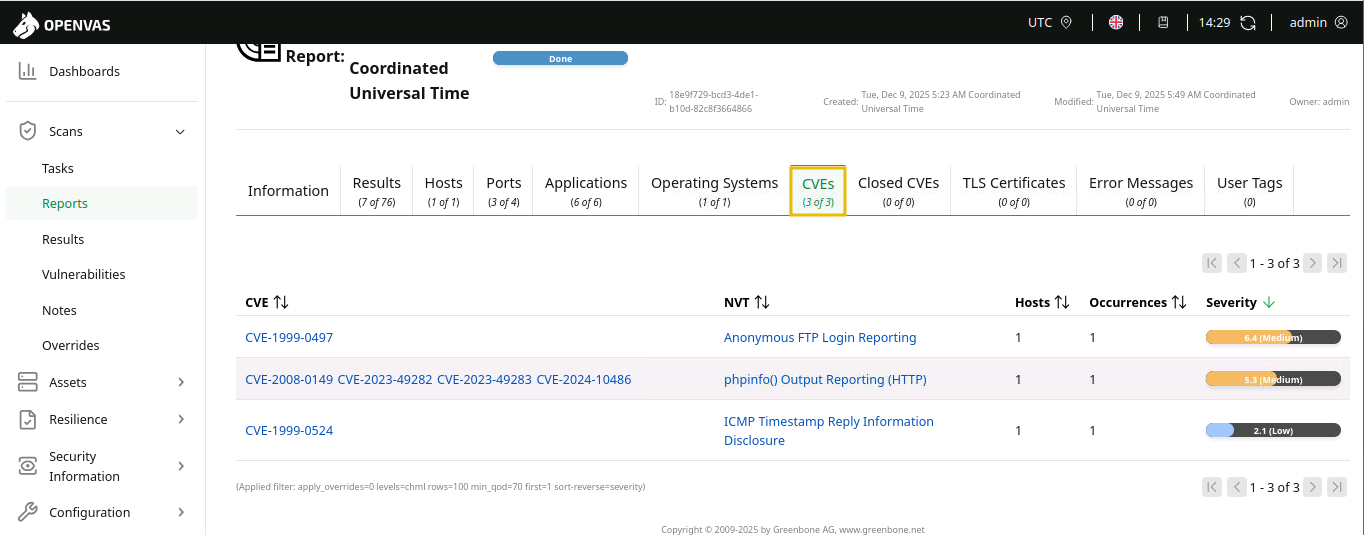
You can answer the following questions using the MyTarget scan result.
Answer the questions below
What is the severity number for the vulnerablility
phpinfo() Output Reporting (HTTP)?5.3What is the CVE value associated with
Anonymous FTP Login Reporting?CVE-1999-0497What is the target Operating System?
Ubuntu 24.04
Best Practices
Now that the earlier tasks introduced multiple vulnerability scanning tools, this section focuses on using them effectively and responsibly. Understanding how to approach scans, interpret results, and avoid common mistakes is essential for conducting safe and reliable assessments. These best practices will help build confidence as you begin performing real scans in practical environments.

Start Light: Begin with non-intrusive scans to avoid slowing or disrupting the target system, especially in shared or production environments.
Right Tooling: Match the scanner to the job—use Nmap for network discovery, OpenVAS for deep analysis, and Nikto for web server checks.
Verify Results: Double-check high-severity findings manually because scanners can produce false positives or incomplete information.
Stay Updated: Keep scanning tools and vulnerability feeds up to date so the scanner can identify new CVEs and configuration issues.
Use Credentials: When allowed, run authenticated scans to get more accurate visibility into missing patches and internal weaknesses.
Compare Over Time: Save scan outputs and compare them regularly to track improvements, detect regressions, and monitor newly introduced issues.
Scan Smart: Schedule scans during low-traffic hours since vulnerability scanning can consume noticeable network and system resources.
Conclusion
Vulnerability scanning tools play a critical role in modern cyber security by automatically identifying weaknesses, misconfigurations, and outdated software across systems and networks. These tools help pentesters to detect potential attack vectors before adversaries can exploit them, making them essential for maintaining a strong security posture.
In this room, you gained an understanding of vulnerability scanning and its importance in securing networks and systems, covering:
What vulnerability scanning is and its importance in securing networks and systems.
What vulnerabilities are, how they are classified, and why identifying them early is essential for reducing security risks.
Using Nmap, OpenVAS, and Nikto to identify, analyse, and interpret vulnerabilities effectively.
What the best practices are for performing safe and ethical scans.




