Link to the challenge on TryHackMe: Trusted By Default
Introduction
Trusted By Default is a Splunk-based investigation room on TryHackMe that drops you into a live-fire correlation exercise across web logs, Windows Security events, and Zeek network data. No file uploads, no lab setup — the evidence is already indexed, and the challenge is entirely about knowing how to ask the right SPL questions of it.
The premise: a suspicious POST request lands on a web server, and from there you're tracing the full blast radius — which account got compromised, how it moved laterally, what privileges it grabbed, and where the attacker actually landed for hands-on access.
Tools/sources involved:
Splunk SPL (
rex,stats,search, field extraction against raw XML)IIS web logs
Windows Security Event Logs (
XmlWinEventLog:Security, EventCode 4624/4728)Zeek
conn.logfor network-layer correlation
The room's biggest lesson showed up early and repeated throughout: the field/host you expect is rarely the field/host that has the data. Logons authenticated against a domain controller get logged on the DC, not the resource being accessed. Splunk's automatic XML field extraction doesn't always parse cleanly. And the question's terminology ("batch logon") didn't always match the actual LogonType value in the event — Type 4 showed up for one hop, Type 3 for another, and the room expected you to catch the mismatch rather than pattern-match on wording.
Case Briefing
Prerequisites
The Investigation
Open Search & Reporting. The evidence is already indexed; you do not need to upload files or configure Splunk.
Investigation Guidance
Start broad enough to compare normal and abnormal activity.
Inspect the returned fields before adding filters.
Use the value recovered in one question as the pivot for the next.
Use source-specific endpoint fields instead of Splunk's ingestion
hostfield.Use decimal bytes for an exact transfer total unless a question requests another unit.
The main incident activity occurs on 11 August 2026.
Answer the questions below
Review the web logs for the unusual POST request associated with the start of the incident. What URI path was requested? Submit the complete path beginning with a forward slash. /portal/REDACTED.aspx
POST
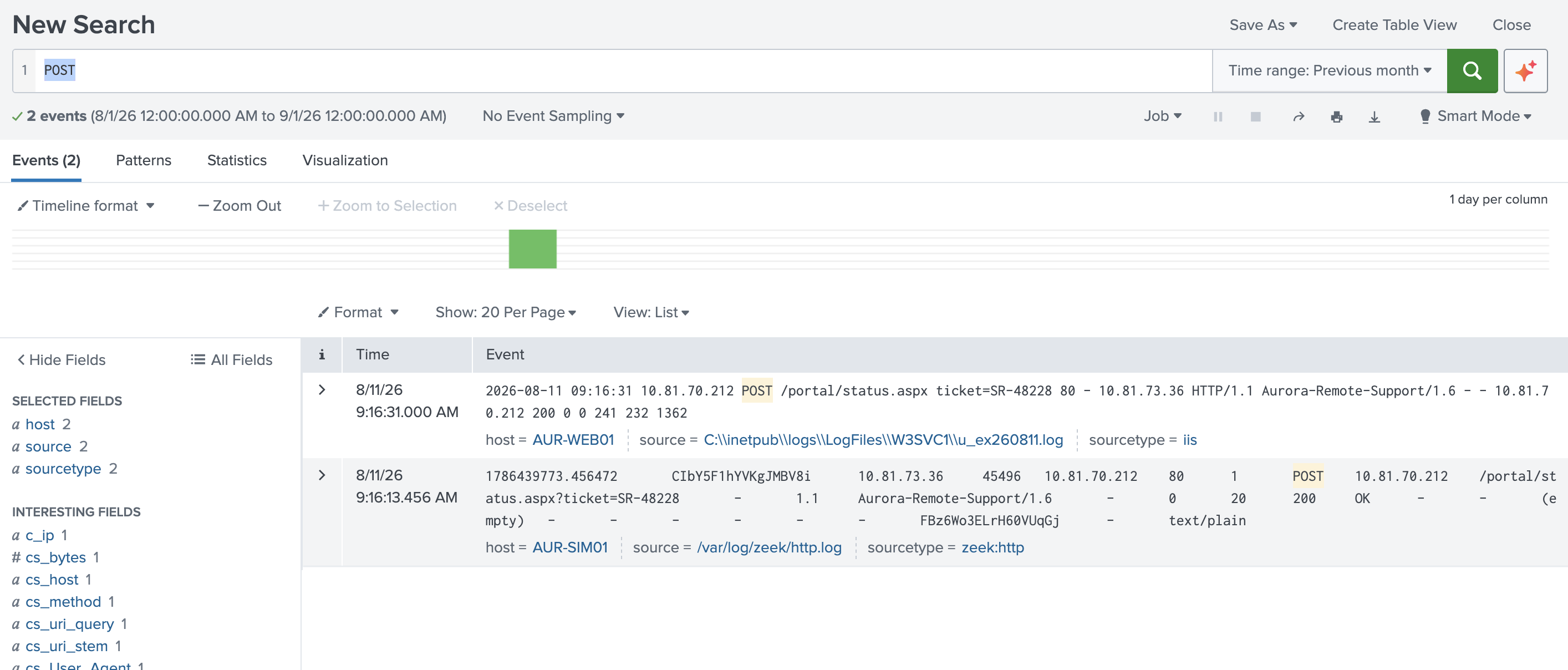
Inspect the same suspicious POST event and examine the client details recorded with it. Which source IP submitted the request? Submit the IP address only. 10.xx.73.xx
Correlate the suspicious web request with Windows logons on AUR-WEB01. Which non-system account received a batch logon shortly before the request?
index=* host=AUR-DC01.aurora.local EventCode=4624 earliest="08/11/2026:09:00:00" latest="08/11/2026:09:15:40"
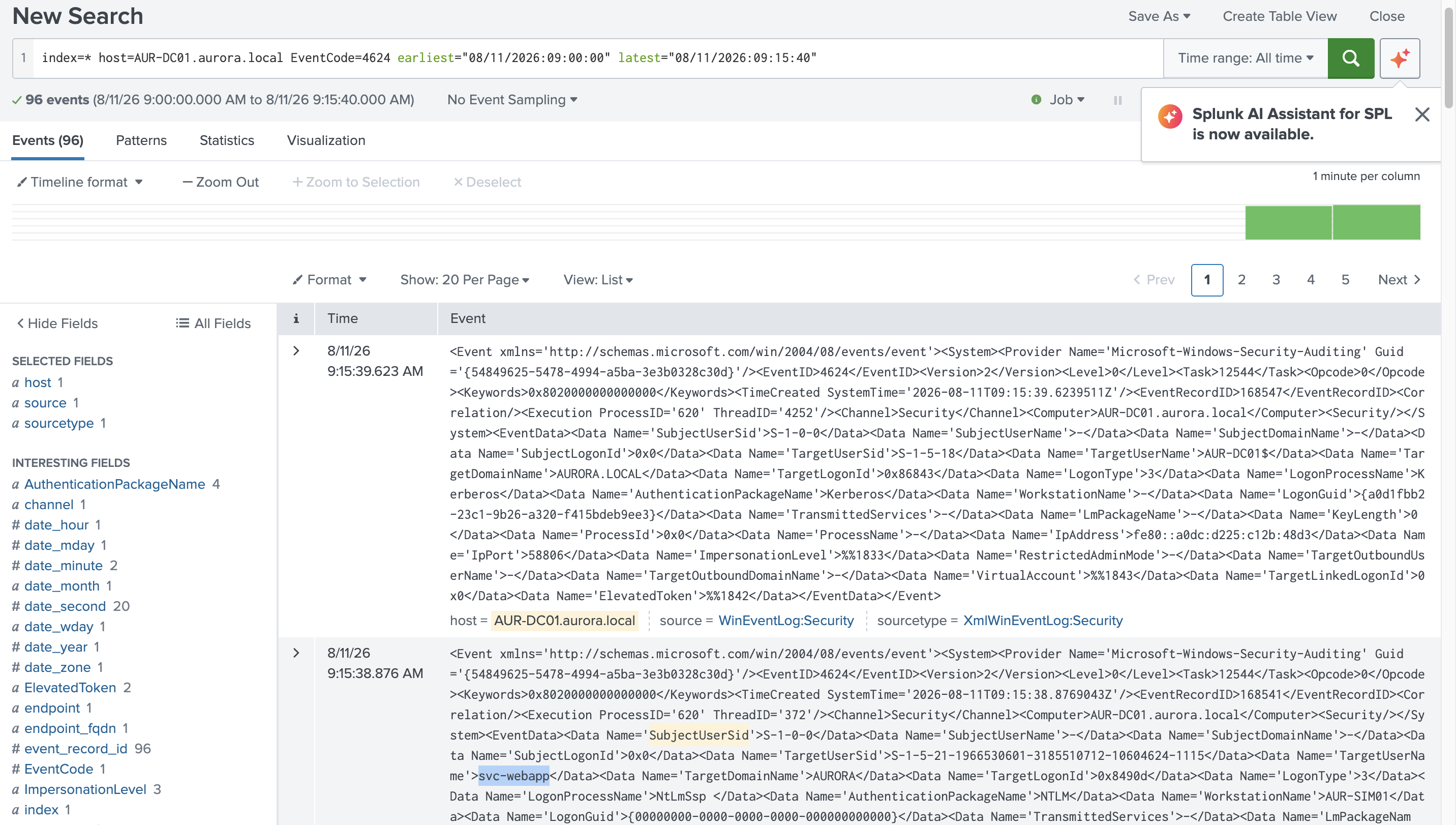
index=* host=AUR-DC01.aurora.local sourcetype="XmlWinEventLog:Security" EventCode=4624 earliest="08/11/2026:09:00:00" latest="08/11/2026:09:15:40"
| rex field=_raw "Name='LogonType'>(?<LogonType>\d+)<"
| rex field=_raw "Name='TargetUserName'>(?<TargetUserName>[^<]+)<"
| rex field=_raw "Name='IpAddress'>(?<IpAddress>[^<]+)<"
| search IpAddress="10.81.73.36"
| table _time, LogonType, TargetUserName, IpAddress
| sort _time
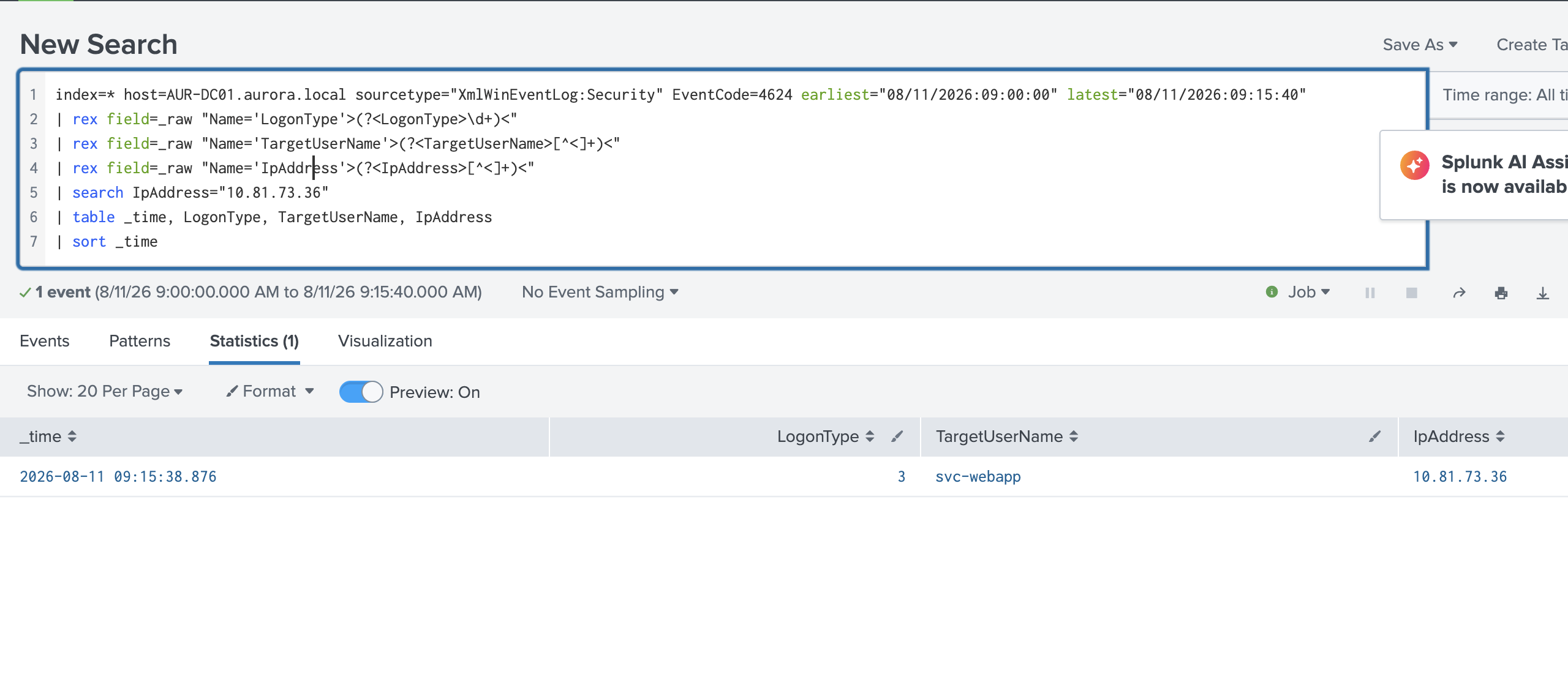
What Windows logon type was recorded for that batch logon? 4
After the web-server activity, review Windows group-membership changes involving the Portal Application Service account. Which privileged group was modified? Submit the group name exactly as recorded.
index=* host=AUR-DC01.aurora.local (EventCode=4728 OR EventCode=4732 OR EventCode=4756)
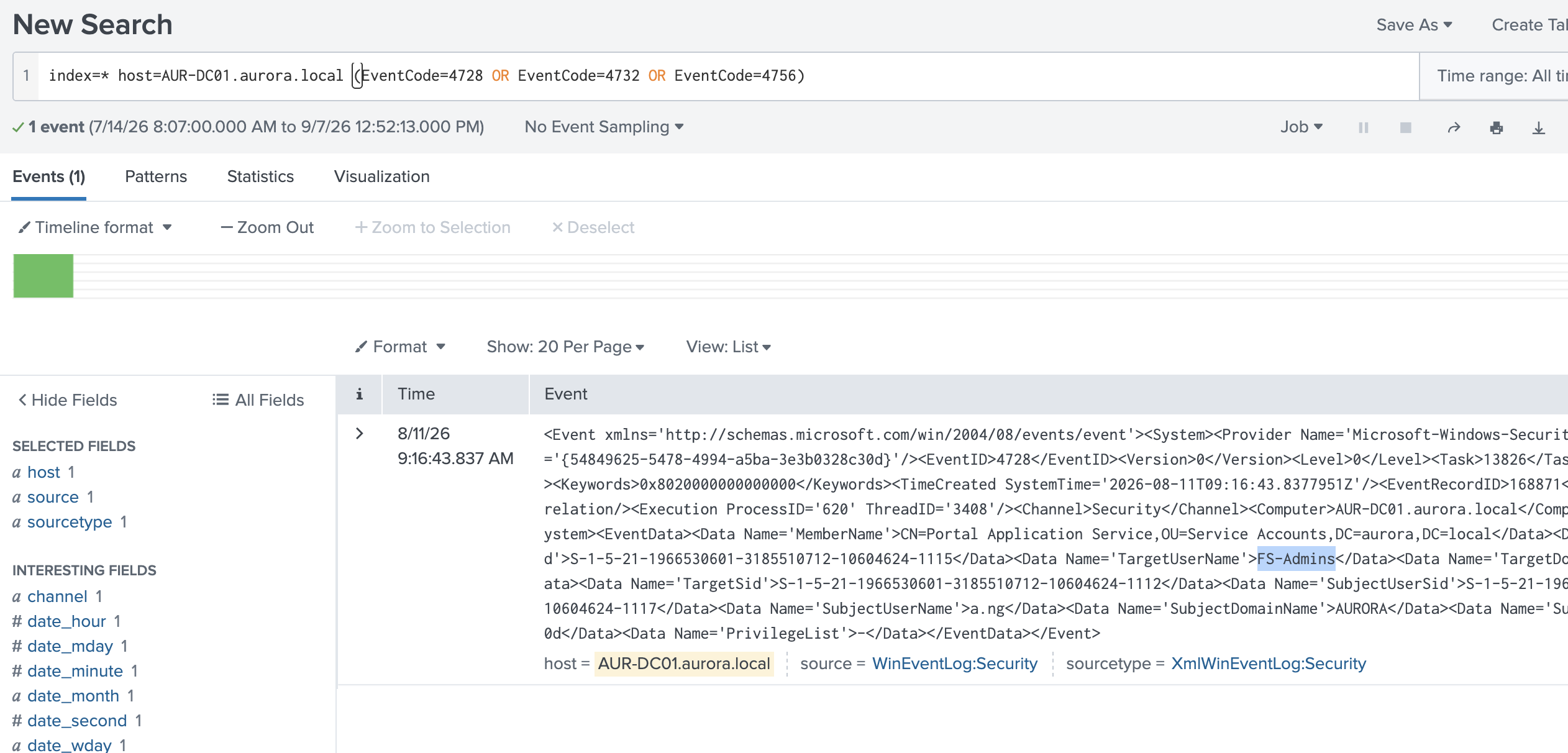
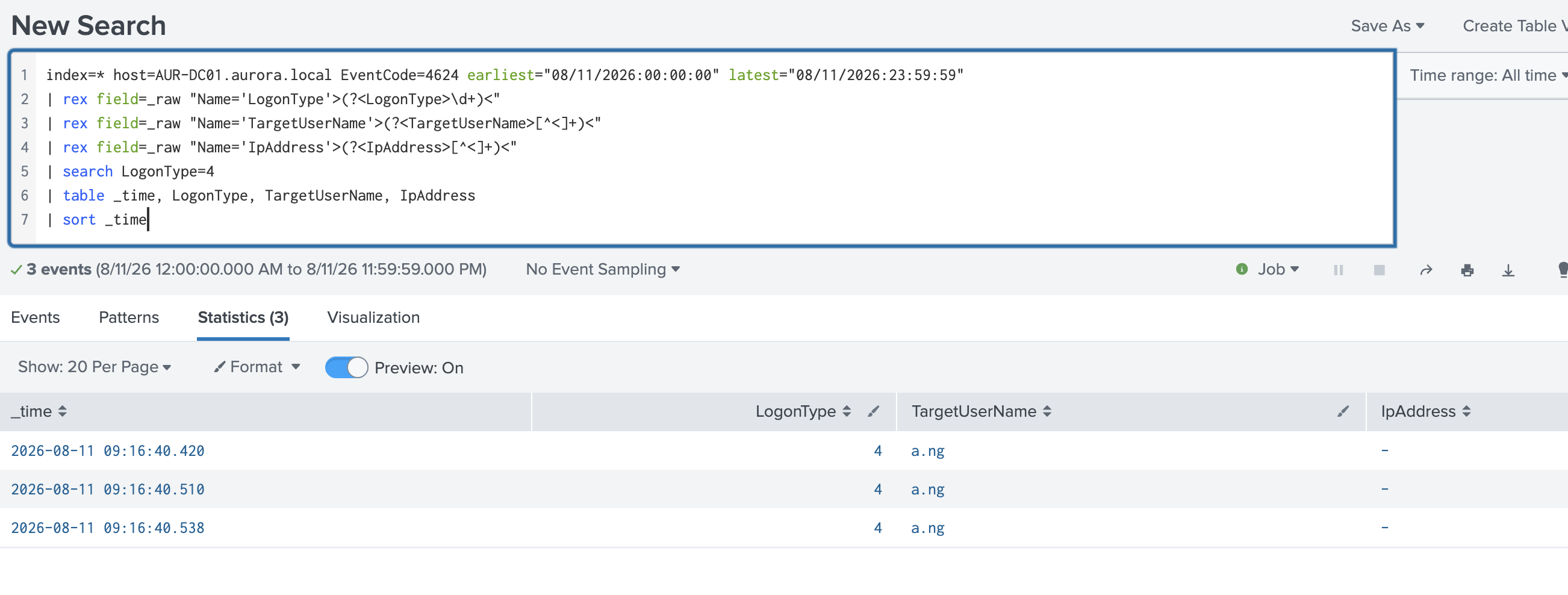
Inspect the same group-membership event. Which user performed the change? Submit the username only.
index=* host=AUR-DC01.aurora.local EventCode=4624 earliest="08/11/2026:00:00:00" latest="08/11/2026:23:59:59"
| rex field=_raw "Name='LogonType'>(?<LogonType>\d+)<"
| rex field=_raw "Name='TargetUserName'>(?<TargetUserName>[^<]+)<"
| rex field=_raw "Name='IpAddress'>(?<IpAddress>[^<]+)<"
| search LogonType=4
| table _time, LogonType, TargetUserName, IpAddress
| sort _time
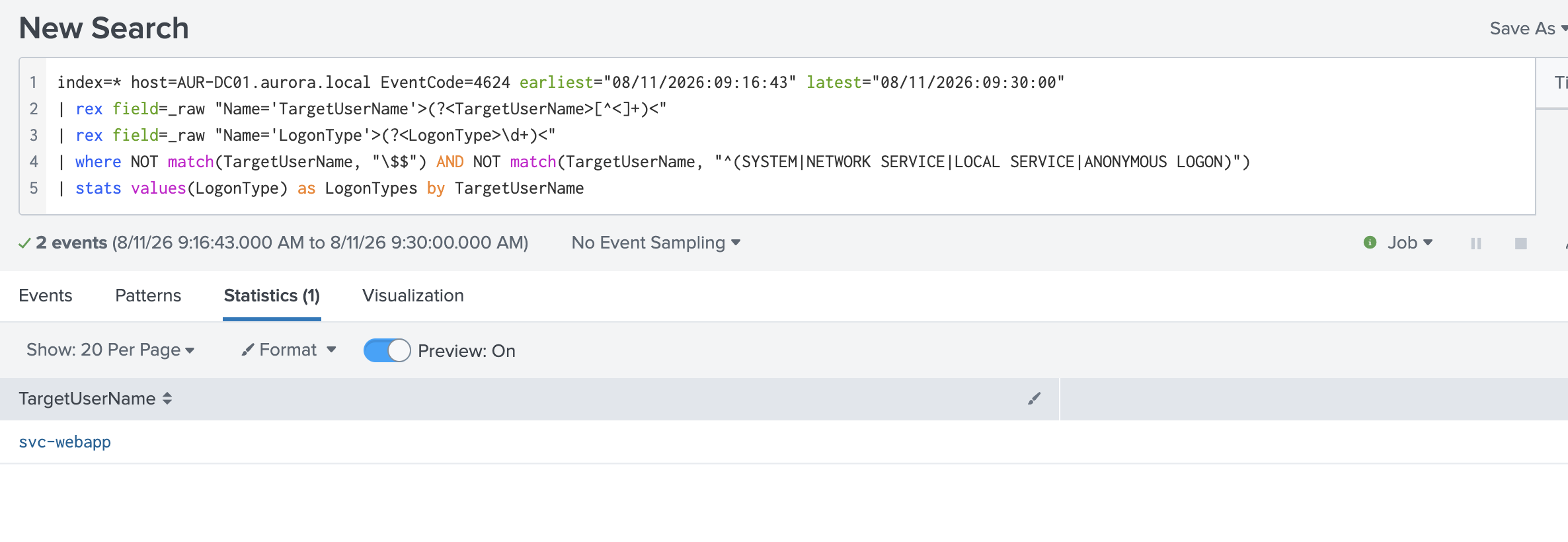
Continue into successful logon events on the file server during the short window after the group change. Which non-built-in account generated both network and remote-interactive logon types? Submit the account name only.
index=* host=AUR-DC01.aurora.local EventCode=4624 earliest="08/11/2026:09:16:43" latest="08/11/2026:09:30:00"
| rex field=_raw "Name='TargetUserName'>(?<TargetUserName>[^<]+)<"
| rex field=_raw "Name='LogonType'>(?<LogonType>\d+)<"
| where NOT match(TargetUserName, "\$$") AND NOT match(TargetUserName, "^(SYSTEM|NETWORK SERVICE|LOCAL SERVICE|ANONYMOUS LOGON)")
| stats values(LogonType) as LogonTypes by TargetUserName
Inspect the successful logons for that account. Which numeric LogonType identifies the remote-interactive session? Submit the number only. 10
LogonType 10 is the standard Windows code for RemoteInteractive — i.e., an RDP session — as opposed to Type 3 (Network), which is what you saw for SMB/file-share style access.
Use the source IP from the suspicious POST as the source-side pivot and correlate RDP activity in the short incident window. Which destination IP is associated with the sustained connection rather than the immediately reset attempts? Submit the IP address only.
index=* host=AUR-DC01.aurora.local sourcetype="XmlWinEventLog:Security" EventCode=4624 earliest="08/11/2026:00:00:00" latest="08/11/2026:23:59:59"
| table _time, EventCode, Logon_Type, TargetUserName, IpAddress
| sort _time
output
_time    EventCode    Logon_Type    TargetUserName    IpAddress
2026-08-11 09:14:00.127    4624         SYSTEM    -
2026-08-11 09:14:00.272    4624         AUR-FS01$    10.81.112.251
2026-08-11 09:14:00.293    4624         AUR-WEB01$    10.81.70.212
2026-08-11 09:14:00.347    4624         AUR-DC01$    ::1
2026-08-11 09:14:00.404    4624         AUR-DC01$    2001:0:285a:882:142d:2071:cb2e:7695
2026-08-11 09:14:00.414    4624         AUR-DC01$    -
2026-08-11 09:14:00.453    4624         AUR-DC01$    2001:0:285a:882:142d:2071:cb2e:7695
2026-08-11 09:14:00.458    4624         AUR-DC01$    -
2026-08-11 09:14:02.445    4624         AUR-DC01$    ::1
2026-08-11 09:14:02.469    4624         AUR-DC01$    fe80::a0dc:d225:c12b:48d3
2026-08-11 09:14:02.486    4624         AUR-DC01$    fe80::a0dc:d225:c12b:48d3
2026-08-11 09:14:02.512    4624         AUR-DC01$    ::1
2026-08-11 09:14:18.197    4624         SYSTEM    -
2026-08-11 09:14:20.301    4624         SYSTEM    -
2026-08-11 09:14:20.383    4624         UMFD-0    -
2026-08-11 09:14:20.383    4624         UMFD-0    -
2026-08-11 09:14:20.394    4624         UMFD-1    -
2026-08-11 09:14:20.395    4624         UMFD-1    -
2026-08-11 09:14:20.407    4624         SYSTEM    -
2026-08-11 09:14:20.536    4624         NETWORK SERVICE    -
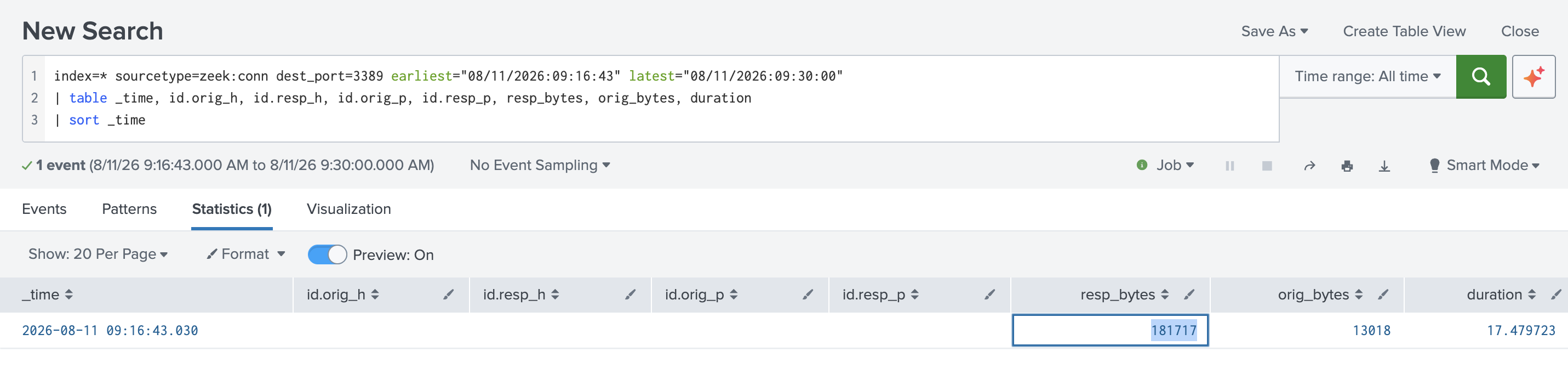
Inspect the sustained RDP connection identified in the previous step. What resp_bytes value records the data returned by the destination? Submit digits only.
index=* sourcetype=zeek:conn dest_port=3389 earliest="08/11/2026:09:16:43" latest="08/11/2026:09:30:00"
| table _time, id.orig_h, id.resp_h, id.orig_p, id.resp_p, resp_bytes, orig_bytes, duration
| sort _time
Conclusion
The kill chain, pieced together:
Attacker submits a malicious POST to
/portal/REDACTED.aspxfrom10.xx.73.xxsvc-webapp(the Portal Application Service account) authenticates via NTLM from that same source IP — Type 3 network logona.ng, a human account, triggers a Type 4 batch logon shortly aftera.nguses that session to addsvc-webappinto a privileged AD group (FS-Admins) — a textbook privilege escalation via group membership abuseThe now-privileged account logs into the file server with both network (Type 3) and remote-interactive (Type 10) sessions
Zeek
conn.logconfirms a sustained RDP connection (port 3389) to the file server, distinguishing genuine interactive access from noise/reset attempts
Key takeaways:
Source-specific fields > Splunk's ingestion
host. Domain-authenticated logons are recorded on the DC (Computerfield in the XML), not the target resource. If you filter onhost=<target-server>for a 4624 event, you'll come up empty even though the evidence exists.Don't trust event-code assumptions blindly. "Batch logon" in the question phrasing didn't always mean
LogonType=4in the raw data — one step in the chain was actuallyLogonType=3. Pivoting on a confirmed indicator (source IP) is more reliable than filtering on assumed terminology.XML field extraction needs manual
rex. Splunk's default field extraction forXmlWinEventLog:Securitydoesn't reliably surface nested<Data Name='X'>values as usable fields — regex against_rawis the dependable path.Group membership changes (4728/4732/4756) are a critical pivot point.
TargetUserNamein these events is the group, not the account added —MemberNameholds the account. Easy to get backwards on a first pass.
OWASP/CWE mapping:
CWE-269 (Improper Privilege Management) — the
FS-Adminsgroup modificationCWE-798 / T1078 (Valid Accounts, MITRE ATT&CK) — reuse of
svc-webappanda.ngcredentials for lateral movementT1021.001 (Remote Services: RDP) — the sustained RDP session to the file server
Remediation:
Alert on any 4728/4732/4756 event where the modifying account isn't a designated AD admin
Restrict service accounts like
svc-webappfrom being addable to privileged groups at all (deny-by-default group nesting policies)Flag batch/service logons (Type 4) immediately followed by interactive AD changes — that sequence alone is a strong anomaly signal
Monitor for RDP sessions immediately following a privilege escalation event, especially from accounts that don't normally have interactive logon rights
About the author
- Software Developer | Learning Cybersecurity | Open for roles * If you're in the early stages of your career in software development (student or still looking for an entry-level role) and in need of mentorship, you can reach out to me.
Comments
Join the discussionNo comments yet. Be the first to comment.