Introduction to Offensive Security: Operating System Security
In this article, I will write a write-up for Operating System Security that covers an Introduction to Operating System Security, Common Examples of OS Security, and Practical Examples of OS Security.
Which of the following is not an operating system?
ThunderbirdAIX
Android
Chrome OS
Solaris
Thunderbird
Which of the following is a strong password, in your opinion?
LearnM00riloveyou
1q2w3e4r5t
LearnM00r
qwertyuiop
Based on the top 7 passwords, let’s try to find Johnny’s password. What is the password for the user
J**ohnny**?abc123Once you are logged in as Johnny, use the command
historyto check the commands that Johnny has typed. We expect Johnny to have mistakenly typed therootpassword instead of a command. What is the root password?happyHack!NG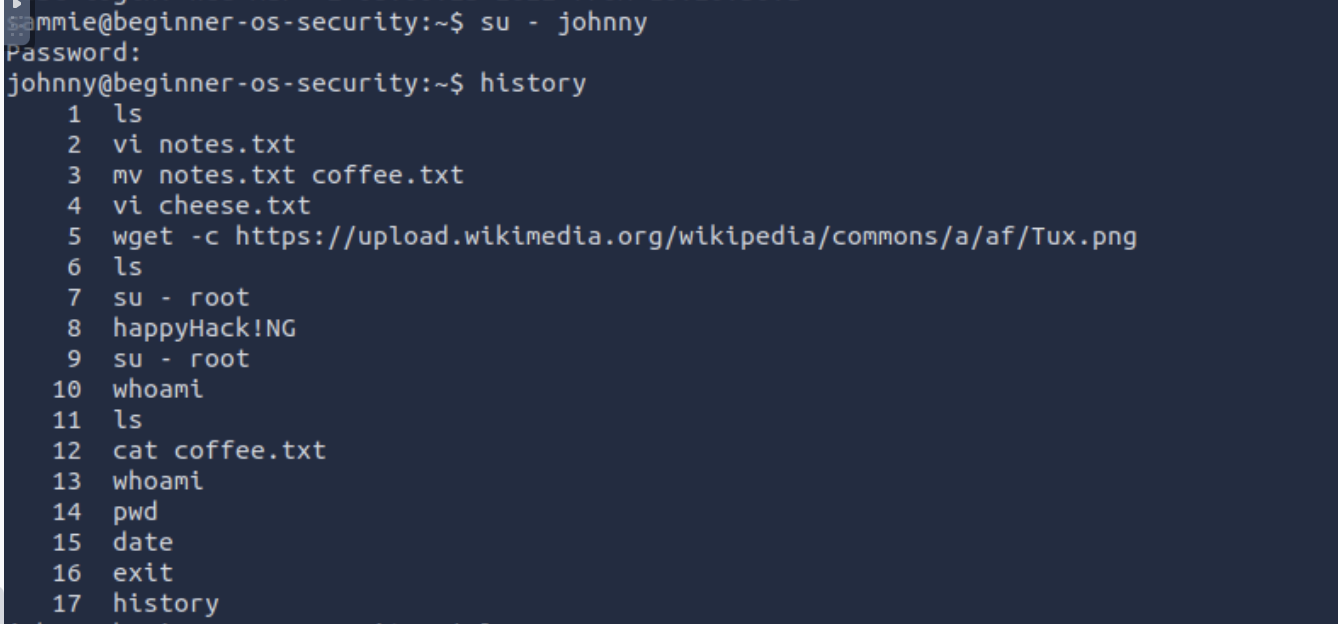
While logged in as Johnny, use the command
su - rootto switch to therootaccount. Display the contents of the fileflag.txtin therootdirectory. What is the content of the file?THM{YouGotRoot}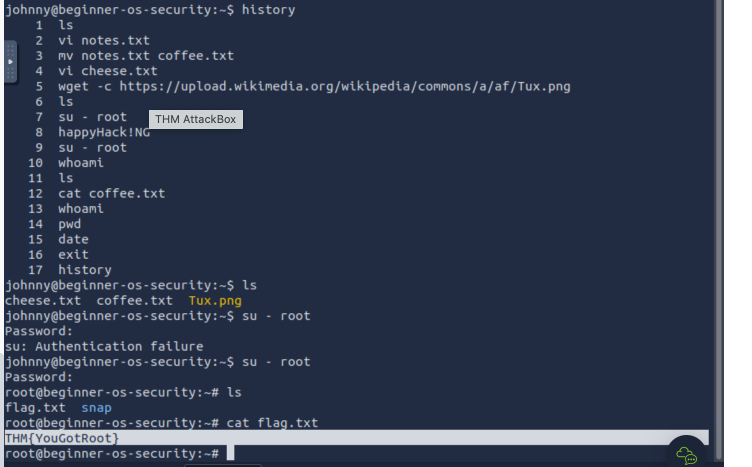
Thank you for reading my article. Please leave any questions or comments on improving my learning journey and the Lab THM challenges.




