
Active Directory post-exploitation is where an attacker's real objectives come into focus. After achieving domain compromise, threat actors move into their endgame — whether that's establishing long-term persistence for espionage, deploying ransomware across the network, exfiltrating sensitive data, or destroying systems entirely.
In this TryHackMe room, I worked through Detecting AD Post-Exploitation from a SOC analyst perspective, covering how to detect these activities in Splunk using real-world attack patterns. The room drew on actual incidents including Volt Typhoon's multi-year espionage campaign against U.S. critical infrastructure and the Qilin ransomware attack on Synnovis/NHS London in 2024.
Skills practiced: Splunk log analysis, pre-encryption indicator detection, ransomware deployment via GPO/WMIC/scheduled tasks, persistence through account creation, and understanding data destruction techniques.
Introduction
As a result of a successful domain compromise, a threat actor can proceed with their actual goals - whether it is long-term access for espionage purposes, ransomware deployment and encryption, data theft, or data destruction. In this room, we will review these scenarios from a SOC team perspective and understand why the attacker pursues them and how they can be detected.
Learning Objectives
Understand how attackers perform AD post-exploitation activities
Explore long-term persistence techniques in AD environments
Learn how threat actors deploy ransomware in enterprise networks
Understand how wiping and data destruction techniques are executed
Prerequisites
It is suggested to complete the following rooms first before proceeding:
AD Post-Exploitation
Threat actors always pursue specific objectives when breaching an organisation. In some cases, the attack is pre-planned and executed against a specific target. In other scenarios, attackers gain initial access opportunistically and then conduct internal reconnaissance to identify valuable resources they can exploit for their benefit.
Post-Exploitation Stage
Consider a scenario where an attacker has successfully compromised the organisation, identified assets of interest that hold value, and is now ready to act on their objectives. The attacker's subsequent actions within this environment are called the post-exploitation phase of the attack.

We will take a closer look at the post-exploitation steps taken by attackers during an intrusion.
Post-Exploitation Options
As mentioned earlier, the attacker's final objective during the post-exploitation phase can vary depending on their goals. Below are the main options an attacker may pursue at this stage:

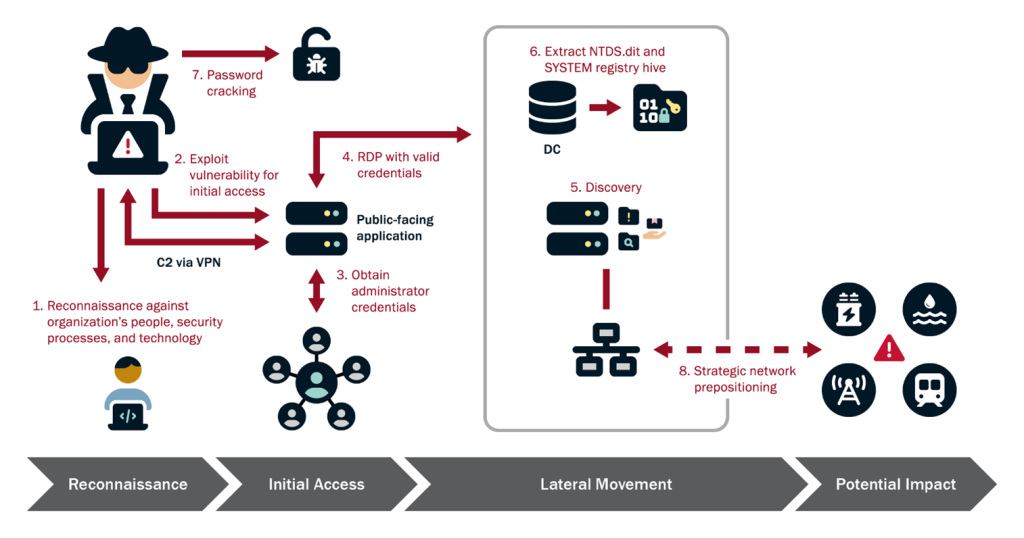
Before we examine how to detect these methods, we want to walk you through several real-world incidents that demonstrate these Post-Exploitation techniques in action. The first case we'll examine is related to the Volt Typhoon group (we strongly recommend you complete the challenge room related to this group), which conducted espionage in U.S. critical infrastructure for nearly three years. Over the course of several years, this group collected information about how U.S. critical infrastructure operates, gathering details about network architecture, power supply systems, and more, until they were discovered. More details about this incident are described in CISA's report from February 2024(opens in new tab), which we recommend you review. Below is the attack chain of this campaign.
The second case we'll examine is related to a now well-known group, Qilin, which has become extremely popular in recent years due to its audacious attacks and effectiveness. One of their most devastating incidents occurred in June 2024, when this group successfully compromised Synnovis, a critical pathology services provider for London's NHS hospitals, resulting in the theft of 400 GB of sensitive patient data. But that wasn't all - after exfiltrating this highly sensitive medical data, they proceeded to encrypt the systems, crippling diagnostic services across seven major hospitals. This is an excellent example that demonstrates how attackers attempt to exfiltrate various types of data before encryption takes place. In this Aviatrix Threat Research report(opens in new tab), you can find a detailed technical analysis of this attack.
Now it’s time for questions. In this task, you will need to conduct a small research exercise that will help you better understand attacker behavior during post-exploitation activities.
Answer the questions below
What type of files did Volt Typhoon exfiltrate based on the CISA report (opens in new tab)? zip

What protocol did Volt Typhoon use for the exfiltration process based on the CISA report? (opens in new tab) SMB
What MITRE ATT&CK technique ID is associated with exfiltration in the Synnovis 2024 ransomware attack on UK Healthcare based on the report? (opens in new tab)

Long-Term Persistence
When choosing a persistence mechanism, advanced attackers think about how to remain undetected for as long as possible and how to attract the least attention to themselves during this activity. In this task, we'll examine several popular methods that attackers use in an Active Directory environment for long-term persistence.
Below, I want to present you with some interesting statistics comparing 2022 (opens in new tab)and 2025(opens in new tab), so you can see how the methods that attackers use for persistence have changed over the years.

In this task, we'll discuss persistence methods that relate specifically to the AD environment and not individual Windows machines. If you're interested in more comprehensive methods, I recommend Windows Threat Detection 3 room.
Create Account
Once an attacker obtains Domain Admin privileges in an AD environment, a very straightforward persistence method is creating a new user account with elevated privileges. In our scenario, the attacker successfully compromised the TrySaveMe domain and obtained Domain Admin privileges, specifically the anna.gallo user account. Creating a new user, the attacker will maintain access to the environment until the security team removes the user from the domain. This activity can be detected at two stages: first, the creation of the new user itself, and second, adding the user to domain groups.

Valid Account
In some cases, the attacker decides not to create a new account for persistence but instead uses one of the compromised accounts. However, a threat actor can escalate the account's privileges, add it to the RDP group to gain future remote access, or change the user's password to maintain exclusive access to it. These actions generate less activity but are still noticeable in the logs.

>
Kerberos ticket-related persistence methods, specifically Golden/Silver Tickets, are also very popular in the wild, but we'll cover these topics in more detail in the next rooms. For now, it's time for practice.
Practice Scenario
An alert has been escalated to you during your L2 analyst shift. The suspicious process updater.exe was executed on the domain controller DC-01 under the maria.garcia domain admin account in the TrySaveMe domain.
The L1 analyst suspects this could be a remote shell communicating with an attacker's C2 infrastructure and needs you to perform deeper analysis to identify any follow-on adversary activity on the compromised host.
The logs for this task are located in the Splunk index task3. Use the following query: index=task3
Answer the questions below
From which directory was the malicious file executed as mentioned in the scenario?
index=task3 C:


index=task3 maria.garcia


Which user did the attacker create on the system as a persistence mechanism?
index=task3 action=created

What is the name of the group this account was added to for remote access?
index=task3 hans.schmidt


What time was this account added to the Domain Admins group?
index=task3 hans.schmidt Account_Name="hans.schmidt" status=success

index=task3 hans.schmidt group

Did the attacker later use this account to log in? (Yes / Nop)
Ransomware Detection 1
Ransomware Overview
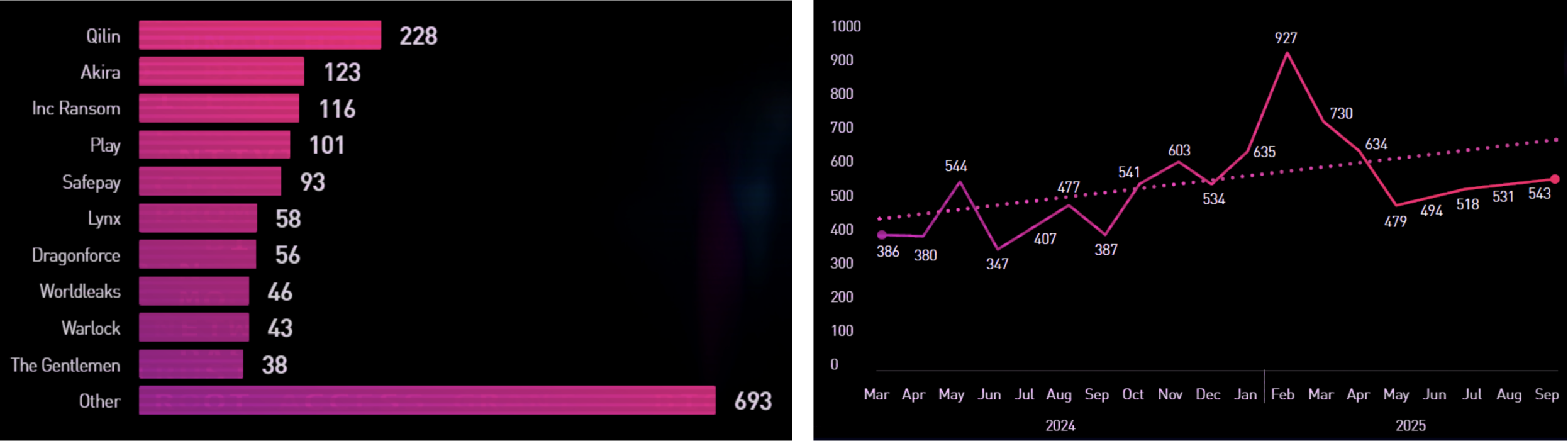
With ransomware attacks escalating annually, SOC analysts must identify indicators of ransomware behavior. This room covered what attackers do before encryption, how ransomware spreads across networks, and other essential techniques. Below are some alarming statistics on ransomware group activity from Q3 2025, along with a chart showing trends across 2024-2025, described by the Check Point Research team in their report(opens in new tab).
Ransomware-as-a-Service
In recent years, Ransomware-as-a-Service (RaaS) platforms have gained significant popularity, where ransomware developers provide samples to affiliates who deploy them for their own purposes. This is a different approach than traditional ransomware groups and makes life much easier for attackers.
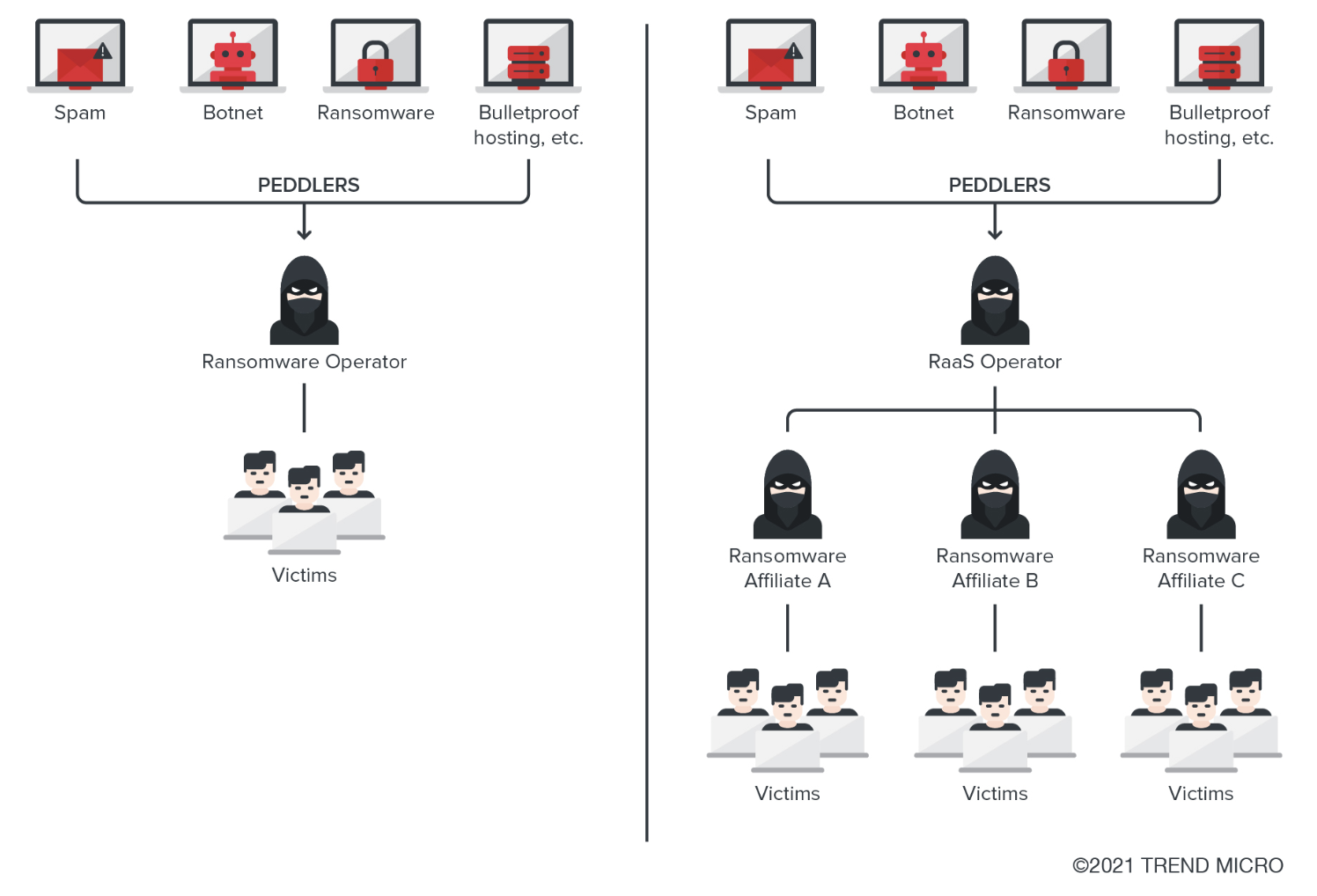
Typically, the main goal with ransomware is money - attackers encrypt data and hope for a generous payment for the decryptor. No one wants to be a ransomware victim, so what should you do, and how can you detect it? The ransomware encryption process is typically the final stage of the attack. Consequently, ransomware group activity for detection purposes can be divided into several steps.

Pre-Encryption Detection
We review how to detect the main techniques used during the pre-encryption stage.
**Delete Volume Shadow Copies
**Organisations often use Volume Shadow Copy Service (VSS) for data backup purposes. Threat actors typically delete these shadow copies and disable the service to prevent recovery. Below is how this activity can be identified in logs. This activity can be observed in Sysmon EventID 1 or Windows Event Logs Security EventID 4688.

**Disable Windows Recovery
**In cases where the system cannot boot normally due to crashes, corrupted files, or boot errors - which quite often occur during ransomware attacks - users attempt to utilise the Windows Recovery mechanism. Therefore, attackers frequently disable this capability before deploying ransomware.
**Delete Backups
**Organisations with robust backup infrastructure can mitigate the impact of encryption by restoring affected data, thereby eliminating the need for a decryptor and negating any potential ransom payment. Recognising this, threat actors systematically identify and destroy backup repositories prior to the encryption processes to maximise leverage over victims.
This activity can be observed in Sysmon EventID 1 or Windows Event Logs Security EventID 4688.

**Delete Logs
**Since ransomware is the final stage of an attack, threat actors can delete logs from systems in order to hinder the SOC team's investigation. This, in turn, increases the time required to understand how the incident occurred, identify the entry point, and reconstruct the attack timeline. This activity can be observed in Sysmon EventID 1 or Windows Event Logs Security EventID 4688 and EventID 1102. It's also important to understand that if your logs are ingested into a SIEM solution, even if an attacker performs these actions, you will still be able to see the lost logs in your SIEM.

Successfully detecting these steps in your environment serves as a critical indicator that an adversary is preparing for the encryption phase. This represents your final opportunity to preempt the attack and prevent data encryption. A practical exercise now awaits you, where you will practice identifying these pre-encryption indicators. Good luck!
Practice Scenario
Based on your analysis in the previous task, you, as a SOC L2 analyst, determined that the TrySaveMe incident is indeed serious and warrants an in-depth investigation. In this task, you will continue analysing the adversary activity within this domain.
The logs for this task are located in the Splunk index task4. Use the following query: index=task4
Answer the questions below
What command did the attacker use to view available VSS shadow copies?
index=task4 shadow command

What was the PID of the process that successfully deleted the VSS shadow copies on DC-01?
index=task4 shadow command

Which logs did the attacker delete on DC-01?
index=task4
Select the cleared action, then you’ll find the log name

index=task4 action=cleared

Ransomware Detection 2
Now we will take a closer look at how threat actors share ransomware and execute it within the environment.
In situations where you were able to detect the pre-encryption steps and prevent the ransomware from spreading and encrypting systems, you would not need to discover the steps described in this task.
Ransom Deployment and Encryption Detection
Prior to executing encryption in the environment, an attacker must distribute the ransomware across the client's network. There are actually quite a number of methods available to them, and we'll examine the primary ones in this task.
Detection of Ransomware Deployment Using GPO
Group Policy Objects are a very convenient option for attackers to spread ransomware, as they provide the ability to execute specific actions across entire Organisational Units. Just a single GPO can target hundreds or thousands of endpoints simultaneously - the only important point for this manipulation is that the threat actor must have the appropriate permissions, such as Domain Admin, Enterprise Admins. Below we will examine what this entire process looks like and what an attacker needs for this.

Let's imagine an attacker has already obtained Domain Admin through privilege escalation. What can we detect next? Let's examine this now. The threat actor needs to upload a Ransom file to SYSVOL. As you can see, the Office364.exe file was created in the scripts folder, after which the attacker proceeded to create a new GPO.

After that, the attacker needs to select a method to launch the ransom file. In our case, this is StartUp. As a result, the attacker adds a condition to this GPO to launch the file on systems in the TrySaveMe domain using StartUp.

As a result of the Group Policy being applied to the domain, a new StartUp task will be created on the systems. After the systems reboot, the ransom will be successfully launched on them.

**Detecting WMIC-Related Ransomware Activity
**Adversaries frequently leverage WMIC in incidents for multiple purposes including discovery, persistence, lateral movement, as well as for execution ransomware across the client's environment. Through the use of the process call create command with wmic process, threat actors are able to remotely execute processes on target systems. This remotely spawned process can be a ransomware executable that triggers the file encryption process. It's important to note that the parent process on the remote system will be wmiprvse.exe. Below you can see how this activity looks in a real environment. Also, in this report you can see an excellent example of ransomware distribution and execution using WMIC.

Detecting Tasks-Related Ransomware Activity
I'm sure you've heard or seen threat actor activity related to scheduled tasks many times before, and typically this was a persistence mechanism. Interestingly, tasks can be created and executed on remote systems, which is exactly what adversaries do during ransomware campaigns. Specifically, they use schtasks to distribute ransomware across the network by creating scheduled tasks to execute the ransomware at the same time on all network hosts. Below we demonstrate an example of how the activity related to ransomware distribution via scheduled tasks would appear in logs, originating from host PROD-WKS-07 across the CONTOSO network**.** You can detect this activity using Sysmon Event ID 1 or Windows Event Log Security Event ID 4688 where the process name is schtasks, or by monitoring for scheduled task creation events Event ID 4698 on destination machines.

Detecting RMM-Related Ransomware Activity
A large number of organisations use RMM solutions to facilitate IT operations at scale in large environments, and indeed these solutions offer many advantages. Unfortunately, adversaries, recognising that RMM products are increasingly prevalent in corporate environments, have realised they can gain access directly to the RMM product's management console and from there distribute and execute ransomware, instead of taking the full and lengthy path of compromising the AD domain. Below is shown how exactly an attack occurs through RMM.

To detect the ransomware deployment and execution via RRM, we can identify this activity in Sysmon logs using EventCode 1. As demonstrated in the example below, the malicious activity originates from the RMM agent, which in our case is ScreenConnect.

Practice Scenario
The attacker's actions in the previous task should have raised red flags, as these activities typically occur immediately before the worst possible outcome. What is that outcome? Your objective in this task is to determine what the attacker was preparing for.
The logs for this task are located in the Splunk index task5. Use the following query: index=task5
Answer the questions below
What is the full path to the ransomware executable that was created on TSM-PROD-01?
index=task5 host="TSM-PROD-01" C: created

index=task5 fixer.exe

What is the MITRE ATT&CK ID of the method the attacker used to execute ransomware on domain systems?


How many systems were targeted for ransomware execution by the attacker?
index=task5 WMIC.exe

Did the attacker successfully execute the ransomware on the hosts? (Yes/Nop)
Remember our current host is PROD, but is it really the one executing the ransom
index=task5 WMIC.exe
Data Destruction
Not all attacks are motivated by data theft or ransom payments. Sometimes the attacker's sole intention is to cause maximum damage to systems and operations.
Data Destruction
The process of destroying data and files on specific systems is called Data Destruction and corresponds to the Impact Tactic in MITRE with ID T1485. We'll explore several common methods that threat actors are actively using in the wild.

Such activity is usually performed using malware. Typically, XDR systems in enterprise environments should detect and prevent these attacks. In this task, we will explore the most prominent cases from recent years connected to each technique.
Boot-Level Destruction
Attackers overwrite the Master Boot Record or Boot Sectors to prevent the system from starting. This technique targets the first sectors of the disk where boot instructions are stored, rendering the machine unbootable even though data may still physically exist on the drive. I recommend paying attention to the MBR and GPT Analysis room for a better understanding of analyzing the attacker's activity.

File System-Level Destruction
Attackers corrupt or delete file system metadata structures such as Partition tables, Master File Tables, or inode tables. This makes it impossible for the operating system to locate or access files, even though the actual data content remains physically intact on the disk.

File Overwriting
Attackers systematically traverse directories and overwrite file contents with random data or zeros, making data recovery impossible. Unlike encryption, this technique permanently destroys the actual data, not just the keys to access it, ensuring files cannot be restored through any forensic methods.

Firmware-Level Destruction
Attackers target firmwares, network devices, or storage controllers to render hardware unusable. This low-level attack corrupts the firmware below the operating system layer, often requiring hardware replacement or specialized re-flashing procedures that go beyond standard system recovery.

This task was focused more on researching and sharing examples of popular companies affected by wipers rather than the detection side, as identifying a wiper immediately in logs is nearly impossible. Advancing into reverse engineering to understand malware behavior is not the topic of this room, so we skipped it here. Additional research tasks are waiting for you in the questions!
Answer the questions below
What is the MITRE ATT&CK ID for the Data Destruction technique under the Impact tactic?

What service did HermeticWiper use for CDN payload delivery? Discord
What protocol did Apostle Wiper use for tunneling? RDP
Conclusion
Great job completing this room! You've now gained a solid understanding of Active Directory post-exploitation tactics and how threat actors pursue their final objectives after domain compromise.
Investigated AD post-exploitation techniques and long-term persistence methods used by attackers.
Analyzed ransomware deployment strategies and lateral movement across enterprise networks.
Understood how wiper malware and data destruction techniques are executed and detected.
More exciting challenges await you next!
Key Takeaways
Pre-encryption detection is your last line of defence — shadow copy deletion, disabling Windows Recovery, and log clearing are all high-fidelity signals that ransomware deployment is imminent
AD persistence often starts quietly — a new domain account or group membership change in logs is easy to miss but critical to catch early
Ransomware distribution methods are varied — GPO abuse, WMIC remote execution, and scheduled tasks each leave distinct log signatures worth knowing by heart
Data destruction differs from ransomware — wipers permanently overwrite or corrupt data with no decryption path; the detection window is extremely narrow and often requires behavioral/XDR tooling rather than log analysis alone
SIEM ingestion protects your visibility — even if an attacker clears local event logs, logs already forwarded to Splunk remain available for investigation
Understanding post-exploitation from the defender's side makes it much easier to reason about attacker intent during an incident — every action in this phase is purposeful and time-pressured, which is exactly what makes the pre-encryption window so important to catch.
About the author
- Software Developer | Learning Cybersecurity | Open for roles * If you're in the early stages of your career in software development (student or still looking for an entry-level role) and in need of mentorship, you can reach out to me.
Comments
Join the discussionNo comments yet. Be the first to comment.




