Detecting AD Credential Attacks (TryHackMe)

Introduction
In August 2024, The DFIR Report documented a BlackSuit ransomware intrusion(opens in new tab) where the attackers used Rubeus to Kerberoast service accounts, AS-REP Roasted an account with preauthentication disabled, and dumped credentials from LSASS memory, all within a single intrusion. In a separate BlackSuit case investigated by ReliaQuest(opens in new tab) that same year, the attackers compromised over 20 accounts through Kerberoasting, including a domain administrator. The techniques they used were not exotic or novel. They are the same credential attacks that show up in incident after incident, and they are detectable if you know what to look for.
This room covers five techniques that bridge the gap between "attacker has a foothold" and "attacker owns the domain."
Kerberoasting and AS-REP Roasting abuse Kerberos to crack passwords offline.
LSASS dumping extracts credentials directly from memory.
DCSync impersonates a domain controller to pull every password hash in the directory.
NTDS.dit extraction copies the AD database file directly from the domain controller's disk.
These aren't the only ways attackers get credentials (a passwords.xlsx sitting on a network share is still a real attack vector), but they're the five that abuse AD's authentication and replication infrastructure directly. Each targets a different part of that infrastructure, requires a different level of privilege, and leaves distinct artifacts in different log sources.
Learning Objectives
Detect Kerberoasting through anomalous TGS requests with RC4 encryption
Identify AS-REP Roasting by recognizing TGT requests for accounts with preauthentication disabled
Detect LSASS credential dumping through suspicious process access patterns
Identify DCSync attacks through unauthorized AD replication requests
Detect NTDS.dit extraction through process creation and file write events on domain controllers
Correlate credential access artifacts across host and domain controller logs to trace an attacker's escalation path
Prerequisites
Active Directory basics: Core AD concepts like domains, users, groups, OUs, and how Kerberos/NTLM authentication works (Active Directory Basics room)
Windows logging: Windows Event Log structure, Security log channels, and key Event IDs (Windows Logging for SOC room)
Active Directory monitoring: Kerberos authentication flows, TGT/TGS ticket concepts, Event IDs 4768 and 4769 (Monitoring Active Directory room)
Splunk basics: SPL queries, filtering, stats commands (Splunk: Exploring SPL room)
Detecting Kerberoasting
Attackers target service accounts through Kerberoasting because these accounts often have weak passwords and elevated privileges. A SQL service account running as Domain Admin, for example, gives an attacker full domain control the moment they crack the password. And the attack itself requires nothing more than a regular domain user account.
How Do Accounts End Up Kerberoastable?
It usually starts with an IT admin who needs to run a service, like SQL Server or a web application, and decides to use their own DA account (or a shared admin account) as the service identity because it's quick. They register an SPN on the account, set a short password so the team can remember it, and move on. Now that account has a weak password hash tied to an SPN that any domain user can request. Multiply this across years of admin decisions, and you get environments with dozens of Kerberoastable accounts.
When a user needs to access a service in Active Directory, they request a Kerberos service ticket (TGS) from the domain controller. The DC looks up the SPN, encrypts the ticket with the service account's password hash, and hands it back. Normally, the user presents the ticket to the service, and the service decrypts it to verify the user's identity.
The problem is that any domain user can request a service ticket for any SPN in the domain. The DC doesn't check whether the user actually intends to use the service. It just issues the ticket. An attacker takes that ticket and cracks the encryption offline. If the service account has a weak password, the attacker recovers the plaintext password in minutes. The diagram below illustrates this flow:

The detection centers on Event 4769 (Kerberos Service Ticket Requested), which the DC logs when it processes a TGS-REQ. Modern AD environments default to AES-256 encryption (0x12) for Kerberos tickets. Most Kerberoasting tools, including Rubeus and Impacket's GetUserSPNs.py, downgrade the request to RC4 encryption (0x17) because RC4 hashes are much faster to crack. A TGS request with Ticket_Encryption_Type=0x17 in an environment that uses AES is a strong indicator.
Here are the fields in Event 4769 that matter for detection:
| Field | What It Contains | Why It Matters |
|---|---|---|
| Service_Name | The SPN being requested (e.g., svc-sql) | Identifies which service account is being targeted |
| Ticket_Encryption_Type | 0x12 (AES) or 0x17 (RC4) | RC4 requests are the primary Kerberoasting signal |
| Account_Name | The account requesting the ticket | Identifies the compromised user running the attack |
| Client_Address | Source IP of the request | Identifies the attacker's machine |

Important note: The Client_Address field in Event 4769 often uses IPv6-mapped IPv4 notation on modern Windows domain controllers. Instead of displaying 10.5.90.1, the field shows ::ffff:10.5.90.1. This is standard behavior, not an error. The actual IPv4 address is the portion after ::ffff:, so ::ffff:10.5.90.1 means the source IP is 10.5.90.1.
Walkthrough
Follow along in the Splunk instance, and use index=task2 for all queries in this task
Normal Kerberos traffic includes a lot of Event 4769 entries. Computer accounts (names ending in $) and krbtgt requests generate high volumes as part of regular domain operations. We exclude both to focus on service accounts that could be Kerberoasting targets. Our primary filter is Ticket_Encryption_Type=0x17 since that's the RC4 downgrade signal. The diagram below contrasts normal TGS patterns with a Kerberoasting attack:
index=task2 EventCode=4769 Ticket_Encryption_Type=0x17 Service_Name!="*$" Service_Name!="krbtgt"
| table _time, Account_Name, Service_Name, Ticket_Encryption_Type, Client_Address
| sort _time
Multiple TGS requests with RC4 encryption, all from the same account, targeting different service accounts, within a short time window. That pattern is textbook Kerberoasting.
Let's aggregate to answer the key triage questions: how many service accounts were targeted, which account ran the attack, and where did it come from:
index=task2 EventCode=4769 Ticket_Encryption_Type=0x17 Service_Name!="*$" Service_Name!="krbtgt"
| stats dc(Service_Name) as targeted_services count by Account_Name, Client_Address
Your next triage priority is the privilege level of the targeted accounts. If any of those service accounts are members of Domain Admins or other privileged groups, the attacker may already have domain-level access once they crack the hash. That distinction is the difference between a routine alert and an active domain compromise.
Detection evasion
In 2022, TrustedSec released the Orpheus(opens in new tab) tool demonstrating that Kerberoasting can be performed with AES-256 encryption instead of RC4, bypassing the Ticket_Encryption_Type=0x17 filter entirely. Microsoft has been deprecating RC4(opens in new tab) as the default Kerberos encryption type, starting with Windows Server 2025, where AES is the default for new Kerberos tickets. RC4 tickets can still be issued for service accounts that only support RC4 in their encryption type attributes, but the overall trend is toward AES-only environments.
This means RC4-based detection alone isn't enough for the long term. Volume-based detection catches both RC4 and AES Kerberoasting because tools like GetUserSPNs.py and Rubeus request tickets for every SPN-holding account in the domain by default, producing a burst of TGS requests that stands out against normal activity regardless of the encryption type used. The following query groups TGS requests into 5-minute windows and flags any account that requested tickets for more than 5 unique service accounts within a window:
index=task2 EventCode=4769 Service_Name!="*$" Service_Name!="krbtgt"
| bin _time span=5m
| stats dc(Service_Name) as unique_spns count by Account_Name, Client_Address, _time
| where unique_spns > 5
Info: The threshold of 5 here is tuned for our lab environment. In production, the right number depends on what's normal in your network. Establish how many distinct service tickets a typical account requests during normal operations, then set your threshold above that peak.
The BlackSuit ransomware group that we mentioned in the introduction used Rubeus for Kerberoasting, and the joint CISA/FBI advisory on Akira ransomware (AA24-109A(opens in new tab)) lists Kerberoasting among the post-exploitation credential access techniques used by the group. These groups are actively using this in the wild, and the RC4 signal is still the most reliable indicator in most environments today.
On the Splunk instance, investigate the Kerberoasting activity using the queries above.
Answer the questions below
How many service accounts were targeted by Kerberoasting?
index=task2 EventCode=4769 Ticket_Encryption_Type=0x17 Service_Name!="*$" Service_Name!="krbtgt" | table _time, Account_Name, Service_Name, Ticket_Encryption_Type, Client_Address | sort _time

What account requested the service tickets? (Answer Format: username only, without @domain)
index=task2 EventCode=4769 Ticket_Encryption_Type=0x17 Service_Name!="*$" Service_Name!="krbtgt" | stats dc(Service_Name) as targeted_services count by Account_Name, Client_Address

What source IP initiated the Kerberoasting? 10.5.90.1
Detecting AS-REP Roasting
Kerberoasting targets service accounts that have SPNs registered. AS-REP Roasting targets a different weakness entirely: user accounts with preauthentication disabled. It doesn't require SPNs, and unlike Kerberoasting, the attacker doesn't even need valid domain credentials to perform it. The underlying flaw is the same, though: the DC hands back encrypted material that the attacker can crack offline to recover the plaintext password. The difference is what triggers the DC to hand it over and what it's encrypted with.
Under normal Kerberos authentication, when a user requests a TGT (ticket-granting ticket), the domain controller requires them to prove they know their password first. The user encrypts a timestamp with their password hash and sends it along with the AS-REQ. The DC decrypts it, verifies the timestamp is recent, and only then issues the TGT. The DC logs Event 4768 (Kerberos TGT Request) with Pre_Authentication_Type=2, followed by Event 4769 when the user requests a service ticket, and Event 4624 when they log onto the target service. The diagram below shows this normal authentication flow:

Normal Kerberos authentication flow where the user proves their identity through preauthentication before receiving a TGT
On the other hand, when an account has the DONT_REQUIRE_PREAUTH flag enabled, the DC skips that verification step. It issues the TGT without first confirming the requester knows the password. The AS-REP that comes back is encrypted with the account's password hash, which means an attacker can take it offline and crack it to recover the plaintext password. An attacker doesn't even need a valid domain account. They only need to know the username of an account with preauthentication disabled. The diagram below shows how this attack bypasses the preauthentication step:

This misconfiguration exists because some legacy applications, like older ERP or payroll systems, fail Kerberos authentication unless preauth is disabled for their service account. Admins might disable it to get the application working and then forget about it.
The key difference between AS-REP Roasting and the normal flow is that the attacker requests the TGT purely to extract the crackable hash. They never request a service ticket, and they never log onto anything. So the DC logs Event 4768 with Pre_Authentication_Type=0, but there is no 4769 and no 4624. The diagram below highlights this difference:

Walkthrough
Follow along in the Splunk instance, and use index=task3 for all queries in this task.
Let's start by looking at all TGT request events to see what normal traffic looks like:
index=task3 EventCode=4768
| table _time, Account_Name, Pre_Authentication_Type, Ticket_Encryption_Type, Client_Address
| sort _time
The entry with Pre_Authentication_Type=0 and RC4 encryption (0x17) is the anomaly we're investigating. Let's isolate it:
index=task3 EventCode=4768 Pre_Authentication_Type=0
| table _time, Account_Name, Pre_Authentication_Type, Ticket_Encryption_Type, Client_Address
This returns the AS-REP Roasting attempt. The Pre_Authentication_Type=0 entry tells us this account has preauthentication disabled, and someone requested a TGT for it.
Now let's check whether this was followed by any authentication activity. If the same source generated any logon events (4624) or TGS requests (4769) for this account after the TGT request, it might be legitimate usage. If there's nothing, the attacker only wanted the hash.
Replace {ACCOUNT_NAME} with the account you identified from the previous results:
index=task3 (EventCode=4624 OR EventCode=4769) | search Account_Name="{ACCOUNT_NAME}" | table _time, EventCode, Account_Name, Client_Address
The query returns zero results. That strongly suggests the TGT was requested for offline cracking rather than for normal service access, though it is not definitive by itself.
A legitimate application could still produce this pattern if it failed before requesting a service ticket, relied on a cached ticket, or otherwise did not complete the expected Kerberos flow. Even so, when the same event also shows Pre_Authentication_Type=0 and RC4 encryption, the absence of follow-up activity makes malicious intent much more likely.
The BlackSuit ransomware group used AS-REP Roasting alongside Kerberoasting in the same intrusion documented by The DFIR Report(opens in new tab). They identified one account with preauthentication disabled and harvested its hash alongside the service account tickets, giving them multiple credential cracking opportunities from a single attack session.
Kerberoasting vs AS-REP Roasting
Now that we've investigated both attacks, the diagram below provides a quick reference for distinguishing them during triage:

On the Splunk instance, investigate the AS-REP Roasting activity.
Answer the questions below
Which account had preauthentication disabled? (Answer Format: username)
index=task3 EventCode=4768 | table _time, Account_Name, Pre_Authentication_Type, Ticket_Encryption_Type, Client_Address | sort _time

Detecting LSASS Credential Dumping
So far, we've been working with Kerberos events on the domain controller to detect attacks that crack passwords offline. LSASS dumping is different. It's a direct credential theft technique that happens on the endpoint where the credentials are stored, and detecting it requires a completely different approach.
Attackers target LSASS (Local Security Authority Subsystem Service) because it stores credentials for every user who has authenticated to the machine. If a domain admin logged into a workstation earlier that day, their NTLM hash and Kerberos tickets are sitting in LSASS memory. An attacker who dumps LSASS on that machine gets those credentials immediately, no cracking required.
Let's think like an attacker. We've Kerberoasted some service accounts in the previous task, but none had domain admin privileges. So what would we do next?
There are different approaches attackers can take, but one of them is finding a machine where a DA or any account with higher privileges has an active session. Dumping LSASS is the next escalation path.
What LSASS Stores
LSASS holds different types of credentials depending on the Windows version and configuration:
NTLM password hashes for all authenticated users
Kerberos tickets (TGTs and TGS tickets) for active sessions
Plaintext passwords on systems where WDigest is enabled (Windows 8/Server 2012 and earlier by default, or any newer version where the
UseLogonCredentialregistry value has been set to1)Cached domain credentials for offline logon
The diagram below shows the different credential types stored in LSASS memory:

If an attacker dumps LSASS, they can use NTLM hashes to crack them offline, use them in Pass-the-Hash attacks, or dump Kerberos tickets for Pass-the-Ticket attacks. These are lateral movement techniques with their own detection artifacts. For now, our focus is on detecting the dump itself. The diagram below illustrates the LSASS dumping attack flow:

Detection With Sysmon Event 10
Sysmon Event 10 (ProcessAccess) fires when one process opens a handle to another process. When a tool like Mimikatz or ProcDump accesses lsass.exe, Sysmon records exactly which process did it, what level of access it requested, and the call stack that led to the access. For a deeper dive into LSASS access detection patterns, the Splunk Threat Research Team's article You Bet Your Lsass: Hunting LSASS Access(opens in new tab) is an excellent resource.

Warning: Sysmon Event 10 only logs process access when the Sysmon configuration includes explicit ProcessAccess rules targeting lsass.exe. The default Sysmon installation does NOT log these events. If your environment uses a minimal Sysmon config, LSASS dumping will be invisible to Sysmon.
Here are the fields we'll use for detection:
| Field | What It Contains | Why It Matters |
|---|---|---|
| SourceImage | Full path of the process accessing LSASS | Identifies the tool used for the dump |
| SourceUser | The user account running the source process | Identifies the compromised account. SYSTEM is expected; a domain user account is suspicious |
| TargetImage | Full path of the target process (lsass.exe) | Confirms LSASS was the target |
| GrantedAccess | Hex access mask showing requested permissions | Different tools request different access levels |
| CallTrace | DLL call stack leading to the access | Reveals the method used (MiniDump API, injection, etc.) |
Understanding the GrantedAccess Field
The GrantedAccess value is a hex bitmask built by adding together individual process access rights(opens in new tab). Understanding how these values are composed helps when you encounter an unfamiliar access mask in the field:

For example, 0x1010 = 0x1000 (PROCESS_QUERY_LIMITED_INFORMATION) + 0x0010 (PROCESS_VM_READ). The 0x0010 bit is what matters for credential dumping, because reading LSASS process memory is how credentials are extracted.
In practice, 0x1010 is associated with Mimikatz, and 0x1FFFFF (PROCESS_ALL_ACCESS) with ProcDump, comsvcs.dll, and Task Manager.
Understanding the CallTrace Field
The CallTrace field shows the chain of DLL calls that led to the LSASS access, and it can distinguish between different dump methods:
Known DLLs like
dbgcore.dllanddbghelp.dllindicate the MiniDump API was used. This is how ProcDump andcomsvcs.dllcreate memory dumps. It's a legitimate API being used for a malicious purpose.UNKNOWN memory offsets (addresses not mapped to any known DLL) indicate injected code. This is the signature of Cobalt Strike beacons, Meterpreter, and other in-memory implants that access LSASS from injected shellcode.
To make this concrete, here's what each pattern looks like in a real CallTrace value:
MiniDump-based (ProcDump/comsvcs.dll):
C:\Windows\SYSTEM32\ntdll.dll+9D4C4|C:\Windows\System32\KERNELBASE.dll+2B16D|C:\Windows\System32\dbgcore.dll+A3C8|...
Injection-based (e.g., Cobalt Strike):
C:\Windows\SYSTEM32\ntdll.dll+9D4C4|UNKNOWN(0000025FA0120000)|UNKNOWN(0000025FA0124B30)|...
The diagram below provides a visual comparison of these two CallTrace patterns:

The distinction matters because it tells you what kind of attacker you're dealing with. A ProcDump-based dump suggests a hands-on-keyboard attacker using LOLBins (legitimate tools for malicious purposes). An injection-based dump suggests a more sophisticated implant.
What Normal Looks Like
Several legitimate processes access LSASS as part of normal Windows operations. Knowing these helps us filter noise:
| Full Process Path | Typical GrantedAccess | Why |
|---|---|---|
| C:\Windows\System32\csrss.exe | 0x1000 or 0x1400 | Windows subsystem, manages processes |
| C:\Windows\System32\WerFault.exe | 0x1000 | Windows Error Reporting crash handler |
| C:\Windows\System32\svchost.exe | 0x1010 | Various service functions (normal at this access level) |
| AV/EDR agent paths | Varies | Security products monitor LSASS for protection |
Note: When filtering out legitimate processes during investigation, always match on the full path, not just the executable name. An attacker can name their tool svchost.exe and place it in C:\Users\Public\ or C:\Temp\. The process name looks legitimate, but the path gives it away. The same logic applies to csrss.exe, WerFault.exe, and any other system process. If the SourceImage path isn't C:\Windows\System32\, treat it as suspicious regardless of the file name. This also means that access masks that are associated with credential dumping tools aren't automatically malicious. It all depends on context: which process is accessing LSASS, and why.
Walkthrough
Follow along in the Splunk instance, and use index=task4 for all queries in this task.
Our investigation starts broad. Rather than jumping straight to known-bad access masks, we first want to see every process that accessed LSASS so we don't miss anything by filtering too early:
index=task4 EventCode=10 TargetImage="*\\lsass.exe"
| stats count by SourceImage, GrantedAccess

If we look at the results, we can see a mix of legitimate system processes and a suspicious entry. Once we identify the suspicious process, let's examine its CallTrace to understand the method used.
Replace {SUSPICIOUS_PROCESS} with the process you identified as suspicious in the previous step:
index=task4 EventCode=10 TargetImage="*\\lsass.exe" SourceImage={SUSPICIOUS_PROCESS}
| table _time, SourceImage, SourceUser, GrantedAccess, CallTrace

The CallTrace tells us whether this was a MiniDump-based dump (known DLLs like dbgcore.dll) or an injection-based dump (UNKNOWN offsets). This distinction matters for the investigation because it changes what you look for next.
The SourceUser field tells us which account was running the dump tool. If it's NT AUTHORITY\SYSTEM, the tool was executed with system-level privileges (possibly through a service or scheduled task). If it's a domain user account like DOMAIN\jsmith, that account is confirmed compromised and needs immediate investigation. Knowing the compromised account is a critical part of scoping the incident because it tells you which credentials, sessions, and systems that account had access to.
In the BlackSuit intrusion documented by The DFIR Report (August 2024)(opens in new tab), the attackers accessed LSASS through an injected mstsc.exe process with an access mask of 0x1010 and through dllhost.exe with 0x1FFFFF in the March 2025 case(opens in new tab). Both processes had been injected with Cobalt Strike beacons, and the CallTrace contained UNKNOWN offsets rather than legitimate DLLs.
Other Credential Stores
LSASS is not the only credential store on a Windows machine, but it is the most valuable target for domain compromise:
The SAM database (
C:\Windows\System32\config\SAM) stores local account hashes only, not domain credentials. Attackers extract SAM hashes with tools likereg saveor Mimikatz'slsadump::sam, but these only give access to local accounts on that specific machine.Cached domain credentials (stored in the registry under
SECURITY\Cache) are DCC2 hashes that allow offline logon when the DC is unreachable. These are slow to crack (bcrypt-based) and can't be used for Pass-the-Hash, making them a lower-priority target.The NTDS.dit database on domain controllers contains every account hash in the domain. Extracting it requires privileged access on the DC itself, which we cover in Task 6.
LSASS is the primary target because it holds live domain credentials in a directly usable format. If an attacker dumps LSASS on a machine where a Domain Admin has an active session, they can immediately use those credentials for Pass-the-Hash or Pass-the-Ticket without any cracking.
On the Splunk instance, investigate the LSASS access events.
Answer the questions below
What is the full path of the process that accessed lsass.exe?
index=task4 EventCode=10 TargetImage="*\lsass.exe" | stats count by SourceImage, GrantedAccess

What GrantedAccess value was used? (Answer Format: 0xNNNNNN) 0x1FFFFF
Which DLL in the CallTrace reveals the dump method?
index=task4 EventCode=10 TargetImage="*\lsass.exe" dll calltrace 0x1FFFFF

Detecting DCSync
At this point in the attack chain, imagine the attacker has Domain Admin credentials. Maybe they cracked a Kerberoasted service account that happened to be a Domain Admin, or they dumped LSASS on a machine where a Domain Admin had an active session. Either way, they now have the highest level of access in the domain. The question is what they do with it.
Attackers target DCSync because it lets them extract every password hash in the domain without touching the domain controller's disk, without creating volume shadow copies, and without needing physical access to the DC. It works by abusing the Active Directory replication protocol (DRSUAPI), the same protocol that legitimate domain controllers use to synchronize directory data with each other. The attacker's machine pretends to be a domain controller and requests password data via DRSUAPI. If their account has the right permissions, the real DC complies. Domain Admins, Enterprise Admins, and DC machine accounts have these replication rights by default.
In some environments, attackers can also obtain replication rights through ACL abuse (WriteDACL on the domain object) without ever joining the Domain Admins group.
How DCSync Works
Active Directory replication is built on a set of extended rights that control who can request directory data. Three specific GUIDs are relevant:
{1131f6ad-9c07-11d1-f79f-00c04fc2dcd2}is DS-Replication-Get-Changes-All{1131f6aa-9c07-11d1-f79f-00c04fc2dcd2}is DS-Replication-Get-Changes{89e95b76-444d-4c62-991a-0facbeda640c}is DS-Replication-Get-Changes-In-Filtered-Set
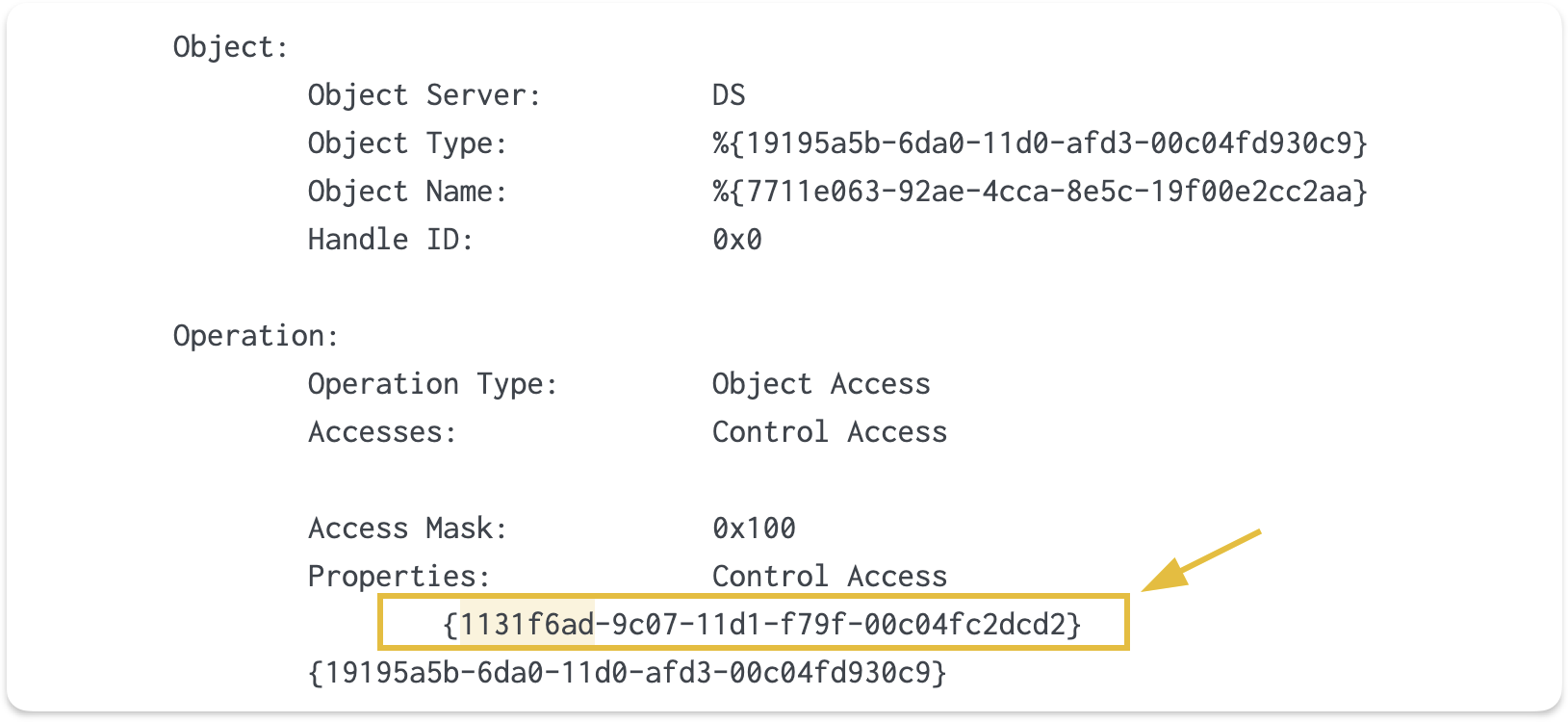
The one that matters most is 1131f6ad, which is DS-Replication-Get-Changes-All. This is the permission that allows pulling password data, and it's the primary indicator of DCSync.
Detection with Event 4662
DCSync detection uses Event 4662 (An operation was performed on an object), which is part of Directory Service Access auditing. When someone exercises the replication extended rights on the domain partition, Event 4662 fires with the replication GUID embedded in the raw event data.
| Field | What It Contains | Why It Matters |
|---|---|---|
| user | The account performing the replication | Identifies who is running DCSync |
| Access_Mask | 0x100 (Control Access) | Indicates an extended right was exercised |
| Properties | Shows "Control Access" (GUIDs in raw event) | The replication GUIDs confirm DCSync |
| Logon_ID | Hex session identifier | Links to 4624 logon event for source IP correlation |
The detection signal is an Event 4662 with Access_Mask=0x100, the replication GUIDs present in the raw event data, and a user that isn't a machine account (doesn't end in $).
Warning: Event 4662 for DCSync detection requires TWO things to be configured in advance: (1) "Audit Directory Service Access" must be enabled via Group Policy, and (2) a SACL (System Access Control List) must be set on the domain partition to audit replication operations. Neither is enabled by default. Without both of these, DCSync is completely invisible in the logs. This is one of the most common detection gaps in real environments, and it's worth verifying in any network you're responsible for.
Normal vs Suspicious Replication
In a production environment with multiple domain controllers, Event 4662 events with replication GUIDs are completely normal. Domain controllers replicate constantly. The distinction between normal and malicious is the source, as shown in the diagram below:

| Pattern | Normal | Suspicious |
|---|---|---|
| user | Machine account ending in \( (e.g., THM-DC\)) | Human user account (not ending in $) |
| Source host | Another domain controller | A workstation or non-DC server |
| Frequency | Regular intervals matching replication schedule | One-time or burst of requests |
| Scope | Specific partition changes | Requesting all credentials (-just-dc-ntlm or full dump) |
Important note: Our lab environment has a single domain controller, so you won't see legitimate DC-to-DC replication traffic. In a production environment with multiple DCs, the user!="*$" filter is what separates normal replication from DCSync attacks.
Walkthrough
Follow along in the Splunk instance, and use index=task5 for all queries in this task.
With the normal replication patterns from the table above as our baseline, we can filter for the anomaly: a non-machine account exercising replication rights.
The 1131f6ad GUID (DS-Replication-Get-Changes-All) is the permission that allows pulling password data, and filtering out machine accounts (user!="*$") isolates any human user performing replication:
index=task5 EventCode=4662 "1131f6ad" user!="*$"
| table _time, user, Access_Mask, Properties
| sort _time

This query returned results, which means there's a non-machine account performing AD replication. The user field tells us which account was used, and the Properties field confirms this was a Control Access operation. The replication GUID 1131f6ad that we filtered for is embedded in the raw event data, which is why we search for it as a keyword rather than a field filter.
If you click on the event to expand it, you'll see the full GUID {1131f6ad-9c07-11d1-f79f-00c04fc2dcd2} in the raw log details under the Properties section. Splunk's field extraction parses this as "Control Access" (the access type) but doesn't extract the individual GUIDs into separate fields. That's why our query uses "1131f6ad" as a keyword search against the raw event text rather than filtering on the Properties field directly.
Warning: The user!="*\(" filter assumes attackers use human accounts for DCSync. In practice, adversaries who compromise machine account hashes (through ADCS abuse, unconstrained delegation, or other exploits) can perform DCSync from a machine account. In those cases, the \) filter would hide the attack. For mature environments, consider monitoring ALL accounts performing replication and baselining which machine accounts normally replicate.
Getting the Source IP
Event 4662 doesn't contain a source IP field directly. To find where the DCSync originated, we correlate the Logon_ID from the 4662 event with a 4624 (logon) event for the same session, which contains the Source_Network_Address field. The diagram below illustrates this correlation:

Replace {COMPROMISED_USER} with the account you identified from the previous query:
index=task5 EventCode=4662 Access_Mask=0x100 user={COMPROMISED_USER} "1131f6ad"
| table _time, host, user, Logon_ID
Replace {LOGON_ID} with the Logon_ID value from the results above:
index=task5 EventCode=4624 Logon_ID={LOGON_ID}
| table _time, host, user, Source_Network_Address, Logon_Type
This gives us the source IP and confirms the logon type.
During the SolarWinds compromise attributed to APT29(opens in new tab), incident responders documented that the threat actor used privileged accounts to replicate directory service data, confirming DCSync as part of the intrusion. Scattered Spider(opens in new tab) also uses DCSync as a standard part of their credential access playbook, relying on tools like Mimikatz and secretsdump.py once they have obtained domain admin credentials.
On the Splunk instance, investigate the DCSync activity.
Answer the questions below
What account performed the DCSync?
index=task5 EventCode=4662 "1131f6ad" user!="*$"
| table _time, user, Access_Mask, Properties
| sort _time

What is the Logon_ID of the DCSync session? (Answer Format: 0xNNNNNNN)
index=task5 EventCode=4662 "1131f6ad" user!="*$" 0x100

What source IP initiated the DCSync?
index=task5 0x5A01668 10.

Detecting NTDS.dit Extraction
DCSync works remotely and blends in with replication traffic. But it's not the only way attackers extract credentials from Active Directory. Before DCSync became the standard, attackers copied the NTDS.dit file directly from the domain controller. This older approach is noisier, but it's still actively used in real intrusions.
How NTDS.dit Extraction Works
The NTDS.dit file is the Active Directory database stored on every domain controller (typically at C:\Windows\NTDS\ntds.dit). It contains password hashes for every account in the domain. The problem for attackers is that Windows locks this file while AD DS is running, so it can't be copied directly. Attackers use two main workarounds:
Volume Shadow Copy (vssadmin): Creates a point-in-time snapshot of the filesystem, bypassing the file lock. The attacker creates a shadow copy, copies ntds.dit and the SYSTEM registry hive (needed to decrypt the hashes) from the snapshot, then deletes the shadow copy.
Typical command sequence:
C:\Windows\System32> vssadmin create shadow /for=C:
C:\Windows\System32> copy \\?\GLOBALROOT\Device\HarddiskVolumeShadowCopy1\Windows\NTDS\ntds.dit C:\temp\ntds.dit
C:\Windows\System32> copy \\?\GLOBALROOT\Device\HarddiskVolumeShadowCopy1\Windows\System32\config\SYSTEM C:\temp\SYSTEM
C:\Windows\System32> vssadmin delete shadows /shadow={shadow-id} /quiet
Install From Media / ntdsutil: A legitimate AD management tool designed for domain controller promotion. Attackers abuse the IFM (Install From Media) feature to produce a clean copy of ntds.dit and the SYSTEM hive, saving them to a local directory.
Typical command:
C:\Windows\System32> ntdsutil "ac i ntds" "ifm" "create full C:\temp" q q
Both methods require privileged access on the domain controller. vssadmin needs local admin rights, while ntdsutil requires Domain Admin or equivalent AD DS permissions. Both produce the same result: an offline copy of the AD database that can be parsed with tools like secretsdump.py or NTDSDumpEx to extract all password hashes. The diagram below shows both extraction paths:

Detecting NTDS.dit Extraction
NTDS.dit extraction is detected through process creation events. We're looking for vssadmin.exe or ntdsutil.exe being executed on a domain controller with command-line arguments related to shadow copies or IFM.
Note: If Sysmon isn't deployed on your domain controllers, Windows Security Event 4688 (Process Creation) with command-line logging enabled provides the same process and command-line visibility. The queries in this walkthrough use Sysmon Event 1, but the detection logic applies to 4688 as well.
Sysmon Event 1 (Process Creation) captures the full command line. The detection signals are:
ntdsutil.exewith a command line containingifmandcreatevssadmin.exewith a command line containingcreate shadow
Sysmon Event 11 (File Creation) captures when ntds.dit is written to an unusual location by ntdsutil.exe. The MITRE CAR-2019-08-002(opens in new tab) analytic specifically targets this artifact.
Walkthrough 1: Investigating ntdsutil Malicious Use
Follow along in the Splunk instance, and use index=task6 for all queries in this task.
We start by looking for ntdsutil.exe execution because the IFM subcommand is the most common extraction method, and Sysmon Event 1 captures the full command line:
index=task6 EventCode=1 Image="*\ntdsutil.exe"
| table _time, host, User, ParentImage, Image, CommandLine

The CommandLine field shows the full ntdsutil command used. The ParentImage tells us how ntdsutil was launched.
Now let's check if the extraction produced the expected file:
index=task6 EventCode=11 TargetFilename="*ntds.dit" Image="*\\ntdsutil.exe"
| table _time, Image, TargetFilename

If this returns a result, the NTDS.dit file was successfully written to disk. The TargetFilename shows where the attacker saved it.
Walkthrough 2: Investigating vssadmin Shadow Copy
The second extraction method uses vssadmin to create a volume shadow copy, then copies ntds.dit and the SYSTEM hive from the snapshot.
Let's search for the shadow copy creation:
index=task6 EventCode=1 Image="*\vssadmin.exe" CommandLine="*create shadow*"
  | table _time, host, User, ParentImage, Image, CommandLine

The CommandLine confirms a shadow copy was created. Creating a shadow copy alone has legitimate uses (backups, system restore), so this event by itself doesn't confirm credential theft. What confirms it is what happens next.
Let's look for copy commands that target sensitive files from the shadow copy path:
index=task6 EventCode=1 CommandLine="*HarddiskVolumeShadowCopy*" (CommandLine="*ntds*" OR CommandLine="*SYSTEM*")
| table _time, host, User, ParentImage, Image, CommandLine
Let's look for copy commands that target sensitive files from the shadow copy path:
index=task6 EventCode=1 CommandLine="*HarddiskVolumeShadowCopy*" (CommandLine="*ntds*" OR CommandLine="*SYSTEM*")
| table _time, host, User, ParentImage, Image, CommandLine

The CommandLine field reveals the full source and destination paths the attacker used. Both files together give the attacker everything needed to extract every credential in the domain offline.
DCSync vs NTDS.dit Extraction
| Attribute | DCSync | NTDS.dit Extraction |
|---|---|---|
| Method | Remote replication via DRSUAPI | Local file copy via shadow copy or IFM |
| Access needed | Replication rights (DA by default) | Local admin on the DC |
| Log source | Event 4662 (Directory Service Access) | Sysmon Event 1 (Process Creation), Event 11 (File Creation) |
| Network visibility | Replication traffic from a non-DC IP | No network artifacts (local operation) |
| Noise level | Low (blends with normal replication) | High (shadow copy creation, file writes) |
The diagram below visualizes these differences:

On the Splunk instance, investigate the NTDS.dit extraction activity.
Answer the questions below
What is the full command line used to extract NTDS.dit? (Answer Format: full command line as shown in Splunk)
index=task6 EventCode=1 Image="*\ntdsutil.exe"
| table _time, host, User, ParentImage, Image, CommandLine

What is the full shadow copy path the attacker copied ntds.dit from? (Answer Format: full path as shown in the CommandLine)
index=task6 THM-DC ntds.dit User="tryhatmestudios\adm-luke.sullivan"

Where did the attacker stage the files copied from the shadow copy? (Answer Format: directory path) C:\Windows\Temp
Investigation Challenge
A detection rule triggered on your SIEM for a burst of TGS requests with RC4 encryption from a single source within a 60-second window. The requests targeted multiple service accounts across different departments, and the source IP doesn't belong to any known service or scheduled task. Investigate whether this is a legitimate application or an active intrusion, and determine how far the attacker got.
This challenge uses a separate dataset from the guided tasks. Use index=task7 for all queries in this task.
Answer the questions below
Which account was targeted by AS-REP Roasting?
index=task7 Pre_Authentication_Type=0

What account performed the Kerberoasting? (Answer Format: username only, without @domain)
index=task7 EventCode=4769 Ticket_Encryption_Type=0x17 Service_Name!="*$" Service_Name!="krbtgt"

What process accessed LSASS on the workstation?
index=task7 lsass

index=task7 EventCode=10 TargetImage="*\lsass.exe" dll calltrace 0x1FFFFF

What GrantedAccess value was used for the LSASS dump? (Answer Format: 0xNNNNNN) 0x1FFFFF
What account performed the DCSync attack?
index=task7 0x1FFFFF

Conclusion
This room covered five credential attack techniques that bridge an attacker's initial foothold to full domain compromise, each detected through a different log source and event type.
Takeaways
| Technique | Event ID | Detection Signal | Log Source | Privilege Required |
|---|---|---|---|---|
| Kerberoasting | Security 4769 | Ticket_Encryption_Type=0x17, multiple SPNs from one account | DC Security Log | Any domain user |
| AS-REP Roasting | Security 4768 | Pre_Authentication_Type=0, no follow-up authentication | DC Security Log | None (just a username) |
| LSASS Dumping | Sysmon 10 | TargetImage=lsass.exe, suspicious GrantedAccess and CallTrace | Endpoint Sysmon | Local admin |
| DCSync | Security 4662 | Access_Mask=0x100, replication GUIDs, non-machine account | DC Security Log | Domain Admin (replication rights) |
| NTDS.dit Extraction | Sysmon 1, 11 | ntdsutil.exe or vssadmin.exe with IFM/shadow copy arguments | DC Sysmon | Local admin on DC |
Each technique in the escalation chain uses a different log source. Kerberos attacks show up on the DC Security log, LSASS dumping requires Sysmon on endpoints, and DCSync needs Directory Service Access auditing on the DC.
The events themselves aren't rare. What makes them suspicious is context: RC4 in an AES environment, a non-DC account performing replication, or a high-privilege access mask on LSASS from an unexpected process.
Logging must be configured before the attack happens. DCSync is invisible without SACLs on the domain partition, and LSASS access is invisible without Sysmon ProcessAccess rules.
Attackers use credentials from these techniques for lateral movement (Pass-the-Hash, Pass-the-Ticket), which are separate detection challenges with their own log artifacts.