Client-Server Basics (TryHackMe)

Client-Server Basics is a beginner-friendly room that covers some of the fundamentals of the client-server model, i.e., protocols, responses, and requests, HTTP commands, DNS, ports, among others. This forms part of the fundamentals of web security and networking.
Introduction
In the previous rooms, we looked at different types of computers and how computers are used at work. Initially, most computers worked alone: they stored their own files, ran their own programs, and did not communicate with other computers.
Soon, multiple organizations around the world started with the idea of interconnecting these systems to facilitate information exchange and resource sharing regardless of distance. Hence, the precursors of the "internet" were born. Networks such as ARPANET, CYCLADES, NPL, and NSFNET paved the way for the modern internet.
Just like in society, where people distinguish themselves with a particular set of skills and offer these as a service, interconnected systems started to specialize as well. So how does this work? How are computer systems able to use services on another computer system? At the end of this room, you will know the answer to these questions.
Learning Objectives
Understand the Client-Server model
Understand the following concepts on a surface level:
DNS
Client
Server
Port
Protocol
Network
Prerequisites
Coming soon: Inside a Computer System
Coming soon: Types of Computers
Pizza Delivery
One of the easiest ways to explain how computer systems provide services to other systems is to use an analogy: for example, how shops offer services to their customers. Let's have a look at a pizza takeaway.
It's Friday night, and Alice and Bob feel like having pizza. Alice looks at Luigi's Pizza's menu and tells Bob which pizza she wants. Bob takes the car, enters Luigi's address into his GPS, and starts driving. Once Bob arrives, he enters Luigi's and places his order: "Get me a large pepperoni pizza and a coke." The employee acknowledges the order and starts making the pizza. Once the order is ready, Bob returns home and has a lovely pizza night with Alice.
This seems like a standard, straightforward process. But don't be fooled. Because we are so used to ordering pizza, we have internalized the process. Let's have a closer look at each step and relate it to how computer systems interact.
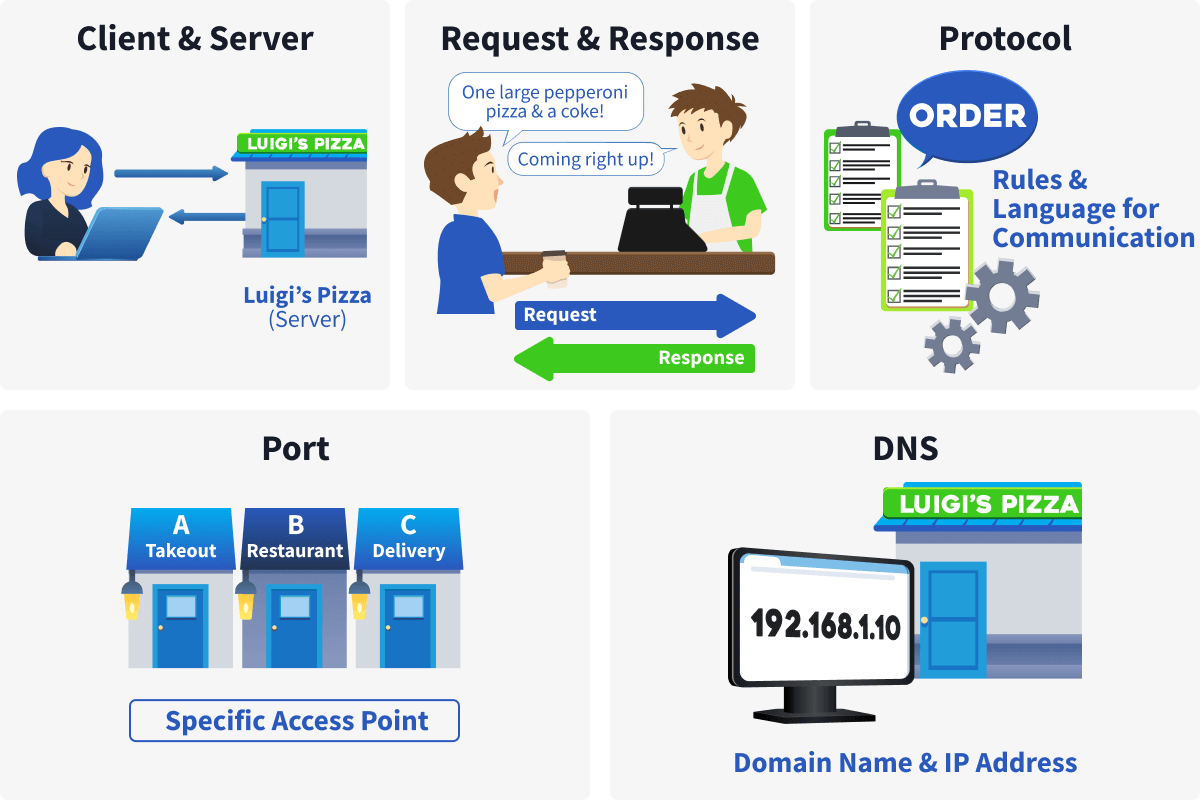
Service, Client, Server
In our analogy, Bob and Alice choose to use the Pizza takeaway service. Alice is the client who passes her order to Bob, who then passes it to the Server at Luigi's Pizzas. In computer terms, we can translate this as Alice using, for example, a browser to navigate to a website. The browser is the client that requests the webpage, and the server is the system that serves it.
Note that the client is the one who always initiates the request.
Request and Response
Alice requested a large pepperoni pizza from Luigi's. Be careful, this request was not made to Bob. Bob was the one who brought the request to Luigi's. What is important to realize is that if the request is not formatted correctly or the requested resource is unavailable, we will get an error response. For example, Bob returns to Alice with the message that there were no pepperoni pizzas or that the server did not understand the order.
In computer systems, we can say that Alice used a browser (the client) to request a webpage from a server, which then sent the webpage to the client.
Protocol
One of the things we don't often realize, until we go on a trip to a foreign country, is our language. When Alice formulates her request to Bob, she uses the language Luigi's Pizza understands. Additionally, Alice uses the menu to determine which orders she can place. Bob understood the request (language and order) and went to Luigi's to bring it; he received a response he understood and brought it back to Alice.
We can compare Bob to a protocol that computer systems use to communicate. A protocol defines how a client can communicate with a server. This definition includes:
Which commands do the client and server understand. E.g., the get command.
How a request is structured. E.g., first the command and then the order.
What syntax is used. E.g., Alice uses the English language.
What response should be given to which type of request. E.g., a request for pizza results in receiving the available pizza.
What response to give to faulty requests. E.g., the server at Luigi's Pizzas says: No pepereonni pizza available
Port
A port is used to identify a specific service running on a system. When a client wants to access a service on a server, it must connect using the correct port.
Imagine that Luigi’s takeaway service requires customers to enter through a specific door. Everyone ordering takeaway uses the same door. In the same way, a service on a server listens on a specific port.
Now imagine that Luigi’s offers multiple services, such as takeaway, dining in, and delivery. Each service uses a different door: door A for takeaway, door B for the restaurant, and door C for delivery. Similarly, a single server can run multiple services at the same time, with each service identified by a different port.
DNS
When Alice sent Bob her request, only the name of the pizza place was known. With that alone, it is not possible to reach the destination. So, Bob entered Luigi's Pizza into a GPS device, and the device returned the coordinates for Luigi's.
DNS stands for Domain Name Service and works similarly to GPS: when you enter the name of, for example, a website, DNS resolves it to server's location. These location coordinates are called an Internet Protocol (IP) address in computer terms. Imagine this IP as the address to your home (street name, house number, postal code, city, and country), but for computer systems.
Let's look at the next task to see how the client-server model applies when browsing a website.
Answer the questions below
What do we use to identify a specific service on a server?
PortWhat do we call the address of a server?
Internet protocol address
Web Communication in Practice
Hypertext Transfer Protocol (Secure), abbreviated as HTTP(S), is a stateless client-server protocol used for the World Wide Web. This means that each request is processed independently, without the server retaining information about previous requests.
Although the protocol itself is stateless, modern websites and web applications implement mechanisms to introduce statefulness at the application level.
For example, when you log into a website using your credentials, the server creates a session identifier (often stored in a cookie or token) that is sent with each subsequent request.
Without these mechanisms, you would need to authenticate again with every new request, because the server would have no memory of your previous login.
HTTP Commands
In the main specifications that define HTTP (also called Request for Comments, or RFC documents), there are 9 core commands. In HTTP lingo, we use the term method instead of command. Below you can see an overview of these methods:
GET
POST
PUT
DELETE
PATCH
HEAD
OPTIONS
CONNECT
TRACE
We will focus on discussing one of the two most common methods used: GET. We will approach this practically by examining the requests a browser sends when you navigate to a website.
Click on the "Start Virtual Machine" button below. This will show a new window in split-screen where we can open a website and inspect a GET request. If the split-screen is not showing, click the blue "Start Split-screen" button at the top of the room.
GET
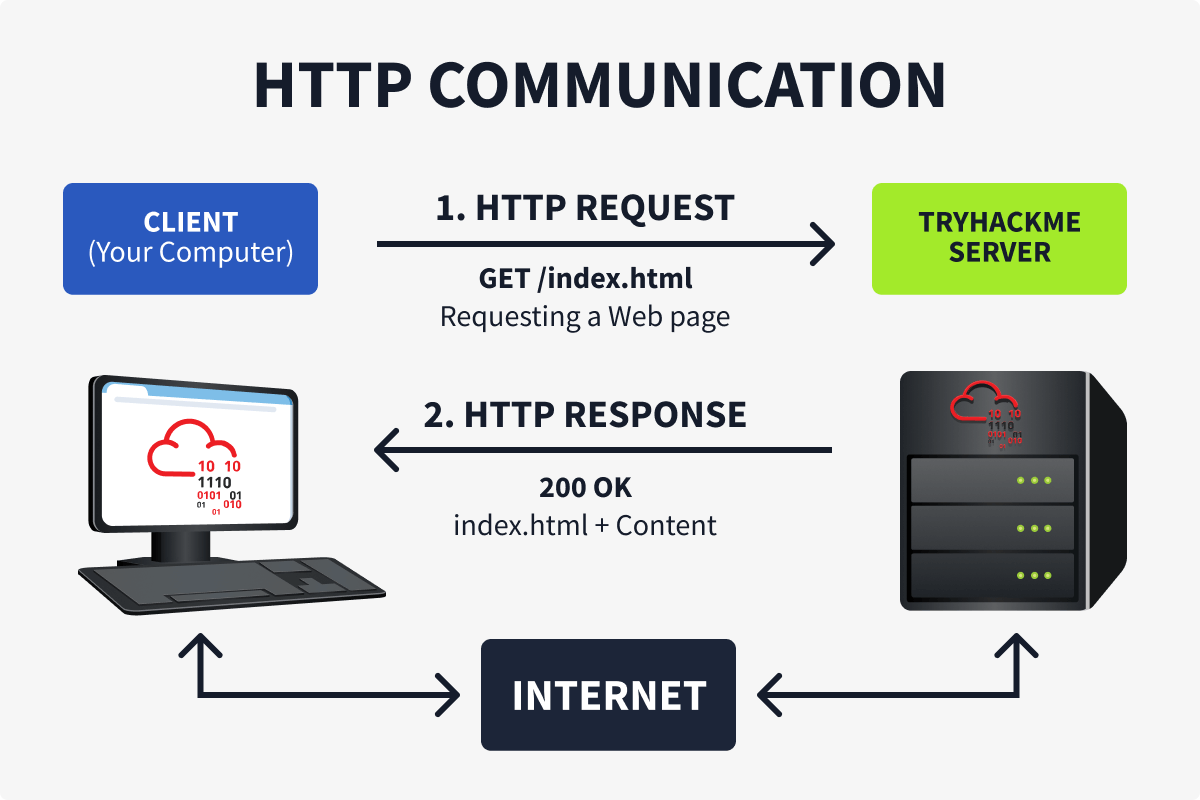
The GET method is actually pretty straightforward. We can use this method to retrieve a resource from web server. For example, GET https://tryhackme.com/index.php. This request retrieves the TryHackMe website's homepage. You don't need to type in this request yourself. When you open a browser (this is the client) and type "https://tryhackme.com," the browser constructs the message behind the scenes using information you provide and other fields defined in the HTTP specifications. When the web server receives the request, it sends a response that includes a status code (Indicating the type of response) and the requested information. The image below shows the flow of this request.
Let's have a look at an actual GET request and its response. Navigate to the Virtual Machine that opened next to this screen, then click the Firefox icon on the Desktop. Once the browser is open, the web page http://httpdemo.local:8080 should show. Proceed by pressing F12 or right-clicking in the browser window and selecting "Inspect". This will open the Firefox Developer Tools, which allows us to inspect, debug, and analyze web pages and traffic. Click on the "Network" tab as shown in the image below.
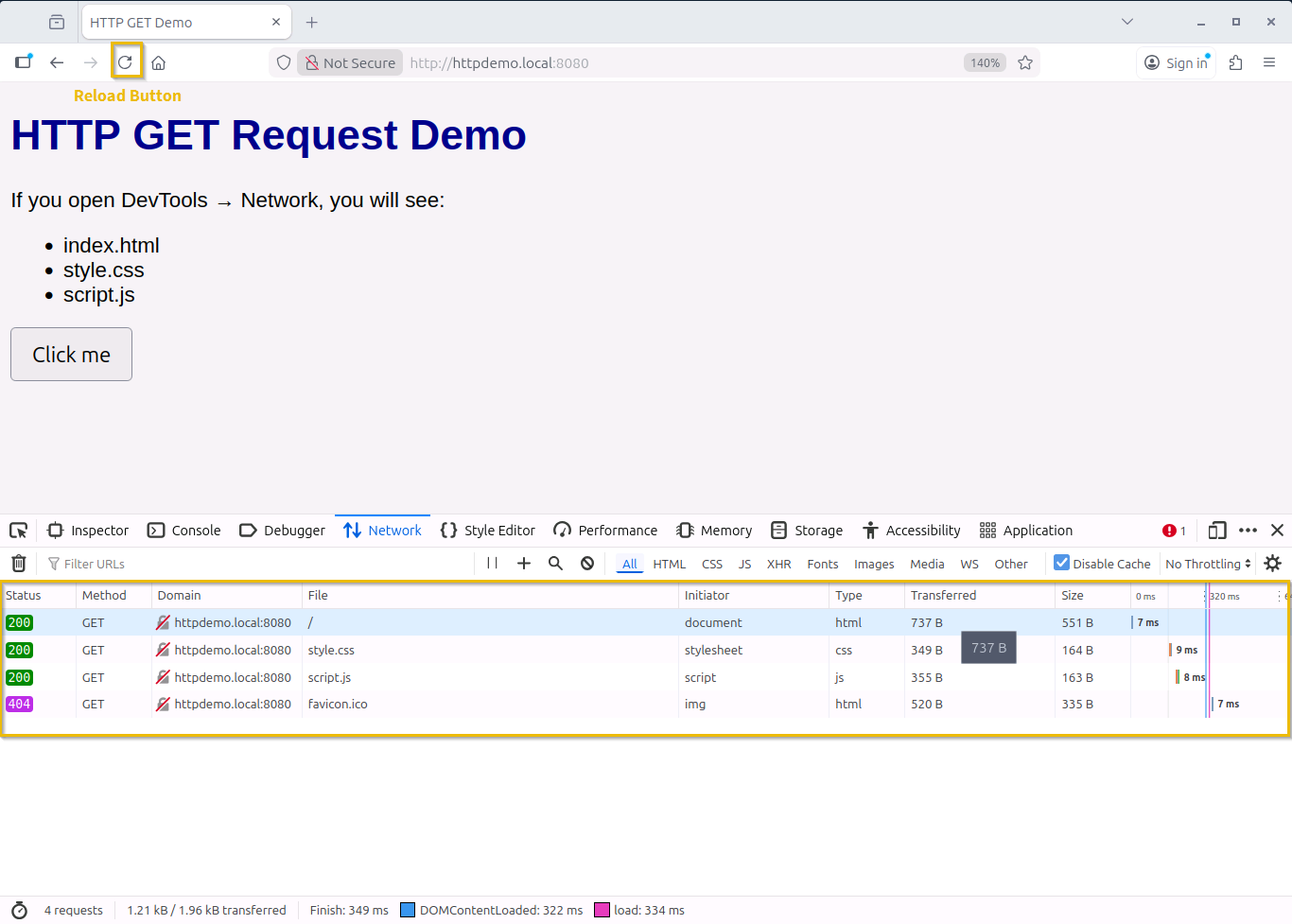
Now reload the page by clicking the circular logo highlighted on the image above (next to where you type the URL). You should see multiple GET requests appearing in the Developer Tools window, under the Network tab. Click on the first entry as shown below to see more information.
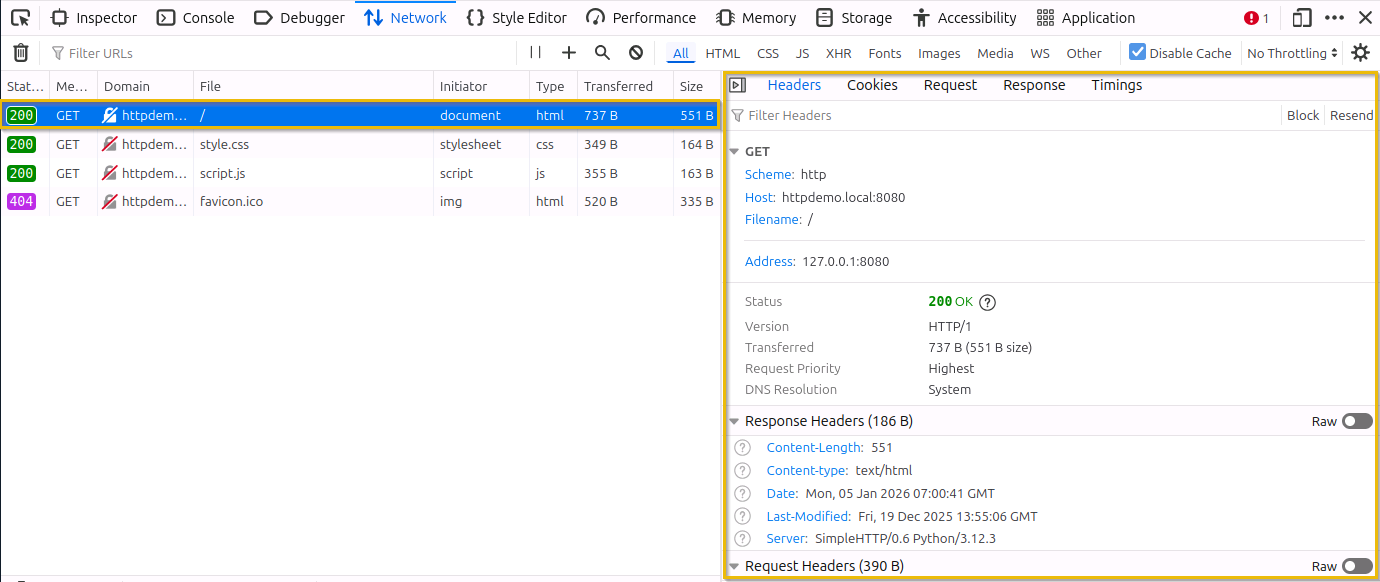
In the right-hand panel, we can see more information about our GET request. We won't go into much detail, but let's have a look at some of these fields.
Scheme: Tells us which protocol was used: HTTP or HTTPS.
Host: Tells us the name of the host we request resources from.
Filename: Indicates which file we requested from the host. In our request, this is "/", which actually translates to "index.html".
Address: Displays the IP address where the website is hosted. In our example, we are hosting the website on the same device. That's why the address 127.0.0.1 is shown.
Status: This field indicates whether the request was successful. In our example, we received a "200 OK" status, which means that the request was successful.
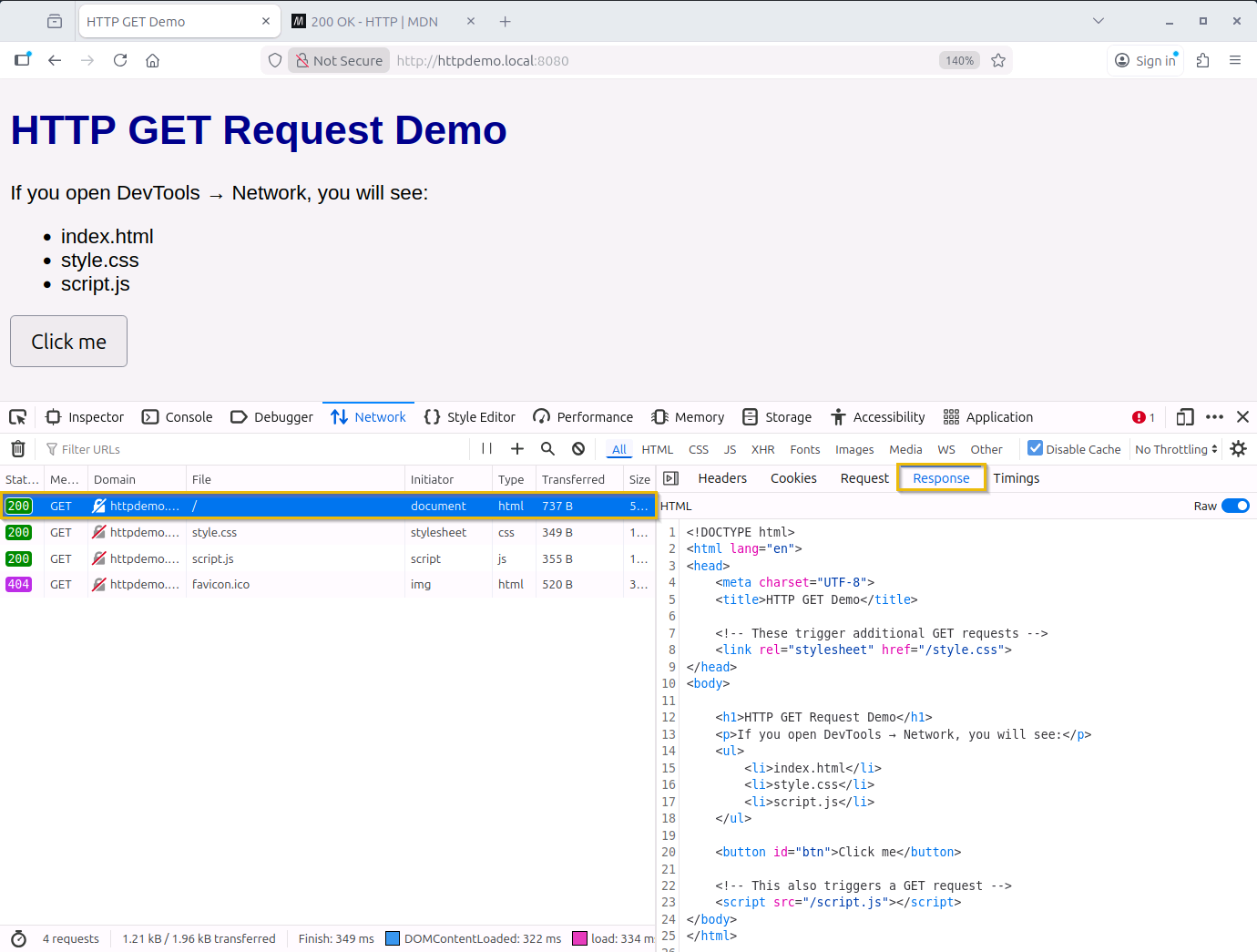
When a request is sent, we will get a response from the server. The response is divided into two parts: the response header and the response body. The response header contains metadata about the response, while the response body contains the requested content.
We can see this response body by clicking on the "Response" tab when displaying the details of a request. In our example, the response contains the index page of the requested website. The image below shows the content in HTML format.
Answer the questions below
What would be the host in the following URL?
https://www.iamlearning.thm/contactwww.iamlearning.thmWhat would be the scheme in the following URL?
https://www.iamlearning.thm/contacthttps
Conclusion
In this room, we have explored how devices on the internet can offer services to each other. We focused on the client-server model, which is similar to ordering a pizza. The client initiates the communication and the server replies.
Then, we continued with an example of the HTTP protocol which is used for websites. We saw a practical example of how a client request and server response actually looks like behind the scenes.
Now that we have seen how services are offered on the internet, let's have a look at the infrastructure that supports them. In the next room we will cover the basics of virtualization.




