Become a Hacker (TryHackMe)

Become a Hacker is a pre-security room in TryHackMe that introduces beginners to offensive security and basic enumeration tools like Gobuster and Hydra used in pentesting.
What Is Offensive Security?
Offensive Security focuses on proactively testing systems by attempting to break into them, with the goal of identifying weaknesses before real attackers can exploit them. If you’ve been working through the Pre Security path, you’ve already built a solid foundation in how computers, networks, and web technologies work. In this room, you’ll take the next step and start applying that knowledge from an attacker’s perspective.
In offensive security, you start with questions: What is exposed? What can be accessed? What assumptions does the system make? A hacker applies these questions methodically, observing how systems respond to unexpected input. In this room, “hacking” refers to penetration testing, an ethical, legal, and structured method for identifying weaknesses so they can be addressed. A hacker is someone who uses these skills positively to improve system security. In the following tasks, you’ll learn common offensive security terminology and methodology, then apply those concepts in a hands-on scenario to see how attackers identify and chain weaknesses together as they move deeper into a target.
Learning Objectives
Explain what offensive security is and understand why it is used to improve system security
Recognize common terminology and methodology used in offensive security
Practice ethical hacking techniques in a safe, permission-based environment
Identify next steps and learning paths to continue your offensive security journey
Prerequisites
This room is beginner-friendly and does not require any prior knowledge of hacking (penetration testing); however, a basic understanding of how computers work and some familiarity with using a command-line interface (CLI) will help you feel more comfortable during the hands-on tasks.
Finding Weaknesses
Before we begin our ethical hacking exercise, it is important to understand some common terminology you'll encounter throughout the room and in your cyber security learning journey. In our exercise, you'll interact with a web application and begin thinking like an attacker, safely and responsibly. This approach is known as offensive security. Rather than waiting for attackers to strike, offensive security professionals proactively test systems to find weaknesses before malicious hackers do.
Core Offensive Security Terms
Red Teaming: A structured, authorized attack methodology that simulates a real adversary to test the effectiveness of defenses and find vulnerabilities within a defined scope
Penetration Test: A structured security assessment where an authorized tester attempts to identify and exploit vulnerabilities within a defined scope to understand real-world risk
Vulnerability: A weakness or flaw in a system, application, or configuration that an attacker could abuse
Exploit: A technique or method used to take advantage of a vulnerability to achieve a specific outcome, such as accessing restricted functionality or data
Scope: The boundaries of what is allowed to be tested during an engagement. Scope defines which systems, applications, and actions are permitted, and what is off-limits
While some terms are used interchangeably, they all share one critical rule: permission. Ethical hacking, also known as penetration testing, is the practice of testing systems in a controlled and legal manner. Ethical hackers are explicitly allowed to test systems within a defined scope, making this work intentional and safe. In the real world, organizations hire penetration testers or red teams to simulate attacks against their own systems and networks. The purpose isn’t to cause damage; it’s to test the strength of security controls and defenses, uncover gaps, and help teams improve their overall security posture.
Getting Hands-On
Now that you’re familiar with some common offensive security terminology, it’s time to put those concepts into practice. In this task, you’ll interact with a web application and begin thinking like an attacker, safely and responsibly.
Scenario and Tools
After months of working on his business idea, Mike is finally ready to launch his website. He has invested a significant amount of time and effort in developing a product that he believes users will love. However, Mike is also aware that businesses of all sizes are targeted by attackers daily. Before going live, he wants reassurance that no sensitive or unintended pages have been left publicly accessible. You’ve been asked to perform an assessment of his web application and identify any exposed areas that could pose a security risk. Your goal is to find these weaknesses before real attackers do, and help Mike launch with confidence. When you’re ready, click the View Site button above to access the web application and begin your assessment.
In the upper-right half of the split-screen, you can see a simulated browser window displaying the URL http://www.onlineshop.thm/, as shown in the figure below.

In the lower right half, you can access a simulated terminal, as seen below, to use the available security tools later in this exercise.
Terminal
Welcome to fish, the friendly interactive shell
user@thm ~>
Beginning Your Assessment
Remember, Mike has asked you to assess his web application and spot any weaknesses. There are several strategies you could use to approach this assessment, but let's begin by identifying any hidden pages that shouldn't be accessible to the public. Let's test out the pages below by adding them at the end of the http://www.onlineshop.thm/ URL in the address bar. Note that upon testing a URL that does not exist, you will see an Error 404 response on the screen, indicating that the requested page cannot be found. See if you can find the hidden page now!
sitemapUse the browser to check ifhttp://www.onlineshop.thm/sitemapexistsmailContinue checking for the remaining pagesregisterloginadmin

Using Automated Tools
That approach worked great, and you should have been able to identify the hidden page successfully. Entering URLs manually is not a big deal if you have a limited number of pages to test, but what if you have a long list of potential pages? One tool in an ethical hacker's arsenal is Gobuster. This tool runs in the terminal and automates the scanning for web pages. Head to the terminal in the bottom half of your split-screen view and enter the following command.
gobuster dir --url http://www.onlineshop.thm/ -w /usr/share/wordlists/dirbuster/directory-list.txt
Note: To obtain a successful scan result, ensure your input matches the syntax provided above.
The command above is made up of the following parts:
gobusterThe command-line tool used to perform the discovery of web contentdirSpecifies the directory and file enumeration mode, which attempts to discover hidden directories and files on a web server--urlhttp://www.onlineshop.thm/Sets the target website that Gobuster will scan-w /usr/share/wordlists/dirbuster/directory-list.txtSpecifies the wordlist Gobuster will use to guess directory and file names

Answer the questions below
Using the manual or automated methods described above, what hidden web page did you discover?
gobuster dir --urlhttp://www.onlineshop.thm/-w /usr/share/wordlists/dirbuster/directory-list.txt
Based on your Gobuster scan results, what status code is returned when accessing the hidden page?
Exploiting Weaknesses
Part of ethical hacking involves learning how to chain weaknesses together. A single weakness may not seem like a critical issue on its own, but when combined with other weaknesses, it can lead to serious consequences. Think of security weaknesses like a line of dominoes. One domino falling on its own doesn’t cause much damage. But when the dominoes are placed close together, knocking over just one can trigger a chain reaction that brings them all down.
In the previous task, discovering a hidden login page was that first domino. On its own, a hidden page might not seem dangerous, but it can become far more serious when combined with other weaknesses, such as weak passwords. Ethical hackers search for and demonstrate these chained weaknesses, showing how minor issues can align to produce a greater impact.

Think Like a Hacker
To become a hacker, you must think like one. Hackers look beyond whether something works as intended and ask how it might be misused, combined with other behavior, or used for unauthorized access. This means thinking creatively and testing new ideas. Ethical hackers adopt this same mindset, but in a safe and authorized way. They find and prove risks before real attackers can.
Here are some key points to keep in mind as you continue your ethical hacking journey.
Ask questions: Don't assume a feature works as intended. Instead, ask “What if it doesn't?”
Test the unexpected: Try actions and inputs that the developers didn't consider
Chain small weaknesses: A tiny flaw may be harmless alone, but could be connected to create a bigger impact
Think like an adversary: Think “How would a malicious actor approach this target?”
A Valuable Target
Attackers are often interested in gaining valid credentials, such as usernames and passwords, because gaining access can unlock private areas of an application and increase their capabilities. Let’s explore what becomes accessible to an attacker once they gain entry to the private areas of an application.
Sensitive functionality: Features that perform essential actions, such as modifying data, viewing restricted content, or triggering processes that should only be available to authorized users
User data: Personal or private information belonging to users, such as names, email addresses, or account details, which attackers may steal, abuse, or sell
Administrative features: High-privilege functionality that allows attackers to manage users, change settings, or gain full control of the application if accessed
Further attack opportunities: Authenticated access can expose other vulnerabilities, allowing attackers to expand their access or move deeper into the application
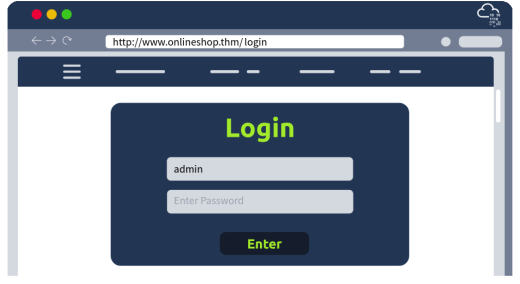
In the previous task, you discovered a hidden page that allows registered users to sign in. While this page may appear harmless, exposing authentication functionality can allow attackers to attempt unauthorized access. In this task, you'll attempt to exploit this weakness by testing whether the login mechanism can be abused.
Getting Hands-On
You now know which page you can access, and your next goal is to determine whether you can find a set of working login credentials (username and password) to access the web application. One of the most common usernames is admin so let's begin your attempt here. Like in the previous task, we will begin with a relatively short word list. Go ahead and try the admin username with the list of passwords below.
abc123123456passwordqwerty654321
Were you able to find the password and log in successfully? The username admin paired with one of the passwords above will give you access and present you with your flag.
Hacking Automation
In the previous task, you learned about and experienced the power of automated tools in ethical hacking. While a short password list may be quick to test manually, real‑world penetration testers often test hundreds or thousands of passwords. In this section, you’ll use Hydra, a password‑testing tool that automates login attempts against a target application using a wordlist. Since we already know the username, Hydra will systematically try each password in the wordlist to see if the login is successful. This technique is known as a dictionary attack, as the tool relies on a predefined list of possible passwords.
Once again, navigate to the terminal in the bottom half of your split-screen view and enter the following command.
hydra -l admin -P passlist.txt www.onlineshop.thm http-post-form "/login:username=^USER^&password=^PASS^:F=incorrect" -V
The command above is made up of the following parts:
hydraThe command-line tool used to perform the dictionary attack-l adminAttempts to log in using the usernameadmin-P passlist.txtSpecifies the password list to trywww.onlineshop.thmSets the target websitehttp-post-formIndicates that this is an HTTP POST request form"/login:username=^USER^&password=^PASS^:F=incorrect"Specifies how the login request is sent and how Hydra determines whether a login attempt has failed-VEnables verbose output, which displays each username and password attempted
The command arguments listed above may seem overwhelming at first, but there’s no need to fully understand how they are constructed yet. For now, simply run the command and examine the resulting output to observe how Hydra tests each password in the wordlist to locate valid credentials. The valid password is on the second-to-last line of the results. Much faster than attempting them manually!
Whether you used the manual method of testing each password individually or let an automated tool handle it for you, you should now have the admin password. Congratulations! You’ve completed your first ethical hacking exercise by identifying and exploiting weaknesses within Mike’s web application.
Answer the questions below
Using either manual testing or an automated dictionary attack, what password did you discover for the
adminuser?hydra -l admin -P passlist.txt www.onlineshop.thm http-post-form "/login:username=^USER^&password=^PASS^:F=incorrect" -V
After logging in using the password found, what secret message is displayed on the page?
Review the output of your Hydra dictionary attack.
How many password attempts were made before the correct password was found?17
Where to Go From Here
In this room, you learned about the role of ethical hackers, became familiar with key terminology and hacking methodologies, and gained hands-on experience using real security tools used by professional red teamers to help secure a web application.
Key Terminology
Scope: The exact systems and actions allowed during a security test
Vulnerability: A hidden weakness in a system that an attacker could use to break in
Exploit: A method or technique that takes advantage of a vulnerability
Enumeration: Collecting details about a system, users, and services to find weak points
Credentials: Login details such as usernames and passwords that unlock access
Authentication: The step that checks if someone or something is really who they claim to be when logging in
Dictionary attack: Trying a predefined wordlist to guess a password or username
What Is Next
Learning a new discipline can be intimidating, and it’s often hard to know where to start. After completing this room and the Pre Security path, you’ve built a solid foundation for your cyber security learning journey, and now you may be thinking about how to continue in a manageable, sustainable way.
The answer is simpler than it seems: break the field down, choose an area of cyber security that interests you, and practice regularly using hands-on exercises. You may find that the offensive techniques learned in this room are what interest you most. By building a habit of learning a little each day on TryHackMe, you’ll steadily develop the skills and confidence needed to move toward your first role in the industry.
Potential Career Opportunities
At this point, you may be wondering what career opportunities exist for hackers. Let’s review a few common roles where these skills are applied in professional, real-world settings.
Penetration Tester/Ethical Hacker: Focuses on safely exploring vulnerabilities within a defined scope
Vulnerability Researcher: Identify and validate undiscovered weaknesses in software and hardware
Red Team Operator: Simulate real-world adversaries to test an organization's detection, response, and defensive capabilities
Further Learning
If you're interested in learning more about what other opportunities there are within the broad field of cyber security, you are encouraged to walk through Become a Defender, which will outline the defensive techniques used by professionals to secure an organization's infrastructure. From there, you can explore additional learning paths that align with your interests, whether that’s offense, defense, or building broader foundations.




